
ExtremeComponents源码解析(一)
一、前言
因参与公司框架改造,在负责前端table组件选型时,原本选了jqGrid和Bootstraptable作为备选方案,评审会上,武哥提了EXtremeComponents,让我也去了解下,看下合不合适,在此机缘下,我便按照网络上的教程搭建了演示实例,使用起来也挺简单,功能确实挺强大,当时虽然没有深入研究,但是看过几个扩展现有功能的例子,发现它扩展性挺好,但是因其导出xls依赖的jar包太过老旧,现有系统使用高版本的jar包和ExtremeComponents结合使用时,功能不能正常使用,所以放弃了这个方案。当初在整理这个方案时,看到挺多人说其框架设计的不错,于是便决定通读其源码,以窥其精妙,自我提升一番~这篇我仅仅介绍如何安装ExtremeComponents的及简单的使用~
二、正文
1. 开发环境介绍
本文使用的开发环境如下:
jdk1.8

eclipse Mars.2 Release (4.5.2)
依赖的jar包如下:
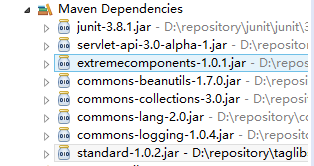
因本工程使用maven创建,所以顺带附上pom.xml文件的配置:
<project xmlns="http://maven.apache.org/POM/4.0.0" xmlns:xsi="http://www.w3.org/2001/XMLSchema-instance"

  xsi:schemaLocation="http://maven.apache.org/POM/4.0.0 http://maven.apache.org/maven-v4_0_0.xsd">

  <modelVersion>4.0.0</modelVersion>

  <groupId>org.extremeComponents.com</groupId>

  <artifactId>ExtremeComponents</artifactId>

  <packaging>war</packaging>

  <version>1.0-SNAPSHOT</version>

  <name>ExtremeComponents Maven Webapp</name>

  <url>http://maven.apache.org</url>

  <dependencies>

    <dependency>

      <groupId>junit</groupId>

      <artifactId>junit</artifactId>

      <version>3.8.1</version>

      <scope>test</scope>

    </dependency>

    <dependency>

        <groupId>javax.servlet</groupId>

        <artifactId>servlet-api</artifactId>

        <version>3.0-alpha-1</version>

        <scope>provided</scope>

    </dependency>

    <dependency>

        <groupId>org.extremecomponents</groupId>

        <artifactId>extremecomponents</artifactId>

        <version>1.0.1</version>

    </dependency>

  </dependencies>

  <build>

    <finalName>ExtremeComponents</finalName>

    <plugins>

        <plugin>

            <groupId>org.apache.tomcat.plugin</groupId>

            <artifactId>tomcat7-maven-plugin</artifactId>

            <version>2.2</version>

            <configuration>

                <port>8080</port>

            </configuration>

        </plugin>

    </plugins>

  </build>

</project>
这边特别说明下:ExtremeComponents最新版本就是1.0.1,并且是更新于2006年5月30日,如果不使用Maven的童鞋,可以直接到官网上面去下载对应的压缩包解压(使用Maven,有些静态文件还是需要从压缩包中获取,所以都要下载),传送门:https://sourceforge.net/projects/extremecomp/files/eXtremeComponents/,下载的话,下载eXtremeComponents-1.0.1-with-dependencies.zip,安装使用指南也可以参考这篇博文:http://www.blogjava.net/i369/articles/237808.html
2. extremeComponents安装
下面也简要的说下安装extremeComponents(以Maven为例说明,如果非Maven工程,请自己将extremeComponents所需的jar加入build path),像笔者一样配置好pom.xml文件,Maven会自动下载如下包:
这是使用Maven下载的jar,但是需要使用extremeComponents的css及某些js函数,这时候就需要从下载的压缩包:eXtremeComponents-1.0.1-with-dependencies.zip中拷贝到工程里面:
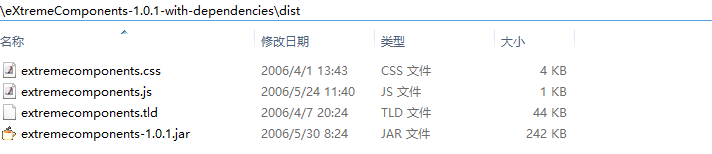
比如我将extremecomponents.css拷贝至webapp/styles,extremecomponents.js拷贝到webapp/js,images文件夹直接复制到webapp下,如下:

3. tld文件的使用
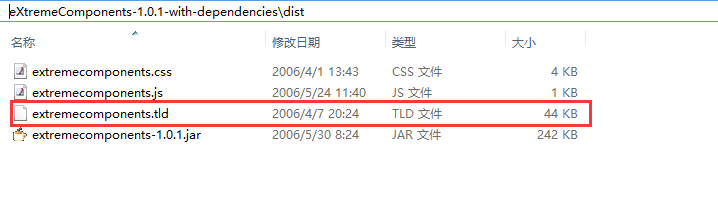
到目前为止,extremecomponent基础使用环境已经搭建完毕(目前的配置还不能支持导出excel和pdf,如何配置才能支持,请往后看)。eXtremeComponents-1.0.1-with-dependencies.zip压缩包解压后,在dist目录下有个extremecomponents.tld文件,我相信有自定义过jstl标签的人,应该知道这个文件的作用,就是标签的配置文件(不知道的可以自行百度),extremecomponent是开源标签库,那么我们是否有必要将这个拷贝到我们工程目录的WEB-INF目录下呢?处理tld文件有两种方式:
1)你可以把extremecomponents.tld文件放到WEB-INF目录下的任何地方。 不过,为了便于管理,可以将TLD文件都放到/WEB-INF/tld(自行建立这个目录)目录下,然后你需要根据你的extremecomponents.tld 文件的位置来修改/WEB-INF/web.xml文件的标签映射:
<taglib>

    <taglib-uri>/tld/extremecomponents</taglib-uri>

    <taglib-location>/WEB-INF/tld/extremecomponents.tld</taglib-location>

</taglib>
在使用的时候:
<%@ taglib uri="/tld/extremecomponents" prefix="ec" %>
特别说明:有些人在web.xml中添加<taglib />标签的时候报错:

这是什么原因呢?这就要看你web.xml中根节点是怎么声明了,如果类似如下形式声明:
<?xml version="1.0" encoding="UTF-8"?>

<web-app version="2.5"

    xmlns="http://java.sun.com/xml/ns/javaee"

    xmlns:xsi="http://www.w3.org/2001/XMLSchema-instance"

    xmlns:web="http://java.sun.com/xml/ns/javaee"

    xsi:schemaLocation="http://java.sun.com/xml/ns/javaee

    http://java.sun.com/xml/ns/javaee/web-app_2_5.xsd">

  ..................................

</web-app>
那么在声明<taglib />标签的时候应该这样:
<?xml version="1.0" encoding="UTF-8"?>

<web-app version="2.5"

    xmlns="http://java.sun.com/xml/ns/javaee"

    xmlns:xsi="http://www.w3.org/2001/XMLSchema-instance"

    xmlns:web="http://java.sun.com/xml/ns/javaee"

    xsi:schemaLocation="http://java.sun.com/xml/ns/javaee

    http://java.sun.com/xml/ns/javaee/web-app_2_5.xsd">

  ..................................

  <jsp-config>

      <taglib>

        <taglib-uri>/tld/extremecomponents</taglib-uri>

        <taglib-location>/WEB-INF/tld/extremecomponents.tld</taglib-location>

      </taglib>

  </jsp-config>

 ..................................

</web-app>
如果web.xml是如下形式的:
<!DOCTYPE web-app PUBLIC

 "-//Sun Microsystems, Inc.//DTD Web Application 2.3//EN"

 "http://java.sun.com/dtd/web-app_2_3.dtd" >

<web-app>

  ....................

</web-app>
那么taglib应该按如下方式声明:
<!DOCTYPE web-app PUBLIC

 "-//Sun Microsystems, Inc.//DTD Web Application 2.3//EN"

 "http://java.sun.com/dtd/web-app_2_3.dtd" >

<web-app>

    ......................................

    <taglib>

            <taglib-uri>/tld/extremecomponents</taglib-uri>

            <taglib-location>/WEB-INF/tld/extremecomponents.tld</taglib-location>

    </taglib>

    ......................................

</web-app>
2)如果你的servlet容器支持JSP 1.2 (或更高版本),它将能够自动发现TLD文件,那么你什么也不需要做。 当extremecomponents.jar被容器加载的时候,在它的META-INF目录下的extremecomponents.tld(jar包本身包含这个tld文件,可以将jar解压看到)文件将被找到。 这时,你需要向下面一样在你的JSP里把eXtremeTable包含进来:
<%@ taglib uri="http://www.extremecomponents.org" prefix="ec" %>
4. extremecomponent效果展示
说了半天,extremecomponent的使用效果如何,没有一个直观的感受,那么我先po上一张图:
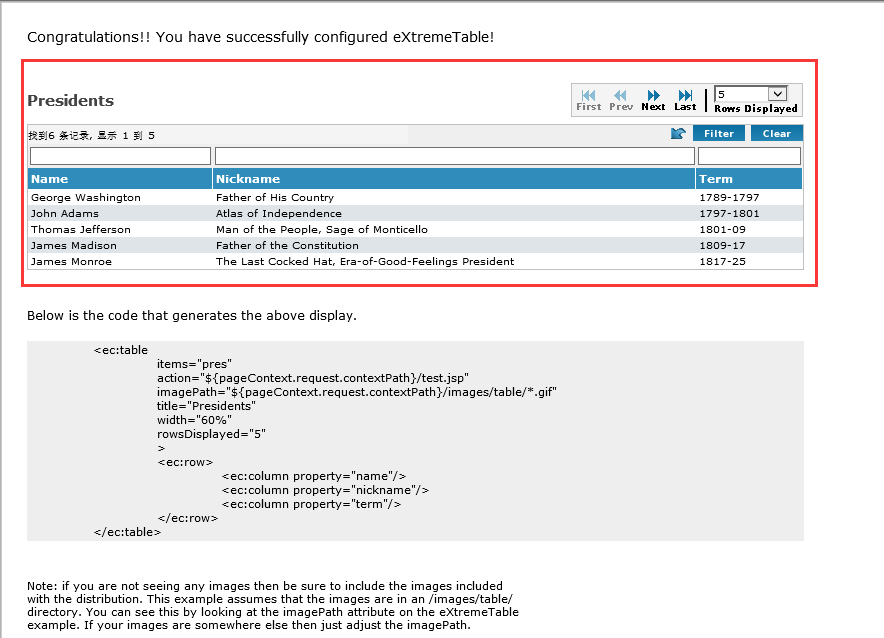
红色部分就是这个jstl标签最终的显示效果。这个页面的源码如下:
<%@page contentType="text/html;charset=utf-8" %>
<!--如何之前有在web.xml配置了tablib标签,那么这边uri要和那边<taglib-uri />配置的一致-->
<%@taglib uri="http://www.extremecomponents.org" prefix="ec" %> <html> <head>
<title>eXtremeTest</title> <style type="text/css"> .eXtremeTable {
margin: 0;
padding: 0;
} .eXtremeTable select {
font-family: Verdana;
font-size: 9px;
border: solid 1px #EEE;
width: 75px;
} .eXtremeTable .tableRegion {
border: 1px solid silver;
padding: 2px;
font-family:Verdana;
font-size: 10px;
margin-top: 7px;
} .eXtremeTable .filter {
background-color: #efefef;
} .eXtremeTable .filter input {
font-family: Verdana;
font-size: 10px;
width: 100%;
} .eXtremeTable .filter select {
font-family: Verdana;
font-size: 9px;
border: solid 1px #EEE;
width: 100%;
} .eXtremeTable .tableHeader {
background-color: #308dbb;
color: white;
font-family:Verdana;
font-size: 11px;
font-weight: bold;
text-align: left;
padding-right: 3px;
padding-left: 3px;
padding-top: 4;
padding-bottom: 4;
margin: 0;
border-right-style: solid;
border-right-width: 1px;
border-color: white;
} .eXtremeTable .tableHeaderSort {
background-color: #3a95c2;
color: white;
font-family:Verdana;
font-size: 11px;
font-weight: bold;
text-align: left;
padding-right: 3px;
padding-left: 3px;
padding-top: 4;
padding-bottom: 4;
border-right-style: solid;
border-right-width: 1px;
border-color: white;
} .eXtremeTable .odd a, .even a {
color: Black;
font-size: 10px;
} .eXtremeTable .odd td, .eXtremeTable .even td {
padding-top: 2px;
padding-right: 3px;
padding-bottom: 2px;
padding-left: 3px;
vertical-align: middle;
font-family:Verdana;
font-size: 10px;
} .eXtremeTable .odd {
background-color: #FFFFFF;
} .eXtremeTable .even {
background-color: #dfe4e8;
} .eXtremeTable .highlight td {
color: black;
font-size: 10px;
padding-top: 2px;
padding-right: 3px;
padding-bottom: 2px;
padding-left: 3px;
vertical-align: middle;
background-color: #fdecae;
} .eXtremeTable .highlight a, .highlight a {
color: black;
font-size: 10px;
} .eXtremeTable .toolbar {
background-color: #F4F4F4;
font-family:Verdana;
font-size: 9px;
margin-right: 1px;
border-right: 1px solid silver;
border-left: 1px solid silver;
border-top: 1px solid silver;
border-bottom: 1px solid silver;
} .eXtremeTable .toolbar td {
color: #444444;
padding: 0px 3px 0px 3px;
text-align:center;
} .eXtremeTable .separator {
width: 7px;
} .eXtremeTable .statusBar {
background-color: #F4F4F4;
font-family:Verdana;
font-size: 10px;
} .eXtremeTable .filterButtons {
background-color: #efefef;
text-align: right;
} .eXtremeTable .title {
color: #444444;
font-weight: bold;
font-family:Verdana;
font-size: 15px;
vertical-align: middle;
} .eXtremeTable .title span {
margin-left: 7px;
} .eXtremeTable .formButtons {
display: block;
margin-top: 10px;
margin-left: 5px;
} .eXtremeTable .formButton {
cursor: pointer;
font-family:Verdana;
font-size:10px;
font-weight: bold;
background-color: #308dbb;
color: white;
margin-top: 5px;
border: outset 1px #333;
vertical-align: middle;
} .eXtremeTable .tableTotal {
background-color: #FFFFFF;
border-top: solid 1px Silver;
} .eXtremeTable .tableTotalEmpty {
background-color: #FFFFFF;
} </style> </head> <% java.util.List presidents = new java.util.ArrayList(); %> <% java.util.Map president = new java.util.HashMap(); %>
<% president.put("name", "George Washington"); %>
<% president.put("nickname", "Father of His Country"); %>
<% president.put("term", "1789-1797"); %>
<% presidents.add(president); %> <% president = new java.util.HashMap(); %>
<% president.put("name", "John Adams"); %>
<% president.put("nickname", "Atlas of Independence"); %>
<% president.put("term", "1797-1801"); %>
<% presidents.add(president); %> <% president = new java.util.HashMap(); %>
<% president.put("name", "Thomas Jefferson"); %>
<% president.put("nickname", "Man of the People, Sage of Monticello"); %>
<% president.put("term", "1801-09"); %>
<% presidents.add(president); %> <% president = new java.util.HashMap(); %>
<% president.put("name", "James Madison"); %>
<% president.put("nickname", "Father of the Constitution"); %>
<% president.put("term", "1809-17"); %>
<% presidents.add(president); %> <% president = new java.util.HashMap(); %>
<% president.put("name", "James Monroe"); %>
<% president.put("nickname", "The Last Cocked Hat, Era-of-Good-Feelings President"); %>
<% president.put("term", "1817-25"); %>
<% presidents.add(president); %> <% president = new java.util.HashMap(); %>
<% president.put("name", "John Adams"); %>
<% president.put("nickname", "Old Man Eloquent"); %>
<% president.put("term", "1825-29"); %>
<% presidents.add(president); %> <% request.setAttribute("pres", presidents); %> <body style="margin:25px;"> <p style="font-family: Verdana;font-size:14px;">
Congratulations!! You have successfully configured eXtremeTable!
</p> <br> <ec:table items="pres"
action="${pageContext.request.contextPath}/test.jsp"
imagePath="${pageContext.request.contextPath}/images/table/*.gif"
title="Presidents"
width="60%"
rowsDisplayed="5">
<ec:row>
<ec:column property="name"/>
<ec:column property="nickname"/>
<ec:column property="term"/>
</ec:row>
</ec:table> <br> <p style="font-family:Verdana;font-size:12px"> Below is the code that generates the above display. </p> <pre class="bodyText" style="background-color:#eee;padding:2px;width:60%;font-family: Verdana;font-size:11px;">
<ec:table
items="pres"
action="${pageContext.request.contextPath}/test.jsp"
imagePath="${pageContext.request.contextPath}/images/table/*.gif"
title="Presidents"
width="60%"
rowsDisplayed="5"
>
<ec:row>
<ec:column property="name"/>
<ec:column property="nickname"/>
<ec:column property="term"/>
</ec:row>
</ec:table>
</pre> <br> <p style="font-family:Verdana;font-size:11px;width:500px">
Note: if you are not seeing any images then be sure to include the images included with the distribution.
This example assumes that the images are in an /images/table/ directory. You can see this by looking at the
imagePath attribute on the eXtremeTable example. If your images are somewhere else then just adjust the
imagePath.
</p> </body>
</html>
5. 文件导出配置
之前有提过,如果要支持excel导出,以及pdf导出,要如何配置呢?这边以支持excel导出为例进行说明,首先需要在web.xml中配置导出过滤器:
<filter>

    <filter-name>eXtremeExport</filter-name>

    <filter-class>org.extremecomponents.table.filter.ExportFilter</filter-class>

</filter>

<filter-mapping>

    <filter-name>eXtremeExport</filter-name>

    <url-pattern>/*</url-pattern>

</filter-mapping>
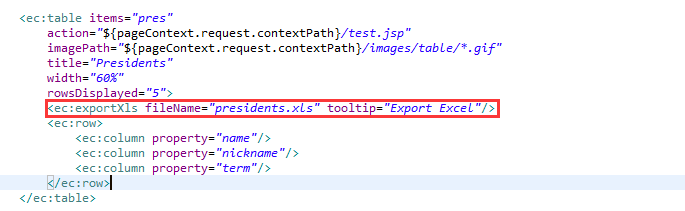
然后在页面中增加红色部分:
页面呈现效果:
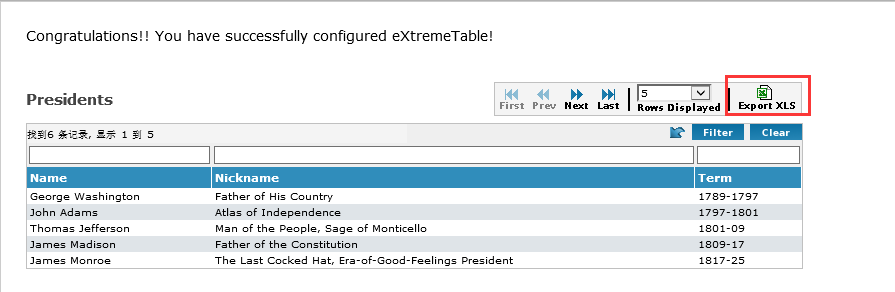
特别说明:在配置<ec:table />标签的时候,有个items属性,eXtremeTable在给定的servlet范围(scope)内取得Beans或Maps的集合用于JSP页面显示。 servlet范围的搜索顺序是:page, request, session和application。
三、参考链接
http://www.blogjava.net/i369/articles/237808.html
https://sourceforge.net/projects/extremecomp/(官网)
四、联系本人
为方便没有博客园账号的读者交流,特意建立一个企鹅群(纯公益,非利益相关),读者如果有对博文不明之处,欢迎加群交流:261746360,小杜比亚-博客园
ExtremeComponents源码解析(一)的更多相关文章
- 【原】Android热更新开源项目Tinker源码解析系列之三:so热更新
本系列将从以下三个方面对Tinker进行源码解析: Android热更新开源项目Tinker源码解析系列之一:Dex热更新 Android热更新开源项目Tinker源码解析系列之二:资源文件热更新 A ...
- 【原】Android热更新开源项目Tinker源码解析系列之一:Dex热更新
[原]Android热更新开源项目Tinker源码解析系列之一:Dex热更新 Tinker是微信的第一个开源项目,主要用于安卓应用bug的热修复和功能的迭代. Tinker github地址:http ...
- 【原】Android热更新开源项目Tinker源码解析系列之二:资源文件热更新
上一篇文章介绍了Dex文件的热更新流程,本文将会分析Tinker中对资源文件的热更新流程. 同Dex,资源文件的热更新同样包括三个部分:资源补丁生成,资源补丁合成及资源补丁加载. 本系列将从以下三个方 ...
- 多线程爬坑之路-Thread和Runable源码解析之基本方法的运用实例
前面的文章:多线程爬坑之路-学习多线程需要来了解哪些东西?(concurrent并发包的数据结构和线程池,Locks锁,Atomic原子类) 多线程爬坑之路-Thread和Runable源码解析 前面 ...
- jQuery2.x源码解析(缓存篇)
jQuery2.x源码解析(构建篇) jQuery2.x源码解析(设计篇) jQuery2.x源码解析(回调篇) jQuery2.x源码解析(缓存篇) 缓存是jQuery中的又一核心设计,jQuery ...
- Spring IoC源码解析——Bean的创建和初始化
Spring介绍 Spring(http://spring.io/)是一个轻量级的Java 开发框架,同时也是轻量级的IoC和AOP的容器框架,主要是针对JavaBean的生命周期进行管理的轻量级容器 ...
- jQuery2.x源码解析(构建篇)
jQuery2.x源码解析(构建篇) jQuery2.x源码解析(设计篇) jQuery2.x源码解析(回调篇) jQuery2.x源码解析(缓存篇) 笔者阅读了园友艾伦 Aaron的系列博客< ...
- jQuery2.x源码解析(设计篇)
jQuery2.x源码解析(构建篇) jQuery2.x源码解析(设计篇) jQuery2.x源码解析(回调篇) jQuery2.x源码解析(缓存篇) 这一篇笔者主要以设计的角度探索jQuery的源代 ...
- jQuery2.x源码解析(回调篇)
jQuery2.x源码解析(构建篇) jQuery2.x源码解析(设计篇) jQuery2.x源码解析(回调篇) jQuery2.x源码解析(缓存篇) 通过艾伦的博客,我们能看出,jQuery的pro ...
随机推荐
- golang使用rabbitMQ入门代码
package main import ( "github.com/streadway/amqp" "log" "time" ) func ...
- tensorflow简单实现卷积前向过程
卷积,说白了就是对应位置相乘再求和,卷积操作用广泛应用于图像识别,在自然语言处理中也开始应用,用作文本分类问题. 卷积操作最重要的部分就是卷积核或者说过滤器 1.常用过滤器尺寸为3*3或者5*5 2. ...
- NoSQL入门第四天——事务与主从复制
一.Redis的事务 1.是什么 可以一次执行多个命令,本质是一组命令的集合.一个事务中的 所有命令都会序列化,按顺序地串行化执行而不会被其它命令插入,不许加塞 (更多请参见官网事务介绍) 2.能干什 ...
- 20154327 Exp2 后门原理与实践
实践内容 使用netcat和socat.msf-meterpreter等工具获得主机权限,并进行一些恶意行为,如监控摄像头.记录键盘输入.截屏等. 详情见实验指导书 实践过程 netcat netca ...
- Dinic算法最大流入门
例题传送门 Dinic算法是网络流最大流的优化算法之一,每一步对原图进行分层,然后用DFS求增广路.时间复杂度是O(n^2*m),Dinic算法最多被分为n个阶段,每个阶段包括建层次网络和寻找增广路两 ...
- MySQL 存储过程常用SQL语句收集
1,select curdate() /*2016-10-08*/ 2,select date_sub(curdate(), INTERVAL 6 DAY) /*2016-10-02*/ 3,case ...
- 相机imu外参标定
1. 第一步初始化imu外参(可以从参数文档中读取,也可以计算出),VINS中处理如下: # Extrinsic parameter between IMU and Camera. estimate_ ...
- SIFT 特征点提取算法
SIFT特征点相对于ORB计算速度较慢,在没有GPU加速情况下,无法满足视觉里程计的实时性要求,或者无法运行在手机平台上,但是效果更好,精度更高.在应用时可以择优选取,了解其本质原理的动机是为了自己使 ...
- PHP数组中插入元素
1. array_unshift()数组头插入新元素 $fruits = array('apple','pear','banana','orange'); array_unshift($fruits, ...
- java 泛型历史遗留问题
Map<String,Integer> hashMap = new HashMap<String,Integer>(); hashMap.put(); // hashMap.p ...