
OpenCV 之 霍夫变换
Hough 变换,对图像中直线的残缺部分、噪声、以及其它的共存结构不敏感,因此,具有很强的鲁棒性。
它常用来检测 直线和曲线 (圆形),识别图像中的几何形状,甚至可用来分割重叠或有部分遮挡的物体。
1 平面坐标和极坐标
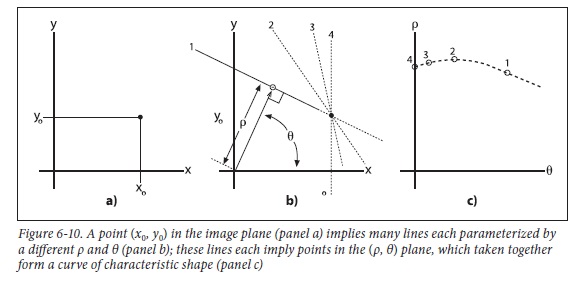
1) 平面坐标的点 <=> 极坐标(平面化)的曲线
所谓极坐标平面化是指, 将 ρ-θ 的关系像 x-y 那样在平面内展开。
公式推导: x-y坐标中的点 (x0, y0), 代入极坐标 ρ-θ 中得
$\quad \begin{align*}\rho = x_{0}\: cos\theta + y_{0}\: sin\theta = \sqrt{x_{0}^{2}+y_{0}^{2}}\:\left (\frac{x_{0}}{\sqrt{x_{0}^{2}+y_{0}^{2}}}\: cos\theta + \frac{y_{0}}{\sqrt{x_{0}^{2}+y_{0}^{2}}}\:sin\theta\right )
= \sqrt{x_{0}^{2}+y_{0}^{2}} \; sin(\varphi_{0} +\theta ) \end{align*} $
其中, $sin\varphi_{0} = \frac{x_{0}}{\sqrt{x_{0}^{2}+y_{0}^{2}}}$
由上述公式可以明显的看出ρ与θ之间的函数关系。
2) 极坐标的点 <=> 平面坐标的直线
公式推导: ρ-θ 极坐标中的点 (ρ0, θ0), 代入平面坐标 x-y 中得
$\quad y = ( -\tfrac{cos\theta_{0} }{sin\theta_{0}} )\:x + \tfrac{\rho_{0} }{sin\theta_{0}}$
由此可知, 极坐标中的一个定点(ρ0, θ0), 对应于平面坐标内的一条直线。若极坐标中有N条曲线相交于一点(如下左图), 则说明在平面坐标中, 该点对应的直线包含N条曲线对应的N个点, 也即这N个点组成了一条直线。


上面左图中, 是平面坐标中的三个点 (8,6), (4, 9), (12,3) 分别对应的三条曲线。
因此, 霍夫变换的目的是将平面坐标内的直线检测, 转换为极坐标内的交点检测, 显然寻找一个交点要比寻找直线(实际上是寻找许多点)容易得多了。
2 OpenCV中的函数
1) HoughLines
void cv::HoughLines(
  InputArray image,  // 输入图像
  OutputArray lines, // 输出位直线数组
  double rho,        // 用像素个数表示的长度分辨率
  double theta,      // 用像素个数表示的角度分辨率
  int threshold,     // 累加器阈值 (只有大于该阈值的才有足够的投票)
  double srn = ,    // 若 srn = stn = 0,则使用的是经典霍夫变换
  double stn =,
  double min_theta = ,     // 取值为 0 ~ max_theta
  double max_theta = CV_PI  // 取值为 min_theta ~ CV_PI
);
未完待续-源代码留待以后剖析:
/*

Here image is an input raster;

step is it's step; size characterizes it's ROI;

rho and theta are discretization steps (in pixels and radians correspondingly).

threshold is the minimum number of pixels in the feature for it

to be a candidate for line. lines is the output

array of (rho, theta) pairs. linesMax is the buffer size (number of pairs).

Functions return the actual number of found lines.

*/

static void

HoughLinesStandard( const Mat& img, float rho, float theta,

                    int threshold, std::vector<Vec2f>& lines, int linesMax,

                    double min_theta, double max_theta )

{

    int i, j;

    float irho =  / rho;

    CV_Assert( img.type() == CV_8UC1 );

    const uchar* image = img.ptr();

    int step = (int)img.step;

    int width = img.cols;

    int height = img.rows;

    if (max_theta < min_theta ) {

        CV_Error( CV_StsBadArg, "max_theta must be greater than min_theta" );

    }

    int numangle = cvRound((max_theta - min_theta) / theta);

    int numrho = cvRound(((width + height) *  + ) / rho);

#if defined HAVE_IPP && !defined(HAVE_IPP_ICV_ONLY) && IPP_VERSION_X100 >= 810 && IPP_DISABLE_BLOCK

    CV_IPP_CHECK()

    {

        IppiSize srcSize = { width, height };

        IppPointPolar delta = { rho, theta };

        IppPointPolar dstRoi[] = {{(Ipp32f) -(width + height), (Ipp32f) min_theta},{(Ipp32f) (width + height), (Ipp32f) max_theta}};

        int bufferSize;

        int nz = countNonZero(img);

        int ipp_linesMax = std::min(linesMax, nz*numangle/threshold);

        int linesCount = ;

        lines.resize(ipp_linesMax);

        IppStatus ok = ippiHoughLineGetSize_8u_C1R(srcSize, delta, ipp_linesMax, &bufferSize);

        Ipp8u* buffer = ippsMalloc_8u(bufferSize);

        if (ok >= ) ok = ippiHoughLine_Region_8u32f_C1R(image, step, srcSize, (IppPointPolar*) &lines[], dstRoi, ipp_linesMax, &linesCount, delta, threshold, buffer);

        ippsFree(buffer);

        if (ok >= )

        {

            lines.resize(linesCount);

            CV_IMPL_ADD(CV_IMPL_IPP);

            return;

        }

        lines.clear();

        setIppErrorStatus();

    }

#endif

    AutoBuffer<int> _accum((numangle+) * (numrho+));

    std::vector<int> _sort_buf;

    AutoBuffer<float> _tabSin(numangle);

    AutoBuffer<float> _tabCos(numangle);

    int *accum = _accum;

    float *tabSin = _tabSin, *tabCos = _tabCos;

    memset( accum, , sizeof(accum[]) * (numangle+) * (numrho+) );

    float ang = static_cast<float>(min_theta);

    for(int n = ; n < numangle; ang += theta, n++ )

    {

        tabSin[n] = (float)(sin((double)ang) * irho);

        tabCos[n] = (float)(cos((double)ang) * irho);

    }

    // stage 1. fill accumulator

    for( i = ; i < height; i++ )

        for( j = ; j < width; j++ )

        {

            if( image[i * step + j] !=  )

                for(int n = ; n < numangle; n++ )

                {

                    int r = cvRound( j * tabCos[n] + i * tabSin[n] );

                    r += (numrho - ) / ;

                    accum[(n+) * (numrho+) + r+]++;

                }

        }

    // stage 2. find local maximums

    for(int r = ; r < numrho; r++ )

        for(int n = ; n < numangle; n++ )

        {

            int base = (n+) * (numrho+) + r+;

            if( accum[base] > threshold &&

                accum[base] > accum[base - ] && accum[base] >= accum[base + ] &&

                accum[base] > accum[base - numrho - ] && accum[base] >= accum[base + numrho + ] )

                _sort_buf.push_back(base);

        }

    // stage 3. sort the detected lines by accumulator value

    std::sort(_sort_buf.begin(), _sort_buf.end(), hough_cmp_gt(accum));

    // stage 4. store the first min(total,linesMax) lines to the output buffer

    linesMax = std::min(linesMax, (int)_sort_buf.size());

    double scale = ./(numrho+);

    for( i = ; i < linesMax; i++ )

    {

        LinePolar line;

        int idx = _sort_buf[i];

        int n = cvFloor(idx*scale) - ;

        int r = idx - (n+)*(numrho+) - ;

        line.rho = (r - (numrho - )*0.5f) * rho;

        line.angle = static_cast<float>(min_theta) + n * theta;

        lines.push_back(Vec2f(line.rho, line.angle));

    }

}
2) HoughLinesP
void cv::HoughLinesP ( InputArray image, OutputArray lines,

                        double rho,  double theta, int threshold,

                        double minLineLength=,  double maxLineGap= )

/*

1) image

    8-bit, single-channel binary source image. The image may be modified by the function.

2) lines

    Output vector of lines. Each line is represented by a 4-element vector x1, y1, x2,y2), where (x1, y1) and (x2, y2) are the ending points of each detected line segment.

3) rho

    Distance resolution of the accumulator in pixels.

4) theta

    Angle resolution of the accumulator in radians.

5) threshold

    Accumulator threshold parameter. Only those lines are returned that get enough votes(>threshold).

6) minLineLength

    Minimum line length. Line segments shorter than that are rejected.

7) MaxLineGap

    Maximum allowed gap between points on the same line to link them. */
Progressive Probabilistic Hough Transform Algorithm Outline:
/* 摘自文献 J. Matas, Robust Detection of Lines Using the Progressive Probabilistic Hough Transform

1. Check the input image; if it is empty then finish.

2. Update the accumulator with a single pixel randomly selected from the input image.

3. Remove the selected pixel from input image.

4. Check if the highest peak in the accumulator that was modified by the new pixel is higher than threshold thr(N). If not then goto 1.

5. Look along a corridor specified by the peak in the accumulator, and find the longest segment that either is continuous

   or exhibits a gap not exceeding a given threshold.

6. Remove the pixels in the segment from input image.

7. “Unvote” from the accumulator all the pixels from the line that have previously voted.

8. If the line segment is longer than the minimum length add it into the output list.

9. Goto 1. */
3) HoughCircles
void cv::HoughCircles ( InputArray image, OutputArray circles,

                        int method,  double dp,  double minDist,

                        double param1 = ,  double param2 = ,

                        int minRadius = ,  int maxRadius = )

/*

1) image

    8-bit, single-channel, grayscale input image.

2) circles

    Output vector of found circles. Each vector is encoded as a 3-element floating-point vector (x, y, radius).

3) method

    Detection method, see cv::HoughModes. Currently, the only implemented method is HOUGH_GRADIENT

4) dp

    Inverse ratio of the accumulator resolution to the image resolution.

    For example, if dp=1 , the accumulator has the same resolution as the input image.

    If dp=2 , the accumulator has half as big width and height.

5) minDist

    Minimum distance between the centers of the detected circles.

    If the parameter is too small, multiple neighbor circles may be falsely detected in addition to a true one.

    If it is too large, some circles may be missed.

6) param1

    First method-specific parameter.

    In case of CV_HOUGH_GRADIENT , it is the higher threshold of the two passed to the Canny edge detector (the lower one is twice smaller).

7) param2

    Second method-specific parameter.

    In case of CV_HOUGH_GRADIENT , it is the accumulator threshold for the circle centers at the detection stage.

    The smaller it is, the more false circles may be detected. Circles, corresponding to the larger accumulator values, will be returned first.

8) minRadius

    Minimum circle radius.

9) maxRadius

    Maximum circle radius. */
3 代码示例
在进行霍夫变换之前,首先要对图像进行"边缘检测"的预处理。
3.1 检测直线 (带滑动条)
#include "opencv2/imgcodecs.hpp"

#include "opencv2/highgui.hpp"

#include "opencv2/imgproc.hpp"

using namespace cv;

using namespace std;

// 全局变量

Mat src, src_gray, edges;

Mat standard_hough, probabilistic_hough;

int min_threshold = ;

int max_trackbar = ;

const char* probabilistic_name = "Probabilistic Hough Lines";

int p_trackbar = max_trackbar;

void Probabilistic_Hough( int, void* );  // 函数声明


int main( int, char** argv )

{

   // 读图

   src = imread("line_demo.png");

   if(src.empty())

       return -;

   // 灰度图

   cvtColor(src, src_gray, COLOR_RGB2GRAY);

   // cany 边缘检测

   Canny(src_gray, edges, , , );

   // 阈值滑动条

   char thresh_label[];

   sprintf( thresh_label, "Thres: %d + input", min_threshold );

   namedWindow(probabilistic_name, WINDOW_AUTOSIZE );

   createTrackbar(thresh_label, probabilistic_name, &p_trackbar, max_trackbar, Probabilistic_Hough);

   // 回调函数

   Probabilistic_Hough(, );

   waitKey();

}

void Probabilistic_Hough(int, void*)

{

  vector<Vec4i> p_lines;

  // gray -> rgb

  cvtColor(edges, probabilistic_hough, COLOR_GRAY2BGR);

  // Probabilistic Hough Transform

  HoughLinesP(edges, p_lines, , CV_PI/, min_threshold + p_trackbar, ,  );

  // 显示

  for( size_t i = ; i < p_lines.size(); i++ ) {

      Vec4i l = p_lines[i];

      line(probabilistic_hough, Point(l[], l[]), Point(l[], l[]), Scalar(,,), , LINE_AA);

  }

   imshow( probabilistic_name, probabilistic_hough );

}
3.2 检测圆形 (不带滑动条)
#include <opencv2/imgproc.hpp>

#include <opencv2/highgui.hpp>

using namespace cv;

using namespace std;

int main(int argc, char** argv)

{

    // 读图

    Mat src, src_gray;

    src = imread("circle_demo.png");

    if(src.empty())

        return -;

    // 灰度图 + 高斯滤波

    cvtColor(src, src_gray, COLOR_BGR2GRAY);

    GaussianBlur(src_gray, src_gray, Size(, ), ,  );

    // 画圆

    vector<Vec3f> circles;

    HoughCircles(src_gray, circles, HOUGH_GRADIENT, , src_gray.rows/, ,  );

    for(size_t i=; i<circles.size(); ++i)

    {

         Point center(cvRound(circles[i][]), cvRound(circles[i][]));

         int radius = cvRound(circles[i][]);

         circle(src, center, , Scalar(,,), -, ,  ); // 圆心

         circle(src, center, radius, Scalar(,,), , ,  ); // 圆形

    }

    // 窗体

    namedWindow("circles", WINDOW_AUTOSIZE);

    imshow("circles", src);

    waitKey();

}
参考资料:
<图像处理、分析与机器视觉> 第4版, 6.2.6 Hough 变换
OpenCV Tutorials / Image Processing (imgproc module) / Hough Line Transform
OpenCV Tutorials / Image Processing (imgproc module) / Hough Circle Transform
OpenCV 之 霍夫变换的更多相关文章
- 【OpenCV新手教程第14】OpenCVHough变换:霍夫变换线,霍夫变换圆汇编
本系列文章由@浅墨_毛星云 出品.转载请注明出处. 文章链接:http://blog.csdn.net/poem_qianmo/article/details/26977557 作者:毛星云(浅墨) ...
- 【OpenCV入门教程之十四】OpenCV霍夫变换:霍夫线变换,霍夫圆变换合辑
http://blog.csdn.net/poem_qianmo/article/details/26977557 本系列文章由@浅墨_毛星云 出品,转载请注明出处. 文章链接:http://blog ...
- 学习 opencv---(13)opencv霍夫变换:霍夫线变换,霍夫圆变换
在本篇文章中,我们将一起学习opencv中霍夫变换相关的知识点,以及了解opencv中实现霍夫变换的HoughLines,HoughLinesP函数的使用方法,实现霍夫圆变换的HoughCircles ...
- 【OpenCV新手教程之十四】OpenCV霍夫变换:霍夫线变换,霍夫圆变换合辑
本系列文章由@浅墨_毛星云 出品,转载请注明出处. 文章链接:http://blog.csdn.net/poem_qianmo/article/details/26977557 作者:毛星云(浅墨) ...
- OpenCV-Python教程(9、使用霍夫变换检测直线)
相比C++而言,Python适合做原型.本系列的文章介绍如何在Python中用OpenCV图形库,以及与C++调用相应OpenCV函数的不同之处.这篇文章介绍在Python中使用OpenCV的霍夫变换 ...
- opencv-霍夫直线变换与圆变换
转自:https://blog.csdn.net/poem_qianmo/article/details/26977557 一.引言 在图像处理和计算机视觉领域中,如何从当前的图像中提取所需要的特征信 ...
- OpenCV探索之路(七):霍夫变换
我们如何在图像中快速识别出其中的圆和直线?一个非常有效的方法就是霍夫变换,它是图像中识别各种几何形状的基本算法之一. 霍夫线变换 霍夫线变换是一种在图像中寻找直线的方法.OpenCV中支持三种霍夫线变 ...
- C++ Opencv HoughLines()用霍夫变换在二元图像中寻线
一.霍夫变换简介 参考http://homepages.inf.ed.ac.uk/rbf/HIPR2/hough.htm 二.HoughLines()函数详解 该函数接受的输入矩阵只能是8位单通道的二 ...
- opencv 霍夫变换 实现图片旋转角度计算
在OCR实际开发中,证件照采集角度有很大的偏差,需要将图片进行旋转校正, 效果图: 在应用中发现应该加入高斯模糊,可以极大减少误差线条. 知道线条后 通过求斜率 得旋转角度 .(x1-x2)/(y1- ...
随机推荐
- CentOS 6.7下配置 yum 安装 Nginx
CentOS 6.7下配置 yum 安装 Nginx. 转载:http://www.linuxidc.com/Linux/2016-07/133283.htm 第一步,在/etc/yum.repos. ...
- 启动WAMPSERVER出现计算机中丢失 MSVCR110.dll
最近电脑因为系统损坏无法启动,不得已重装系统,也让PHP程序员雷雪松下决心坚决的抛弃XP系统.这样一来跟上时代的步伐,二来也为Win7的市场占有率和消灭IE7以下浏览器做点贡献.,作为一个PHP程序员 ...
- 获取或设置config节点值
ExeConfigurationFileMap 这个类提供了修改.获取指定 config 的功能:新建一个 ExeConfigurationFileMap 的实例 ecf :并设置 ExeConfig ...
- python数据库编程_sqlite
原文请看:http://blog.csdn.net/jj_liuxin/article/details/3584448 sqlite是一个轻量级的数据库,与很多大型的数据库(例如DB2,Oracle, ...
- 用Chrome在手机上调试本地网页代码
本文摘自Google 原文地址1:https://developers.google.com/web/tools/chrome-devtools/remote-debugging/?utm_sourc ...
- 开发Android逆向工具
韩梦飞沙 yue31313 韩亚飞 han_meng_fei_sha 313134555@qq.com 源代码及演示程序,请点击这里下载 下载地址: [北方网通] [电信网通] [下载说明] ...
- HDU 2255 奔小康赚大钱(KM算法)
[题目链接] http://acm.hdu.edu.cn/showproblem.php?pid=2255 [题目大意] 求最大匹配 [题解] KM模板 [代码] #include <cstdi ...
- 【bfs+优先队列】POJ2312-Battle City
[思路] 题目中的“可以沿直线发射打破砖墙”可能会迷惑到很多人,实际上可以等价理解为“通过砖墙的时间为2个单位”,这样题目就迎刃而解了.第一次碰到时可能不能很好把握,第二次基本就可以当作水题了. [错 ...
- Activity(活动)的启动模式
在实际项目中我们应该根据特定的需求为每个活动指定相应的启动模式.启动模式一共分为4种:standar.singleTop.singleTask和singleInstance.可以在AndroidMan ...
- Team Queue(POJ 2259)
题意:有若干个团体,每个团体有若干个元素,他们按次序来排队,如果队列中已经有同一团体的元素在,则可以插队到它后面,模拟这个过程 思路:用map存下元素与团体的关系,并开2个队列,一个存整体队伍的排列( ...