
Delegate(QLabel和QComboBox)
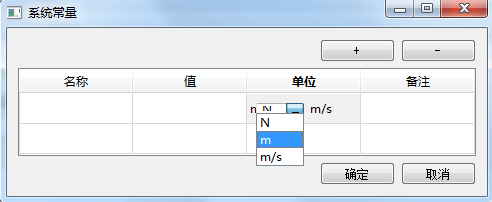
一.最终效果
二.实现思路
1.createEditor()中create两个控件,分别是QLabel和QComboBox,将其添加到一个widget中,然后返回该widget;
2.setEditorData()中,通过1中返回的widget找到label,设置参数;
3.setModelData()中,通过1中返回的widget找到combobox,找到当前选中的index,将其更新到model中;
4.updateEditorGeometrey()不变;
代码如下:
comboboxDelegate.h
 #ifndef COMBODELEGATE_H

 #define COMBODELEGATE_H

 #include <QItemDelegate>

 class ComboDelegate : public QItemDelegate

 {

     Q_OBJECT

 public:

     ComboDelegate(QObject *parent = );

     QWidget *createEditor(QWidget *parent, const QStyleOptionViewItem &option, const QModelIndex    &index) const;

     void setEditorData(QWidget *editor, const QModelIndex &index) const;

     void setModelData(QWidget *editor, QAbstractItemModel *model, const QModelIndex &index) const;

     void updateEditorGeometry(QWidget *editor, const QStyleOptionViewItem &option, const  QModelIndex &index) const;

 };

 #endif // COMBODELEGATE_H
comboboxDelegate.cpp
 #include <QComboBox>

 #include <QDebug>

 ComboDelegate::ComboDelegate(QObject *parent) :

 QItemDelegate(parent)

 {

 }

 QWidget *ComboDelegate::createEditor(QWidget *parent,const QStyleOptionViewItem &/*option*/,const QModelIndex &/*index*/) const

 {

     QComboBox *comboBox = new QComboBox();

     comboBox->setObjectName("comboBox");    //为该对象设置名字,否则后面使用findchild()函数会出错

     //editor->lineEdit()->setAlignment(Qt::AlignCenter);

     comboBox->setEditable(true);

     //editor->setStyleSheet("QComboBox{border:1px solid gray;}""QComboBox QAbstractItemView::item{height:25px;}");

     //editor->setView(new QListView());

     comboBox->addItem("N");

     comboBox->addItem("m");

     comboBox->addItem("m/s");

     comboBox->installEventFilter(const_cast<ComboDelegate*>(this));

     QLabel *label = new QLabel;

     label->setObjectName("label");

     label->setText(tr("m/s"));

     QHBoxLayout *hLay = new QHBoxLayout;

     hLay->addWidget(comboBox);

     hLay->addWidget(label);

     QWidget *wighet = new QWidget(parent);

     wighet->setLayout(hLay);

     return wighet;

 }

 void ComboDelegate::setEditorData(QWidget *editor,const QModelIndex &index) const

 {

     //QString str =index.model()->data(index).toString();

     QString str = "m";

     //QString str = "meos";

     QWidget *box = static_cast<QWidget*>(editor);

     //QPushButton *button = parentWidget->findChild<QPushButton *>("button1");

     //QComboBox *comboBox = static_cast<QComboBox *>(box->findChild<QComboBox *>("editor"));

     //int i = comboBox->findText(str);

     //comboBox->setCurrentIndex(i);

     //QComboBox *combo = new QComboBox(comboBox);

     QLabel *label = editor->findChild<QLabel *>("label");

     //label->setText(str);

     qDebug("Test:%s",qPrintable(label->text()));

     //label->setText(tr("1"));

     //box->findChild<QComboBox *>("editor")->setCurrentIndex(i);

 }

 void ComboDelegate::setModelData(QWidget *editor, QAbstractItemModel *model, const QModelIndex &index) const

 {

     QWidget *box = static_cast<QWidget*>(editor);

     QComboBox *comboBox= box->findChild<QComboBox *>();

     QString str = comboBox->currentText();

     model->setData(index,str);

 }

 void ComboDelegate::updateEditorGeometry(QWidget *editor,const QStyleOptionViewItem &option, const QModelIndex &/*index*/) const

 {

     editor->setGeometry(option.rect);

 }
三. 注意以下几个函数:
1.comboBox->setObjectName("comboBox");
2.QWidget *box = static_cast<QWidget*>(editor);
3.QLabel *label = editor->findChild<QLabel *>("label");
4.QComboBox *comboBox= box->findChild<QComboBox *>();
Delegate(QLabel和QComboBox)的更多相关文章
- 2.QLabel,QPushButton,QLineEdit,QComboBox,QCheckBox,QRadioButton,QTextEdit,QTextBrowser,QGroupBox,QSl
1.新建一个空项目(其它项目->空QT项目): 2 添加新文件(选择C++Class) MyWidget.h #ifndef MYWIDGET_H #define MYWIDGET_H ...
- Qt kdChart 甘特图案例
KDChart 甘特图在Qt中的加载使用案例,代码来自官方 mainwindow.h /******************************************************* ...
- QT_地图导航
//地图显示功能 #ifndef MAPWIDGET_H #define MAPWIDGET_H #include <QGraphicsView> #include <QLabel& ...
- Qt5_简易画板_详细注释
代码下载链接: http://pan.baidu.com/s/1hsc41Ek 密码: 5hdg 显示效果如下: 代码附有详细注释(代码如下) /*** * 先新建QMainWindow, 项目名称 ...
- qt_文本编辑器实现_附带详细注释和源码下载
源码下载: 链接: http://pan.baidu.com/s/1c21EVRy 密码: qub8 实现主要的功能有:新建,打开,保存,另存为,查找(查找的时候需要先将光标放到最下面位置才能查全,不 ...
- 列表框QListWidget类
QListWidget类也是GUI中常用的类,它从QListView下派生: class Q_GUI_EXPORT QListWidget : public QListView { Q_OBJECT ...
- 读Qt Demo——Basic Layouts Example
此例程主要展示用代码方式创建控件并用Layout管理类对其进行布局: 例程来自Qt5.2,如过是默认安装,代码位于:C:\Qt\Qt5.2.0\5.2.0\mingw48_32\examples\wi ...
- C++ GUI Qt4编写的文本编辑器
mainwindow.h: #ifndef MAINWINDOW_H #define MAINWINDOW_H #include <QMenu> #include <QAction& ...
- QT_校园导航(绘制路线已实现)_Updata_详细注释
//MainWidget.h #ifndef MAINWINDOW_H #define MAINWINDOW_H #include <QMainWindow> #include " ...
随机推荐
- 【小尝试】Java获取慕课网原有路径课程列表
作为一个老慕课网(https://www.imooc.com/)粉丝,还记得最开始的慕课网有很多免费的路径课程,练习什么的也特别详细,是入门一门语言的好方法. 现在慕课网发展起来了收费模式,添加了很多 ...
- Java使用zxing生成解读QRcode二维码
1.maven的pom配置jar包,如果不实用maven请手动下载jar包 <dependency> <groupId>com.google.zxing</groupId ...
- mvc:interceptor拦截器使用
在spring-mvc.xml里面配置标签 <mvc:interceptors> <mvc:interceptor> <mvc:mapping path="/* ...
- Java基础之this和super关键字用法
this 在java中,this是一个引用当前类对象的引用变量,主要有以下几种用法: 引用当前类的实例变量· this关键字可以用来引用当前类的实例变量.如果实例变量和某个方法的参数之间存在歧义(实例 ...
- JavaWeb——课程管理系统(1)jsp界面---18.11.29
add.jsp <%@page import="com.jaovo.msg.Util.ValidateUtil"%><%@page import="co ...
- react路由按需加载方法
使用router4之后以前的按需加载方法require.ensure 是不好使了. 所以我们改用react-loadable插件做按需加载. 第一步: yarn add react-loadable ...
- 20145209 2016-2017-2 《Java程序设计》第4周学习总结
20145209 2016-2017-2 <Java程序设计>第4周学习总结 教材学习内容总结 继承是面向对象最显著的一个特性.继承是从已有的类中派生出新的类,新的类能吸收已有类的数据属性 ...
- 在同一台机器上启动多个tomcat服务(转)
转载:https://blog.csdn.net/wangxy799/article/details/53957770 1.案例:配置一台机上配置三个Tomcat 2.方法1:[只用修改第一个以外To ...
- 北京Uber优步司机奖励政策(12月25日)
滴快车单单2.5倍,注册地址:http://www.udache.com/ 如何注册Uber司机(全国版最新最详细注册流程)/月入2万/不用抢单:http://www.cnblogs.com/mfry ...
- day 1 安装pygame
1.稀里糊涂装上了 参考博客:http://blog.csdn.net/sinat_40043477/article/details/78276460