
CentOS 7.2安装11g Grid Infrastructure
 vim /etc/hosts

 cat /etc/hosts

 #public ip

 192.168.56.11 rac1    rac1-pub

 192.168.56.12 rac2    rac2-pub

 #private ip

 10.10.10.11    rac1-priv

 10.10.10.12    rac2-priv

 #virtual ip

 192.168.56.13 rac1-vip

 192.168.56.14 rac2-vip

 #scan ip

 192.168.56.15 rac-scan
2. Disable firewall & selinux(all nodes).
 systemctl stop firewalld

 systemctl status firewalld

 systemctl status firewalld

 vim /etc/selinux/config

 cat /etc/selinux/config

 SELINUX=disabled

 sestatus -v

 SELinux status:                 disabled
3. Install packages(all nodes).
yum -y install binutils compat-db compat-libcap1 compat-libstdc++- control-center elfutils-libelf-devel gcc gcc-c++ glibc glibc-common gnome-libs libaio-devel libstdc++ libstdc++-devel make pdksh sysstat xscreensaver libaio openmotif21 smartmontools
4. Configure ssh connectivities(all nodes,both grid & oracle).
 rac1:

 ssh-keygen -t rsa

 rac2:

 ssh-keygen -t rsa

 rac1:

 cat  ~/.ssh/id_rsa.pub  >> ~/.ssh/authorized_keys

 ssh rac2 cat ~/.ssh/id_rsa.pub  >> ~/.ssh/authorized_keys

 rac2:

 cat  ~/.ssh/id_rsa.pub  >> ~/.ssh/authorized_keys

 ssh rac1 cat ~/.ssh/id_rsa.pub  >> ~/.ssh/authorized_keys

 //Test execute command on remote host without password.

 ssh rac1 date

 ssh rac2 date
5. Add user & usergroups(all nodes).
 groupadd oinstall

 groupadd dba

 groupadd oper

 groupadd asmdba

 groupadd asmoper

 groupadd asmadmin

 useradd -g oinstall -G dba,oper,asmdba oracle

 useradd -g oinstall -G asmdba,dba,asmadmin,asmoper grid
6. Create directory & grant privileges(all nodes).
 mkdir /u01

 mkdir /u01/gridbase

 mkdir /u01/gridhome

 mkdir /u01/oracle

 chown -R grid:oinstall /u01

 chown -R oracle:oinstall /u01/oracle

 chmod -R g+w /u01
7. Modify environment variables((all nodes,both grid & oracle).
 grid(rac1):

 vim /home/grid/.bash_profile

 cat /home/grid/.bash_profile

 ORACLE_BASE = /u01/gridbase

 ORACLE_HOME = /u01/gridhome

 ORACLE_SID = +ASM1

 PATH = $ORACLE_HOME/bin:$PATH

 LD_LIBRARY_PATH = $ORACLE_HOME/lib:$LD_LIBRARY_PATH

 export ORACLE_BASE ORACLE_HOME ORACLE_SID PATH LD_LIBRARY_PATH

 grid(rac2):

 vim /home/grid/.bash_profile

 cat /home/grid/.bash_profile

 ORACLE_BASE = /u01/gridbase

 ORACLE_HOME = /u01/gridhome

 ORACLE_SID = +ASM2

 PATH=$ORACLE_HOME/bin:$PATH

 LD_LIBRARY_PATH = $ORACLE_HOME/lib:$LD_LIBRARY_PATH

 export ORACLE_BASE ORACLE_HOME ORACLE_SID PATH LD_LIBRARY_PATH

 oracle(rac1):

 vim /home/oracle/.bash_profile

 cat /home/oracle/.bash_profile

 ORACLE_BASE = /u01/oracle

 ORACLE_HOME = /u01/oracle/db

 ORACLE_SID = ora11g1

 PATH = $ORACLE_HOME/bin:$PATH

 LD_LIBRARY_PATH = $ORACLE_HOME/lib:$LD_LIBRARY_PATH

 export ORACLE_BASE ORACLE_HOME ORACLE_SID PATH LD_LIBRARY_PATH

 oracle(rac2):

 vim /home/oracle/.bash_profile

 cat /home/oracle/.bash_profile

 ORACLE_BASE = /u01/oracle

 ORACLE_HOME = /u01/oracle/db

 ORACLE_SID = ora11g2

 PATH = $ORACLE_HOME/bin:$PATH

 LD_LIBRARY_PATH = $ORACLE_HOME/lib:$LD_LIBRARY_PATH

 export ORACLE_BASE ORACLE_HOME ORACLE_SID PATH LD_LIBRARY_PATH

 //Make it take effect(rac1 & rac2).

 source /home/oracle/.bash_profile

 source /home/grid/.bash_profile
8. Modify kernel parameters(all nodes).
 vim /etc/sysctl.conf

 cat vim /etc/sysctl.conf

 kernel.msgmnb =

 kernel.msgmax =

 kernel.shmmax =  //1G memory for Oracle.

 kernel.shmall =

 kernel.shmmni =

 fs.aio-max-nr =

 fs.file-max =

 kernel.sem =

 net.ipv4.ip_local_port_range =

 net.core.rmem_default =

 net.core.rmem_max =

 net.core.wmem_default =

 net.core.wmem_max =

 //Make the kernel parameters take effect.

 sysctl -p
9. Modify limites(all nodes).
 vim /etc/security/limits.conf

 cat /etc/security/limits.conf

 #oracle

 oracle soft nproc

 oracle hard nproc

 oracle soft nofile

 oracle hard nofile

 oracle soft stack

 #grid

 grid soft nproc

 grid hard nproc

 grid soft nofile

 grid hard nofile

 grid soft stack
10. Modify pam limits(all nodes).
 vim /etc/pam.d/login

 cat /etc/pam.d/login

 session required /lib64/security/pam_limits.so

 session required pam_limits.so
11. Modify profile(all nodes).
 vim /etc/profile

 cat /etc/profile

 if [ $USER = "oracle" ]||[$USER = "grid" ]; then if [ $SHELL = "/bin/ksh" ]; then ulimit -p  ulimit -n  else

 /

 ulimit -u  -n

 fi

 fi
 fdisk -l

 fdisk /dev/sdc

 n

 enter

 enter

 enter

 w

 fdisk /dev/sdd

 n

 enter

 enter

 enter

 w

 fdisk /dev/sde

 n

 enter

 enter

 enter

 w

 ll /dev/sd*

 ...

 /dev/sdc1

 /dev/sdd1

 /dev/sde1
2. Install asmlib packages(both rac1 & rac2).
yum -y localinstall kmod-oracleasm oracleasm-support oracleasmlib
3. Bind the shared disks with "oracleasm"(root execute).
 rac1:

 oracleasm configure -i

 grid

 asmadmin

 y

 y

 oracleasm init

 oracleasm createdisk ASMDISK1 sdc1

 oracleasm createdisk ASMDISK2 sdd1

 oracleasm createdisk ASMDISK3 sde1

 oracleasm listdisks

 ASMDISK1

 ASMDISK2

 ASMDISK3

 oracleasm scandisks

 rac2:

 oracleasm  configure -i

 grid

 asmadmin

 y

 y

 oracleasm init

 //Reboot rac2 and check the shared disks.

 oracleasm listdisks

 ASMDISK1

 ASMDISK2

 ASMDISK3
 cd /u01

 unzip p13390677_112040_Linux-x86-64_3of7.zip

 chown -R grid:oinstall  /u01/grid
 cd /u01/grid

 ./runcluvfy.sh stage -pre crsinst -n rac1,rac2 -fixup -verbose
yum -y groupinstall "X Windows System"
 xhost +

 export DISPLAY=192.168.56.99:0.0
 ./runInstaller -ignorePrereq

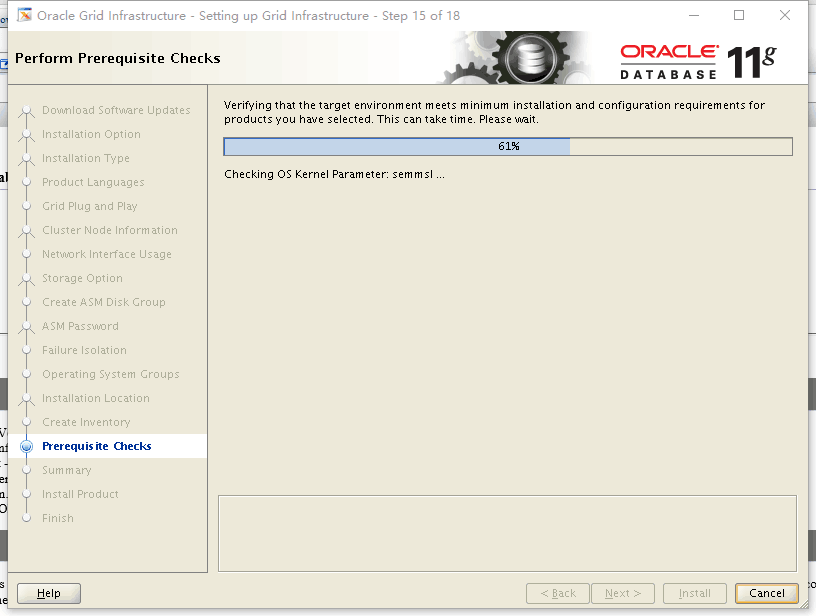
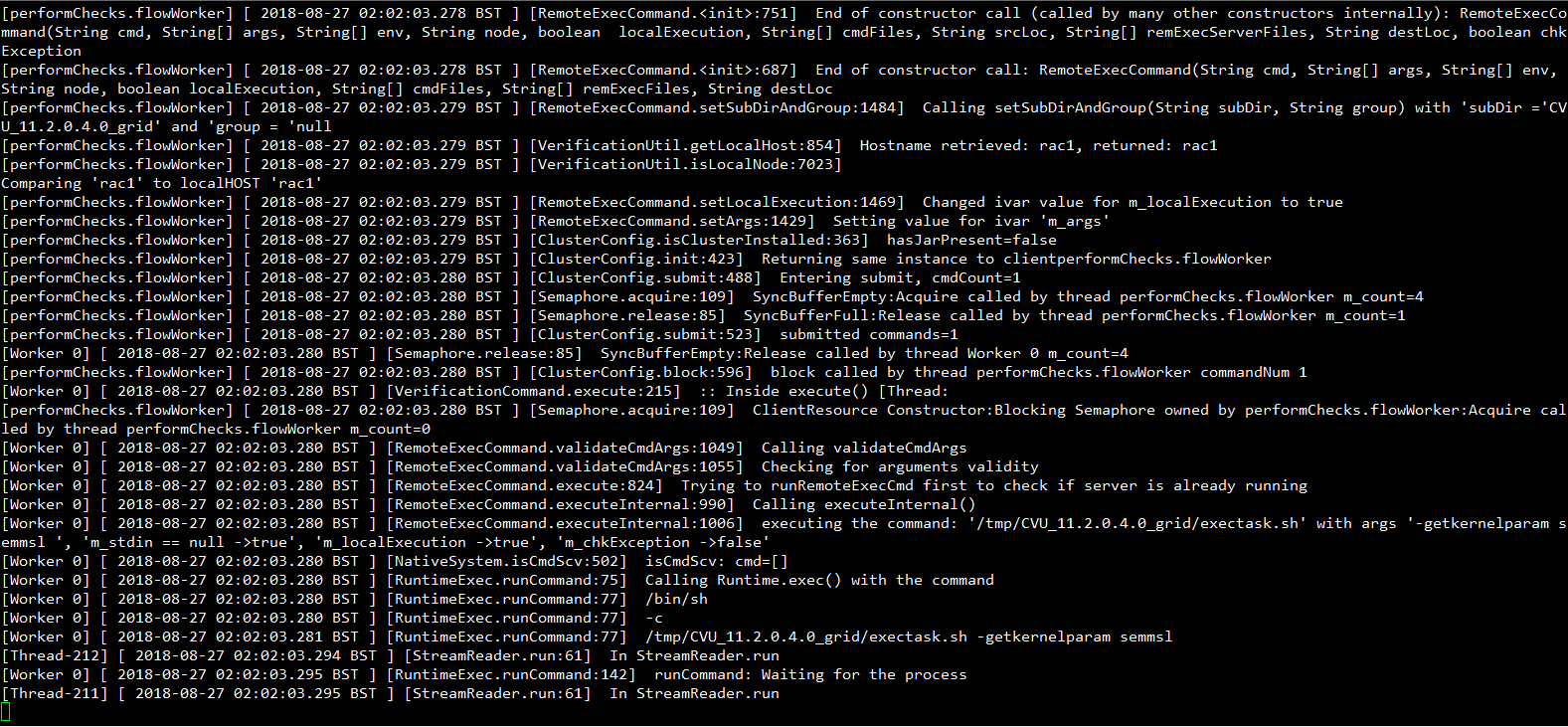
 //I've tried many times not add "-ignorePrereq" option,but the OUI will stuck at 61% when checking the semaphore.I'm afraid it's the incompatible poit installing 11g rac on CentOS 7.2.The picture of stuck point shows below.


6. Execute below scripts in RAC1,RAC2 in order(This step really took me quit a long time to solve it,So I'd like to put the details below).
 /u01/oraInventory/orainstRoot.sh

 /u01/gridhome/root.sh

 I got an error bellow when execute "/u01/gridhome/root.sh" script:

 Adding Clusterware entries to inittab

 ohasd failed to start

 Failed to start the Clusterware. Last  lines of the alert log follow:

 -- ::20.078:

 [client()]CRS-:The OLR was formatted using version .

 -- ::24.742:

 [client()]CRS-:The OLR was formatted using version .

 -- ::25.615:

 [client()]CRS-:The OLR was formatted using version .

 //It's an oracle bug 18370031,a patch should be applied before execute the "root.sh".

 su - root

 chown -R grid:oinstall /u01/

 su - grid

 export PATH=$PATH:$ORACLE_HOME/OPatch

 mv $ORACLE_HOME/OPatch $ORACLE_HOME/OPatch112034

 cd /u01

 unzip p6880880_112000_Linux-x86-.zip -d $ORACLE_HOME

 $ORACLE_HOME/OPatch/opatch version

 OPatch Version: 11.2.0.3.

 OPatch succeeded.

 cd ~

 $ORACLE_HOME/OPatch/ocm/bin/emocmrsp

 OCM Installation Response Generator 10.3.7.0. - Production

 Copyright (c) , , Oracle and/or its affiliates.  All rights reserved.

 Provide your email address to be informed of security issues, install and

 initiate Oracle Configuration Manager. Easier for you if you use your My

 Oracle Support Email address/User Name.

 Visit http://www.oracle.com/support/policies.html for details.

 Email address/User Name:

 You have not provided an email address for notification of security issues.

 Do you wish to remain uninformed of security issues ([Y]es, [N]o) [N]:  y

 The OCM configuration response file (ocm.rsp) was successfully created.

 unzip p18370031_112040_Linux-x86-.zip

 opatch apply /u01// -oh $ORACLE_HOME -ocmrf /home/grid/ocm.rsp

 Oracle Interim Patch Installer version 11.2.0.3.

 Copyright (c) , Oracle Corporation.  All rights reserved.

 Oracle Home       : /u01/gridhome

 Central Inventory : /u01/oraInventory

    from           : /u01/gridhome/oraInst.loc

 OPatch version    : 11.2.0.3.

 OUI version       : 11.2.0.4.

 Log file location : /u01/gridhome/cfgtoollogs/opatch/opatch2018--27_06--31AM_1.log

 Verifying environment and performing prerequisite checks...

 OPatch continues with these patches:

 Do you want to proceed? [y|n]

 y

 User Responded with: Y

 All checks passed.

 Please shutdown Oracle instances running out of this ORACLE_HOME on the local system.

 (Oracle Home = '/u01/gridhome')

 Is the local system ready for patching? [y|n]

 y

 User Responded with: Y

 Backing up files...

 Applying interim patch '' to OH '/u01/gridhome'

 Patching component oracle.crs, 11.2.0.4....

 Copy failed from '/u01/18370031/files/bin/ohasd.bin' to '/u01/gridhome/bin/ohasd.bin'...

 Please verify all applications associated with the Oracle Home '/u01/gridhome' are shut down. If this is AIX, please perform solution documented in Note 739963.1 on https://myoraclesupport.oracle.com.

 Do you want to retry copying the file? [y|n]

 y

 User Responded with: Y

 Retry copying the file to '/u01/gridhome/bin/ohasd.bin'.

 The following actions have failed:

 Copy failed from '/u01/18370031/files/bin/ohasd.bin' to '/u01/gridhome/bin/ohasd.bin'...

 Do you want to proceed? [y|n]

 Y

 User Responded with: Y

 Patch  successfully applied.

 OPatch Session completed with warnings.

 Log file location: /u01/gridhome/cfgtoollogs/opatch/opatch2018--27_06--31AM_1.log

 OPatch completed with warnings.

 [grid@rac2 u01]$ ps -ef|grep ohasd

 root             : ?        :: /u01/gridhome/bin/ohasd.bin reboot

 grid         : pts/    :: grep --color=auto ohasd

 //If you want to copy it right now,then kill the ohasd process first(I didn't do that).

 kill -

 cp /u01//ohasd.bin /u01/gridhome/bin/ohasd.bin

 //If you are using OEL 7.2,there's another patch "19404309" need to apply to guarantee the GRID Softerware can be normally implement.

 [root@rac1 ~]# /u01/gridhome/root.sh

 Performing root user operation for Oracle 11g

 The following environment variables are set as:

     ORACLE_OWNER= grid

     ORACLE_HOME=  /u01/gridhome

 Enter the full pathname of the local bin directory: [/usr/local/bin]:

 The contents of "dbhome" have not changed. No need to overwrite.

 The contents of "oraenv" have not changed. No need to overwrite.

 The contents of "coraenv" have not changed. No need to overwrite.

 Entries will be added to the /etc/oratab file as needed by

 Database Configuration Assistant when a database is created

 Finished running generic part of root script.

 Now product-specific root actions will be performed.

 Using configuration parameter file: /u01/gridhome/crs/install/crsconfig_params

 User ignored Prerequisites during installation

 Installing Trace File Analyzer

 Adding Clusterware entries to oracle-ohasd.service

 CRS-: Attempting to start 'ora.mdnsd' on 'rac1'

 CRS-: Start of 'ora.mdnsd' on 'rac1' succeeded

 CRS-: Attempting to start 'ora.gpnpd' on 'rac1'

 CRS-: Start of 'ora.gpnpd' on 'rac1' succeeded

 CRS-: Attempting to start 'ora.cssdmonitor' on 'rac1'

 CRS-: Attempting to start 'ora.gipcd' on 'rac1'

 CRS-: Start of 'ora.cssdmonitor' on 'rac1' succeeded

 CRS-: Start of 'ora.gipcd' on 'rac1' succeeded

 CRS-: Attempting to start 'ora.cssd' on 'rac1'

 CRS-: Attempting to start 'ora.diskmon' on 'rac1'

 CRS-: Start of 'ora.diskmon' on 'rac1' succeeded

 CRS-: Start of 'ora.cssd' on 'rac1' succeeded

 ASM created and started successfully.

 Disk Group OCRVOTE created successfully.

 clscfg: -install mode specified

 Successfully accumulated necessary OCR keys.

 Creating OCR keys for user 'root', privgrp 'root'..

 Operation successful.

 CRS-: Updating the profile

 Successful addition of voting disk a11c41b9357d4f48bf1b7c5e03c1510a.

 Successfully replaced voting disk group with +OCRVOTE.

 CRS-: Updating the profile

 CRS-: Voting file(s) successfully replaced

 ##  STATE    File Universal Id                File Name Disk group

 --  -----    -----------------                --------- ---------

  . ONLINE   a11c41b9357d4f48bf1b7c5e03c1510a (ORCL:ASMDISK1) [OCRVOTE]

 Located  voting disk(s).

 sh: /bin/netstat: No such file or directory

 CRS-: Attempting to start 'ora.asm' on 'rac1'

 CRS-: Start of 'ora.asm' on 'rac1' succeeded

 CRS-: Attempting to start 'ora.OCRVOTE.dg' on 'rac1'

 CRS-: Start of 'ora.OCRVOTE.dg' on 'rac1' succeeded

 Preparing packages...

 ls: cannot access /usr/sbin/smartctl: No such file or directory

 /usr/sbin/smartctl not found.

 error: %pre(cvuqdisk-1.0.-.x86_64) scriptlet failed, exit status

 error: cvuqdisk-1.0.-.x86_64: install failed

 Configure Oracle Grid Infrastructure for a Cluster ... succeeded

 [root@rac1 ~]# crs_stat -t

 Name           Type           Target    State     Host

 ------------------------------------------------------------

 ora....N1.lsnr ora....er.type ONLINE    ONLINE    rac1

 ora.OCRVOTE.dg ora....up.type ONLINE    ONLINE    rac1

 ora.asm        ora.asm.type   ONLINE    ONLINE    rac1

 ora.cvu        ora.cvu.type   ONLINE    ONLINE    rac1

 ora.gsd        ora.gsd.type   OFFLINE   OFFLINE

 ora....network ora....rk.type ONLINE    ONLINE    rac1

 ora.oc4j       ora.oc4j.type  ONLINE    ONLINE    rac1

 ora.ons        ora.ons.type   ONLINE    ONLINE    rac1

 ora....SM1.asm application    ONLINE    ONLINE    rac1

 ora.rac1.gsd   application    OFFLINE   OFFLINE

 ora.rac1.ons   application    ONLINE    ONLINE    rac1

 ora.rac1.vip   ora....t1.type ONLINE    ONLINE    rac1

 ora.scan1.vip  ora....ip.type ONLINE    ONLINE    rac1

 //Omitted the procedure of apply patch "18370031" on RAC2.

 [root@rac2 ~]# /u01/gridhome/root.sh

 Performing root user operation for Oracle 11g

 The following environment variables are set as:

     ORACLE_OWNER= grid

     ORACLE_HOME=  /u01/gridhome

 Enter the full pathname of the local bin directory: [/usr/local/bin]:

 The contents of "dbhome" have not changed. No need to overwrite.

 The contents of "oraenv" have not changed. No need to overwrite.

 The contents of "coraenv" have not changed. No need to overwrite.

 Entries will be added to the /etc/oratab file as needed by

 Database Configuration Assistant when a database is created

 Finished running generic part of root script.

 Now product-specific root actions will be performed.

 Using configuration parameter file: /u01/gridhome/crs/install/crsconfig_params

 User ignored Prerequisites during installation

 Installing Trace File Analyzer

 CRS-: Attempting to start 'ora.mdnsd' on 'rac2'

 CRS-: Start of 'ora.mdnsd' on 'rac2' succeeded

 CRS-: Attempting to start 'ora.gpnpd' on 'rac2'

 CRS-: Start of 'ora.gpnpd' on 'rac2' succeeded

 CRS-: Attempting to start 'ora.cssdmonitor' on 'rac2'

 CRS-: Attempting to start 'ora.gipcd' on 'rac2'

 CRS-: Start of 'ora.cssdmonitor' on 'rac2' succeeded

 CRS-: Start of 'ora.gipcd' on 'rac2' succeeded

 CRS-: Attempting to start 'ora.cssd' on 'rac2'

 CRS-: Attempting to start 'ora.diskmon' on 'rac2'

 CRS-: Start of 'ora.diskmon' on 'rac2' succeeded

 CRS-: Start of 'ora.cssd' on 'rac2' succeeded

 sh: /bin/netstat: No such file or directory

 Preparing packages...

 ls: cannot access /usr/sbin/smartctl: No such file or directory

 /usr/sbin/smartctl not found.

 error: %pre(cvuqdisk-1.0.-.x86_64) scriptlet failed, exit status

 error: cvuqdisk-1.0.-.x86_64: install failed

 Configure Oracle Grid Infrastructure for a Cluster ... succeeded

 [root@rac2 ~]# crs_stat -t

 Name           Type           Target    State     Host

 ------------------------------------------------------------

 ora....N1.lsnr ora....er.type ONLINE    ONLINE    rac1

 ora.OCRVOTE.dg ora....up.type ONLINE    ONLINE    rac1

 ora.asm        ora.asm.type   ONLINE    ONLINE    rac1

 ora.cvu        ora.cvu.type   ONLINE    ONLINE    rac1

 ora.gsd        ora.gsd.type   OFFLINE   OFFLINE

 ora....network ora....rk.type ONLINE    ONLINE    rac1

 ora.oc4j       ora.oc4j.type  ONLINE    ONLINE    rac1

 ora.ons        ora.ons.type   ONLINE    ONLINE    rac1

 ora....SM1.asm application    ONLINE    ONLINE    rac1

 ora.rac1.gsd   application    OFFLINE   OFFLINE

 ora.rac1.ons   application    ONLINE    ONLINE    rac1

 ora.rac1.vip   ora....t1.type ONLINE    ONLINE    rac1

 ora....SM2.asm application    ONLINE    ONLINE    rac2

 ora.rac2.gsd   application    OFFLINE   OFFLINE

 ora.rac2.ons   application    ONLINE    ONLINE    rac2

 ora.rac2.vip   ora....t1.type ONLINE    ONLINE    rac2

 ora.scan1.vip  ora....ip.type ONLINE    ONLINE    rac1
7. Skip the subsequent failure of checking NETCA & CVU and finish the installation of GI and check crs status.
 [root@rac1 u01]# crsctl check crs

 CRS-: Oracle High Availability Services is online

 CRS-: Cluster Ready Services is online

 CRS-: Cluster Synchronization Services is online

 CRS-: Event Manager is online

 [root@rac2 u01]# crsctl check crs

 CRS-: Oracle High Availability Services is online

 CRS-: Cluster Ready Services is online

 CRS-: Cluster Synchronization Services is online

 CRS-: Event Manager is online
CentOS 7.2安装11g Grid Infrastructure的更多相关文章
- RAC2——11g Grid Infrastructure的新机制
版权声明:本文为博主原创文章,未经博主允许不得转载. 可以看到,最初CRS(Cluster Ready Services)名词的起源就是因为10.1中作为集群软件的原因.后来经历了Clusterwar ...
- Linux安装Oracle 11g Grid Infrastructure 出现OUI-10182错误解决办法
已确保安装的ORACLE_BASE目录是属于grid:oinstall 但安装时总是报:OUI-10182 The effective user ID does not match the own ...
- CentOS 7.2安装11g数据库软件
Preface Yesterday I've installed the 11g GI software on CentOS 7.2.But I still encounter som ...
- Oracle Grid Infrastructure安装部署文档
1. 部署环境步骤 1.1 软件环境 操作系统: CentOS release 6.5 oracle安装包: linux.x64_11gR2_grid.zip linux.x64_11gR2_data ...
- 基于CentOS与VmwareStation10搭建Oracle11G RAC 64集群环境:4.安装Oracle RAC FAQ-4.6.重新配置与缷载11R2 Grid Infrastructure
1.[root@linuxrac1 ~]# /u01/app/oraInventory/orainstRoot.sh 2.[root@linuxrac2 ~]# /u01/app/oraInvento ...
- 基于CentOS与VmwareStation10搭建Oracle11G RAC 64集群环境:4.安装Oracle RAC FAQ-4.4.无法图形化安装Grid Infrastructure
无法图形化安装: [grid@linuxrac1 grid]$ ./runInstaller Starting Oracle Universal Installer... Checking Temp ...
- 基于CentOS与VmwareStation10搭建Oracle11G RAC 64集群环境:3.安装Oracle RAC-3.4.安装Grid Infrastructure
3.4.安装Grid Infrastructure 3.4.1.安装Grid 1.运行 grid的安装文件runInstaller [grid@linuxrac1 grid]$ ./runInstal ...
- Centos 6.5 安装Oracle 11g R2 on vbox
由于上一篇的rac安装,截图较多,这一篇选择以txt的方式叙述,另外上一篇的时间比较久远,这里最近从新安装 --2018-10-29 1 os环境初始化 [root@rac1 yum.repos.d] ...
- Linux下搭建Oracle11g RAC(6)----安装Grid Infrastructure
从此步骤开始,我们正式安装Grid软件: ① 以grid用户登录图形界面,执行/home/grid/grid/runInstaller,进入OUI的图形安装界面: ② 进入OUI安装界面后,选择第3项 ...
随机推荐
- Gluon sgd
from mxnet import nd,autograd,init,gluon from mxnet.gluon import data as gdata,loss as gloss,nn num_ ...
- rc.local 开机自启脚本无法启动
1.看是否rc.local 第一行如果是 #!/bin/sh -e 改成 #!/bin/bash sudo systemctl enable rc-local.service 2.看rc.local的 ...
- 2springboot:快速创建springboot项目
使用IDEA快速创建springboot项目流程: 创建新的项目选择 项目的命名以及包名 需要什么包就导入什么包 进行测试的单元 <dependency> <groupId>o ...
- js获取当前URL、参数、端口、IP等信息
以下列出均为常用(转自地址为:https://blog.csdn.net/pengShuai007/article/details/78357238?locationNum=9&fps=1 1 ...
- Kernel Ridge Regression
回顾一下岭回归,岭回归的目的是学习得到特征和因变量之间的映射关系,由于特征可能很高维,所以需要正则化 岭回归的目标函数是 $$ \sum_{i=1}^n \left\|y-X\beta\right\| ...
- Cesium.js学习第三天(模型展示)
var viewer = new Cesium.Viewer('cs'); viewer.scene.primitives.add(Cesium.Model.fromGltf({ url : '/Ce ...
- Fine Tuning
(转载自:WikiPedia) Fine tuning is a process to take a network model that has already been trained for a ...
- css清除间隙
.clear{clear:both;height:0;width:0;line-height:0;overflow:hidden;}
- 查询sqlserver 表结构呀
SQL Server里查询表结构命令 对于SQL Server数据库有两种方法查询表结构 第一种方法 sp_help Accounts_Users 其中Accounts_Users 表示表名 ...
- Oracle中插入千万条测试数据
测试需求,id.姓名.邮箱.手机号不可重复 1.创建序列 create sequence id_sequence; //创建序列id_sequence 2.创建表 create table USERI ...