
AdapterView 和 RecyclerView 的连续滚动
AdapterView 和 RecyclerView 的连续滚动
概述
应用中一个常见的使用场景就是:当用户滚动浏览的项目时,会自动加载更多的项目(又叫做无限滚动)。它的原理是:当滚动到达底部之前,一旦当前剩余可见的项目达到了一个设定好的阈值,就会触发加载更多数据的请求。
本文列举了 ListView、GridView 和 RecyclerView 的实现方法。它们的实现都是类似的,除了 RecyclerView 还需要传入 LayoutManager,这是因为它需要给无限滚动提供一些必要的信息。
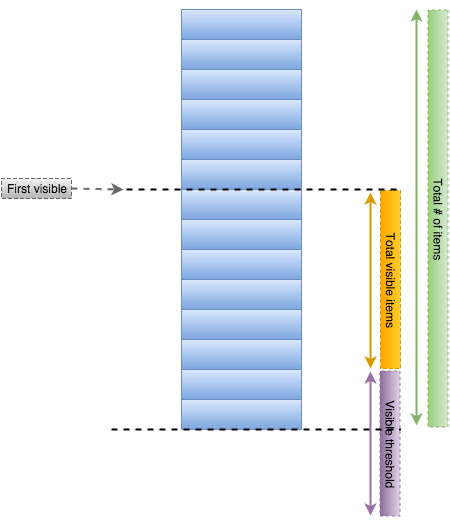
无论哪个控件,实现无限滚动所需要的信息无非就包括这么几点:检测列表中剩余的可见元素,在到达最后一个元素之前开始获取数据的阈值。这个阈值可以用来决定什么时候开始加载更多。
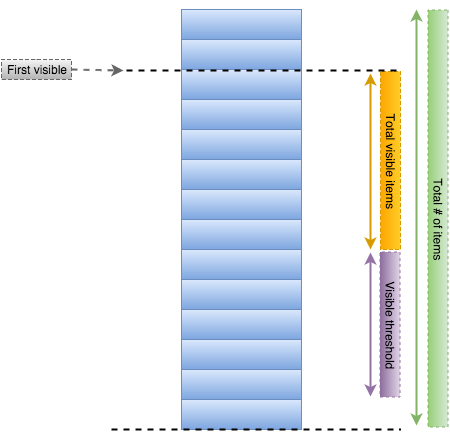
要实现连续滚动的一个重点就是:一定要在用户到达列表的末尾前就获取数据。因此,添加一个阈值来让列表在预期的时候就加载数据。
ListView 和 GridView 的实现方式
每个 AdapterView (例如 ListView 或 GridView)都支持 onScrollListener 事件的绑定,只要用户滑动列表,就会触发该事件。使用该体系,我们就可以定义一个基础类:EndlessScrollListener,它继承自 OnScrollListener,可以适用于大多数情况:
- import android.widget.AbsListView;
- public abstract class EndlessScrollListener implements AbsListView.OnScrollListener {
- // The minimum number of items to have below your current scroll position
- // before loading more.
- private int visibleThreshold = 5;
- // The current offset index of data you have loaded
- private int currentPage = 0;
- // The total number of items in the dataset after the last load
- private int previousTotalItemCount = 0;
- // True if we are still waiting for the last set of data to load.
- private boolean loading = true;
- // Sets the starting page index
- private int startingPageIndex = 0;
- public EndlessScrollListener() {
- }
- public EndlessScrollListener(int visibleThreshold) {
- this.visibleThreshold = visibleThreshold;
- }
- public EndlessScrollListener(int visibleThreshold, int startPage) {
- this.visibleThreshold = visibleThreshold;
- this.startingPageIndex = startPage;
- this.currentPage = startPage;
- }
- // This happens many times a second during a scroll, so be wary of the code you place here.
- // We are given a few useful parameters to help us work out if we need to load some more data,
- // but first we check if we are waiting for the previous load to finish.
- @Override
- public void onScroll(AbsListView view, int firstVisibleItem, int visibleItemCount, int totalItemCount)
- {
- // If the total item count is zero and the previous isn't, assume the
- // list is invalidated and should be reset back to initial state
- if (totalItemCount < previousTotalItemCount) {
- this.currentPage = this.startingPageIndex;
- this.previousTotalItemCount = totalItemCount;
- if (totalItemCount == 0) { this.loading = true; }
- }
- // If it's still loading, we check to see if the dataset count has
- // changed, if so we conclude it has finished loading and update the current page
- // number and total item count.
- if (loading && (totalItemCount > previousTotalItemCount)) {
- loading = false;
- previousTotalItemCount = totalItemCount;
- currentPage++;
- }
- // If it isn't currently loading, we check to see if we have breached
- // the visibleThreshold and need to reload more data.
- // If we do need to reload some more data, we execute onLoadMore to fetch the data.
- if (!loading && (firstVisibleItem + visibleItemCount + visibleThreshold) >= totalItemCount ) {
- loading = onLoadMore(currentPage + 1, totalItemCount);
- }
- }
- // Defines the process for actually loading more data based on page
- // Returns true if more data is being loaded; returns false if there is no more data to load.
- public abstract boolean onLoadMore(int page, int totalItemsCount);
- @Override
- public void onScrollStateChanged(AbsListView view, int scrollState) {
- // Don't take any action on changed
- }
- }
注意:这是一个抽象类,要使用它,必须实现该类中的抽象方法:onLoadMore,用于检索新的数据。在 activity 中,可以用一个匿名内部类来实现这个抽象类,并把它绑定到适配器上。例如:
- public class MainActivity extends Activity {
- @Override
- protected void onCreate(Bundle savedInstanceState) {
- // ... the usual
- ListView lvItems = (ListView) findViewById(R.id.lvItems);
- // Attach the listener to the AdapterView onCreate
- lvItems.setOnScrollListener(new EndlessScrollListener() {
- @Override
- public boolean onLoadMore(int page, int totalItemsCount) {
- // Triggered only when new data needs to be appended to the list
- // Add whatever code is needed to append new items to your AdapterView
- loadNextDataFromApi(page);
- // or loadNextDataFromApi(totalItemsCount);
- return true; // ONLY if more data is actually being loaded; false otherwise.
- }
- });
- }
- // Append the next page of data into the adapter
- // This method probably sends out a network request and appends new data items to your adapter.
- public void loadNextDataFromApi(int offset) {
- // Send an API request to retrieve appropriate paginated data
- // --> Send the request including an offset value (i.e `page`) as a query parameter.
- // --> Deserialize and construct new model objects from the API response
- // --> Append the new data objects to the existing set of items inside the array of items
- // --> Notify the adapter of the new items made with `notifyDataSetChanged()`
- }
- }
现在,当你滚动列表时,每当剩余元素到达阈值时,列表就会自动加载下一页的数据。该方法对于 GridView 来说,一样的有效。
RecyclerView 的实现方式
对于 RecyclerView 来说,我们也可以使用一个相似的方法:定义接口 EndlessRecyclerViewScrollListener;一个必须实现的方法 onLoadMore()。在 RecyclerView 中,LayoutManager 用于渲染列表元素并管理滚动,即提供与适配器相关的当前滚动位置的信息。基于上述理由,我们需要传入一个 LayoutManager 的实例,用于收集必须的信息,和用于确定加载更多数据的时机。
因此,RecyclerView 实现连续分页需要以下几个步骤:
把 EndlessRecyclerViewScrollListener.java 类拷贝到你的项目中
在
RecyclerView上调用addOnScrollListener()方法来启用连续分页。给该方法传入EndlessRecyclerViewScrollListener的实例,当新页需要加载时,实现onLoadMore()方法在
onLoadMore()方法中,加载更多数据,并把它们填充到列表中
代码示例如下:
- public class MainActivity extends Activity {
- // Store a member variable for the listener
- private EndlessRecyclerViewScrollListener scrollListener;
- @Override
- protected void onCreate(Bundle savedInstanceState) {
- // Configure the RecyclerView
- RecyclerView rvItems = (RecyclerView) findViewById(R.id.rvContacts);
- LinearLayoutManager linearLayoutManager = new LinearLayoutManager(this);
- rvItems.setLayoutManager(linearLayoutManager);
- // Retain an instance so that you can call `resetState()` for fresh searches
- scrollListener = new EndlessRecyclerViewScrollListener(linearLayoutManager) {
- @Override
- public void onLoadMore(int page, int totalItemsCount, RecyclerView view) {
- // Triggered only when new data needs to be appended to the list
- // Add whatever code is needed to append new items to the bottom of the list
- loadNextDataFromApi(page);
- }
- };
- // Adds the scroll listener to RecyclerView
- rvItems.addOnScrollListener(scrollListener);
- }
- // Append the next page of data into the adapter
- // This method probably sends out a network request and appends new data items to your adapter.
- public void loadNextDataFromApi(int offset) {
- // Send an API request to retrieve appropriate paginated data
- // --> Send the request including an offset value (i.e `page`) as a query parameter.
- // --> Deserialize and construct new model objects from the API response
- // --> Append the new data objects to the existing set of items inside the array of items
- // --> Notify the adapter of the new items made with `notifyItemRangeInserted()`
- }
- }
复位连续滚动状态
当你准备执行新的搜索时,要确保清除列表上已经存在的数据,并马上通知适配器数据的变化。当然,还需要使用 resetState() 方法来重置 EndlessRecyclerViewScrollListener 的状态:
- // 1. First, clear the array of data
- listOfItems.clear();
- // 2. Notify the adapter of the update
- recyclerAdapterOfItems.notifyDataSetChanged(); // or notifyItemRangeRemoved
- // 3. Reset endless scroll listener when performing a new search
- scrollListener.resetState();
完整的连续滚动代码可以参考:code sample for usage,this code sample。
故障排查
如果在开发中遇到问题,请考虑下述的建议:
对于
ListView来说,请一定在Activity的onCreate()方法 或Fragment的onCreateView()方法中,给它设置setOnScrollListener()监听。否则,你可能会遇到一些想不到的问题要使分页系统可以可靠地、持续地工作,在给列表添加新的数据之前,你应该确保清除适配器的数据。对
RecyclerView来说,当需要通知适配器数据有更新时,强烈建议使用精度更细的通知方法。要触发分页,始终记得
loadNextDataFromApi方法调用时,需要把新数据添加到已经存在的数据源。按句话说,只有首次加载时才清除数据,以后的每次分页都是把新增的数据添加到原有的数据集中。如果你遇到了下述的错误:
Cannot call this method in a scroll callback. Scroll callbacks might be run during a measure & layout pass where you cannot change the RecyclerView data,那你应该按照 Stack Overflow 中的解决办法对代码进行改造:
- // Delay before notifying the adapter since the scroll listeners
- // can be called while RecyclerView data cannot be changed.
- view.post(new Runnable() {
- @Override
- public void run() {
- // Notify adapter with appropriate notify methods
- adapter.notifyItemRangeInserted(curSize, allContacts.size() - 1);
- }
- });
在自定义的适配器中显示进度
想要在 ListView 的底部显示加载数据的进度,需要对适配器进行特殊处理。使用 getItemViewType(int position) 定义两种不同的视图类型,既正常行与最后一行的样子不同。
AdapterView 和 RecyclerView 的连续滚动的更多相关文章
- Unity3D游戏开发之连续滚动背景
Unity3D游戏开发之连续滚动背景 原文 http://blog.csdn.net/qinyuanpei/article/details/22983421 在诸如天天跑酷等2D游戏中,因为游戏须要 ...
- 用js实现table内容从下到上连续滚动
网上有很多用ul实现新闻列表滚动的例子,但是很少有直接用table实现列表内容滚动的例子,而Marquee标签滚动的效果不是很好,于是就自己写了一个,提供给攻城师朋友们参考 实现思路:由于table包 ...
- jquery连续滚动
本文非常详细的讲解在jquery里实现图片或文字的连续循环滚动的方法. 连续循环滚动是我们在网页开发中经常要用到的特效,在jquery里,我们要实现文字或图片的连续循环滚动是非常简单的.出处:http ...
- jquery 写的图片左右连续滚动
<style type="text/css"> *{ margin:0; padding:0;} body { font:12px/1.8 Arial; color:# ...
- [Unity3D]Unity3D游戏开发之连续滚动背景
在诸如天天跑酷等2D游戏中.因为游戏须要表现出运动的感觉.通常都会使游戏背景连续循环滚动以增强视觉效果,那么今天.博主就来带领大家一起来实现连续滚动背景吧. 首先来讲述一下原理.准备两张连续的图片(博 ...
- JS连续滚动幻灯片:原理与实现
什么是连续滚动幻灯片?打开一些网站的首页,你会发现有一块这样的区域:一张图片,隔一段时间滑动切换下一张:同时,图片两端各有一个小按钮,供你手动点选下一张:底部有一排小圆圈,供你选定特定的某帧图片.这就 ...
- RecyclerView 实现快速滚动
RecyclerView 实现快速滚动 https://www.cnblogs.com/mamamia/p/8311449.html
- RecyclerView 实现快速滚动 (转)
RecyclerView 实现快速滚动 极小光 简书作者 简评:Android Support Library 26 中终于实现了一个等待已久的功能:RecyclerView 的快速滚动. An ...
- Android TV端的(RecyclerView)水平滚动焦点错乱问题
package com.hhzt.iptv.ui.customview; import android.content.Context;import android.content.res.Typed ...
随机推荐
- nginx最大并发连接数的思考:worker_processes、worker_connections、worker_rlimit_nofile
参考nginx官网:http://nginx.org/en/docs/ngx_core_module.html#worker_connections 从用户的角度,http 1.1协议下,由于浏览器默 ...
- screen space shadowmap unity
unity用到了screen space shadow map 1.camera 在light pos 生成depth1 2.screen space depth2 3.根据depth1 depth2 ...
- Tile based Rendering 二 tbr and tbdr 优化建议tiled based deferred rendering
http://www.seas.upenn.edu/~pcozzi/OpenGLInsights/OpenGLInsights-TileBasedArchitectures.pdf tbr 和tbdr ...
- Java笔记20:迭代器模式
迭代器模式 所谓Iterator模式,即是Iterator为不同的容器提供一个统一的访问方式.本文以Java中的容器为例,模拟Iterator的原理. 1 定义一个容器Collection接口 pub ...
- OpenStack 实现技术分解 (5) 应用开发 — 使用 OpenStackClients 进行二次开发
文件夹 文件夹 前文列表 參考阅读 前言 OpenStackClients 使用 OpenStackClients 获取 project_client object 的 demo 调用 project ...
- java 注解(自身理解)
声明注解 使用注解 解析注解 产生的结果 注解利用的是反射机制 ============================================================= 使用注解修饰 ...
- Node.js m03122图片批量下载爬虫1.00
//====================================================== // m03122图片批量下载爬虫1.00 // 2017年11月18日 //==== ...
- Win7无法安装Flash Player怎么办
在IE的工具选项中把安全选项中的ActiveX控件一系列都改为启用即可.
- 内网渗透技巧:判断机器真实外网IP的5种方法总结
在内网渗透中有时需要在某台WEB服务器中留下后门,该机器可以通过内网IP建立IPC连接,但还需要获知外网IP或域名才能访问Wbshell,在无网关权限的情况下,我总结了有如下方法: 1.通过nsloo ...
- C语言之基本算法08—去掉最高分去掉最低分求平均值
// /* ================================================================== 题目:选拔赛中通经常使用这种办法求选手分数,去掉一个最 ...