
【Python 解决错误】selenium.common.exception.WebDriverException
近来准备写个脚本去搜索某端游的官网交易平台。因为也不懂高端的爬虫技术,决定用selenium去戳。这里采用的是chrome浏览器,链接网页时报错:
File "C:\Python37\lib\site-packages\selenium\webdriver\chrome\webdriver.py", line 73, in __init__
self.service.start()
File "C:\Python37\lib\site-packages\selenium\webdriver\common\service.py", line 83, in start
os.path.basename(self.path), self.start_error_message)
selenium.common.exceptions.WebDriverException: Message: 'chromedriver' executable needs to be in PATH. Please see https://sites.google.com/a/chromium.org/chromedriver/home
解决办法:
安装与浏览器版本匹配的webdriver
1、打开谷歌浏览器, 在地址栏输入 chrome://version/ 查看版本信息,我的版本信息描述如下:
| Google Chrome | 72.0.3626.119 (正式版本) (32 位) (cohort: Stable) |
| 修订版本 | 9a65993e2cde1b5797ec98da4cd9abcea464cd7b-refs/branch-heads/3626@{#876} |
| 操作系统 | Windows |
2、选择合适版本的驱动下载, 如果没有完全匹配的就选最相似匹配的版本下载。(比如我的版本没有完全匹配的,我选了一个临近的驱动,也可用)
下载地址:
http://chromedriver.storage.googleapis.com/index.html
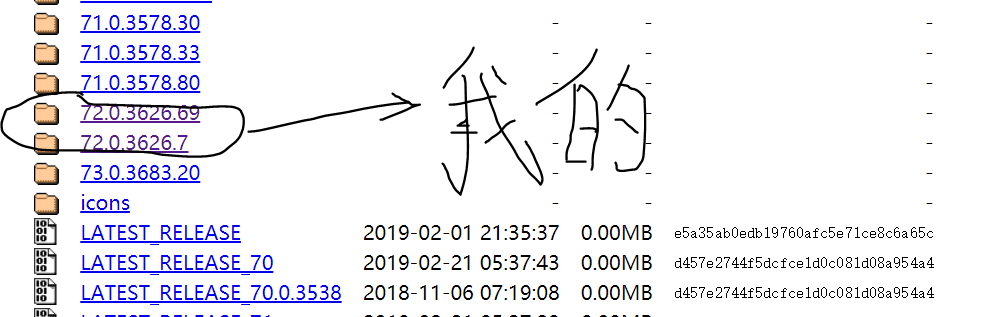
3、解压下载的驱动放到指定目录,代码调用时指定该目录即可。
我把它放在了selenium下的chrome了,代码演示如下
from selenium import webdriver

chrome_driver = r"C:\Python37\Lib\site-packages\selenium\webdriver\chrome\chromedriver.exe"
browser = webdriver.Chrome(executable_path=chrome_driver)
成功解决问题!
【Python 解决错误】selenium.common.exception.WebDriverException的更多相关文章
- 解决selenium.common.exception.WebDriverException:Message:'chromedriver' executable needs to be in Path
'chromedriver' executable needs to be in Path 声明:本人萌新,刚学python不久记录一下自己的坑,发出来若能帮助到一些人尽早解决问题那便是极好的,( ̄▽ ...
- python 安装selenium首次运行错误selenium.common.exceptions.WebDriverException: Message: 'chromedriver' executable needs to be in PATH
问题原因: 没有安装相关的支撑driver https://npm.taobao.org/mirrors/chromedriver/ 下载对应的driver 放置到python路径下
- 解决selenium.common.exceptions.WebDriverException: Message: 'chromedriver' executable needs to be in P
转载 解决selenium.common.exceptions.WebDriverException: Message: 'chromedriver' executable needs to be i ...
- python+selenium,打开浏览器时报selenium.common.exceptions.WebDriverException: Message: 'chromedriver' executable needs to be in PATH
有一年多没写web自动化了,今天搭建环境的时候报了一个常见错误,但是处理过程有点闹心,报错就是常见的找不到驱动<selenium.common.exceptions.WebDriverExcep ...
- python无法启动火狐浏览器且报错“selenium.common.exceptions.WebDriverException: Message: Unable to find a matching set of capabilities”
安装了python2,使用pip安装了selenium,但是在使用时,报了“selenium.common.exceptions.WebDriverException: Message: 'gecko ...
- selenium.common.exceptions.WebDriverException: Message: 'geckodriver' executable needs to be in PATH. 错误处理方法
首次使用selenium webdriver,webdriver.Firefox() 报错selenium.common.exceptions.WebDriverException: Message: ...
- 【Python + Selenium】初次用IE浏览器之报错:selenium.common.exceptions.WebDriverException: Message: Unexpected error launching Internet Explorer. Protected Mode settings are not the same for all zones.
初次用IE浏览器运行自动化程序时,报错:selenium.common.exceptions.WebDriverException: Message: Unexpected error launchi ...
- centos7 selenium.common.exceptions.WebDriverException: Message: 'chromedriver' executable needs to be in PATH
1.查看安装的chrome浏览器版本 2.查看版本对应的驱动 https://sites.google.com/a/chromium.org/chromedriver/downloads 下载后拷贝到 ...
- robotframework执行用例时,报错selenium.common.exceptions.WebDriverException: Message: unknown error: cannot get automation extension from unknown error: page could not be found: chrome-extension://aapnijgdinl
在用robotframework编写移动端测试用例(用chrome浏览器模拟手机浏览器),执行用例时, 报错selenium.common.exceptions.WebDriverException: ...
随机推荐
- Smarty简介
Smarty是一个使用PHP写出来的模板引擎,是目前业界最著名的PHP模板引擎之一.它分离了逻辑代码和外在的内容,提供了一种易于管理和使用的方法,用来将原本与HTML代码混杂在一起PHP代码逻辑分离. ...
- es学习-索引配置
1.创建一个新的索引并且添加一个配置 2.更新索引配置:(更新分词器为例子) 更新分词器前,一定要关闭索引,然后更新,最后再次开启索引 url:PUT http://127.0.0.1:9200/su ...
- springdata -----操作ES
一:配置springdata-Es elasticseach-JPA.xml <?xml version="1.0" encoding="UTF-8"?& ...
- 用word2013发布csdn博客
目前大部分的博客作者在用Word写博客这件事情上都会遇到以下3个痛点: 1.所有博客平台关闭了文档发布接口,用户无法使用Word,Windows Live Writer等工具来发布博客.使用Word写 ...
- Introduction mybatis
项目地址 https://github.com/mybatis/mybatis-3 英文官网 http://mybatis.github.io/mybatis-3/ 中文官网 http://mybat ...
- Hadoop-2.4.0中HDFS文件块大小默认为128M
134217728 / 1024 = 131072 / 1024 = 128
- JS 单例模式
<parctical common lisp>的作者曾说,如果你需要一种模式,那一定是哪里出了问题.他所说的问题是指因为语言的天生缺陷,不得不去寻求和总结一种通用的解决方案. 不管是弱类型 ...
- servlet及xml文件处理流程
启动项目----会找到web.xml文件---跳转到默认jsp----页面重定向----转到xml.文件下 通过<servlet-mapping>映射找到<servlet>标签 ...
- WSAStartup函数
函数WSAStartup 一.WSAStartup函数 int WSAStartup ( ...
- IIS8如何安装和使用URL重写工具-URL Rewrite
下载和安装URL Rewrite IIS8默认是没有安装URL重写工具的,必须要自己下载安装. 如果IIS上默认有安装Web平台安装程序,我们可以使用平台自动安装URL Rewrite重写工具,打开I ...