
Python turtle绘图实例分析
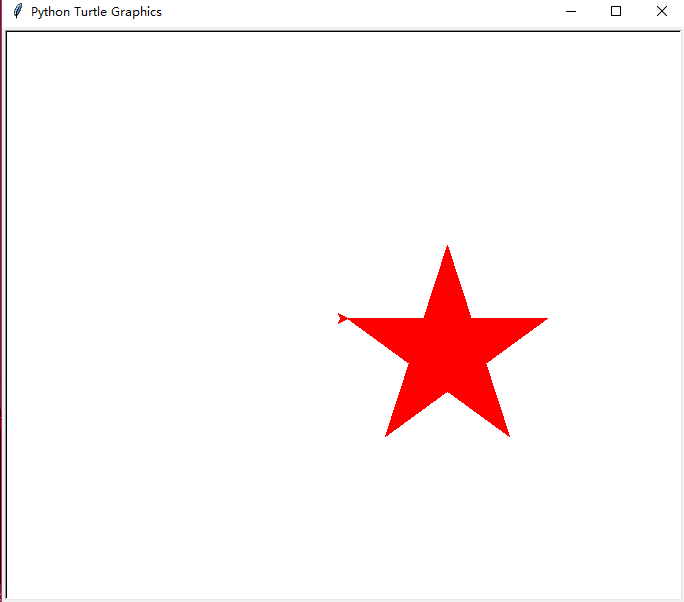
画一个红色的五角星
from turtle import *

color('red','red')

begin_fill()

for i in range(5):

    fd(200)

    rt(144)

end_fill()

done()
效果图:
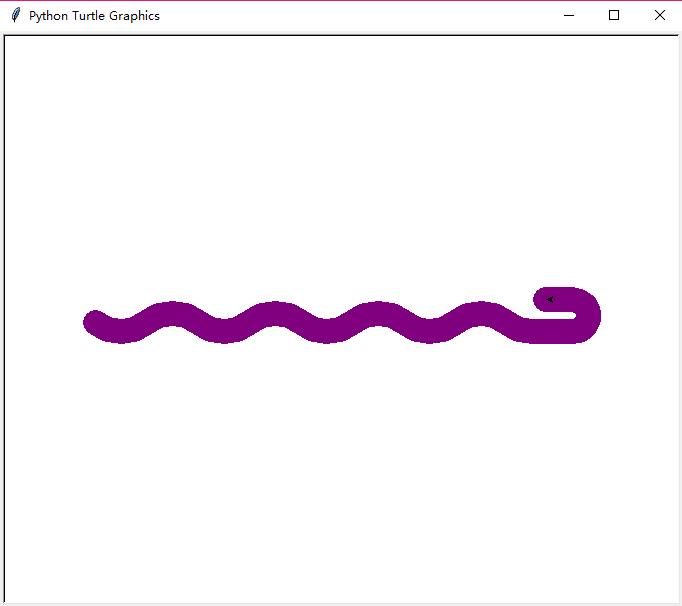
画一条蟒蛇
#PythonDraw.py

import turtle

#turtle.setup(650,350,200,200)

turtle.penup()

turtle.fd(-250)

turtle.pendown()

turtle.pensize(25)

turtle.pencolor("purple")

turtle.seth(-40)

for i in range(4):

    turtle.circle(40,80)

    turtle.circle(-40,80)

turtle.circle(40,80/2)

turtle.fd(40)

turtle.circle(16,180)

turtle.fd(40*2/3)
效果图:
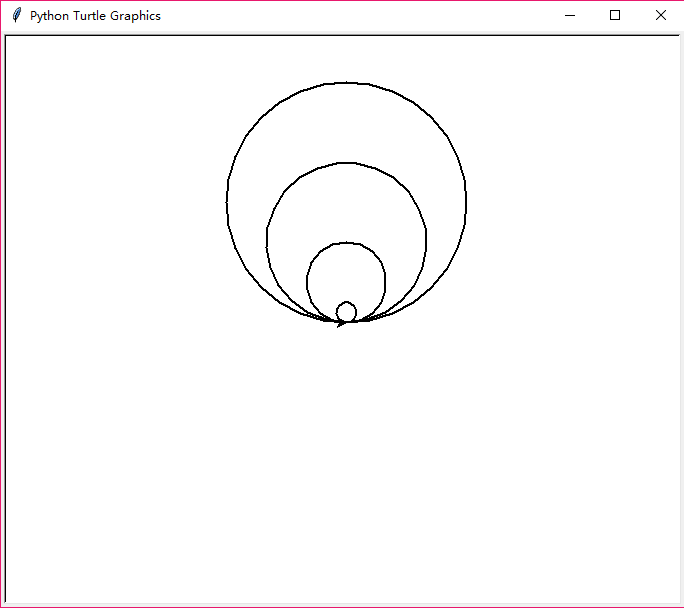
画一组内切圆
import turtle

turtle.pensize(2)

turtle.circle(10)

turtle.circle(40)

turtle.circle(80)

turtle.circle(120)
效果图:
画一个社会人小猪佩奇,代码是借鉴某位大佬的
from turtle import *

def nose(x,y):

    pu()

    goto(x,y)

    pd()

    seth(-30)

    begin_fill()

    a=0.4

    for i in range(120):

        if 0<=i<30 or 60<=i<90:

            a=a+0.08

            lt(3)

            fd(a)

        else:

            a=a-0.08

            lt(3)

            fd(a)

    end_fill()

    pu()

    seth(90)

    fd(25)

    seth(0)

    fd(10)

    pd()

    pencolor(255,155,192)

    seth(10)

    begin_fill()

    circle(5)

    color(160,82,45)

    end_fill()

    pu()

    seth(0)

    fd(20)

    pd()

    pencolor(255,155,192)

    seth(10)

    begin_fill()

    circle(5)

    color(160,82,45)

    end_fill()

def head(x,y):

    color((255,155,192),"pink")

    pu()

    goto(x,y)

    seth(0)

    pd()

    begin_fill()

    seth(180)

    circle(300,-30)

    circle(100,-60)

    circle(80,-100)

    circle(150,-20)

    circle(60,-95)

    seth(161)

    circle(-300,15)

    pu()

    goto(-100,100)

    pd()

    seth(-30)

    a=0.4

    for i in range(60):

        if 0<=i<30 or 60<=i<90:

            a=a+0.08

            lt(3)

            fd(a)

        else:

            a=a-0.08

            lt(3)

            fd(a)

    end_fill()

def ears(x,y):

    color((255,155,192),"pink")

    pu()

    goto(x,y)

    pd()

    begin_fill()

    seth(100)

    circle(-50,50)

    circle(-10,120)

    circle(-50,54)

    end_fill()

    pu()

    seth(90)

    fd(-12)

    seth(0)

    fd(30)

    pd()

    begin_fill()

    seth(100)

    circle(-50,50)

    circle(-10,120)

    circle(-50,56)

    end_fill()

def eyes(x,y):

    color((255,155,192),"white")

    pu()

    seth(90)

    fd(-20)

    seth(0)

    fd(-95)

    pd()

    begin_fill()

    circle(15)

    end_fill()

    color("black")

    pu()

    seth(90)

    fd(12)

    seth(0)

    fd(-3)

    pd()

    begin_fill()

    circle(3)

    end_fill()

    color((255,155,192),"white")

    pu()

    seth(90)

    fd(-25)

    seth(0)

    fd(40)

    pd()

    begin_fill()

    circle(15)

    end_fill()

    color("black")

    pu()

    seth(90)

    fd(12)

    seth(0)

    fd(-3)

    pd()

    begin_fill()

    circle(3)

    end_fill()

def cheek(x,y):

    color((255,155,192))

    pu()

    goto(x,y)

    pd()

    seth(0)

    begin_fill()

    circle(30)

    end_fill()

def mouth(x,y):

    color(239,69,19)

    pu()

    goto(x,y)

    pd()

    seth(-80)

    circle(30,40)

    circle(40,80)

def body(x,y):

    color("red",(255,99,71))

    pu()

    goto(x,y)

    pd()

    begin_fill()

    seth(-130)

    circle(100,10)

    circle(300,30)

    seth(0)

    fd(230)

    seth(90)

    circle(300,30)

    circle(100,3)

    color((255,155,192),(255,100,100))

    seth(-135)

    circle(-80,63)

    circle(-150,24)

    end_fill()

def hands(x,y):

    color((255,155,192))

    pu()

    goto(x,y)

    pd()

    seth(-160)

    circle(300,15)

    pu()

    seth(90)

    fd(15)

    seth(0)

    fd(0)

    pd()

    seth(-10)

    circle(-20,90)

    pu()

    seth(90)

    fd(30)

    seth(0)

    fd(237)

    pd()

    seth(-20)

    circle(-300,15)

    pu()

    seth(90)

    fd(20)

    seth(0)

    fd(0)

    pd()

    seth(-170)

    circle(20,90)

def foot(x,y):

    pensize(10)

    color((240,128,128))

    pu()

    goto(x,y)

    pd()

    seth(-90)

    fd(40)

    seth(-180)

    color("black")

    pensize(15)

    fd(20)

    pensize(10)

    color((240,128,128))

    pu()

    seth(90)

    fd(40)

    seth(0)

    fd(90)

    pd()

    seth(-90)

    fd(40)

    seth(-180)

    color("black")

    pensize(15)

    fd(20)

def tail(x,y):

    pensize(4)

    color((255,155,192))

    pu()

    goto(x,y)

    pd()

    seth(0)

    circle(70,20)

    circle(10,330)

    circle(70,30)

def setting():

    pensize(4)

    hideturtle()

    colormode(255)

    color((255,155,192),"pink")

    setup(840,500)

    speed(10)

def main():

    setting()

    nose(-100,100)

    head(-69,167)

    ears(0,160)

    eyes(0,140)

    cheek(80,10)

    mouth(-20,30)

    body(-32,-8)

    hands(-56,-45)

    foot(2,-177)

    tail(148,-155)

    done()

main()
效果极佳:

简单总结一下好了,其实turtle库还是非常有用的,以后可以画张很有创意的图片去表白女神了,讲不好那天就用上了呢:
显示器和turtle窗体的左上角都是原点
turtle.setup(width,height,startx,starty)设置窗体大小及位置,后面两个参数可选,非必需
空间坐标:绝对坐标:右方向x轴,上方向为y轴,正中心为原点,turtle.goto(x,y)让在任何位置的海龟到达指定的位置
海龟坐标:turtle.fd(d)海龟向前行多少像素
turtle.bk(d)向海龟的反方向运行
turtle.circle(r,angle)以海龟左边的某一点为圆心进行曲线运行
角度坐标:绝对角度:turtle.seth(angle)angle为绝对度数,表示改变海龟的运行方向
海龟角度:turtle.right(angle),turtle.left(angle)改变海龟的运行方向
RGB体系:turtle.colormode(mode)mode=1.0则改用0和1表示,mode=255则改用255和0表示,默认为小数
库引用:import <库名>,from <库名> import *或者from <库名> import <函数名>,import <库名> as <库别名>
画笔控制函数:turtle.penup()别名:turtle.pu()抬起画笔,turtle.pendown()别名:turtle.pd()落下画笔,turtle.pensize(width)别名:turtle.width(width)设置画笔宽度,turtle.pencolor(color)设置画笔颜色,color有三种方式,颜色字符串,或者RGB小数值,或者RGB元组值,例如:turtle.pencolor((0.63,0.13,0.94))
运动控制函数:turtle.circle(r,angle),r(海龟左方向)表示半径,angle表示绘制的角度,默认是360度
方向控制函数:turtle.seth(angle)改变海龟的行进方向,顺时针转向
Python turtle绘图实例分析的更多相关文章
- Python正则简单实例分析
Python正则简单实例分析 本文实例讲述了Python正则简单用法.分享给大家供大家参考,具体如下: 悄悄打入公司内部UED的一个Python爱好者小众群,前两天一位牛人发了条消息: 小的测试题: ...
- 10分钟轻松学会python turtle绘图
 1. 画布(canvas) 1.1 相关函数: 2. 画笔 2.1 画笔的状态 2.2 画笔的属性 2.3 绘图命令 3. 命令详解 4. 绘图举例 4.1 太阳花 4.2 绘制小蟒蛇 4.3 绘 ...
- 10分钟轻松学会 Python turtle 绘图
python2.6版本中后引入的一个简单的绘图工具,叫做海龟绘图(Turtle Graphics),turtle库是python的内部库,使用导入即可 import turtle 先说明一下turtl ...
- Python Turtle绘图
1. 画布(canvas) 画布就是turtle为我们展开用于绘图区域, 我们可以设置它的大小和初始位置 1.1 设置画布大小 turtle.screensize(canvwidth=None, ca ...
- python多线程同步实例分析
进程之间通信与线程同步是一个历久弥新的话题,对编程稍有了解应该都知道,但是细说又说不清.一方面除了工作中可能用的比较少,另一方面就是这些概念牵涉到的东西比较多,而且相对较深.网络编程,服务端编程,并发 ...
- python多进程通信实例分析
操作系统会为每一个创建的进程分配一个独立的地址空间,不同进程的地址空间是完全隔离的,因此如果不加其他的措施,他们完全感觉不到彼此的存在.那么进程之间怎么进行通信?他们之间的关联是怎样的?实现原理是什么 ...
- python类型转换convert实例分析
在python的开发过程中,难免会遇到类型转换,这里给出常见的类型转换demo: 类型 说明 int(x [,base ]) 将x转换为一个整数 long(x [,base ]) 将x转换为一个长整数 ...
- Python 温度转换实例分析
#TempConvert.py Tempstr=input('请输入要转换的温度值:') if Tempstr[-1] in ['C','c']: F=1.8*eval(Tempstr[0:-1])+ ...
- Python中turtle绘图学习笔记和实例
一.既然本次讲的主角是turtle函数库,那肯定得先了解一下它是什么 turtle库是Python语言中一个很流行的绘制图像的函数库,想象一个小乌龟,在一个横轴为x.纵轴为y的坐标系原点,(0,0)位 ...
随机推荐
- 【译】Attacking XML with XML External Entity Injection (XXE)
原文链接:Attacking XML with XML External Entity Injection (XXE) XXE:使用XML外部实体注入攻击XML 在XML中,有一种注入外部文件的方式. ...
- Tensorflow中使用TFRecords高效读取数据--结合Attention-over-Attention Neural Network for Reading Comprehension
原文链接:https://arxiv.org/pdf/1607.04423.pdf 本片论文主要讲了Attention Model在完形填空类的阅读理解上的应用. 转载:https://blog.cs ...
- PHP动态修改配置文件——php经典实例
文件结构: index.php 主页 config 配置文件 doUpdate.php 修改功能页 index.php <html> <head> <title>修 ...
- Linux下文件目录权限和对应命令的总结
Linux下的权限有rwx三种,分别对应读,写,执行三种,在对文件和目录时,分别是下列含义: 对应权限的命令为: 文件: r-- cat, more, head, tail w-- echo, vi ...
- 超简便安装mysql
CentOS7默认数据库是mariadb,配置等用着不习惯,因此决定改成mysql,但是CentOS7的yum源中默认好像是没有mysql的.为了解决这个问题,我们要先下载mysql的repo源. 1 ...
- 2017 NEERC
2017 NEERC Problem A. Archery Tournament 题目描述:在二维平面上,会陆续出现一些圆,以及一些询问,询问点是否在圆内,如果是,则输出那个圆,并把那个圆删掉,否则输 ...
- PHP 面向对象 final类与final方法
final---用于类.方法前. final类---不可被继承. final方法---不可被覆盖. final类不能被继承. 如果我们不希望一个类被继承,我们使用final来修饰这个类.这个类将无法被 ...
- MySQL-开发规范升级版
一.基础规范 表存储引擎必须使用InnoDB 表字符集默认使用utf8,必要时候使用utf8mb4 解读: (1)通用,无乱码风险,汉字3字节,英文1字节 (2)utf8mb4是utf8的超集,有 ...
- ultra-console
console.__proto__.styleText = function (option) { if (!option) { console.groupCollapsed('请输入option') ...
- ps | grep app 命令不显示grep app本身进程的几种方式
ps | grep app 命令不显示grep app本身进程的几种方式 使用ps命令查询进程,常常我们不想打印出"ps | grep app"这个当前进程,比如如下: [root ...