
12.Project Fields to Return from Query-官方文档摘录
1 插入例句
db.inventory.insertMany( [

  { item: "journal", status: "A", size: { h: 14, w: 21, uom: "cm" }, instock: [ { warehouse: "A", qty: 5 } ] },

  { item: "notebook", status: "A",  size: { h: 8.5, w: 11, uom: "in" }, instock: [ { warehouse: "C", qty: 5 } ] },

  { item: "paper", status: "D", size: { h: 8.5, w: 11, uom: "in" }, instock: [ { warehouse: "A", qty: 60 } ] },

  { item: "planner", status: "D", size: { h: 22.85, w: 30, uom: "cm" }, instock: [ { warehouse: "A", qty: 40 } ] },

  { item: "postcard", status: "A", size: { h: 10, w: 15.25, uom: "cm" }, instock: [ { warehouse: "B", qty: 15 }, { warehouse: "C", qty: 35 } ] }

]);
2.只显示需要显示的部分
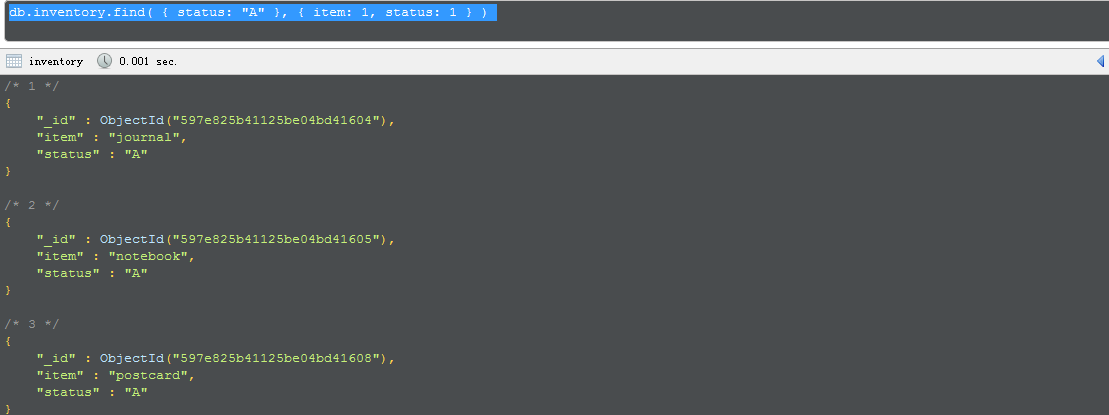
db.inventory.find( { status: "A" }, { item: 1, status: 1 } )
将ID列也省去
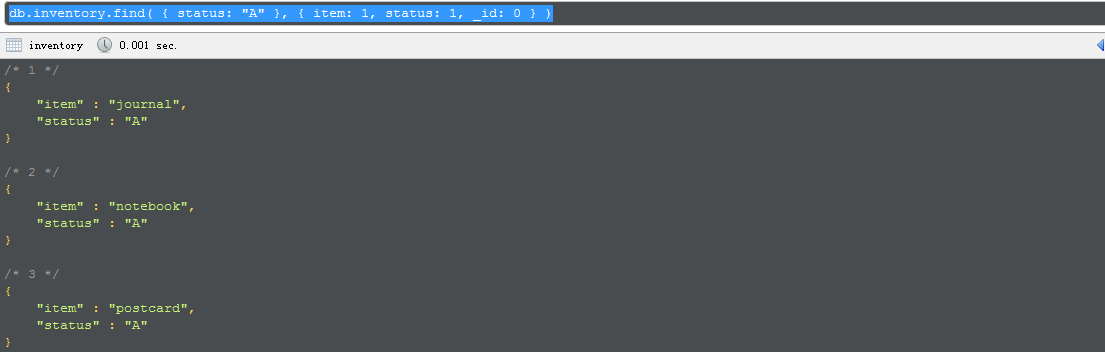
db.inventory.find( { status: "A" }, { item: 1, status: 1, _id: 0 } )
3.查找内嵌文档
db.inventory.find(

{status:"A"},

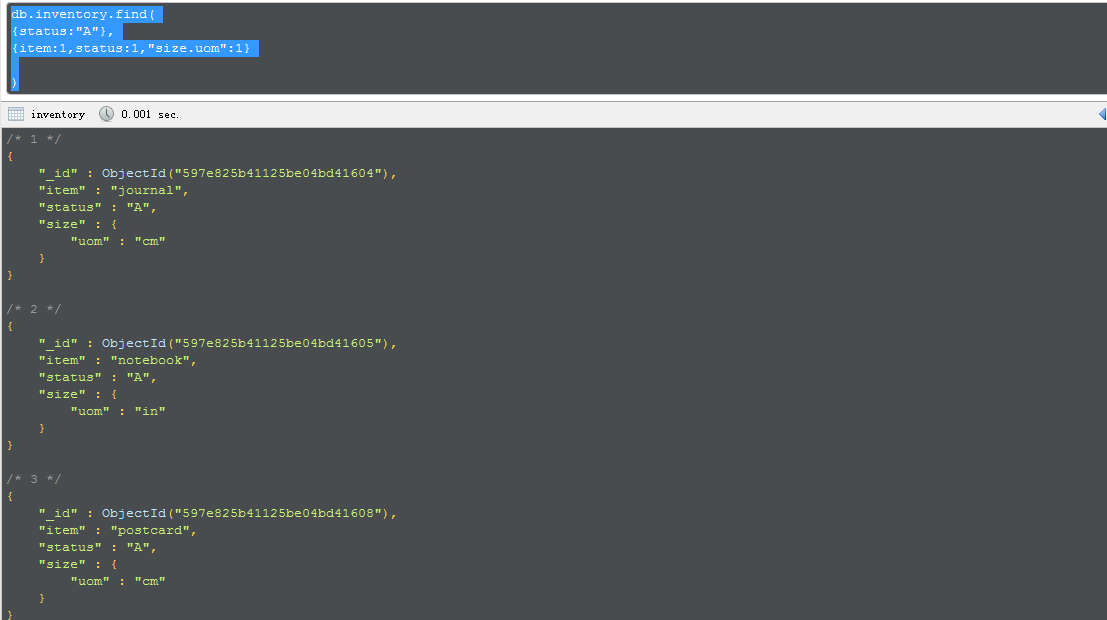
{item:1,status:1,"size.uom":1}

)
4.对数组的查找
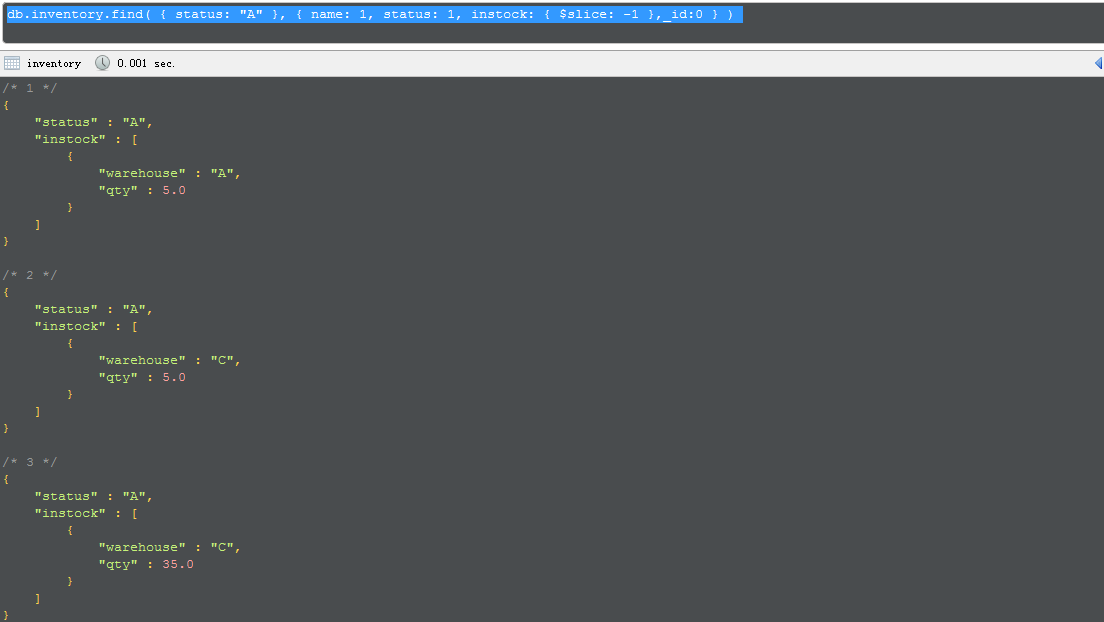
db.inventory.find( { status: "A" }, { name: 1, status: 1, instock: { $slice: -1 },_id:0 } )
By default, queries in MongoDB return all fields in matching documents. To limit the amount of data that MongoDB sends to applications, you can include a projection document to specify or restrict fields to return.
This page provides examples of query operations with projection using the db.collection.find()method in the mongo shell. The examples on this page use the inventory collection. To populate theinventory collection, run the following:
db.inventory.insertMany( [

  { item: "journal", status: "A", size: { h: 14, w: 21, uom: "cm" }, instock: [ { warehouse: "A", qty: 5 } ] },

  { item: "notebook", status: "A",  size: { h: 8.5, w: 11, uom: "in" }, instock: [ { warehouse: "C", qty: 5 } ] },

  { item: "paper", status: "D", size: { h: 8.5, w: 11, uom: "in" }, instock: [ { warehouse: "A", qty: 60 } ] },

  { item: "planner", status: "D", size: { h: 22.85, w: 30, uom: "cm" }, instock: [ { warehouse: "A", qty: 40 } ] },

  { item: "postcard", status: "A", size: { h: 10, w: 15.25, uom: "cm" }, instock: [ { warehouse: "B", qty: 15 }, { warehouse: "C", qty: 35 } ] }

]);
You can run the operation in the web shell below:
Return All Fields in Matching Documents
If you do not specify a projection document, the db.collection.find() method returns all fields in the matching documents.
The following example returns all fields from all documents in the inventory collection where the statusequals "A":
db.inventory.find( { status: "A" } )
The operation corresponds to the following SQL statement:
SELECT * from inventory WHERE status = "A"
Return the Specified Fields and the _id Field Only
A projection can explicitly include several fields by setting the <field> to 1 in the projection document. The following operation returns all documents that match the query. In the result set, only the item, status and, by default, the _id fields return in the matching documents.
db.inventory.find( { status: "A" }, { item: 1, status: 1 } )
The operation corresponds to the following SQL statement:
SELECT _id, item, status from inventory WHERE status = "A"
Suppress _id Field
You can remove the _id field from the results by setting its exclusion <field> to 0 in the projection, as in the following example:
db.inventory.find( { status: "A" }, { item: 1, status: 1, _id: 0 } )
The operation corresponds to the following SQL statement:
SELECT item, status from inventory WHERE status = "A"
Return All But the Excluded Fields
Instead of listing the fields to return in the matching document, you can use a projection to exclude specific fields. The following example which returns all fields except for the status and the instock fields in the matching documents:
db.inventory.find( { status: "A" }, { status: 0, instock: 0 } )
With the exception of the _id field, you cannot combine inclusion and exclusion statements in projection documents.
Return Specific Fields in Embedded Documents
You can return specific fields in an embedded document. Use the dot notation to refer to the embedded field and set to 1 in the projection document.
The following example returns: the _id field (returned by default), item field, status field, and the uom field in the size document; the uom field remains embedded in the size document.
db.inventory.find(

   { status: "A" },

   { item: 1, status: 1, "size.uom": 1 }

)
Suppress Specific Fields in Embedded Documents
You can suppress specific fields in an embedded document. Use the dot notation to refer to the embedded field in the projection document and set to 0.
The following example specifies a projection to exclude the uom field inside the size document. All other fields are returned in the matching documents:
db.inventory.find(

   { status: "A" },

   { "size.uom": 0 }

)
Projection on Embedded Documents in an Array
Use dot notation to project specific fields inside documents embedded in an array.
The following example specifies a projection to return the item field, the status field, and the qty field in the documents embedded in the instock array. The _id field is returned by default.
db.inventory.find( { status: "A" }, { item: 1, status: 1, "instock.qty": 1 } )
Project Specific Array Elements in the Returned Array
For fields that contain arrays, MongoDB provides the following projection operators: $elemMatch, $slice, and $.
The following example uses the $slice projection operator to return just the last element in the instockarray.
db.inventory.find( { status: "A" }, { name: 1, status: 1, instock: { $slice: -1 } } )
$elemMatch, $slice, and $ are the only way to project specific elements to include in the returned array. For instance, you cannot project specific array elements using the array index; e.g. { "instock.0": 1 }projection will not project the array with the first element.
SEE ALSO
12.Project Fields to Return from Query-官方文档摘录的更多相关文章
- 8.Query Documents-官方文档摘录
总结 1 先插入数据 db.inventory.insertMany([ { item: "journal", qty: 25, size: { h: 14, w: 21, uom ...
- Cocos Creator 加载和切换场景(官方文档摘录)
Cocos Creator 加载和切换场景(官方文档摘录) 在 Cocos Creator 中,我们使用场景文件名( 可以不包含扩展名)来索引指代场景.并通过以下接口进行加载和切换操作: cc.dir ...
- ng的概念层次(官方文档摘录)
官方文档是这么说的: You write Angular applications by: composing HTML templates with Angularized markup, writ ...
- MongoDB - MongoDB CRUD Operations, Query Documents, Project Fields to Return from Query
By default, queries in MongoDB return all fields in matching documents. To limit the amount of data ...
- Cocos Creator 生命周期回调(官方文档摘录)
Cocos Creator 为组件脚本提供了生命周期的回调函数.用户通过定义特定的函数回调在特定的时期编写相关 脚本.目前提供给用户的声明周期回调函数有: onLoad start update la ...
- Cocos Creator 使用计时器(官方文档摘录)
在 Cocos Creator 中,我们为组件提供了方便的计时器,这个计时器源自于 Cocos2d-x 中的 cc.Scheduler,我们将它保留在了 Cocos Creator 中并适配了基于组件 ...
- angular 模板语法(官方文档摘录)
https://angular.cn/guide/template-syntax {{}} 和"" 如果嵌套,{{}}里面求完值,""就是原意 <h3&g ...
- 20191106 Spring Boot官方文档学习(1-2)
学习内容相关信息 最新版本:2.2.0 CURRENT GA 官网地址 官方文档地址 单页版文档地址 代码生成网址 2.入门 Spring Boot的主要目标是: 为所有Spring开发提供更快且入门 ...
- Spring 4 官方文档学习(十二)View技术
关键词:view technology.template.template engine.markup.内容较多,按需查用即可. 介绍 Thymeleaf Groovy Markup Template ...
随机推荐
- RIP动态路由的配置
RIP其实相对比会比静态路由会简单的多,只需要使用rip命令添加邻居的网络号即可. 命令: Router(config)#ip route rip Router(config-router)#netw ...
- netctl
netctl is a CLI-based tool used to configure and manage network connections via profiles. It is a na ...
- 示例 - 向百度说 Hello world! 并获得回应.
1. 让浏览器打开www.baidu.com, 并等待页面加载完毕: Default.Navigate("http://www.baidu.com"); Default.Ready ...
- Maple重点知识总结
Maple中的evalf与evalhf evalf 可作用于单值 可作用于List 可作用于Set 可作用于Vector(<..>) 可作用于Matrix(<..|..|..> ...
- 什么是Spring Cloud
Spring Cloud是一系列框架的有序集合.它利用Spring Boot的开发便利性巧妙地简化了分布式系统基础设施的开发,如服务发现注册.配置中心.消息总线.负载均衡.断路器.数据监控等,都可以用 ...
- NANDflash和NORflash的区别(设计师在使用闪存时需要慎重选择)
NANDflash和NORflash的区别(设计师在使用闪存时需要慎重选择) NOR和NAND是现在市场上两种主要的非易失闪存技术.Intel于1988年首先开发出NOR flash技术,彻底 ...
- 通过公网IP主机建立ssh隧道
环境描述 hostA: 有公网IP的linux主机 hostB: 私有路由器后端无公网IPlinux主机,能够ssh连接到hostA hostC: 个人pc机 隧道创建步骤 step1 在hostB上 ...
- Thinkphp整合各个功能
thinkphp整合Auth权限管理.支付宝.微信支付.阿里oss.友盟推送.融云即时通讯.云通讯短信.Email.Excel.PDF等等: 基于thinkphp扩展了大量的功能:而不改动thinkp ...
- 实例讲解JQuery中this和$(this)区别
这篇文章主要介绍了实例讲解JQuery中this和$(this)的区别,this表示当前的上下文对象是一个html对象,可以调用html对象所拥有的属性和方法,$(this),代表的上下文对象是一个j ...
- ip地址查询系统和CMD查询的结果不一样
由于cmd输入 ipconfig查看的IP是局域网内网IP,而用ip地址查看器查看是公网上网的ip地址.所以不一样. 查询内网ip: windows系统: 开始--运行--cmd,命令行输入: ipc ...