
爬虫开发3.requests模块
requests模块
- 基于如下5点展开requests模块的学习
- 什么是requests模块
- requests模块是python中原生的基于网络请求的模块,其主要作用是用来模拟浏览器发起请求。功能强大,用法简洁高效。在爬虫领域中占据着半壁江山的地位。
- 为什么要使用requests模块
- 因为在使用urllib模块的时候,会有诸多不便之处,总结如下:
- 手动处理url编码
- 手动处理post请求参数
- 处理cookie和代理操作繁琐
- ......
- 使用requests模块:
- 自动处理url编码
- 自动处理post请求参数
- 简化cookie和代理操作
- ......
- 因为在使用urllib模块的时候,会有诸多不便之处,总结如下:
- 如何使用requests模块
- 安装:
- pip install requests
- 使用流程
- 指定url
- 基于requests模块发起请求
- 获取响应对象中的数据值
- 持久化存储
- 安装:
- 通过5个基于requests模块的爬虫项目对该模块进行学习和巩固
- 基于requests模块的get请求
- 需求:爬取搜狗指定词条搜索后的页面数据
- 基于requests模块的post请求
- 需求:登录豆瓣电影,爬取登录成功后的页面数据
- 基于requests模块ajax的get请求
- 需求:爬取豆瓣电影分类排行榜 https://movie.douban.com/中的电影详情数据
- 基于requests模块ajax的post请求
- 需求:爬取肯德基餐厅查询http://www.kfc.com.cn/kfccda/index.aspx中指定地点的餐厅数据
- 综合练习
- 需求:爬取搜狗知乎指定词条指定页码下的页面数据
- 基于requests模块的get请求
- 代码展示
怎么看网页是get还是post请求?
- 需求:爬取搜狗指定词条搜索后的页面数据(基于get请求)
import requests

import os

#指定搜索关键字

word = input('enter a word you want to search:')

#自定义请求头信息

headers={

    'User-Agent': 'Mozilla/5.0 (Macintosh; Intel Mac OS X 10_12_0) AppleWebKit/537.36 (KHTML, like Gecko) Chrome/69.0.3497.100 Safari/537.36',

    }

#指定url

url = 'https://www.sogou.com/web'

#封装get请求参数

prams = {

    'query':word,

    'ie':'utf-8'

}

#发起请求

response = requests.get(url=url,params=param)

#获取响应数据

page_text = response.text

with open('./sougou.html','w',encoding='utf-8') as fp:

    fp.write(page_text)
需求:登录豆瓣电影,爬取登录成功后的页面数据(基于post请求)
import requests

import os

url = 'https://accounts.douban.com/login'

#封装请求参数

data = {

    "source": "movie",

    "redir": "https://movie.douban.com/",

    "form_email": "15027900535",

    "form_password": "bobo@15027900535",

    "login": "登录",

}

#自定义请求头信息

headers={

    'User-Agent': 'Mozilla/5.0 (Macintosh; Intel Mac OS X 10_12_0) AppleWebKit/537.36 (KHTML, like Gecko) Chrome/69.0.3497.100 Safari/537.36',

    }

response = requests.post(url=url,data=data)

page_text = response.text

with open('./douban111.html','w',encoding='utf-8') as fp:

    fp.write(page_text)


基于ajax加载
网页中的代码来源一般是服务器将整个网页的数据全部返回,但这在访问量大的情况下会给服务器带来不小的压力,
因此有些时候采用的是ajax,只给部分内容,其余的有关数据方面的信息只在用户需要时返回。由于ajax的异步的特性,
所以不会影响到用户的访问体验。有些网页内容使用AJAX加载,只要记得,AJAX一般返回的是JSON,
直接对AJAX地址进行post或get,就返回JSON数据了
- 需求:爬取豆瓣电影分类排行榜 https://movie.douban.com/中的电影详情数据
- 确定ajax对应的请求路径,和提交的数据
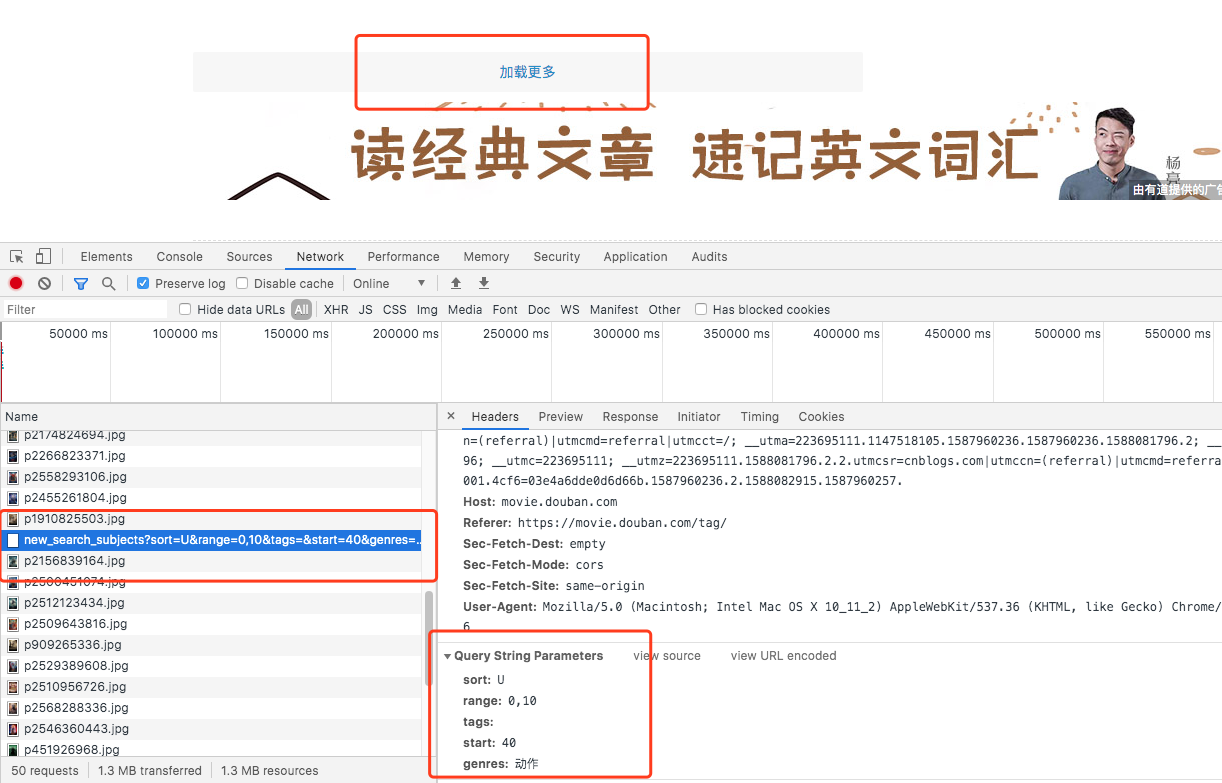
实现代码
import requests

import urllib.request

if __name__ == "__main__":

    #指定ajax-get请求的url(通过抓包进行获取)

    url = 'https://movie.douban.com/j/chart/top_list?'

    #定制请求头信息,相关的头信息必须封装在字典结构中

    headers = {

        #定制请求头中的User-Agent参数,当然也可以定制请求头中其他的参数

        'User-Agent': 'Mozilla/5.0 (Windows NT 6.1; Win64; x64) AppleWebKit/537.36 (KHTML, like Gecko) Chrome/66.0.3359.181 Safari/537.36',

    }

    #定制get请求携带的参数(从抓包工具中获取)

    param = {

        'type':'5',

        'interval_id':'100:90',

        'action':'',

        'start':'0',

        'limit':'20'

    }

    #发起get请求,获取响应对象

    response = requests.get(url=url,headers=headers,params=param)

    #获取响应内容:响应内容为json串

print(response.text)- 需求:爬取肯德基餐厅查询http://www.kfc.com.cn/kfccda/index.aspx中指定地点的餐厅数据
#!/usr/bin/env python

# -*- coding:utf-8 -*-

import requests

import urllib.request

if __name__ == "__main__":

    #指定ajax-post请求的url(通过抓包进行获取)

    url = 'http://www.kfc.com.cn/kfccda/ashx/GetStoreList.ashx?op=keyword'

    #定制请求头信息,相关的头信息必须封装在字典结构中

    headers = {

        #定制请求头中的User-Agent参数,当然也可以定制请求头中其他的参数

        'User-Agent': 'Mozilla/5.0 (Windows NT 6.1; Win64; x64) AppleWebKit/537.36 (KHTML, like Gecko) Chrome/66.0.3359.181 Safari/537.36',

    }

    #定制post请求携带的参数(从抓包工具中获取)

    data = {

        'cname':'',

        'pid':'',

        'keyword':'北京',

        'pageIndex': '1',

        'pageSize': '10'

    }

    #发起post请求,获取响应对象

    response = requests.get(url=url,headers=headers,data=data)

    #获取响应内容:响应内容为json串

print(response.text) - 需求:爬取搜狗知乎指定词条指定页码下的页面数据
import requests

import os

#指定搜索关键字

word = input('enter a word you want to search:')

#指定起始页码

start_page = int(input('enter start page num:'))

end_page = int(input('enter end page num:'))

#自定义请求头信息

headers={

    'User-Agent': 'Mozilla/5.0 (Macintosh; Intel Mac OS X 10_12_0) AppleWebKit/537.36 (KHTML, like Gecko) Chrome/69.0.3497.100 Safari/537.36',

    }

#指定url

url = 'https://zhihu.sogou.com/zhihu'

#创建文件夹

if not os.path.exists('./sougou'):

    os.mkdir('./sougou')

for page in range(start_page,end_page+1):

    #封装get请求参数

    params = {

        'query':word,

        'ie':'utf-8',

        'page':str(page)

    }

    #发起post请求,获取响应对象

    response = requests.get(url=url,params=params)

    #获取页面数据

    page_text = response.text

    fileName = word+'_'+str(page)+'.html'

    filePath = './sougou/'+fileName

    with open(filePath,'w',encoding='utf-8') as fp:

        fp.write(page_text)

        print('爬取'+str(page)+'页结束')
爬虫开发3.requests模块的更多相关文章
- 爬虫开发5.requests模块的cookie和代理操作
代理和cookie操作 一.基于requests模块的cookie操作 引言:有些时候,我们在使用爬虫程序去爬取一些用户相关信息的数据(爬取张三“人人网”个人主页数据)时,如果使用之前requests ...
- 爬虫简介与requests模块
爬虫简介与requests模块 一 爬虫简介 概述 网络爬虫是一种按照一定规则,通过网页的链接地址来寻找网页的,从网站某一个页面(通常是首页)开始,读取网页的内容,找到网页中的其他链接地址,然后通过这 ...
- 爬虫基础之requests模块
1. 爬虫简介 1.1 概述 网络爬虫(又被称为网页蜘蛛,网络机器人,在FOAF社区中间,更经常的称为网页追逐者),是一种按照一定的规则,自动地抓取万维网信息的程序或者脚本. 1.2 爬虫的价值 在互 ...
- python网络爬虫之二requests模块
requests http请求库 requests是基于python内置的urllib3来编写的,它比urllib更加方便,特别是在添加headers, post请求,以及cookies的设置上,处理 ...
- 爬虫中之Requests 模块的进阶
requests进阶内容 session处理cookie proxies参数设置请求代理ip 基于线程池的数据爬取 引入 有些时候,我们在使用爬虫程序去爬取一些用户相关信息的数据(爬取张三“人人网”个 ...
- 爬虫简介和requests模块
目录 爬虫介绍 requests模块 requests模块 1.requests模块的基本使用 2.get 请求携带参数,调用params参数,其本质上还是调用urlencode 3.携带header ...
- 爬虫入门之Requests模块学习(四)
1 Requests模块解析 Requests 唯一的一个非转基因的 Python HTTP 库,人类可以安全享用 Requests 继承了urllib2的所有特性.Requests支持HTTP连接保 ...
- 爬虫(四):requests模块
1. requests模块 1.1 requests简介 requests 是一个功能强大.简单易用的 HTTP 请求库,比起之前用到的urllib模块,requests模块的api更加便捷.(本质就 ...
- Python爬虫学习1: Requests模块的使用
Requests函数库是学习Python爬虫必备之一, 能够帮助我们方便地爬取. Requests: 让HTTP服务人类. 本文主要参考了其官方文档. Requests具有完备的中英文文档, 能完全满 ...
随机推荐
- iOS学习之iOS沙盒(sandbox)机制和文件操作之NSFileManager
我们看看NSFileManager如何使用.包括创建文件,目录,删除,遍历目录等. 1.在Documents里创建目录 创建一个叫test的目录,先找到Documents的目录, [cpp] view ...
- [iOS]swift版内购
//内购Demo,看代码说话吧 class IAPTestViewController: UIViewController ,SKProductsRequestDelegate, SKPaymentT ...
- ansible的ad-hoc模式
一.什么是ad-hoc模式 ansible中有两种模式,分别是ad-hoc模式和playbook模式 ad-hoc简而言之,就是"临时命令" 二.ad-hoc模式使用的场景 场景一 ...
- c语言标准输入和scanf的关系
int a scanf("%d",&a); 什么意思,是从键盘读取一个数字存放到a中.错,scanf和所有从键盘获取输入数据的函数都不是直接从键盘获取数据的,而是从“标准输 ...
- Zookeeper使用--开源客户端
一.ZkClient ZkClient是在Zookeeper原生API接口之上进行了包装,是一个更易用的Zookeeper客户端,其内部还实现了诸如Session超时重连.Watcher反复注册等功能 ...
- LoadRunner11学习记录二 -- 进行cookie模拟
1.LoadRunner录制打开一个网页的脚本,会生成脚本夹杂迅雷,迅雷看看,百度等链接地址,这是因为ie打开之后会加载未禁用的加载项.需要把相关的加载项禁用掉. 禁用ie加载项步骤,工具--管理加载 ...
- CentOS 7 更换 阿里云/清华大学 yum 软件源
阿里云参考:https://opsx.alibaba.com/mirror?lang=zh-CN 清华参考:https://mirrors.tuna.tsinghua.edu.cn/help/cent ...
- springmvc乱码配置
web.xml配置 <!-- springmvc乱码 --> <filter> <filter-name>encodingFilter</filter-nam ...
- pagespeed模块安装——Nginx、Tengine
1.安装好nginx或者tengine 2.下载pagespeed模块并且解压 sudo mkdir -p /usr/local/tengine/modules wget https://github ...
- Linux学习系列——零基础开始
第一部分 Linux基础命令 1.查看系统信息命令 2.Linux内核版本 3.修改环境变量