
爬虫基础之requests模块
1. 爬虫简介
1.1 概述
网络爬虫(又被称为网页蜘蛛,网络机器人,在FOAF社区中间,更经常的称为网页追逐者),是一种按照一定的规则,自动地抓取万维网信息的程序或者脚本。
1.2 爬虫的价值
在互联网的世界里最有价值的便是数据, 谁掌握了某个行业的行业内的第一手数据, 谁就是该行业的主宰. 掌握了爬虫技能, 你就成了所有互联网信息公司幕后的老板,
换言之,它们都在免费为你提供有价值的数据。
1.3 robots.txt协议
如果自己的门户网站中的指定页面中的数据不想让爬虫程序爬取到的话,那么则可以通过编写一个robots.txt的协议文件来约束爬虫程序的数据爬取。robots协议的编写
格式可以观察淘宝网的robots(访问www.taobao.com/robots.txt即可)。但是需要注意的是,该协议只是相当于口头的协议,并没有使用相关技术进行强制管制,所以
该协议是防君子不防小人。
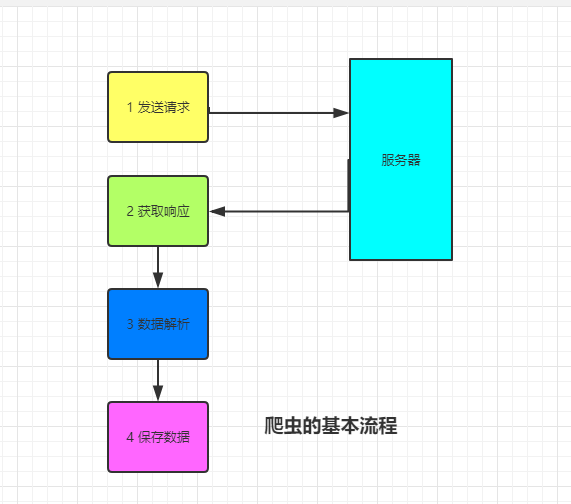
1.4 爬虫的基本流程
- 发送请求: 通过相关模块或者库如浏览器一般向目标站点发送请求, 即一个request, 请求可以携带headers和参数等信息, 然后等待服务器响应
- 获取响应: 服务器正常响应, 会返回一个response, 即页面内容, 类型可能是html, json或者二进制数据(音频视频图片等)
- 解析数据: 响应的字符串可以通过正则表达式或者BeautifulSoup, xpath等解析器提炼出我们需要的数据
- 存储数据: 将解析出来的数据进行持久化保存, 可以存储到文件中, 也可以存储到redis, mondodb等数据库中
2 requests模块
Requests是用python语言基于urllib编写的, 采用的是Apache2 Licensed开源协议的HTTP库, Requests它会比urllib更加方便, 可以节约我们大量的工作. 一句话,
requests是python实现的最简单易用的HTTP库, 建议爬虫使用requests库. 默认安装好python之后, 是没有安装requests模块的, 需要单独通过pip安装.
2.1 基本语法
requests模块支持的请求
import requests

requests.get("http://httpbin.org/get")

requests.post("http://httpbin.org/post")

requests.put("http://httpbin.org/put")

requests.delete("http://httpbin.org/delete")

requests.head("http://httpbin.org/get")

requests.options("http://httpbin.org/get")
get请求
1. 基本请求
import requests

response=requests.get('https://www.jd.com/',)

with open("jd.html","wb") as f:

    f.write(response.content)
2. 含参数请求
import requests

response=requests.get('https://s.taobao.com/search?q=手机')

response=requests.get('https://s.taobao.com/search',params={"q":"美女"}):

    f.write(res.content)
3. 含请求头请求
import requests

headers = {

    "User-Agent": "Mozilla/5.0 (Windows NT 10.0; Win64; x64) AppleWebKit/537.36 (KHTML, like Gecko) Chrome/72.0.3626.119 Safari/537.36"

}

#反爬机制: UA反爬

res = requests.get("https://www.baidu.com/s",params={"wd":"刘亦菲"}, headers=headers)

with open("jay.html","wb") as f:

    f.write(res.content)
4. 含cookies请求
import uuid

import requests

url = 'http://httpbin.org/cookies'

cookies = dict(sbid=str(uuid.uuid4()))

res = requests.get(url, cookies=cookies)

print(res.text)
post请求
1 data参数
requests.post()用法与requests.get()完全一致,特殊的是requests.post()多了一个data参数,用来存放请求体数据
import requests

res = requests.post("http://httpbin.org/post",params={"a":""}, data={"name":"Alex"} )

# 没有指定请求头 #默认的请求头: application/x-www-form-urlencoded

print(res.text)
2. 发送json数据
import requests

# 发送json数据

res = requests.post(url="http://httpbin.org/post", json={"age":""})

# # 默认的请求头: application/json

print(res.text)

# 同时有data和json参数时 data参数优先
session对象
import requests

# 1 创建session对象 使用方法和requests.get() .post 一致

session = requests.session()

res1 = session.get("https://github.com/login")

#后面的访问都会带着获取的session去访问

res2 = session.post("https://github.com/session")
response对象
1. 常见属性
import requests

respone=requests.get('https://sh.lianjia.com/ershoufang/')

# respone属性

print(respone.text)

print(respone.content)

print(respone.status_code)

print(respone.headers)

print(respone.cookies)

print(respone.cookies.get_dict())

print(respone.cookies.items())

print(respone.url)

print(respone.history)

print(respone.encoding)
2. 编码问题
import requests

res = requests.get("http://www.autohome.com/news")

# res.encoding = "gbk"

# with open("autohome.html","w") as f:

#     f.write(res.text)

#汽车之家网站返回的页面内容为gb2312编码的,而requests的默认编码为ISO-8859-1,如果不设置成gbk则中文乱码

# 或者也可以以"wb" 模式写入文件

with open("autohome.html","wb") as f:

    f.write(res.content)
3. 下载二进制文件(音频,视频,图片)
import requests

res = requests.get("https://video.pearvideo.com/mp4/adshort/20190222/cont-1520612-13609117_adpkg-ad_hd.mp4")

with open("lsp.mp4","wb") as f:

    # f.write(res.content)

    # 比如下载视频时,如果视频100G,用response.content然后一下子写到文件中是不合理的

    for line in res.iter_content():

        f.write(line)
4. 解析json数据
import requests

import json

response=requests.get('http://httpbin.org/get')

res1=json.loads(response.text) #太麻烦

res2=response.json() #直接获取json数据

print(res1==res2
5. Redirection and History
默认情况下, 除了head, requests会自动处理所有重定向. 可以使用响应对象的history方法来追踪重定向. Response.history是一个Response对象的列表,
为了完成请求而创建了这些对象. 这个对象列表按照从时间先后顺序进行排序.
import requests

res = requests.get("http://www.jd.com")

print(res.url)

# https://www.jd.com/

print(res.status_code)

#

print(res.history)

# [<Response [302]>]
另外, 可以通过allow_redirects 参数禁用重定向处理
import requests

res = requests.get("http://www.jd.com", allow_redirects=False)

print(res.status_code)

#

print(res.history)

# []
2.2 requests进阶用法
IP代理
一些网站会有相应的反爬虫措施,例如很多网站会检测某一段时间某个IP的访问次数,如果访问频率太快以至于看起来不像正常访客,它可能就会会禁止
这个IP的访问。所以我们需要设置一些代理服务器,每隔一段时间换一个代理,就算IP被禁止,依然可以换个IP继续爬取。
res=requests.get('http://httpbin.org/ip', proxies={'http':'112.17.121.88:8060'}).json()

print(res)
2.3 简单爬虫案例
爬取github的主页内容
import requests,re

# 1 请求获取token, 以便通过post请求校验

session = requests.session()

res = session.get("https://github.com/login")

token = re.findall('<input type="hidden" name="authenticity_token" value="(.*?)"',res.text)[0]

print(token)

# 2 构建post请求数据

data={

    "commit":"Sign in",

    "Sign in": "✓",

    "authenticity_token": token,

    "login": "aflychen",

    "password":"afly264028"

}

response = session.post("https://github.com/session",data=data)

with open("github.html","wb") as f:

    f.write(response.content)
简单的反爬策略
UA反爬: 在request请求头中有一个User-Agent的参数, 服务器通过判断请求是否携带此参数, 来判断访问端是人还是机器.
token反爬: 登录校验是判断请求的formdata中是否含有此数据来判断请求是否合法.
爬虫基础之requests模块的更多相关文章
- 爬虫简介与requests模块
爬虫简介与requests模块 一 爬虫简介 概述 网络爬虫是一种按照一定规则,通过网页的链接地址来寻找网页的,从网站某一个页面(通常是首页)开始,读取网页的内容,找到网页中的其他链接地址,然后通过这 ...
- python基础===基于requests模块上的协程【trip】
今天看博客get了一个有趣的模块,叫做 trip #(pip install trip) 兼容2.7版本 基于两大依赖包:TRIP: Tornado & Requests In Pa ...
- 爬虫基础(一)-----request模块的使用
---------------------------------------------------摆脱穷人思维 <一> : 建立时间价值的概念,减少做那些"时间花的多收 ...
- 爬虫开发5.requests模块的cookie和代理操作
代理和cookie操作 一.基于requests模块的cookie操作 引言:有些时候,我们在使用爬虫程序去爬取一些用户相关信息的数据(爬取张三“人人网”个人主页数据)时,如果使用之前requests ...
- 爬虫开发3.requests模块
requests模块 - 基于如下5点展开requests模块的学习 什么是requests模块 requests模块是python中原生的基于网络请求的模块,其主要作用是用来模拟浏览器发起请求.功能 ...
- python网络爬虫之二requests模块
requests http请求库 requests是基于python内置的urllib3来编写的,它比urllib更加方便,特别是在添加headers, post请求,以及cookies的设置上,处理 ...
- 爬虫中之Requests 模块的进阶
requests进阶内容 session处理cookie proxies参数设置请求代理ip 基于线程池的数据爬取 引入 有些时候,我们在使用爬虫程序去爬取一些用户相关信息的数据(爬取张三“人人网”个 ...
- 爬虫简介和requests模块
目录 爬虫介绍 requests模块 requests模块 1.requests模块的基本使用 2.get 请求携带参数,调用params参数,其本质上还是调用urlencode 3.携带header ...
- Python高手之路【八】python基础之requests模块
1.Requests模块说明 Requests 是使用 Apache2 Licensed 许可证的 HTTP 库.用 Python 编写,真正的为人类着想. Python 标准库中的 urllib2 ...
随机推荐
- ADB——adb devices unauthorized
我们只有在手机打开USB调试,并且允许电脑对其进行调试的前提下才可以用ADB进行自动化操作手机,如果出现unauthorized提示的话就是说明手机没有允许电脑对其调试 这个时候通常手机回弹出允许调试 ...
- ESP8266开发笔记
自1999年MIT的Kevin Ash-ton教授首次提出物联网(IoT)的概念至今已经有20年了.放眼现在国内外的物联网市场,真可谓是百家争鸣,方兴未艾,无数家软硬件公司在这里舞浪弄潮,逐鹿其中,上 ...
- Android 浏览器内 H5 电脑 Chrome 调试
Android 浏览器内 H5 调试 chrome://inspect 移动前端调试方案(Android + Chrome 实现远程调试) adb 相关资源 adb shell(ADB Kits)下载 ...
- C#、winform、wpf将类控件放进工具箱里
有时我们需要将vs自带的控件的某一些方法或属性进行一些修改,我们通常会新建一个类来继承它然后对它的方法或属性进行修改,那么我们如何将修改完成的控件类变成可视化控件放到工具箱中便于使用呢? 很简单,只要 ...
- pydemo_testMaopuSpider
import json from multiprocessing import Pool import requests from requests.exceptions import Request ...
- Firefox 安装 Adobe Flashplayer
3. 安装Adobe Flash Player: Adobe Flash Player的安装比较容易,只要将对应的文档复制到正确的的位置即可,具体的操作 如下: (1) 将libflashplayer ...
- 第一次安装myeclipse+tomcat经验
在网上找了很多资料,这里记录一下验证有用的资料,避免以后走弯路 1.安装myeclipse 参考如下URL,亲测有用 https://blog.csdn.net/qingjianduoyun/arti ...
- python模块与路径
# 切记不能与方法函数同名,否则会报错!!! # python的模块与包 分为三种: #1.标准库 #2.第三方模块 #3.自定义模块 #python 模块的引入原理: # 加入你创建了一个模块,在i ...
- day13 python迭代器与生成器
迭代器 字符串.列表.元组.字典.集合都可以被for循环,说明他们都是可迭代的 可迭代协议 : 就是内部实现了__iter__方法 可以被for循环的都是可迭代的,要想可迭代,内部必须有一个__ite ...
- 【转载】SVN使用教程总结
SVN简介: 为什么要使用SVN? 程序员在编写程序的过程中,每个程序员都会生成很多不同的版本,这就需要程序员有效的管理代码,在需要的时候可以迅速,准确取出相应的版本. Subversion是什么? ...