
Sublime Text 2 设置文件详解(转)
|
Sublime Text 2是那种让人会一眼就爱上的编辑器,不仅GUI让人眼前一亮,功能更是没的说,拓展性目前来说也完全够用了,网上介绍软件的文章和推荐插件的文章也不少,而且很不错,大家可以去找找自己需要的。而且 Linux 支持也做的非常好。 之前想设置什么都是直接在网上搜,但最近想调行距,这个把我给难住了,软件上的设置没找到,网上搜也没有,最后的最后在Sublime的官方论坛找到了,个人觉得行距还是很影响视觉体验的,看看下面的对比图就知道了: 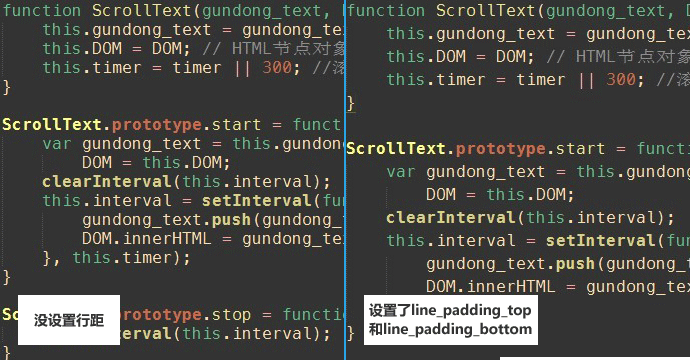 看来想驾驭好这软件不弄清楚配置文件是不行了,周末找了时间把配置文件的每条配置信息都加上了中文注释,现在贴出来和大家共享,里面有解释不清楚的也欢迎大家伙来互相讨论:) 另外,这也是我的第一篇博客,以后我会多写些前端方面的文章和大家共享,欢迎一起讨论:) Preferences.sublime-settings文件: // While you can edit this file, it’s best to put your changes in // Note that the font_face and font_size are overriden in the platform // Valid options are “no_bold”, “no_italic”, “no_antialias”, “gray_antialias”, // Characters that are considered to separate words // Set to false to prevent line numbers being drawn in the gutter // Set to false to hide the gutter altogether // Spacing between the gutter and the text // Fold buttons are the triangles shown in the gutter to fold regions of text // Hides the fold buttons unless the mouse is over the gutter // Columns in which to display vertical rulers // Set to true to turn spell checking on by default // The number of spaces a tab is considered equal to // Set to true to insert spaces when tab is pressed // If translate_tabs_to_spaces is true, use_tab_stops will make tab and // Set to false to disable detection of tabs vs. spaces on load // Calculates indentation automatically when pressing enter // Makes auto indent a little smarter, e.g., by indenting the next line // Adds whitespace up to the first open bracket when indenting. Requires // Trims white space added by auto_indent when moving the caret off the // Disables horizontal scrolling if enabled. // Set to a value other than 0 to force wrapping at that column rather than the // Set to false to prevent word wrapped lines from being indented to the same // Draws text centered in the window rather than left aligned // Controls auto pairing of quotes, brackets etc // Word list to use for spell checking // Set to true to draw a border around the visible rectangle on the minimap. // If enabled, will highlight any line with a caret // Valid values are “smooth”, “phase”, “blink”, “wide” and “solid”. // Set to false to disable underlining the brackets surrounding the caret // Set to false if you’d rather only highlight the brackets when the caret is // Set to false to not highlight square brackets. This only takes effect if // Set to false to not highlight curly brackets. This only takes effect if // Set to false to not highlight angle brackets. This only takes effect if // Enable visualization of the matching tag in HTML and XML // Highlights other occurrences of the currently selected text // Additional spacing at the top of each line, in pixels // Additional spacing at the bottom of each line, in pixels // Set to false to disable scrolling past the end of the buffer. // This controls what happens when pressing up or down when on the first // Set to “none” to turn off drawing white space, “selection” to draw only the // Set to false to turn off the indentation guides. // Controls how the indent guides are drawn, valid options are // Set to true to removing trailing white space on save // Set to true to ensure the last line of the file ends in a newline // Set to true to automatically save files when switching to a different file // The encoding to use when the encoding can’t be determined automatically. // Encoding used when saving new files, and files opened with an undefined // Files containing null bytes are opened as hexadecimal by default // Determines what character(s) are used to terminate each line in new files. // When enabled, pressing tab will insert the best matching completion. // Enable auto complete to be triggered automatically when typing. // The maximum file size where auto complete will be automatically triggered. // The delay, in ms, before the auto complete window is shown after typing // Controls what scopes auto complete will be triggered in // Additional situations to trigger auto complete // By default, auto complete will commit the current completion on enter. // Controls if auto complete is shown when snippet fields are active. // By default, shift+tab will only unindent if the selection spans // If true, the selected text will be copied into the find panel when it’s // // The theme controls the look of Sublime Text’s UI (buttons, tabs, scroll bars, etc) // Set to 0 to disable smooth scrolling. Set to a value between 0 and 1 to // Controls side bar animation when expanding or collapsing folders // OS X 10.7 only: Set to true to disable Lion style full screen support. // Valid values are “system”, “enabled” and “disabled” // // Exiting the application with hot_exit enabled will cause it to close // remember_open_files makes the application start up with the last set of // OS X only: When files are opened from finder, or by dragging onto the // Set to true to close windows as soon as the last file is closed, unless // List any packages to ignore here. When removing entries from this list, 来自:http://hp.dewen.org/?p=1361 |
Sublime Text 2 设置文件详解(转)的更多相关文章
- SUBLIME TEXT 2 设置文件详解
SUBLIME TEXT 2 设置文件详解 Preferences.sublime-settings文件: // While you can edit this file, it’s best to ...
- [转]Sublime Text 2 设置文件详解
Sublime Text 2是那种让人会一眼就爱上的编辑器,不仅GUI让人眼前一亮,功能更是没的说,拓展性目前来说也完全够用了,网上介绍软件的文章和推荐插件的文章也不少,而且很不错,大家可以去找找自己 ...
- Sublime Text 设置文件详解
Sublime Text 2是那种让人会一眼就爱上的编辑器,不仅GUI让人眼前一亮,功能更是没的说,拓展性目前来说也完全够用了,网上介绍软件的文章和推荐插件的文章也不少,而且很不错,大家可以去找找自 ...
- Sublime Text怎么设置文件在新标签打开?
设置Sublime Text新标签页tab打开文件.Sublime Text Files not opening a new tab?每次打开文件,Sublime Text总是把当前的tab打开的文件 ...
- web.xml文件详解
web.xml文件详解 Table of Contents 1 listener. filter.servlet 加载顺序 2 web.xml文件详解 3 相应元素配置 1 listener. f ...
- jni.h头文件详解二
作者:左少华 博客:http://blog.csdn.net/shaohuazuo/article/details/42932813 转载请注明出处:http://blog.csdn.net/shao ...
- 【转】 jni.h头文件详解(二)
原文网址:http://blog.csdn.net/shaohuazuo/article/details/42932813 作者:左少华 博客:http://blog.csdn.net/shaohua ...
- Sublime Text 3设置笔记
Sublime Text 3设置笔记 Sublime Text 3设置指南 1. 安装package control 下载package control源码安装包,并解压: http://yun.ba ...
- PE文件详解(六)
这篇文章转载自小甲鱼的PE文件详解系列原文传送门 之前简单提了一下节表和数据目录表,那么他们有什么区别? 其实这些东西都是人为规定的,一个数据在文件中或者在内存中的位置基本是固定的,通过数据目录表进行 ...
随机推荐
- LeetCode——Median of Two Sorted Arrays
Question There are two sorted arrays nums1 and nums2 of size m and n respectively. Find the median o ...
- 解决 libnanomsg.so.0: cannot open shared object file: No such file or directory 无法找到libnanomsg动态链接库
参考: [11]缺少动态连接库.so--cannot open shared object file: No such file or directory Importing Issues: cann ...
- Gift for GS5
// // main.cpp // 生日快乐 // // Created by wasdns on 16/11/21. // Copyright © 2016年 wasdns. All rights ...
- class.getResource()和getResourceAsStream的用法
转自:http://blog.csdn.net/lcj8/article/details/3502849 class.getResource()的用法 用JAVA获取文件,听似简单,但对于很多像我这样 ...
- eclipse及tomcat web站點
eclipse环境下如何配置tomcat https://www.cnblogs.com/Leo_wl/p/4769760.htmleclipse环境下如何配置tomcat,并且把项目部署到Tomca ...
- SSH密钥登陆免密码方法
原帖地址:http://ask.apelearn.com/question/798 用Putty实现A机器远程登陆B机器,具体实现请看链接:http://www.cnblogs.com/ImJerry ...
- 聚类效果评测-Fmeasure和Accuracy及其Matlab实现
聚类结果的好坏,有很多种指标,其中F-Measue即F值是常用的一种,其中包括precision(查准率或者准确率)和recall(查全率或者召回率). F-Measue是信息检索中常用的评价标准. ...
- 【BZOJ3597】方伯伯运椰子(分数规划,网络流)
[BZOJ3597]方伯伯运椰子(分数规划,网络流) 题解 给定了一个满流的费用流模型 如果要修改一条边,那么就必须满足流量平衡 也就是会修改一条某两点之间的路径上的所有边 同时还有另外一条路径会进行 ...
- 使用python编写微信跳一跳的自动脚本
实现思路: 调用adb命令,截图 寻找小小人的底部中心点role(从下到上扫描,直到找到小小人相同像素的点,至于小小人像素点rgb是什么,可以使用photoshop查看) 寻找棋盘最高点top,然后寻 ...
- 二十四 Python分布式爬虫打造搜索引擎Scrapy精讲—爬虫和反爬的对抗过程以及策略—scrapy架构源码分析图
1.基本概念 2.反爬虫的目的 3.爬虫和反爬的对抗过程以及策略 scrapy架构源码分析图