
LaTeX图片环境 Picture environment
Picture environment
If you need to include simple diagrams or figures in your document, the picture environment may be helpful. This article describes circles, lines, and other graphic elements created with LATEX.
Contents |
Introduction
Images can be "programmed" directly in your LATEX file
\setlength{\unitlength}{1cm}

\thicklines

\begin{picture}(10,6)

\put(2,2.2){\line(1,0){6}}

\put(2,2.2){\circle{2}}

\put(6,2.2){\oval(4,2)[r]}

\end{picture}
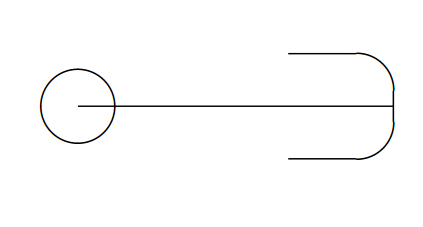
The syntax of the picture is
\begin{picture}(width,height)(x-offset,y-offset)
the parameters are passed inside parentheses, width and height as you may expect, determine the width and the height of the picture; the units for this parameter are set by \setlength{\unitlength}{1cm}. The second parameter is optional and establishes the coordinates for the lower-left corner. Below a description of other commands:
\put(6,2.2){\oval(4,2)[r]}- will draw a oval centred in the point
4,2. The parameter[r]is optional, you can use r, l, t and b to show the right, left, top or bottom part of the oval. If absent the whole oval is drawn.
\put(2,2.2){\circle{2}}- draws a circle centred at the point (2,2.2) and whose diameter is 2.
In the next section the rest of the commands are described.
Open an example the picture environment in ShareLaTeX
Combining lines, circles and text
Different basic elements can be combined for more complex pictures
\setlength{\unitlength}{0.8cm}

\begin{picture}(12,4)

\thicklines

\put(8,3.3){{\footnotesize $3$-simplex}}

\put(9,3){\circle*{0.1}}

\put(8.3,2.9){$a_2$}

\put(8,1){\circle*{0.1}}

\put(7.7,0.5){$a_0$}

\put(10,1){\circle*{0.1}}

\put(9.7,0.5){$a_1$}

\put(11,1.66){\circle*{0.1}}

\put(11.1,1.5){$a_3$}

\put(9,3){\line(3,-2){2}}

\put(10,1){\line(3,2){1}}

\put(8,1){\line(1,0){2}}

\put(8,1){\line(1,2){1}}

\put(10,1){\line(-1,2){1}}

\end{picture}
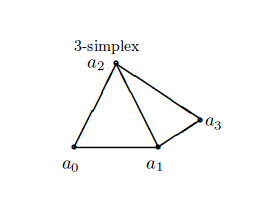
In this example several lines and circles are combined to create a picture, then some text is added to label the points. Below each command is explained:
\thicklines- This changes the thickness of the lines, making them a bit thicker, you can also use
\thinlineswhich has the opposite effect.
\put(8,3.3){{\footnotesize $3$-simplex}}- The text "3-simplex" is inserted at the point (8,3.3), the font size is set to footnotesize. The same command is used to label each point.
\put(9,3){\circle*{0.1}}- This draws a filled circle centred at (9,3) and it's diameter is 0.1. Is so small that is used as a point.
\put(10,1){\line(3,2){1}}
- Draws a straight line, whose start point is at (10,1), it's length is 1 and it's direction is (3,2). As you see lines with arbitrary slopes are tricky to draw, some calculations must be performed for this.
Arrows can also be used inside a picture environment, let's see a second example
\setlength{\unitlength}{0.20mm}

\begin{picture}(400,250)

\put(75,10){\line(1,0){130}}

\put(75,50){\line(1,0){130}}

\put(75,200){\line(1,0){130}}

\put(120,200){\vector(0,-1){150}}

\put(190,200){\vector(0,-1){190}}

\put(97,120){$\alpha$}

\put(170,120){$\beta$}

\put(220,195){upper state}

\put(220,45){lower state 1}

\put(220,5){lower state 2}

\end{picture}
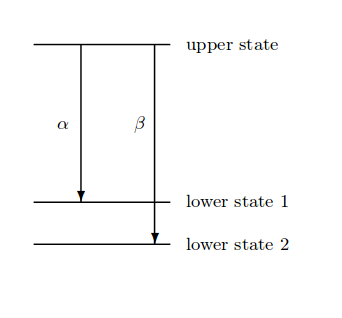
The syntax for vectors the same used for line
\put(120,200){\vector(0,-1){150}}- This renders a vector whose start point is (120,200), its length is 150 and the direction is (0,-1).
Open an example the picture environment in ShareLaTeX
Bézier curves
Bézier curves are special curves that are drawn using three parameters, one start point, one end point and a control point that determines "how curved" it is.
\setlength{\unitlength}{0.8cm}

\begin{picture}(10,5)

\thicklines

\qbezier(1,1)(5,5)(9,0.5)

\put(2,1){{Bézier curve}}

\end{picture}
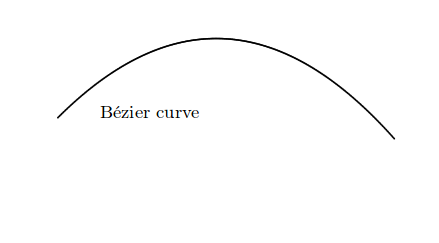
Notice that the command \qbezier (quadratic Bezier curve) is not inside a \put command. The parameters that must be passed are:
- A start point,
- A control point and
- An endpoint.
Picture is the standard tool to create figures in LATEX, as you see this is tool is sometimes too restrictive and cumbersome to work with, but it's supported by most of the compilers and no extra packages are needed. If you need to create complex figures, for more suitable and powerful tools see the TikZ package andPgfplots package articles.
Open an example the picture environment in ShareLaTeX
from: https://www.sharelatex.com/learn/Picture_environment
LaTeX图片环境 Picture environment的更多相关文章
- latex 常用环境(environment)
align \begin{align} \overline{A \cup B} &= \overline{A} \cap \overline{B}, \\ \overline{A \cap B ...
- LaTex Verbatim 环境下使用数学符号
参考: Write math and make a box with alltt environment LaTex Verbatim 环境下使用数学符号 在 Verbatim 环境下使用数学符号,需 ...
- LaTeX技巧96:LaTeX 图片控制命令,位置控制
LaTeX技巧96:LaTeX 图片控制命令,位置控制 2012-04-05 17:25:44 zd0303 阅读数 28512更多 分类专栏: Latex LaTeX 控制图片的位置,就是加感叹 ...
- Ubuntu下LaTex中文环境安装与配置
转载自:http://www.linuxidc.com/Linux/2012-06/62456.htm LaTeX是一个强大的排版软件,但是其最初只是为英文排版而设计的.为了使其能够胜任中文排版的重任 ...
- Mac LaTex中文环境搭建
为了在博客上写公式,折腾了一晚上Mac上的LaTex的环境搭建,本文对步骤进行记录. 系统:Mac OSX 10.10.5 软件准备 1) MacTex 2015 Distribution (Tex的 ...
- LATEX图片位置
常用选项[htbp]是浮动格式: -『h』当前位置.将图形放置在正文文本中给出该图形环境的地方.如果本页所剩的页面不够,这一参数将不起作用. -『t』顶部.将图形放置在页面的顶部. -『b』底部.将图 ...
- Latex图片显示问题(1)
用latex编译后,若用dvipdf生成pdf文件,则其中有个eps图的左侧会显示不完全:若是用dvips--pspdf生成pdf文件,图像显示没问题. 这种情况的问题出在,加载 graphicx 宏 ...
- ubuntu14.04配置中文latex完美环境(texlive+texmaker+lyx)
Ubuntu下的文档编辑虽然有libreoffice,但对中文和公式的排版始终不如ms office,因此要想写出高质量的文档,只能靠latex了,现在随着xeCjk的开发,中文文档在ubuntu下的 ...
- Atom+latex+中文环境
最近在写论文,的路上.很多idea都受限于官方给的模板不能够添加自己即时的中文idea,所以添加中文到文献中很有必要,这里记录自己添加中文的几个小步骤 1. 受限将atom中的latex packag ...
随机推荐
- ***关于WP的邮件无法发送问题的总结(原创)
1.用FTP打开 /wp-include/class-smtp.php ,最好是下载下来,搜索一下,查找到如下的代码: $this->smtp_conn = @stream_socket_cli ...
- git rebase 过程中遇到冲突该怎么解决?
在执行git rebase 过程中经常遇到问题,此时有点慌,一般如何解决呢? 1.先将本地的冲突手动解决 2.执行下面命令 git add . git rebase --contine //继续re ...
- Java学习(基本语句,语法,变量)
一.基本语法: public class Demo { //定义一个类 public static void main(String[] args) { //主方法,一切程序的起点 /* 在屏幕上打印 ...
- 大理石在哪儿(UVa10474)
题目具体描述见:https://uva.onlinejudge.org/index.php?option=com_onlinejudge&Itemid=8&category=835&a ...
- 解决 VUE 微信 IOS 路由跳转问题
watch: { "$route"(){ if (/iPhone|mac|iPod|iPad/i.test(navigator.userAgent)) { location.hre ...
- 【WPF】淡入淡出切换页面
<NavigationWindow x:Class="WpfApplication1.Window1" xmlns="http://schemas.microsof ...
- 20179202《Linux内核原理与分析》第一周作业
实验一 Linux 系统简介 这一节主要学习了Linux的历史,重要人物以及学习Linux的方法.Linux和Windows在是否收费.软件与支持.安全性.可定制性和应用范畴等方面都存在着区别.目前感 ...
- 洛谷——P1330 封锁阳光大学
P1330 封锁阳光大学 题目描述 曹是一只爱刷街的老曹,暑假期间,他每天都欢快地在阳光大学的校园里刷街.河蟹看到欢快的曹,感到不爽.河蟹决定封锁阳光大学,不让曹刷街. 阳光大学的校园是一张由N个点构 ...
- JSTL-3
.循环标签:forEach标签, forTokens标签 <c:forEach>:标签:该标签根据循环条件遍历集合(Collection)中的元素 <c:forEach [var=& ...
- 2017/11/3 Leetcode 日记
2017/11/3 Leetcode 日记 654. Maximum Binary Tree Given an integer array with no duplicates. A maximum ...