
c/c++中system函数在Linux和windows下区别
windows
在windows下的system函数中命令可以不区别大小写!
功 能: 发出一个DOS命令
#include <stdlib.h>

int system(char *command);
执行成功返回0,执行不成功由于不同的操作返回的值不同,可以查手册看
#include<stdio.h>

#include<stdlib.h>

int main()

{

    printf("About to spawn and run a DOS command\n");

    system("dir");

    return ;

}
调用color函数可以改变控制台的前景色和背景,具体参数在下面说明。
用 system(“color 0A”); 其中color后面的0是背景色代号,A是前景色代号。各颜色代码如下:
0=黑色 1=蓝色 2=绿色 3=湖蓝色 4=红色 5=紫色 6=黄色 7=白色 8=灰色 9=淡蓝色 A=淡绿色 B=淡浅绿色 C=淡红色 D=淡紫色 E=淡黄色 F=亮白色 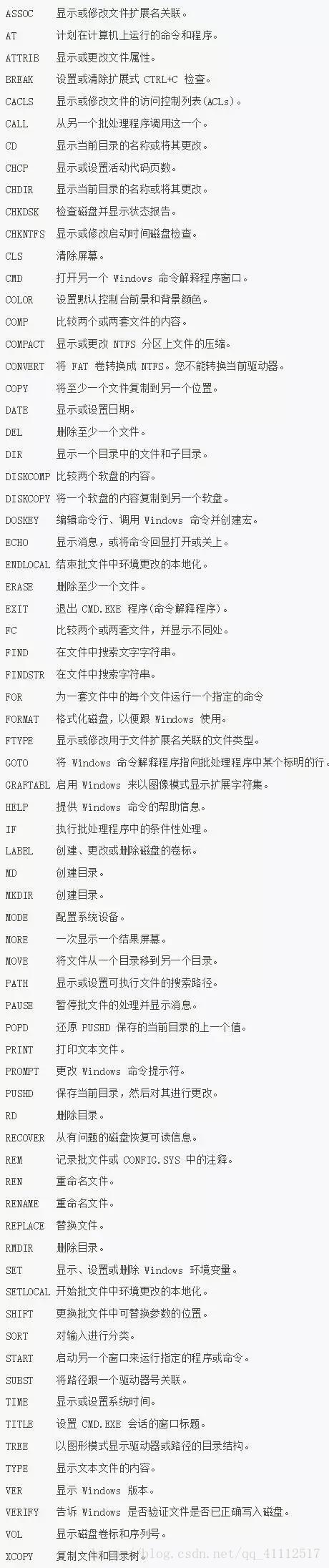
自动关机代码:
#include <stdio.h>

#include <stdlib.h>

#include <string.h>

int main()

{

    char order[];

    system("color 0C");//设置默认控制台前景个背景色

    system("date /T");//该函数可以返回当前系统日期

    system("TIME /T");//该函数可以返回当前系统时间

flag:

    printf("输入\"我是猪\",否则电脑两分钟关机!!!\n");

    system("shutdown -s -t 120");

    scanf("%s",order);

    if(strcmp(order,"我是猪")==)

    {

        printf("恭喜你成功的定位自己的身份!!!关机动作取消\n");

        system("shutdown -a");

        system("pause");

    }

    else

        goto flag;

    return ;

}
定时关机:
#include<stdio.h>

#include<stdlib.h>    //可以输入system用以键入DOS管理窗口界面下的cmd中的命令

#include<string.h>

void print()

{

    printf("****************关机程序****************\n");

    printf("****1.实现在十分钟内的定时关闭计算机****\n");

    printf("****2.立即关闭计算机********************\n");

    printf("****3.注销计算机************************\n");

    printf("****4.取消自动关机**********************\n");

    printf("****5.退出系统**************************\n");

}

int main()

{

    system("title C语言关机程序");//设置cmd窗口宽度

    system("color 2C");//设置默认控制台前景个背景色

    system("date /T");

    system("TIME /T");

    char cmd[] = "shutdown -s -t ";

    char t[];

    print();

flag:

    printf("请输入您的选择1-5:");

    int c;

    scanf("%d", &c);

    if(c>||c==)

    {

        printf("您输入的不合法,请重新输入.\n");

        fflush(stdin);

        goto flag;

    }

    getchar();

    switch(c)

    {

        case :

            printf("您想在多少秒后自动关闭计算机?(0~600)\n");

            scanf("%s", t);

            system(strcat(cmd, t));

            break;

        case :

            system("shutdown -p");

            break;

        case :

            system("shutdown -l");

            break;

        case :

            system("shutdown -a");

        case :

            return ;

        default:

            printf("Error!\n");

    }

    system("pause");

    return ;

}
删除文件:
#include<stdio.h>

#include<stdlib.h>

int main()

{

    system("del d:\123.txt");

    return ;

}
Linux
system源码
#include  <sys/wait.h>

#include  <erron.h>

#include  <signal.h>

#include  <unistd.h>

int system(const char* cmdstring)

{

   pid_t pid;

   int status;

   struct sigaction ignore,saveintr,savequit;

   sigset_t chldmask,savemask;

   if(cmdstring==NULL)

       return ;

   ignore.sa_handler=SIG_IGN;

   if(sigaction(SIGINT,&ignore,&saveintr)<)

       return -;

   if(sigaction(SIGQUIT,&ignore,&savequit)<)

       return -;

   sigemptyset(&chldmask);

   sigaddset(&chldmask,SIGCHLD);

   if(sigpromask(SIG_BOLCK,&chllmask,&savemask)

     return -;

   if((pid=fork())<)

       status=-;

   else if(pid==)

    {

       sigaction(SIGINT,&saveintr,NULL);

       sigaction(SIGQUIT,&savequit,NULL);

       sigpromask(SIG_SETMASK,&savemask,NULL);

       execl("/bin/sh","sh","-c",cmdstring,(char*));

       _exit();

     }

    else

    {

        while(waitpid(pid,&status,)<)

          {

             if(errno!=EINTR)

                {

                   status=-;

                   break;

                }

            }

        if(sigaction(SIGINT,&saveintr,NULL)<)

          return -;

        if(sigaction(SIGQUIT,&savequit,NULL)<)

          return -;

        if(sigpromask(SIG_SETMASK,&savemask,NULL)<)

          return -;

    }

    return status;

}
man:system() executes a command specified in command by calling /bin/sh -c command, and returns after the command has been completed. During execution of the command, SIGCHLD will be blocked, and SIGINT and SIGQUIT will be ignored.
如果父进程正在捕捉SIGCHLD信号,那么正在执行system函数的时候,应当阻塞对父进程递送SIGCHLD信号.否则,当system创建的子进程结束的时候,system的调用者可能错误的认为,它自己的一个子进程结束了.于是,调用者将会调用一种wait函数以获得子进程的终止状态,这样就阻止了system函数获得子进程的终止状态,并将其作为返回值。
- 在该command执行期间,SIGCHLD是被阻塞的,收不到内核发送的SIGCHLD信号
- 在该command执行期间,SIGINT和SIGQUIT是被忽略的,意思是进程收到这两个信号后没有任何动作。
返回值
- fork一个子进程
- 在子进程中调用exec函数去执行command
- 在父进程中调用wait去等待子进程结束
- 对于fork失败,system()函数返回-1
注意:
- 如果exec执行成功,也即command顺利执行完毕,则返回command通过exit或return返回的值。(注意,command顺利执行不代表执行成功,比如command:"rm debuglog.txt",不管文件存不存在该command都顺利执行了)
- 如果exec执行失败,也即command没有顺利执行,比如被信号中断,或者command命令根本不存在,system()函数返回127.
- 如果command为NULL,则system()函数返回非0值,一般为1.
- command命令返回0时,system返回0
- 如果system()调用成功则最后会返回执行shell命令后的返回值,但是此返回值也有可能为system()调用/bin/sh失败所返回的127,因此最好能再检查errno来确认执行成功
- 在编写具有SUID/SGID权限的程序时请勿使用system(),system()会继承环境变量,通过环境变量可能会造成系统安全的问题。system函数已经被收录在标准c库中,可以直接调用
system("mkdir $HOME/.SmartPlatform/");

system("mkdir $HOME/.SmartPlatform/Files/");

system("cp mainnew.cpp $HOME/.SmartPlatform/Files/");
c/c++中system函数在Linux和windows下区别的更多相关文章
- [笔记]linux下和windows下的 创建线程函数
linux下和windows下的 创建线程函数 #ifdef __GNUC__ //Linux #include <pthread.h> #define CreateThreadEx(ti ...
- 【转】linux和windows下安装python集成开发环境及其python包
本系列分为两篇: 1.[转]windows和linux中搭建python集成开发环境IDE 2.[转]linux和windows下安装python集成开发环境及其python包 3.windows和l ...
- linux和windows下TIME_WAIT过多的解决办法
http://www.51testing.com/html/48/202848-249774.html linux和windows下TIME_WAIT过多的解决办法 http://m.sohu.com ...
- Tomcat日志文件的输出在Linux和Windows下的差异
前言 最近老大发现Tomcat的日志文件catalina.out里存在着大量的和公司项目相关的log信息,因为一般都是会使用日志框架并另外将log信息输出到另外的文件里的,catalina.out文件 ...
- 从Docker在Linux和Windows下的区别简单理解Docker的层次结构
上篇文章我们成功在Windows下安装了Docker,输出了一个简单的Hello World程序.本文中我们将利用Docker已有的云端镜像training/webapp来发布一个简单Python的W ...
- 【深度学习】在linux和windows下anaconda+pycharm+tensorflow+cuda的配置
在linux和windows下anaconda+pycharm+tensorflow+cuda的配置 在linux和windows下anaconda+pycharm+tensorflow+cuda的配 ...
- protobuff 配合 libevent 在Linux 和windows 下的使用
protobuff 配合 libevent 在Linux 和windows 下的使用待补全. libprotobuf.lib libproto-lite.lib libprotoc.lib
- tar.xz如何解压:linux和windows下tar.xz解压命令介绍
在linux下怎么解压和压缩tar.xz文件? (本文由www.169it.com搜集整理) 在linux下解压tar.xz文件步骤 1 2 # xz -d ***.tar.xz //先解压xz # ...
- Linux和Windows下查看环境变量方法对比
摘自:Linux和Windows下查看环境变量方法对比 一.查看所有环境变量的名称和值 Linux下:export Windows下:set 二.根据名称查该环境变量的值 Linux下:echo $环 ...
随机推荐
- es6环境中,export与import使用方法
前言 参考自阮一峰大神的教程:http://es6.ruanyifeng.com/?search=export&x=6&y=5#docs/module#export-命令 声明:如有问 ...
- Java进阶1. Synchronized 关键字
Java进阶1. Synchronized 关键字 20131025 1.关于synchronized的简介: Synchronized 关键字代表对这个方法加锁,相当于不管那一个线程,运行到这个方法 ...
- Centos6安装MariaDB-yum方式
1.创建安装目录: mkdir /data/mysql/ mkdir /data/mysql/datafile mkdir /data/mysql/logfile 2.创建用户: useradd -r ...
- 内存保护机制及绕过方法——利用Ret2Libc绕过DEP之ZwSetInformationProcess函数
1. DEP内存保护机制 1.1 DEP工作原理 分析缓冲区溢出攻击,其根源在于现代计算机对数据和代码没有明确区分这一先天缺陷,就目前来看重新去设计计算机体系结构基本上是不可能的,我们只能靠 ...
- Easy UI DataGrid 与 分页
<%@ Page Language="C#" AutoEventWireup="true" CodeFile="Default.aspx.cs& ...
- 【Android测试】UI自动化代码优化之路
◆版权声明:本文出自胖喵~的博客,转载必须注明出处. 转载请注明出处:http://www.cnblogs.com/by-dream/p/5993622.html 关于UI自动化的抱怨 听过不少人这样 ...
- postfix基于客户端的访问控制
1.基于客户端的访问控制概览 postfix内置了多种反垃圾邮件的机制,其中就包括“客户端”发送邮件限制.客户端判别机制可以设定一系列客户信息的判别条件: smtpd_client_restricti ...
- Skynet服务器框架(九) snax框架
什么是 snax 由于 skynet 的 API 还是比较偏底层,为简化服务的编写提供一套简单的 API ,便有了这套 snax 框架,解决的问题: "编写一个 skynet 内部服务,处理 ...
- EasyPlayer RTSP播放器:一个适用于安防行业的工具利器(EasyPlayer Windows v2.0.17.0709)
本文转自EasyDarwin开源团队成员Sword的博客:http://blog.csdn.net/swordtwelve EasyPlayer(Windows) v2.0.17.0709版本又更新发 ...
- postfix邮件服务器搭建03-webmail安装篇
本文接着上文的安装进行,介绍另一个WebMail功能更加人性化的roundcube.当然也可以对已有的postfix邮件系统进行功能完善 1.下载安装roundcube cd /server/tool ...