
ListBox复选框拓展
Toolkit的LongListMutiSelector的复选框功能,想必许多人都需要吧!然而系统本身控件ListBox虽然也有多选功能,可是外观上却缺乏复选框,选择效果只是颜色变化。于是在上一个项目中只好选择LongListMutiSeletor作为列表的控件,项目结束后就有个想法对ListBox进行拓展,使ListBox列表可以拥有复选框。
之前为了修改LongListMutiSelector在白色背景下滚动条无法显示的问题,曾经仔细看了一下LongListMutiSelector相关的一些模版,发现LongListMutiSelector的复选框其实来自LongListMutiSelectorItem模版中的Checkbox。于是心中就有个想法,对ListBox的模版进行修改添加上Checkbox,然后再绑定上ListBox本身IsSelected属性,这样就可以实现复选框了。
说做就做,首先对模版进行拓展,添加Checkbox。
<Style TargetType="control:ListBoxItemEx">

        <Setter Property="Background" Value="Transparent"/>

        <Setter Property="BorderThickness" Value=""/>

        <Setter Property="BorderBrush" Value="Transparent"/>

        <Setter Property="Padding" Value=""/>

        <Setter Property="HorizontalContentAlignment" Value="Left"/>

        <Setter Property="VerticalContentAlignment" Value="Top"/>

        <Setter Property="Template">

            <Setter.Value>

                <ControlTemplate TargetType="control:ListBoxItemEx">

                    <Border x:Name="LayoutRoot" BorderBrush="{TemplateBinding BorderBrush}" BorderThickness="{TemplateBinding BorderThickness}" Background="{TemplateBinding Background}" HorizontalAlignment="{TemplateBinding HorizontalAlignment}" VerticalAlignment="{TemplateBinding VerticalAlignment}">

                        <VisualStateManager.VisualStateGroups>

                            <VisualStateGroup x:Name="CommonStates">

                                <VisualState x:Name="Normal"/>

                                <VisualState x:Name="MouseOver"/>

                                <VisualState x:Name="Disabled">

                                    <Storyboard>

                                        <ObjectAnimationUsingKeyFrames Storyboard.TargetProperty="Background" Storyboard.TargetName="LayoutRoot">

                                            <DiscreteObjectKeyFrame KeyTime="" Value="{StaticResource TransparentBrush}"/>

                                        </ObjectAnimationUsingKeyFrames>

                                        <DoubleAnimation Duration="" To=".5" Storyboard.TargetProperty="Opacity" Storyboard.TargetName="ContentContainer"/>

                                    </Storyboard>

                                </VisualState>

                            </VisualStateGroup>

                            <VisualStateGroup x:Name="SelectionStates">

                                <VisualState x:Name="Unselected"/>

                                <VisualState x:Name="Selected">

                                    <Storyboard>

                                        <!--<ObjectAnimationUsingKeyFrames Storyboard.TargetProperty="Foreground" Storyboard.TargetName="ContentContainer">

                                            <DiscreteObjectKeyFrame KeyTime="" Value="{StaticResource PhoneAccentBrush}"/>

                                        </ObjectAnimationUsingKeyFrames>-->

                                    </Storyboard>

                                </VisualState>

                            </VisualStateGroup>

                            <VisualStateGroup x:Name="FocusStates"/>

                        </VisualStateManager.VisualStateGroups>

                        <Grid>

                            <Grid.ColumnDefinitions>

                                <ColumnDefinition Width="Auto"/>

                                <ColumnDefinition Width="*"/>

                            </Grid.ColumnDefinitions>

                            <CheckBox x:Name="checkBox" Grid.Column="" IsChecked="{TemplateBinding IsSelected}" Visibility="Collapsed"/>

                            <ContentControl x:Name="ContentContainer" Grid.Column="" ContentTemplate="{TemplateBinding ContentTemplate}" Content="{TemplateBinding Content}" Foreground="{TemplateBinding Foreground}" HorizontalContentAlignment="{TemplateBinding HorizontalContentAlignment}" Margin="{TemplateBinding Padding}" VerticalContentAlignment="{TemplateBinding VerticalContentAlignment}"/>

                        </Grid>

                    </Border>

                </ControlTemplate>

            </Setter.Value>

        </Setter>

    </Style>
其次,再对ListBox进行继承拓展。增加SelectionEable属性,当属性更改显示或隐藏复选框。
 public ItemSelectionMode SelectionEable

        {

            get { return (ItemSelectionMode)GetValue(SelectionEableProperty); }

            set { SetValue(SelectionEableProperty, value); }

        }

        public static readonly DependencyProperty SelectionEableProperty = DependencyProperty.Register(

            "SelectionEable",

            typeof(ItemSelectionMode),

            typeof(ListBoxItemEx),

            new PropertyMetadata(ItemSelectionMode.Normal, OnSelectionEableChanged));

        private static void OnSelectionEableChanged(DependencyObject d, DependencyPropertyChangedEventArgs e)

        {

            ListBoxItemEx item = d as ListBoxItemEx;

            if (item.checkBox != null)

            {

                ItemSelectionMode mode = (ItemSelectionMode)e.NewValue;

                switch (mode)

                {

                    case ItemSelectionMode.Normal:

                        item.checkBox.Visibility = Visibility.Collapsed;

                        break;

                    case ItemSelectionMode.Selection:

                        item.checkBox.Visibility = Visibility.Visible;

                        break;

                }

            }

        }
Ok在页面前台写下以下代码,就会发现设计视图中的ListBoxItem有了复选框。
<MyControls:ListBoxItemEx SelectionEable="Selection">

            测试选项

        </MyControls:ListBoxItemEx>
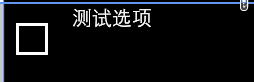
拓展完ListBoxItem后事情还没完,这只是ListBoxItem有了复选框,ListBox并没有,还要对ListBox进行拓展才行。
同样拓展一个SlectionEable属性,并且将该属性和它的Item的SelectonEable属性关联起来。其次还得重载ListBox的GetContainerForItemOverride方法,返回一个重载后的ListBoxItemEx对象作为列表生产每一项内容的承载容器。这样就完成了对ListBox复选框的拓展。

ps:实际测试中发现复选框的IsChecked属性和ListBoxItem的IsSelected属性并没有同步,后面仔细查看文档后发现TemplateBinding并不能进行双向绑定,即前台Checkbox的勾选变化不会同步到IsSelected属性,而只有Binding和StaticResource可以进行双向绑定,于是将TemplateBinding改为Binding,Mode为TwoWay,这样就可以双向绑定了。
ListBox复选框拓展的更多相关文章
- (七)对话框,单选框(radiobox),复选框(checkbox),列表框(ListBox),组合框(CComboBox),水平滚动条(Horizontal scroll bar),微调(旋转)spincontrol,列表视图控件CListCtrl,静态控件static
1,模态对话框和非模态对话框 // 模态对话框 void CMainFrame::OnDialogExec() { // TODO: 在此添加命令处理程序代码 // 创建对话框对象 CDialog d ...
- 【转】纯CSS设置Checkbox复选框控件的样式
Checkbox复选框是一个可能每一个网站都在使用的HTML元素,但大多数人并不给它们设置样式,所以在绝大多数网站它们看起来是一样的.为什么不把你的网站中的Checkbox设置一个与众不同的样式,甚至 ...
- 对jquery操作复选框
摘要:jquery操作复选框.使用更简洁易懂,思路清晰,逻辑更明了,很实用 <!DOCTYPE html> <html> <head> <meta chars ...
- MVC树控件,mvc中应用treeview,实现复选框树的多层级表单控件
类似于多层级的角色与权限控制功能,用MVC实现MVC树控件,mvc中应用treeview,实现复选框树的多层级表单控件.最近我们的项目中需要用到树型菜单,以前使用WebForm时,树型菜单有微软提供的 ...
- jquery复选框 选中事件 及其判断是否被选中
jquery复选框 选中事件 及其判断是否被选中 (2014-07-25 14:03:54) 转载▼ 标签: jquery复选框选中事件 分类: extjs jquery 今天做了 显示和不显示密 ...
- 复选框css
input, select, button, textarea{ -webkit-appearance:none; }该属性会导致复选框失去选择效果
- 案例1.通过Jquery来处理复选框
实现以下功能: 1:选中第一个复选框,那么下面所有的复选框都选中,去除选中第一个复选框,下面的都不选中 2:当点击全选按钮,上面足球.篮球.游泳.唱歌 全部选中 3:当点击全不选按钮,上面四个全部取消 ...
- 【Telerik】实现列表单元格中添加复选框,进行状态(是、否)判断
前台界面: 需求:实现对每条细则是否必备进行判断,必备就勾选,否则不勾选. 首先:要保证列表GridView是可编辑的(IsReadOnly=false) 表格代码 其次:单元格的数据绑定要保证是双向 ...
- 如何在select下拉列表中添加复选框?
近来在给一个公司做考试系统的项目,遇到的问题不少,但其中的几个让我对表单的使用颇为感兴趣,前端程序员都知道,下拉列表有select标签,复选框有checkbox,但是两者合在一起却少有人去研究,当时接 ...
随机推荐
- 异常处理之namespace找不到
最近在做控件的时候遇到了这么一个异常 就是说类库中明明就有命名空间,但是在winForm中引用的时候也能正常显示, 可是编译的时候却报 找不到指定的命名空间 这样的异常,头痛了好久,结果看到了winF ...
- 项目源码--Android美图秀秀源码
下载源码 技术要点: 1. 多种分类分享高清图片 2. 图片缓存技术 3. 图片缩图显示 4. 图片实时加载技术 5. 多点触控技术 6. HTTP网络数据搜索技术 7. 精美UI图片显示 ...
- C++实现日期转换类DateTime
概述 工作中我们在网络传输时使用time_t来传输时间,在显示时使用字符串来显示,下面是一个日期转换类的实现,方便以后使用: // DateTime.hpp #ifndef _DATETIME_H # ...
- DbHelperSQL 判断数据库表结构公用方法
#region 公用方法 /// <summary> /// 判断是否存在某表的某个字段 /// </summary> ...
- 1.4.8 拼凑在一起(putting the pieces together)
putting the pieces together 在最高的级别,schema.xml结构如下, <schema> <types> <fields> <u ...
- 《算法导论》习题解答 Chapter 22.1-2(邻接矩阵与链表)
链表如图: 矩阵: 1 2 3 4 5 6 7 1 0 1 1 0 0 0 0 2 1 0 0 1 1 0 0 3 1 0 0 0 0 1 1 4 0 1 0 0 0 0 0 5 0 1 0 0 0 ...
- php实现签到功能
首先我在数据库里建了两张表,一个是用户的积分表,一个是签到状态表,分来用来记录用户的积分数和先到状态 在用户签到状态表中我们有一个字段,last_sign_time,即上一次签到时间,每次可以签到的时 ...
- LearnMVC5-AddAModel
本人是MVC新手,将从微软官网学习MVC并将看过的英文文档翻译成中文,由于本人英文水平不好,有翻译不准确.错误的地方万望指出,我看到后将会在第一时间修改.另外也希望这一系列文章能为后来者起到引导作用. ...
- VMware系统运维(十三)部署虚拟化桌面 Horizon View Agent 5.2安装
1.先打开安装程序如下所示 2.点击"下一步" 3.不接受,你能装吗?点击"下一步" 4.选择安装位置,点击"下一步" 5.开启3389和3 ...
- ajax中的setRequestHeader设置请求头
1.问题引发点: 前不久发现一个问题: 前端并没有设置请求头信息里面的Accept-Encoding:gzip...但是在请求头中可以明显的看到Accept-Encoding:gzip, deflat ...