
C#上传图片和生成缩略图以及图片预览
因工作需要,上传图片要增加MIME类型验证和生成较小尺寸的图片用于浏览。根据网上代码加以修改做出如下效果图:
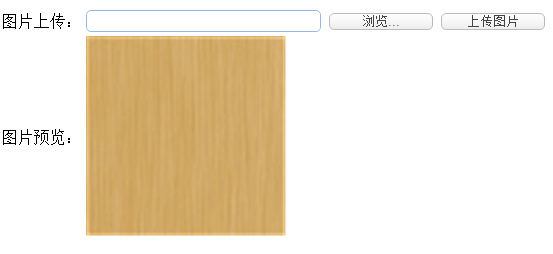
前台代码如下:
 <html xmlns="http://www.w3.org/1999/xhtml">

 <head runat="server">

     <meta http-equiv="Content-Type" content="text/html; charset=utf-8" />

     <title>上传图片和生成缩略图以及图片预览</title>

     <link rel="stylesheet" type="text/css" href="http://www.jeasyui.com/easyui/themes/default/easyui.css">

     <script type="text/javascript" src="http://code.jquery.com/jquery-1.6.min.js"></script>

     <script type="text/javascript" src="http://www.jeasyui.com/easyui/jquery.easyui.min.js"></script>

 </head>

 <body>

     <form id="form1" runat="server">

         <table>

             <tr>

                 <td>图片上传:

                 </td>

                 <td>

                     <input type="text" id="txtImgPath" class="easyui-textbox" runat="server" style="width: 235px;" />

                     <input type="button" id="btnPCImg" value="浏览..." onclick="showFileUp('FileUpload1')"

                         class="easyui-linkbutton btn" style="width: 106px;" />

                     <asp:FileUpload class="easyui-linkbutton btn" Style="display: none" ID="FileUpload1"

                         runat="server" onchange="apendtoText('txtImgPath',this)" />

                     <asp:Button class="easyui-linkbutton btn" ID="btnUpFile" runat="server" Text="上传图片"

                         OnClick="btnUpFile_OnClick" Width="106px" />

                 </td>

             </tr>

             <tr>

                 <td>图片预览:

                 </td>

                 <td>

                     <asp:Image ID="Image1" runat="server" />

                     <asp:TextBox ID="txtimg" Style="display: none;" runat="server" Height="20px"></asp:TextBox>

                     <asp:TextBox ID="oldimgpath" Style="display: none;" runat="server" Height="20px"></asp:TextBox>

                 </td>

             </tr>

         </table>

     </form>

 </body>

 <script type="text/javascript">

     /*

     * 显示文件选择框

     * id {String} 要显示的FileUp

     */

     function showFileUp(id) {

         $('#' + id).click();

     }

     /*

     * FileUp控件值改变后将该控件的值赋给其他控件

     * id {String} 接收值的控件ID

     * obj {Object} FileUp控件

     */

     function apendtoText(id, obj) {

         $('#' + id).textbox('setText', $(obj).val());

     }

 </script>

 </html>
后台代码如下:
         /// <summary>

         /// 上传图片

         /// </summary>

         /// <param name="sender"></param>

         /// <param name="e"></param>

         protected void btnUpFile_OnClick(object sender, EventArgs e)

         {

             if (FileUpload1.PostedFile.FileName != "")

             {

                 if (FileUpload1.PostedFile.ContentLength <= )//只能上传小于或等于2MB的图片

                 {

                     FileExtension[] fe = { FileExtension.Gif, FileExtension.Jpg, FileExtension.Png };//允许的图片格式

                     if (FileValidation.IsAllowedExtension(FileUpload1, fe))

                     {

                         //}

                         //if (newFileExtensions == ".jpg" || newFileExtensions == ".gif" || newFileExtensions == ".bmp" || newFileExtensions == ".png")//直接使用文件后缀检查是否为允许类型

                         //{

                         string sfilename = FileUpload1.PostedFile.FileName;

                         int sfilenamehz = sfilename.LastIndexOf(".", StringComparison.Ordinal);

                         string newFileExtensions = sfilename.Substring(sfilenamehz).ToLower();

                         string pa = "uploadfiles/" + DateTime.Now.Year + "-" + DateTime.Now.Month + "/";//获取当前年份和月份作为文件夹名

                         if (!Directory.Exists("~/" + pa))//如不存在则创建文件夹

                         {

                             Directory.CreateDirectory(Server.MapPath("~/" + pa));

                         }

                         string newFileName = DateTime.Now.ToString("yyyyMMddHHmmss");

                         string uppath = "~/" + pa + newFileName + newFileExtensions;

                         Stream oStream = FileUpload1.PostedFile.InputStream;

                         System.Drawing.Image oImage = System.Drawing.Image.FromStream(oStream);

                         int oWidth = oImage.Width; //原图宽度

                         int oHeight = oImage.Height; //原图高度

                         int tWidth = ; //设置缩略图初始宽度

                         int tHeight = ; //设置缩略图初始高度

                         //按比例计算出缩略图的宽度和高度

                         if (oWidth >= oHeight)

                         {

                             tHeight = (int)Math.Floor(Convert.ToDouble(oHeight) * (Convert.ToDouble(tWidth) / Convert.ToDouble(oWidth)));

                         }

                         else

                         {

                             tWidth = (int)Math.Floor(Convert.ToDouble(oWidth) * (Convert.ToDouble(tHeight) / Convert.ToDouble(oHeight)));

                         }

                         //生成缩略原图

                         Bitmap tImage = new Bitmap(tWidth, tHeight);

                         Graphics g = Graphics.FromImage(tImage);

                         g.InterpolationMode = System.Drawing.Drawing2D.InterpolationMode.High; //设置高质量插值法

                         g.SmoothingMode = System.Drawing.Drawing2D.SmoothingMode.HighQuality;//设置高质量,低速度呈现平滑程度

                         g.Clear(Color.Transparent); //清空画布并以透明背景色填充

                         g.DrawImage(oImage, new Rectangle(, , tWidth, tHeight), new Rectangle(, , oWidth, oHeight), GraphicsUnit.Pixel);

                         string upfilepath2 = "~/" + pa + newFileName + "_m" + newFileExtensions; //缩略图为原图后缀增加_m用于区分

                         string oFullName = Server.MapPath(uppath);

                         string tFullName = Server.MapPath(upfilepath2);

                         try

                         {

                             //保存图片

                             oImage.Save(oFullName);

                             tImage.Save(tFullName);

                             Image1.ImageUrl = upfilepath2;//将缩略图显示到前台Img控件

                             txtimg.Text = pa + newFileName + "_m" + newFileExtensions;//将文件地址赋予控件用于保存

                         }

                         catch (Exception ex)

                         {

                             throw new Exception("发生错误,保存失败!", ex);

                         }

                         finally

                         {

                             //释放资源

                             oImage.Dispose();

                             g.Dispose();

                             tImage.Dispose();

                         }

                     }

                     else

                     {

                         string fileType = string.Empty;

                         foreach (var fileExtension in fe)

                         {

                             if (!string.IsNullOrEmpty(fileType))

                             {

                                 fileType += ",";

                             }

                             fileType += fileExtension;

                         }

                         Response.Write("<script>alert('文件格式被禁止,只支持" + fileType + "格式的图片')</script>");

                     }

                 }

                 else

                 {

                     Response.Write("<script>alert('文件大了,请修改大小,勿超过2MB')</script>");

                 }

             }

         }

         enum FileExtension

         {

             Jpg = ,

             Gif = ,

             Png =

         }

         /// <summary>

         /// 判断上传的文件的真实格式

         /// </summary>

         private class FileValidation

         {

             /// <summary>

             /// 检查是否为允许的图片格式

             /// </summary>

             /// <param name="fu">上传控件</param>

             /// <param name="fileEx">文件扩展名</param>

             /// <returns></returns>

             public static bool IsAllowedExtension(FileUpload fu, FileExtension[] fileEx)

             {

                 int fileLen = fu.PostedFile.ContentLength;

                 byte[] imgArray = new byte[fileLen];

                 fu.PostedFile.InputStream.Read(imgArray, , fileLen);

                 MemoryStream ms = new MemoryStream(imgArray);

                 BinaryReader br = new BinaryReader(ms);

                 string fileclass = string.Empty;

                 try

                 {

                     byte buffer = br.ReadByte();

                     fileclass = buffer.ToString();

                     buffer = br.ReadByte();

                     fileclass += buffer.ToString();

                 }

                 catch //(Exception ex)

                 {

                     // ignored

                 }

                 br.Close();

                 ms.Close();

                 int num = ;

                 int.TryParse(fileclass, out num);

                 foreach (FileExtension fe in fileEx)

                 {

                     if (num == (int)fe)

                         return true;

                 }

                 return false;

             }

         }
C#上传图片和生成缩略图以及图片预览的更多相关文章
- PHP.24-TP框架商城应用实例-后台1-添加商品功能、钩子函数、在线编辑器、过滤XSS、上传图片并生成缩略图
添加商品功能 1.创建商品控制器[C] /www.test.com/shop/Admin/Controller/GoodsController.class.php <?php namespace ...
- MVC4 上传图片并生成缩略图
Views @using (Html.BeginForm("Create","img",FormMethod.Post, new { enctype = &qu ...
- 使用canvas实现图片预览、缩放(压缩)以及生成文件下载
参考 https://www.runoob.com/html/html5-canvas.html https://www.cnblogs.com/yuanzhiguo/p/8288822.html h ...
- HTML5浏览器端图片预览&生成Base64
本文主要介绍如何通过拖拽方式在浏览器端实现图片预览,并生成图片的Base64编码. 工具链接:图片转Base64. 首先介绍一下FileReader, FileReader对象允许浏览器使用File或 ...
- (干货)微信小程序之上传图片和图片预览
这几天一直负责做微信小程序这一块,也可以说是边做边学习吧,把自己做的微信小程序的一些功能分享出来,与大家探讨一下,相互学习相互进步. 先看下效果图 只写了一下效果样式的话希望大家不要太在意,下面马路杀 ...
- jquery解决file上传图片+图片预览
js解决file上传图片+图片预览 demo案例中代码为js原生控制,可以根据项目的需求修改为jquery操作 <!DOCTYPE html><html lang="en& ...
- jquery实现上传图片及图片大小验证、图片预览效果代码
jquery实现上传图片及图片大小验证.图片预览效果代码 jquery实现上传图片及图片大小验证.图片预览效果代码 上传图片验证 */ function submit_upload_picture() ...
- vue-preview vue图片预览插件+缩略图样式
一.安装 npm i vue-preview -S 二.main.js中 导入组件 //vue-preview 开始 import VuePreview from 'vue-preview'; // ...
- 微信小程序之上传图片和图片预览
这几天一直负责做微信小程序这一块,也可以说是边做边学习吧,把自己做的微信小程序的一些功能分享出来,与大家探讨一下,相互学习相互进步. 先看下效果图 只写了一下效果样式的话希望大家不要太在意,下面马路杀 ...
随机推荐
- UILabel的各种属性与方法的使用
//设置字体:粗体,正常的是 SystemFontOfSize label1.font = [UIFont boldSystemFontOfSize:20]; //设置文字颜色 label1.text ...
- iOS开发—字典转模型,KVC设计模式
iOS开发UI基础—字典转模型 开发中,通常使用第三方框架可以很快的实现通过字典转模型,通过plist创建模型,将字典的键值对转成模型属性,将模型转成字典,通过模型数组来创建一个字典数组,通过字典数组 ...
- 射频识别技术漫谈(5)——防冲突【worldsing 笔记】
正常情况下读写器某一时刻只能对磁场中的一张射频卡进行读写操作.但是当多张卡片同时进入读写器的射频场时,读写器怎么办呢?读写器需要选出唯一的一张卡片进行读写操作,这就是防冲突. 防冲突机制是非接触式智能 ...
- jquery回车提交表单
jquery回车提交表单,比较方便的功能. 三个事件keydown,keypress,keyup,分别是按下,按着没上抬,上抬键盘 ,所以用keyup. $(document).keyup(funct ...
- BZOJ 1927: [Sdoi2010]星际竞速 费用流
1927: [Sdoi2010]星际竞速 Time Limit: 1 Sec Memory Limit: 256 MB 题目连接 http://www.lydsy.com/JudgeOnline/pr ...
- JS字符处理
JS取整 1.toFixed(num)(ps:num为保留小数点后几位) 自定义保留小数点后几位,进行四舍五入.严格来说,这个函数不属于取整,但是当num=0时,也就是取整了,所以一起放到这里,方便查 ...
- iOS之宏定义#define
最基本的宏定义用法 #define aaa bbb 表示用aaa替换bbb的内容. 宏作用范围 宏的作用范围是在当前文件内, 如果需要作用于其他类(如在类b调用类a已定义宏),那么需要在类b引入类a的 ...
- iOS开发——图形编程Swift篇&CAShapeLayer实现圆形图片加载动画
CAShapeLayer实现圆形图片加载动画 几个星期之前,Michael Villar在Motion试验中创建一个非常有趣的加载动画. 下面的GIF图片展示这个加载动画,它将一个圆形进度指示器和圆形 ...
- 《Linux内核修炼之道》 之 高效学习Linux内核
http://blog.csdn.net/fudan_abc/article/details/5738436
- [020]转--C++ swap函数
原文来自:http://www.cnblogs.com/xloogson/p/3360847.html 1.C++最通用的模板交换函数模式:创建临时对象,调用对象的赋值操作符 template < ...