
Fedora 23如何安装LAMP服务器
LAMP 是开源系统上 Web 服务器的梦幻组合。LAMP 是 Linux、 Apache HTTP 服务、 MySQL/MariaDB 数据库和 PHP、 Perl 或 Python 的简称。

下面教你如何在 Fedora 23 服务器上安装 LAMP 组合。
下面的教程默认使用 192.168.1.102/24 实例,请按照你的服务器做修改。
Apache 是一款开源的 web 服务框架。完全支持 CGI, SSL。
切换到 root 账户:

su

Fedora 23/22 输入以下命令来安装Apache:

dnf install httpd -y

Fedora 21 及更早的版本:

yum install httpd -y

启动httpd服务,以在每次系统启动服务:

systemctl enable httpd

使用以下命令来启动httpd服务:

systemctl start httpd
如果您遇到以下错误:
Job for httpd.service failed. See ‘systemctl status httpd.service’ and ‘journalctl -xn’ for details.
删除所有内容在/etc/hostname,并加上“localhost”。同时,在/etc/httpd/conf/httpd.conf文件中的“Servername”的值设定为“localhost”,并再次尝试启动httpd服务。
并调整防火墙以允许httpd服务,从远程客户端访问。
firewall-cmd --permanent --add-service=http

firewall-cmd --permanent --add-service=https
重新启动firewalld服务:
firewall-cmd --reload
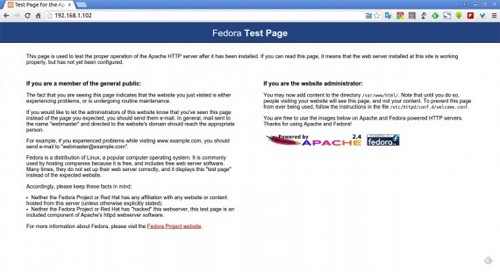
打开浏览器,输入服务器IP访问:
Fedora 23/22 用户安装命令:
dnf install mariadb mariadb-server -y
Fedora 21 及早前版本命令:
yum install mariadb mariadb-server -y
随系统自动启动命令:
systemctl enable mariadb
启动数据库服务器:
systemctl start mariadb
设置 MariaDB root 账户密码,默认情况下MySQL root用户的密码为空。因此,以防止未经授权的访问MySQL数据库,我们设置需要root用户密码:
mysql_secure_installation
NOTE: RUNNING ALL PARTS OF THIS SCRIPT IS RECOMMENDED FOR ALL MariaDB
SERVERS IN PRODUCTION USE! PLEASE READ EACH STEP CAREFULLY!
In order to log into MariaDB to secure it, we’ll need the current
password for the root user. If you’ve just installed MariaDB, and
you haven’t set the root password yet, the password will be blank,
so you should just press enter here.
Enter current password for root (enter for none):
OK, successfully used password, moving on…
Setting the root password ensures that nobody can log into the MariaDB
root user without the proper authorisation.
You already have a root password set, so you can safely answer ‘n’.
Change the root password? [Y/n] y ## Enter ‘y’ and press enter ##
New password: ## Enter password ##
Re-enter new password: ## Re-enter password ##
Password updated successfully!
Reloading privilege tables..
… Success!
By default, a MariaDB installation has an anonymous user, allowing anyone
to log into MariaDB without having to have a user account created for
them. This is intended only for testing, and to make the installation
go a bit smoother. You should remove them before moving into a
production environment.
Remove anonymous users? [Y/n] ## Press Enter ##
… Success!
Normally, root should only be allowed to connect from ‘localhost’. This
ensures that someone cannot guess at the root password from the network.
Disallow root login remotely? [Y/n] ## Press Enter ##
… Success!
By default, MariaDB comes with a database named ‘test’ that anyone can
access. This is also intended only for testing, and should be removed
before moving into a production environment.
Remove test database and access to it? [Y/n] ## Press Enter ##
– Dropping test database…
ERROR 1008 (HY000) at line 1: Can’t drop database ‘test’; database doesn’t exist
… Failed! Not critical, keep moving…
– Removing privileges on test database…
… Success!
Reloading the privilege tables will ensure that all changes made so far
will take effect immediately.
Reload privilege tables now? [Y/n] ## Press Enter ##
… Success!
Cleaning up…
All done! If you’ve completed all of the above steps, your MariaDB
installation should now be secure.
Thanks for using MariaDB!
Fedora 23/22 用户命令:
dnf install php -y
Fedora 21 及早期版本:
yum install php -y
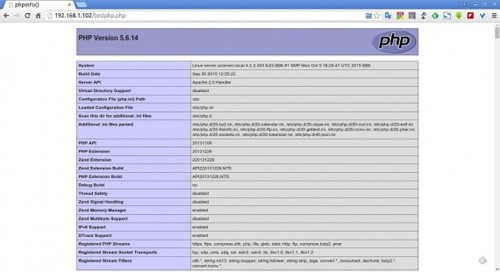
测试PHP是否运行:
vi /var/www/html/testphp.php
输入以下内容:
<?phpphpinfo();

?>
重启 Http 服务:
systemctl restart httpd
浏览器输入看看:
搜索模块并安装:
Fedora 23/22 用户:
dnf search php
Fedora 22及早期版本:
yum search php
现在安装你所选择所需模块,例如php-mysql,使用以下命令:
Fedora 23/22 用户:
dnf install php-mysql -y
Fedora 22及早期版本:
yum install php-mysql -y
重启 HTTP 服务:
systemctl restart httpd
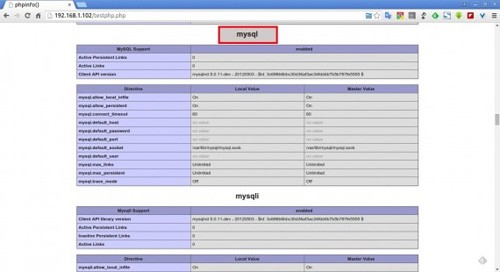
浏览器查看模块安装是否成功:
phpmyadmin 用于管理数据库:
Fedora 23/22 用户:
dnf install phpmyadmin -y
Fedora 22及早期版本:
yum install phpmyadmin -y
缺省情况下,phpMyAdmin 只能从本地主机进行访问。若要从远程系统访问您的网络中,请执行下列操作步骤。
vi /etc/httpd/conf.d/phpMyAdmin.conf
查找并注释掉127.0.0.1 和请求 ip ::1 lines。然后添加一个额外的行要求所有授予略低于为注释行。
这是我的更改后的 phpMyAdmin.conf 文件。这些变化以粗体标记。
[...]

Alias /phpMyAdmin /usr/share/phpMyAdmin

Alias /phpmyadmin /usr/share/phpMyAdmin

<Directory /usr/share/phpMyAdmin/>

   AddDefaultCharset UTF-8

   <IfModule mod_authz_core.c>

     # Apache 2.4

     <RequireAny>

#       Require ip 127.0.0.1

#       Require ip ::1

        Require all granted

     </RequireAny>

   </IfModule>

   <IfModule !mod_authz_core.c>

     # Apache 2.2

     Order Deny,Allow

     Deny from All

     Allow from 127.0.0.1

     Allow from ::1

   </IfModule>

</Directory>

<Directory /usr/share/phpMyAdmin/setup/>

   <IfModule mod_authz_core.c>

     # Apache 2.4

     <RequireAny>

#       Require ip 127.0.0.1

#       Require ip ::1

        Require all granted

     </RequireAny>

   </IfModule>

   <IfModule !mod_authz_core.c>

[...]
重要提示:不过让localhost以外的人访问数据库,应视为危险,除非通过SSL适当保护。做到这一点需要您自担风险。
保存并关闭文件。重新启动httpd服务。
systemctl restart httpd
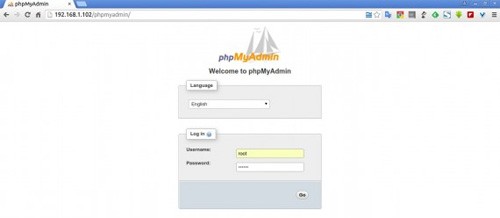
OK,打开 phpmyadmin 测试一下:
好了,安装完毕!
免费提供最新Linux技术教程书籍,为开源技术爱好者努力做得更多更好:https://www.linuxprobe.com/
Fedora 23如何安装LAMP服务器的更多相关文章
- 【转载】如何在Ubuntu上安装LAMP服务器系统?
转载自:http://os.51cto.com/art/201307/405333.htm [2013年7月25日 51CTO外电头条]为何应该在Ubuntu上安装LAMP服务器?从事Web开发工作时 ...
- [转载]如何在Ubuntu上安装LAMP服务器系统
[2013年7月25日 51CTO外电头条]为何应该在Ubuntu上安装LAMP服务器?从事Web开发工作时,我更偏爱在不受干扰的情况下,在我那台计算机上的开发环境下进行开发.我宁愿所犯的错误大部分是 ...
- 在Fedora 23上安装多媒体解码器
在Fedora 23上安装多媒体解码器 时间:2016-06-25来源:topspeedsnail.com 作者:斗大的熊猫 安装多媒体解码器允许你播放更多格式的音频和视频格式.大多数这些解码器都 ...
- VirtualBox 5.0.10 中 Fedora 23 在安装了增强工具后无法自动调节虚拟机分辨率的问题(改)
VirtualBox 5.0.10 中安装 Fedora 23,即使在安装了增强工具后,仍然会发现虚拟机无法根据 VirtualBox 的运行窗口大小自动进行分辨率调节.究其原因,主要是因为 Fedo ...
- 在Ubuntu上安装LAMP服务器
1.安装Ubuntu上安装LAMP apt-get install lamp-server^ 2.安装过程中设置MySql密码 3.测试 创建index.php var/www/html/index. ...
- 如何在Ubuntu上安装LAMP服务器系统?
在Ubuntu上安装LAMP Ubuntu的开发人员让人们很容易安装和配置LAMP软件包,只要借助一个终端命令.所以,打开终端窗口,让我们开始入手吧. sudo apt-get install lam ...
- 安装lamp服务器
1.安装http: $ yum install httpd 2.启动http: $ systemctl start httpd 3.访问:http://192.168.1.100 4.Installi ...
- 刚安装Fedora 23工作站后,你必须要做的24件事
[51CTO.com快译]Fedora 23工作站版本已发布,此后我们就一直在密切关注它.我们已经为新来读者介绍了一篇安装指南:<Fedora 23工作站版本安装指南> 还有一篇介绍如何从 ...
- Ubuntu 搭建 LAMP 服务器
/******************************************************************** * Ubuntu 搭建 LAMP 服务器 * 说明: * 想 ...
随机推荐
- mongodb使用中遇到的问题汇总
1. 每次重新打开mongo,都会显示:forked process:xxxx ,然后用 find -name mongod.lock 进行搜索,发现在 ./var/lib/mongodb/ 目录下又 ...
- LeetCode(7) - Reverse Integer
题目的要求就是要反转一个Integer,例如输入123,则输出321,这一题比较tricky的地方就是它有可能越界,就是说1234567899,反过来是9987654321是一个越界的Integer, ...
- 开始使用Ambari吧
最开始接触Hadoop是研究生入学后,帮师姐装装集群什么的.过程很繁琐,很重复,很是让人抓狂.当时装一个三台机器的集群需要两天左右,这还是装的很熟练的时间花费,刚入手的时候简直是惨不忍睹,三台机器装了 ...
- 轻松学习Linux之Shell文件和目录属性详解
轻松学习Linux之Shell文件和目录属性详解 轻松学习Linux之理解Sitcky 轻松学习Linux之理解umask 轻松学习Linux之理解SUID&SGUID 本系列多媒体教程已完成 ...
- Hadoop 1.1.2 Eclipse 插件使用——异常解决
permission denied user 1.修改配置文件在conf/hdfs-site.xml文件中添加如下内容: <property> <name>dfs.permis ...
- Uber新功能:隐藏司机乘客们的手机号码
滴快车单单2.5倍,注册地址:http://www.udache.com/ 如何注册Uber司机(全国版最新最详细注册流程)/月入2万/不用抢单:http://www.cnblogs.com/mfry ...
- HDU 1564 Play a game (找规律博弈)
Play a game Time Limit: 1000/1000 MS (Java/Others) Memory Limit: 32768/32768 K (Java/Others)Total ...
- jsp两种包含方式
jsp中存在两种文件的包含指令 1.<%@include file="xxx.jsp" %> 2.<jsp:include page="xxx.jsp& ...
- java获取数据库的所有列名和对应的数据库类型
/** * 连接数据库 * @param driver 数据库的驱动类 * @param url 数据库的地址 * @param userName 数据库的用户名 ...
- Java调用Telnet示例
import java.io.IOException; import java.io.InputStream; import java.io.PrintStream; import java.io.U ...