
.Net程序员安卓学习之路1:登陆界面
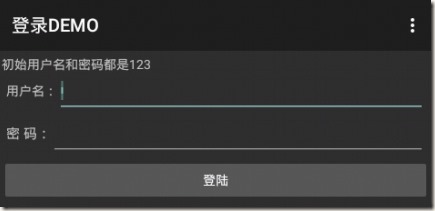
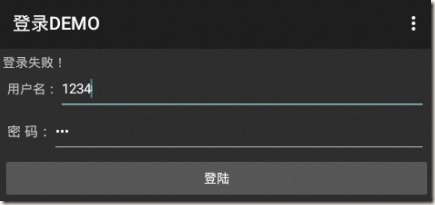
任何编程学习起步均是HelloWorld,作为稍有>net编程经验的我们来说就跳过这步吧,咱们且从简单登录界面开始。先看看效果:
一、准备知识:
1. 安卓环境:安装好JDK,直接去官网下载ADT-bundle集成包后更新即可使用。
2. 项目目录:一张图说明一切 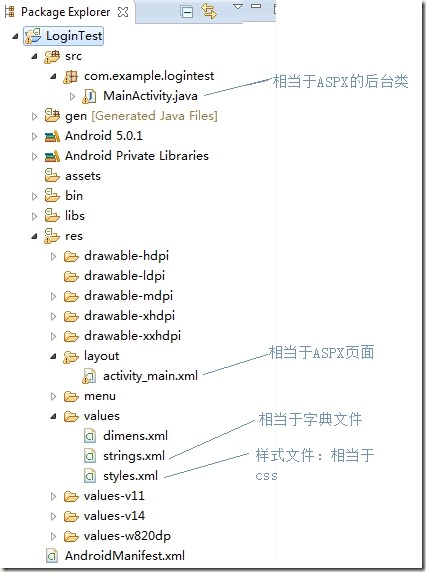
二、页面布局:
还是一幅图说明一切
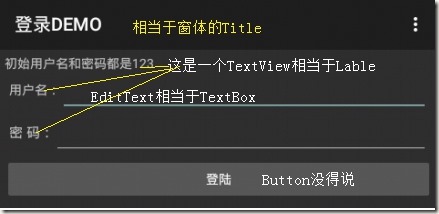
那么这个界面的布局如何呢?
<LinearLayout >最外边的DIV,用的是线性布局,方向是垂直

    <TextView/>就是上图“初始用户名。。。”这几个字所在Lable

    <LinearLayout >里面的DIV,水平布局

        <TextView/>用户名Lable

        <EditText/>用户名TextBox

    </LinearLayout>

    <LinearLayout>里面的DIV,水平布局

        <TextView/>密码Lable

        <EditText/>密码TextBox

    </LinearLayout>

    <Button/>登录按钮

</LinearLayout>
上图一看,就会一半,下来一个一个看:
1. 最外层DIV:
<LinearLayout xmlns:android="http://schemas.android.com/apk/res/android"

android:layout_width="fill_parent"

android:layout_height="fill_parent"

android:orientation="vertical" android:layout_margin="5dip" >
定义宽高的停靠方式,有
fill_parent、match_parent:是一样的,为了兼容低版本,建议使用fill_parent
设置布局/控件为fill_parent将强制性让它布满整个屏幕或填满父控件的空白
wrap_content:被内容撑大,刚好能显示下内容为止
Orientation:排列方式,vertical垂直,默认是HORIZONTAL水平
2. 文本框:
<TextView

android:id="@+id/lbl_LoginPass"

android:layout_width="wrap_content"

android:layout_height="wrap_content"

android:text="@string/lbl_LoginPass_Text"

android:textSize="15.0sp" />
这里出现了两个未知属性:
@+id/lbl_LoginPass和@string/lbl_LoginPass_Text
其实完全可以直接写:
android:text="用户名"
系统会提示这是硬编码,建议改写(汗,写了这么多年硬编码),他意思是这里仅仅引用字典中一个变量的名称,具体的值在字典中去维护,那么字典在哪里呢?
Res/Values/String.xml中维护了这个字典:
<resources>

    <string name="app_name">登录DEMO</string>

    <string name="action_settings">Settings</string>

    <string name="lbl_LoginName">用户名:</string>

    <string name="lbl_LoginPass_Text">密    码:</string>

    <string name="btn_login">开始登陆</string>

</resources>
这里编码规范得注意一下了:假如控件ID为lbl_LoginPass,则他的字典名应该为lbl_LoginPass_Text为了防止多个页面的字典名重复建议最好加上页面前缀,如Login_lbl_LoginPass_Text
完整代码如下:
<LinearLayout xmlns:android="http://schemas.android.com/apk/res/android"

    android:layout_width="fill_parent"

    android:layout_height="fill_parent"

    android:orientation="vertical" android:layout_margin="5dip" >

            <TextView

                android:id="@+id/form_title"

                android:layout_width="wrap_content"

                   android:layout_height="wrap_content"

                android:text="初始用户名和密码都是123" />

        <LinearLayout

        android:id="@+id/layout_login_name"

        android:layout_width="fill_parent"

        android:layout_height="wrap_content"

        android:layout_margin="5.0dip"

        android:layout_marginTop="10.0dip"

        android:orientation="horizontal" >

            <TextView

                android:layout_width="wrap_content"

                   android:layout_height="wrap_content"

                android:text="@string/lbl_LoginName" />

            <EditText

                android:id="@+id/txt_login_name"

                android:layout_width="fill_parent"

                android:layout_height="wrap_content"

                android:textSize="15.0sp" />

        </LinearLayout>

        <LinearLayout

        android:id="@+id/login_pwd_layout"

        android:layout_width="fill_parent"

        android:layout_height="wrap_content"

        android:layout_below="@id/layout_login_name"

        android:layout_centerHorizontal="true"

        android:layout_margin="5.0dip"

        android:orientation="horizontal" >

            <TextView

                android:id="@+id/login_pass_edit"

                android:layout_width="wrap_content"

                android:layout_height="wrap_content"

                android:text="@string/lbl_LoginPass"

                android:textSize="15.0sp" />

            <EditText

                android:id="@+id/txt_login_pwd"

                android:layout_width="fill_parent"

                android:layout_height="wrap_content"

                android:password="true"

                android:textSize="15.0sp" />

            </LinearLayout>

           <Button

        android:id="@+id/btn_login"

        android:layout_width="fill_parent"

        android:layout_height="wrap_content"

        android:layout_gravity="center"

        android:gravity="center"

        android:onClick="btn_click"

        android:text="登陆" />

</LinearLayout>
3. 页面后台
打开页面对应的后台代码:MainActivity.java
手动实现按钮的点击事件:
    public void btn_click(View v)

    {

        TextView lblInfo=(TextView)findViewById(R.id.form_title);

        EditText txt_login_name=(EditText)findViewById(R.id.txt_login_name);

        EditText txt_login_pass=(EditText)findViewById(R.id.txt_login_pwd);

        String loginName=txt_login_name.getText().toString().trim();

        String loginPass=txt_login_pass.getText().toString().trim();

        if(loginPass.equals("")&&loginName.equals(""))

        {

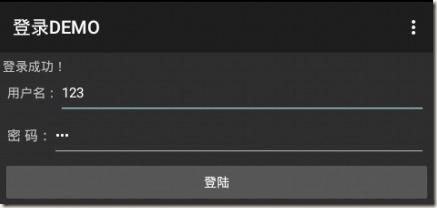
            lblInfo.setText("登录成功!");

        }

        else

        {

            lblInfo.setText("登录失败!");

        }

    }
其实这些倒没啥说的一看名字就知道啥意思。
.Net程序员安卓学习之路1:登陆界面的更多相关文章
- .Net程序员安卓学习之路4:使用xutils Get Post数据
前面使用了一些网络上找来的类进行网络访问,后来发现了安卓开发中有一个国人写的类库xutils比较全面,也比较经典,故后续使用xutils类库进行记录. 本例服务端使用WCF来实现,写好的WCF服务端在 ...
- .Net程序员安卓学习之路6:等待条
一般在需要访问网络或者长时间操作的时候避免界面无响应才使用:等待条 本例将实现一个无框架的等待条,效果如下: 点击后,使线程Sleep5秒,就出现如下效果: 实现代码如: private Progre ...
- .Net程序员安卓学习之路5:使用xutils注入View和事件以及图片的显示
xUtils注入和图片显示 一.xUtils注入 引用官方介绍: ViewUtils模块: •android中的ioc框架,完全注解方式就可以进行UI,资源和事件绑定: •新的事件绑定方式,使用混淆工 ...
- .Net程序员安卓学习之路3:Post数据给网络API
本例我们实现一次真正的网络交互,将数据POST到API,然后接收服务器的返回值进行处理,同时引入自定义类型和传说中阿里的FastJson. 实现思路如: 1. 在API端接收客户POST的数据还原成对 ...
- .Net程序员安卓学习之路2:访问网络API
做应用型的APP肯定是要和网络交互的,那么本节就来实战一把Android访问网络API,还是使用上节的DEMO: 一.准备API: 一般都采用Json作为数据交换格式,目前各种语言均能输出Json串. ...
- zz 游戏程序员的学习之路(中文版)
游戏程序员的学习之路(中文版) Milo Yip · 1 天前 感谢 @楚天阔(tkchu)编写脚本及整理中文译本数据,自动从英文版生成中文版,SVG / PDF 版本中的书籍图片现在链接至豆瓣页面. ...
- GJM : 游戏程序员的学习之路
原文作者:miloyip 原帖地址:http://gad.qq.com/article/detail/7180681 原帖备注:版权所有,禁止匿名转载:禁止商业使用:禁止个人使用. 腾讯前端技术总监 ...
- 五年.net程序员Java学习之路
大学毕业后笔者进入一家外企,做企业CRM系统开发,那时候开发效率最高的高级程序语言,毫无疑问是C#.恰逢公司也在扩张,招聘了不少.net程序员,笔者作为应届生,也乐呵呵的加入到.net程序员行列中. ...
- 2017PHP程序员的进阶之路
2017PHP程序员的进阶之路 又是一年毕业季,可能会有好多毕业生即将进入开发这个圈子,踏上码农这个不归路.根据这些年在开发圈子总结的LNMP程序猿发展轨迹,结合个人经验体会,总结出很多程序员对未来的 ...
随机推荐
- BZOJ3578 : GTY的人类基因组计划2
关于如何判断一个集合是否出现过: 给每个元素随机一个hash权值,然后xor起来即可 插入删除都只需xor 线段树维护区间有效人数和,以及打标记表示这个区间的集合要全部标记为出现过,并把区间内sum值 ...
- 自己的一份Spring的xml配置文件
<?xml version="1.0" encoding="UTF-8"?><beans xmlns="http://www.spr ...
- 面试题中遇到的SQL题目
1.假设有一张表示cj表 Name Subject Result 张三 语文 80 张三 数学 90 张三 物理 85 李四 语文 85 李四 数学 92 李四 物理 82 要求查询结果: 姓名 语文 ...
- Sublime Text 2的快速入门和常用技巧
1. 安装扩展器包管理器Package Control组件 点击菜单 View -> Show Console 调出控制台或者按快捷键 “Ctrl + `”(1左边的符号,可能和QQ拼音输入法和 ...
- C#开发MySQL数据库程序时需要注意的几点
一:引用MySQL使用基于Parameter方式代码,总是提示:“Column '列名'cannot be null”解决 MySQL使用基于Parameter方式代码,总是提示:“Column '列 ...
- [译]- 6-1 排列窗体上的控件(Laying Out Widgets on a Form)
排列窗体上的控件(Laying Out Widgets on a Form) 中英文对照:form(窗体),layout(布局或者排列,意思是进行窗体上控件的排列的过程,如大小位置等) absolu ...
- [杂谈]交通工具orca card
How and Where to Use the ORCA Card The Microsoft ORCA card provides unlimited rides on all buses, tr ...
- jQuery 两种方法实现IE10以下浏览器的placeholder效果
/* ** jQuery版本:jQuery-1.8.3.min.js ** 测试的浏览器:IE8,IETester下的IE6-IE9** Author:博客园小dee */ placeholder是H ...
- 第十章:鸟哥的Linux私房菜
第十章.vim程式编辑器 1. vi与vim 1.1 为何要学vim2. vi的使用 2.1 简易执行范例 2.2 按键说明 2.3 一个案例的练习 2.4 vim的暂存档.救援回复与开启时的警告讯息 ...
- 11.PHP内核探索:嵌入式PHP PHP内核探索:嵌入式PHP
从PHP源码目录结构的介绍以及PHP生命周期可知:嵌入式PHP类似CLI,也是SAPI接口的另一种实现. 一般情况下,它的一个请求的生命周期也会和其它的SAPI一样:模块初始化=>请求初始化=& ...