
jade模板引擎学习笔记(WebsStorm9.0.3+ nodejs+express+jade)
- jade环境搭建
- jade标签写法
- jade注释
- jade添加类名、id、属性
- jade添加脚本,css
- jade变量
- jade多行文本显示
- jade流程代码:for,each,while
- jade流程代码:if - else - unless ,case
- 可重用的jade块Mixins
- 模板继承(extends)
- 模板包含(include)
jade环境搭建
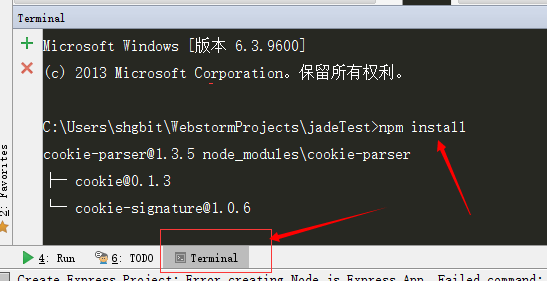
打开WebsStorm9.0.3,File—New Project…,project type选择Node.js Express App,新建项目jadeTest,打开Terminal,输入npm install 安装程序需要的依赖项,安装成功后,环境就搭好了,打开app.js文件,找到jade模板引擎的引用代码如下
 var express = require('express');

 var app = express();

 app.set('views', path.join(__dirname, 'views'));

 app.set('view engine', 'jade');
接下来,我们开始学习jade语法,程序的默认页面是index.jade,打开index.jade,然后在Terminal中输入以下命令:
jade -P -w index.jade
命令行:jade -P -w index.jade 实时监控jade文件,自动编译为不压缩的html文件,方便实时查看写的jade代码和html的比较
jade标签写法
index.jade
 doctype html

 html

     head

         title jade标签写法

     body

         P 文档声明:doctype html

         P 标签省去尖括号,元素和文本用空格间隔

         div

             P 元素的父子关系用空格缩进表示
编译成html:
 <!DOCTYPE html>

 <html>

   <head>

     <title>jade学习</title>

   </head>

   <body>

     <P>文档声明:doctype html</P>

     <P>标签省去尖括号,元素和文本用空格间隔</P>

     <div>

       <P>元素的父子关系用空格缩进表示</P>

     </div>

   </body>

 </html>
jade注释
单行注释: //
编译成html:<!-- 单行注释 -->
 doctype html

 html

     head

         title jade学习

     body

          p 单行注释://

         //div

              p 测试单行注释
编译成html
 <!DOCTYPE html>

 <html>

   <head>

     <title>jade学习</title>

   </head>

   <body>

     <p>单行注释://</p>

     <!--divp 测试单行注释

     -->

      </body>

 </html>
块注释://
 doctype html

 html

     head

         title jade学习

     body

         p 块注释://

         //

             div

                p 测试块注释
编译成html
 <!DOCTYPE html>

 <html>

   <head>

     <title>jade学习</title>

   </head>

   <body>

     <p>块注释://</p>

     <!--

     div

        p 测试块注释

     -->

   </body>

 </html>
非缓存注释:注释的内容不会显示在编译的html中
 doctype html

 html

     head

         title jade学习

     body

         P 非缓存注释/块注释://-

         //-div

             p 测试多行注释
编译成html
 <!DOCTYPE html>

 <html>

   <head>

     <title>jade学习</title>

   </head>

   <body>

     <P>非缓存注释/块注释://-</P>

   </body>

 </html>
jade添加类名、id、属性
 doctype html

 html

     head

         title jade学习

     body

        div.className#idName

            p.className 类名加点紧跟元素后面或者id后面,不用加空格,后面紧跟的文本属性要加空格

            p#idTest id名加#紧跟元素后面或者类后面,不用加空格,后面紧跟的文本要加空格

        #testDiv div如果有className/id,可以省略元素div

        .classDiv div如果有className/id,可以省略元素div

        h1 属性添加

        .className

            p 属性放在小括号里,紧跟元素/id/ClassName后面,属性之间用逗号隔开,id或class也可以放在括号内

            input.classP(id='content',type='text',value="添加属性")
编译成html
 <!DOCTYPE html>

 <html>

   <head>

     <title>jade学习</title>

   </head>

   <body>

     <div id="idName" class="className">

       <p class="className">类名加点紧跟元素后面或者id后面,不用加空格,后面紧跟的文本属性要加空格</p>

       <p id="idTest">id名加#紧跟元素后面或者类后面,不用加空格,后面紧跟的文本要加空格</p>

     </div>

     <div id="testDiv">div如果有className/id,可以省略元素div</div>

     <div class="classDiv">div如果有className/id,可以省略元素div</div>

     <h1>属性添加</h1>

     <div class="className">

       <p>属性放在小括号里,紧跟元素/id/ClassName后面,属性之间用逗号隔开,id或class也可以放在括号内</p>

       <input id="content" type="text" value="添加属性" class="classP">

     </div>

   </body>

 </html>
Jade添加脚本,css
 doctype html

 html

     head

         meta

         title #{title}

         style.

             .className{

                 background: red;

                 width:200px;

             }

             #id1{

                 background: blue;

                 width: 200px;

             }

         script.

             var s='test';

     body
编译成html
 <!DOCTYPE html>

 <html>

   <head>

     <meta>

     <title></title>

     <style>

       .className{

           background: red;

           width:200px;

       }

       #id1{

           background: blue;

           width: 200px;

       }

     </style>

     <script>var s='test';</script>

   </head>

   <body>

   </body>

 </html>
jade变量
服务器端代码:以 '-'开头的代码
变量的引用方式:
#{表达式}
= 表达式
!{表达式}
!= 表达式
 doctype html

 html

     head

         title jade学习

     body

         -var test="以'-'开头写服务器端代码"

         p #{test}

         -var str='test1' ;

         -var strTest='<div><p>变量调用</p></div>';

         p #{str.toUpperCase()}

         p= str

         //转义引用,(#{表达式} 等价于 =表达式)

         p #{strTest}

         p= strTest

         //非转义引用,(!{表达式}等价于 !=表达式)

         p !{strTest}

         p!= strTest
编译成html
<!DOCTYPE html>
<html>
<head>
<title>jade学习</title>
</head>
<body>
<p>以'-'开头写服务器端代码</p>
<p>TEST1</p>
<p>test1</p>
<!--转义引用,(#{表达式} 等价于 =表达式)-->
<p><div><p>变量调用</p></div></p>
<p><div><p>变量调用</p></div></p>
<!--非转义引用,(!{表达式}等价于 !=表达式)-->
<p><div><p>变量调用</p></div></p>
<p><div><p>变量调用</p></div></p>
</body>
</html>
直接显示#{title}表达式引用方法:
p \#{title}
p \!{title}

编译成html
<p>#{title}</p>
<p>!{title}</p>
注意:
input(value=data),data有值就显示值,没有值就什么也不显示
input(value=#{data})data有值就显示值,没有值显示undifined
模板里的数据优先级高于外部传进来的数据

可以传递json数据

可以对表达式进行进行操作,例如:
-var c='test1' ; p #{c.toUpperCase()}
编译成html为:
<p>TEST1</p>
jade多行文本显示
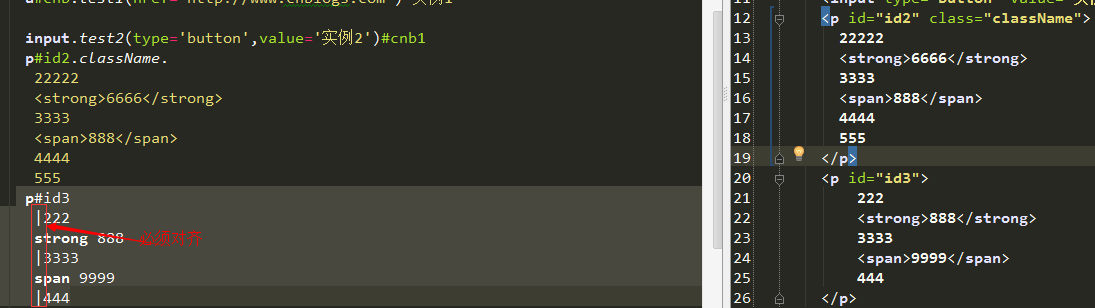
多行文本显示有2中方式
1.标签后边紧跟点
p#id2.className.

       22222

       <strong>6666</strong>

       3333

       <span>888</span>

       4444

       555
2.标签后面的文本以|开头
 p#id3

       |222

       strong 888

       |3333

       span 9999

       |444
jade流程代码:for,each,while
for
遍历数组的for
     -var arry=[1,3,5,7,9];

     ul

        -for (var i=0;i<arry.length;i++)

         li= arry[i]
编译成html
 <ul>

      <li>1</li>

      <li>3</li>

      <li>5</li>

      <li>7</li>

      <li>9</li>

</ul>
遍历对象属性的for
      -var json={name:'tom',age:9,phone:13222222222};

      -for(var j in json)

       p= json[j]
编译成html
<p>tom</p>

<p>9</p>

<p>13222222222</p>
each
遍历数组
     -var arry=[1,3,5,7,9];

     -each value,index in arry

       p #{index}:#{value}
     each item in arry
       p= item
编译成html
    <p>0:1</p>

    <p>1:3</p>

    <p>2:5</p>

    <p>3:7</p>

    <p>4:9</p>
    <p>1</p>
    <p>3</p>
    <p>5</p>
    <p>7</p>
    <p>9</p>
遍历json数据
     -var json={name:'tom',age:9,phone:13222222222};

     ul

      -each value,key in json

       li #{key}:#{value}
编译成html
   <ul>

      <li>name:tom</li>

      <li>age:9</li>

      <li>phone:13222222222</li>

    </ul>
while
  -var j=0;

      ul

          while j<3

             li= j++
编译成html
<ul>

      <li>0</li>

      <li>1</li>

      <li>2</li>
 </ul>
jade流程代码:if - else - unless ,case
if - else - unless
-var arry=['hello','world','good','test']
 if arry
    if(arry.length>2)
      div
           p= arry[0] +':if'
           p= arry[1]+':if'
    else
      p 数组长度等于小于2
 else
   p 数组为空
 unless arry.length<=2
   div
       p= arry[0]
       p= arry[1]
编译成html
   <div>

      <p>hello:if</p>

      <p>world:if</p>

    </div>

    <div>

      <p>hello</p>

      <p>world</p>

    </div>
注: unless 相当于非,unless false 才执行代码
case
case相当于switch
-var arry=['hello','world','good','test']

  each item in arry

         case item

            when 'hello'

            when 'world'

              p hello Tom!

            when 'good': P Good News

            default

               P #{item}
编译成html
    <p>hello Tom!</p>

    <p>hello Tom!</p>

    <P>Good News</P>

    <P>test</P>
注意:
when 'world'

   p hello Tom!
或者

when 'good': P Good News
效果是一样的
可重用的jade块Mixins
1.Mixins简单说就是代码块复用
      //定义代码块

      mixin bags

        div.allBags

           p 书包

           p 文具包

           p 公文包

           p 工具包

      //调用

      +bags
编译成html
    <!--定义代码块-->

    <!--调用-->

        <div class="allBags">

          <p>书包</p>

          <p>文具包</p>

          <p>公文包</p>

          <p>工具包</p>

        </div>
2.可以为mixin定义参数
      //参数个数确定

      mixin parameters(name,age)

        p #{name}今年#{age}岁

      +parameters('小明',6)

      +parameters('小强',8)

      //参数个数不确定

      mixin parameterList(name,...items)

        h1= name

        ul

          each nn in items

           li= nn

      +parameterList('小明','早晨读书','中午练书法','下午练拳')
编译成html
<!--参数个数确定-->

        <p>小明今年6岁</p>

        <p>小强今年8岁</p>

    <!--参数个数不确定-->

        <h1>小明</h1>

        <ul>

          <li>早晨读书</li>

          <li>中午练书法</li>

          <li>下午练拳</li>

        </ul>
3.mixin可以嵌套使用
     mixin bags

        div.allBags

           p 书包

           p 文具包

           p 公文包

           p 工具包

      //调用

      mixin getBags(name)

        P(class= name) 请列举包的种类

        +bags

      +getBags('back')
编译成html
            <P class="back">请列举包的种类</P>

            <div class="allBags">

              <p>书包</p>

              <p>文具包</p>

              <p>公文包</p>

              <p>工具包</p>

            </div>
4.mixin可以从外部传入代码块
 mixin bags

        div.allBags

           p 书包

           p 文具包

           p 公文包

           p 工具包

           //block:外部传入的代码块关键字

           if block

              block

 +bags

        h1 外部代码块

        div

            p 外部代码块1

            p 外部代码块2
编译成html
 <div class="allBags">

          <p>书包</p>

          <p>文具包</p>

          <p>公文包</p>

          <p>工具包</p>

          <!--block:外部传入的代码块关键字-->

          <h1>外部代码块</h1>

          <div>

            <p>外部代码块1</p>

            <p>外部代码块2</p>

          </div>

 </div>
5.mixin支持传递属性
     mixin GetAttrs(name1,name2)

         h1 传递属性的方法1

         p(class!=attributes.class)= name1

         h1 传递属性的方法2

         p&attributes(attributes)= name2

      +GetAttrs('方法1','方法2')(class='redColor',id='passId')
编译成html
        <h1>传递属性的方法1</h1>

        <p class="redColor">方法1</p>

        <h1>传递属性的方法2</h1>

        <p id="passId" class="redColor">方法2</p>
模板继承(extends)
继承者里如果与模板里有同名的block,继承者里同名的block会覆盖掉模板里的block
layout.jade
doctype html

html

  head

    title= title

    link(rel='stylesheet', href='/stylesheets/style.css')

  body
index7.jade
//layout.jdae与index7.jade是同一个目录下
extends layout

block content

    p 继承模板layout
index7.jade编译成html
<!DOCTYPE html>

<html>

  <head>

    <title></title>

    <link rel="stylesheet" href="/stylesheets/style.css">

  </head>

  <body>

    <p>继承模板layout</p>

  </body>

</html>
模板包含(include)
把很多块引用到一个页面中
index8.jade
doctype html

html

    head

       include ../templates/head

    body

        p 引入静态的jade css

        include ../templates/css

        p 引入html文件

        include  ../templates/content.html

        P 引入页脚模块

        include ../templates/footer
编译成html
<!DOCTYPE html>

<html>

  <head>

    <title></title>

    <link rel="stylesheet" href="/stylesheets/style.css">

  </head>

  <body>

    <p>引入静态的jade css</p>

    <style>

      p{

      background:blue;

      }

    </style>

    <p>引入html文件</p><div>引用html</div>

    <P>引入页脚模块</P>

    <div>页脚模块</div>

  </body>

</html>
下面这些文件的位置是在index8.jade上一级目录templates中
head.jade
title= title

link(rel='stylesheet', href='/stylesheets/style.css')
css.jade
style.

    p{

    background:blue;

    }
content.html
<div>引用html</div>
footer.jade
div 页脚模块
jade模板引擎学习笔记(WebsStorm9.0.3+ nodejs+express+jade)的更多相关文章
- NVelocity模板引擎学习笔记
NVelocity模板引擎学习笔记 学习模板引擎有一段时间现在做一些总结
- Jade模板引擎学习(二)语法:代码、变量、循环、过滤器及mixin
Jade语法 一.代码 不会被缓冲代码 ul - for(var i=0; i; i++) li Jade Engine 会转换为: <ul> <li>Jade Engine& ...
- Volecity模板引擎学习笔记
转自:https://blog.csdn.net/reggergdsg/article/details/50937433 最近项目中用到了volecity模板,这里做一下笔记,学习中...相比较 Fr ...
- Jade模板引擎学习(一)安装及基本语法
Jade是一款高性能简洁易懂的模板引擎,Jade是Html的Javascript实现,在服务端(NodeJS)及客户端均有支持. 一.功能 客户端支持 超强的可读性 灵活易用的缩进 块扩展 代码默认 ...
- nodejs学习篇 (1)webstorm创建nodejs + express + jade 的web 项目
之前简单了解过nodejs,觉得用nodejs来做个网站也太麻烦了,要自己拼html的字符串返回,这能做网站嘛? 最近看到使用jade模板来开发,觉得挺新奇的,于是试了一把,也了解了一些特性,算是个新 ...
- Jade 模板引擎使用
在 Express 中调用 jade 模板引擎 jade 变量调用 if 判断 循环 Case 选择 在模板中调用其他语言 可重用的 jade 块 (Mixins) 模板包含 (Includes) 模 ...
- Express框架之Jade模板引擎使用
日期:2018-7-8 十月梦想 node.js 浏览:2952次 评论:0条 前段时间讲说了ejs模板引擎,提到了jade的效率等等问题!今天在这里简单提一下jade的使用方式!结合expr ...
- Jade模板引擎使用详解
在 Express 中调用 jade 模板引擎 jade 变量调用 if 判断 循环 Case 选择 在模板中调用其他语言 可重用的 jade 块 (Mixins) 模板包含 (Includes) 模 ...
- Express全系列教程之(十):jade模板引擎
一.前言 随着前端业务的不断发展,页面交互逻辑的不断提高,让数据和界面实现分离渐渐被提了出来.JavaScript的MVC思想也流行了起来,在这种背景下,基于node.js的模板引擎也随之出现. 什么 ...
随机推荐
- 《The Book of CSS3》学习笔记
一.浏览器前缀 E{ -moz-name : value; /* Firefox */ -ms-name : value; /* IE */ -o-name : value; /* Opera */ ...
- 困扰多日的C#调用Haskell问题竟然是Windows的一个坑
最近一直被C#调用Haskell时的“尝试读取或写入受保护的内存”问题所困扰(详见C#调用haskell遭遇Attempted to read or write protected memory,C# ...
- [翻译]Bob大叔:反思极限编程
译者注: Bob大叔14年后再次谈论极限编程.极限编程经历了14年的风风雨雨后,Bob大叔将会给它怎么样的定义那? 在我手中拿着的一本白皮薄书,在14年前彻底的改变了软件世界.这本书的标题是解析极限编 ...
- git查看一个文件的历史记录
git log --all -- '*'FILENAME'*' 支持模糊查询 主要用于查找历史上被删除的文件 可以做成git的一个快捷命令 find = "!f(){ git log --a ...
- C++ 标准库类型-String,Vector and Bitset
<C++ Primer 4th>读书摘要 最重要的标准库类型是 string 和 vector,它们分别定义了大小可变的字符串和集合.这些标准库类型是语言组成部分中更基本的那些数据类型(如 ...
- hibernate懒加载(转载)
http://blog.csdn.net/sanjy523892105/article/details/7071139 懒加载详解 懒加载为Hibernate中比较常用的特性之一,下面我们详细来了解下 ...
- spring-mvc.xml报错cvc-complex-type.2.4.c
添加 <!-- 定义请求处理映射HandlerMapping --> <bean id = "handlerMapping" class = "org. ...
- atitit.提升开发效率---使用服务器控件生命周期 asp.net 11个阶段 java jsf 的6个阶段比较
atitit.提升开发效率---使用服务器控件生命周期 asp.net 11个阶段 java jsf 的6个阶段比较 如下列举了服务器控件生命周期所要经历的11个阶段. (1)初始化-- --在此 ...
- paip.提高稳定性---自动检测sleep mysql数据库死连接以及kill
paip.提高稳定性---自动检测sleep mysql数据库死连接以及kill 作者Attilax 艾龙, EMAIL:1466519819@qq.com 来源:attilax的专栏 地址:ht ...
- XML的简单学习
推荐入门级学习XML网址W3c http://www.w3school.com.cn/xml/xml_intro.asp 1: XML 指可扩展标记语言 XML 被设计用来传输和存储数据 ...