
matplotlib 高阶之path tutorial
import matplotlib.pyplot as plt

from matplotlib.path import Path

import matplotlib.patches as patches
Path 通过一个(N, 2)的包含(x, y)的点来实例比如,我们想要画一个标准的正方形:
verts = [

   (0., 0.),  # left, bottom

   (0., 1.),  # left, top

   (1., 1.),  # right, top

   (1., 0.),  # right, bottom

   (0., 0.),  # ignored

]

codes = [

    Path.MOVETO,

    Path.LINETO,

    Path.LINETO,

    Path.LINETO,

    Path.LINETO,

]

path = Path(verts, codes)

fig, ax = plt.subplots(figsize=(5, 5))

patch = patches.PathPatch(path, facecolor='orange', lw=2)

ax.add_patch(patch)

ax.set_xlim(-2, 2)

ax.set_ylim(-2, 2)

plt.show()
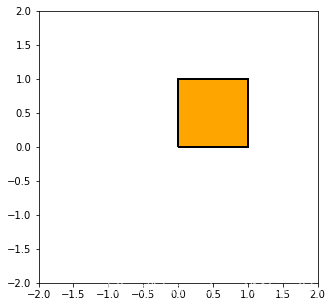
注意到,上面的codes包含了一些path的种类:
STOP: 标志着整个path的结束
MOVETO: 提起笔,移动到当前给定的位置 path的第一个点必须是MOVETO 表示提起笔?
LINETO: 画一条从当前位置到给定点的直线
CURVE3: 需要给定一个控制点和一个结束点 画一个二次Bézier曲线,利用控制点到结束点
CURVE4: 需要给定俩个控制点和一个街书店, 画一个三次Beier曲线, 利用给定的控制点到结束点
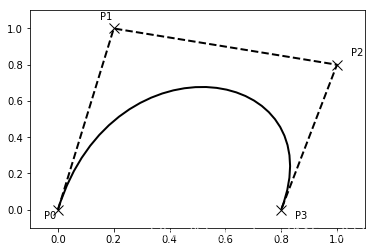
Bezier example
有些path需要多个点来确定,比如上面的CURVE3要2个点CURVE4需要3个点
verts = [

   (0., 0.),   # P0

   (0.2, 1.),  # P1

   (1., 0.8),  # P2

   (0.8, 0.),  # P3

]

codes = [

    Path.MOVETO,

    Path.CURVE4, #我们看到CURVE4占了3个点

    Path.CURVE4,

    Path.CURVE4,

]

path = Path(verts, codes)

fig, ax = plt.subplots()

patch = patches.PathPatch(path, facecolor='none', lw=2)

ax.add_patch(patch)

xs, ys = zip(*verts)

ax.plot(xs, ys, 'x--', lw=2, color='black', ms=10)

ax.text(-0.05, -0.05, 'P0')

ax.text(0.15, 1.05, 'P1')

ax.text(1.05, 0.85, 'P2')

ax.text(0.85, -0.05, 'P3')

ax.set_xlim(-0.1, 1.1)

ax.set_ylim(-0.1, 1.1)

plt.show()
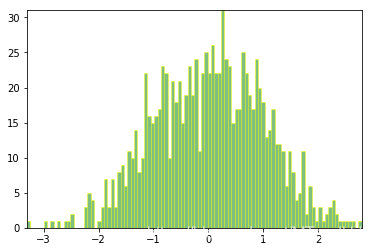
用path来画柱状图
matplotlib里面的很多元素,比如hist, bar等都是以path为图元的
import numpy as np

nrects = 100

data = np.random.randn(1000)

n, bins = np.histogram(data, nrects) # n每个bin的个数, bins位置
left = np.array(bins[:-1]) #矩形的左边位置

right = np.array(bins[1:]) #矩形的右边位置

bottom = np.zeros(nrects) #下

top = bottom + n #上
接下来,我们来构建柱状体,每个柱子需要5个点,一个MOVETO,三个LINETO,一个CLOSEPOLY
nverts = nrects*(1+3+1)

verts = np.zeros((nverts, 2)) #构建nevrts * 2 的数组

codes = np.ones(nverts, int) * Path.LINETO #LINETO == 2

codes[0::5] = Path.MOVETO #每隔五步是一个新的起点 MOVETO == 1

codes[4::5] = Path.CLOSEPOLY  #同样有一个终点 CLOSEPOLY == 79

verts[0::5,0] = left #下面都是设置起始位置

verts[0::5,1] = bottom

verts[1::5,0] = left

verts[1::5,1] = top

verts[2::5,0] = right

verts[2::5,1] = top

verts[3::5,0] = right

verts[3::5,1] = bottom
barpath = Path(verts, codes)

patch = patches.PathPatch(barpath, facecolor='green',

  edgecolor='yellow', alpha=0.5)

fig, ax = plt.subplots()

ax.add_patch(patch)

ax.set_xlim(left[0], right[-1])  #坐标不会自动调整,需要自己设定

ax.set_ylim(bottom.min(), top.max())

plt.show()
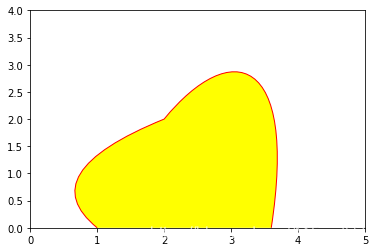
随便玩玩
verts = [

    (1, 0),

    (0, 1),

    (2, 2),

    (3, 3.5),

    (4, 3.2),

    (3.6, 0)

]

codes = [

    Path.MOVETO,

    Path.CURVE3,

    Path.CURVE3,

    Path.CURVE4,

    Path.CURVE4,

    Path.CURVE4

]

linepath = Path(verts, codes)

pathce = patches.PathPatch(linepath, facecolor="yellow", edgecolor="red")

fig, ax  = plt.subplots()

ax.add_patch(pathce)

ax.set_xlim(0, 5)

ax.set_ylim(0, 4)

plt.show()
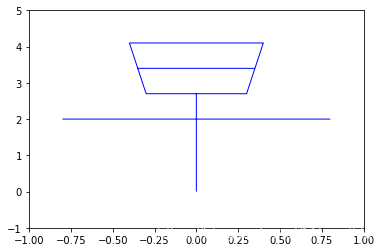
verts = [

    (0, 0),

    (0, 2.7),

    (-0.8, 2),

    (0.8, 2),

    (-0.3, 2.7),

    (0.3, 2.7),

    (-0.4, 4.1),

    (0.4, 4.1),

    (-0.35, 3.4),

    (0.35, 3.4),

    (-0.3, 2.7),

    (-0.4, 4.1),

    (0.3, 2.7),

    (0.4, 4.1)

]

codes = [

    Path.MOVETO,

    Path.LINETO,

    Path.MOVETO,

    Path.LINETO,

    Path.MOVETO,

    Path.LINETO,

    Path.MOVETO,

    Path.LINETO,

    Path.MOVETO,

    Path.LINETO,

    Path.MOVETO,

    Path.LINETO,

    Path.MOVETO,

    Path.LINETO

]

zaopath = Path(verts, codes)

patch = patches.PathPatch(zaopath, edgecolor="blue")

fig, ax = plt.subplots()

ax.add_patch(patch)

ax.set_xlim(-1, 1)

ax.set_ylim(-1, 5)

plt.show()
matplotlib 高阶之path tutorial的更多相关文章
- matplotlib 高阶之Transformations Tutorial
目录 Data coordinates Axes coordinates Blended transformations 混合坐标系统 plotting in physical units 使用off ...
- matplotlib 高阶之patheffect (阴影,强调)
目录 添加阴影 使Artist变得突出 更多效果 我们可以通过path来修饰Artist, 通过set_path_effects import matplotlib.pyplot as plt imp ...
- 迈向高阶:优秀Android程序员必知必会的网络基础
1.前言 网络通信一直是Android项目里比较重要的一个模块,Android开源项目上出现过很多优秀的网络框架,从一开始只是一些对HttpClient和HttpUrlConnection简易封装使用 ...
- Jackson 框架的高阶应用
Jackson 是当前用的比较广泛的,用来序列化和反序列化 json 的 Java 的开源框架.Jackson 社 区相对比较活跃,更新速度也比较快, 从 Github 中的统计来看,Jackson ...
- 高阶函数 - Higher Order Function
一个函数如果有 参数是函数 或 返回值是函数,就称为高阶函数. 这篇文章介绍高阶函数的一个子集:输入 fn,输出 fn'. 按 fn 与 fn' 功能是否一致,即相同输入是否始终对应相同输出,把这类高 ...
- python开发基础04-函数、递归、匿名函数、高阶函数、装饰器
匿名函数 lamba lambda x,y,z=1:x+y+z 匿名就是没有名字 def func(x,y,z=1): return x+y+z 匿名 lambda x,y,z=1:x+y+z #与函 ...
- 《React后台管理系统实战 :一》:目录结构、引入antd、引入路由、写login页面、使用antd的form登录组件、form前台验证、高阶函数/组件
实战 上接,笔记:https://blog.csdn.net/u010132177/article/details/104150177 https://gitee.com/pasaulis/react ...
- 利用 React 高阶组件实现一个面包屑导航
什么是 React 高阶组件 React 高阶组件就是以高阶函数的方式包裹需要修饰的 React 组件,并返回处理完成后的 React 组件.React 高阶组件在 React 生态中使用的非常频繁, ...
- ASP.NET Core 6框架揭秘实例演示[33]:异常处理高阶用法
NuGet包"Microsoft.AspNetCore.Diagnostics"中提供了几个与异常处理相关的中间件,我们可以利用它们将原生的或者定制的错误信息作为响应内容发送给客户 ...
随机推荐
- adult
adult是adolescere (grow up)的过去分词. egg - embryo [胚胎] - foetus [就要出生的胎儿] - toddler [刚会走路] - adolescent ...
- COAP协议 - arduino ESP32 M2M(端对端)通讯与代码详解
前言 最近我在研究 COAP 协议,在尝试使用 COAP 协议找了到了一个能在ESP32上用的coap-simple库,虽然库并不完善关于loop处理的部分应该是没写完,但是对于第一次接触COAP的朋 ...
- DBeaver客户端工具连接Hive
目录 介绍 下载安装 相关配置 1.填写主机名 2.配置驱动 简单使用 主题设置 字体背景色 介绍 在hive命令行beeline中写一些很长的查询语句不是很方便,急需一个hive的客户端界面工具 D ...
- FastDFS分布式文件系统及源码解析
记录一次本人学习FastDFS-分布式文件系统的学习过程,希望能帮助到有需要的人. 首选得对此技术有个大概的了解,可以参考 https://www.cnblogs.com/centos2017/p/7 ...
- js调用高德地图API获取地理信息进行定位
<script type="text/javascript" src="http://webapi.amap.com/maps?v=1.3&key=(需要自 ...
- Cnblog博客美化
具体的使用教程文档在这里 BNDong/Cnblogs-Theme-SimpleMemory 简要的操作如下: 博客园 - 管理 - 设置 值得注意得是: 要想JS代码要申请才可以使用 博客侧边栏 可 ...
- vue 键盘事件keyup/keydoen
使用: <!DOCTYPE html> <html> <head> <title></title> <meta charset=&qu ...
- linux系统下命令的学习
本博客是本人工作时做的笔记 ps aux |grep ^profile |grep A190200024 ^ 表示行首匹配 linux查看文件大小: 具体可查看:https://www.cnblogs ...
- XML名命空间
XML的名命空间就类似于java的包,命名空间定义:xmlns:***="URI",默认命名空间定义:xmlns="URI" 引号中的URl内容用来唯一标识命名 ...
- 智龙开发板搭建llsp环境
智龙开发板搭建llsp(linux+lighttpd+sqlite3+php)环境 1. 准备 1. 智龙开发板V3 2. 软件编译环境:VirtualBox6+CentOS6.10-i386.min ...