
iOS 2D绘图 (Quartz2D)之Transform(CTM,Translate,Rotate,scale)
前言:Quartz默认采用设备无关的user space来进行绘图,当context(画板)建立之后,默认的坐标系原点以及方向也就确认了,可以通过CTM(current transformation matrix)来修坐标系的原点。从数组图像处理的角度来说,就是对当前context state乘以一个状态矩阵。其中的矩阵运算开发者可以不了解
最初的状态和代码
#import "CustomView.h"

@implementation CustomView

- (void)drawRect:(CGRect)rect {

    [super drawRect:rect];

    //画一个矩形

    CGContextRef context = UIGraphicsGetCurrentContext();

    CGContextAddRect(context, CGRectMake(,,, ));

    CGContextSetFillColorWithColor(context,[UIColor blueColor].CGColor);

    CGContextFillPath(context);

}

-(instancetype)initWithFrame:(CGRect)frame{

    if (self = [super initWithFrame:frame]) {

        self.opaque = NO;

        self.layer.borderColor = [UIColor lightGrayColor].CGColor;

        self.layer.borderWidth = 1.0;

    }

    return self;

}

@end
在控制器里调用一下就可以了
CustomView * customView = [[CustomView alloc] initWithFrame:CGRectMake(, ,, )];

[self.view addSubview:customView];
图解
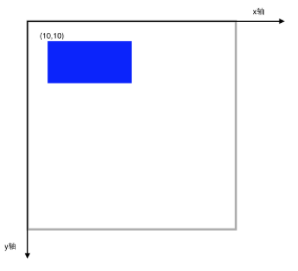
Translate
假如我们在绘制前,进行坐标系移动会是什么效果呢?
代码:
- (void)drawRect:(CGRect)rect {

    [super drawRect:rect];

    //画一个矩形

    CGContextRef context = UIGraphicsGetCurrentContext();

    //移动坐标系

    CGContextTranslateCTM(context, , );

    CGContextAddRect(context, CGRectMake(,,, ));

    CGContextSetFillColorWithColor(context,[UIColor blueColor].CGColor);

    CGContextFillPath(context);

}
效果:
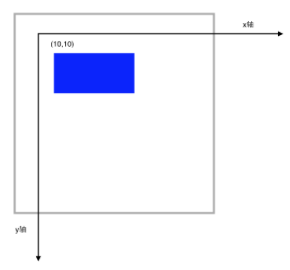
代码中 我们还是在(10,10)点绘制,但是要注意,当前坐标系的原点已经移动到(10,10)了。
Rotate
在Transform的基础上 我们再Rotate 45度,注意CGContextRotateCTM传入的参数是弧度
代码
- (void)drawRect:(CGRect)rect {

    [super drawRect:rect];

    //画一个矩形

    CGContextRef context = UIGraphicsGetCurrentContext();

    //移动坐标系

    CGContextTranslateCTM(context, , );

    //旋转坐标系

    CGContextRotateCTM(context, M_PI_4);

    CGContextAddRect(context, CGRectMake(,,, ));

    CGContextSetFillColorWithColor(context,[UIColor blueColor].CGColor);

    CGContextFillPath(context);

}
效果
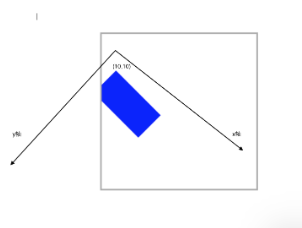
Scale
对于Scale相对来说,好理解一些,无非就是成比例放大或缩小
代码
- (void)drawRect:(CGRect)rect {

    [super drawRect:rect];

    //画一个矩形

    CGContextRef context = UIGraphicsGetCurrentContext();

    //移动坐标系

    CGContextTranslateCTM(context, , );

    //旋转坐标系

    CGContextRotateCTM(context, M_PI_4);

    //缩放坐标系

    CGContextScaleCTM(context, 0.5, 0.5);

    CGContextAddRect(context, CGRectMake(,,, ));

    CGContextSetFillColorWithColor(context,[UIColor blueColor].CGColor);

    CGContextFillPath(context);

}
效果
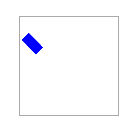
状态保存 恢复
在复杂的绘制图中,我们可能指向对一个subPath进行缩放移动旋转。这个时候,状态堆栈就起到作用了。
代码
- (void)drawRect:(CGRect)rect {

    [super drawRect:rect];

    //画一个矩形

    CGContextRef context = UIGraphicsGetCurrentContext();

    //保存状态 入栈

    CGContextSaveGState(context);

    //移动坐标系

    CGContextTranslateCTM(context, , );

    //旋转坐标系

    CGContextRotateCTM(context, M_PI_4);

    //缩放坐标系

    CGContextScaleCTM(context, 0.5, 0.5);

    CGContextAddRect(context, CGRectMake(,,, ));

    CGContextSetFillColorWithColor(context,[UIColor blueColor].CGColor);

    CGContextFillPath(context);

    //推出栈顶部状态

    CGContextRestoreGState(context);

    //这里坐标系已经回到了最开始的状态

    CGContextAddRect(context, CGRectMake(, , , ));

    CGContextFillPath(context);

}
效果

Affine Transforms
可以通过以下方法先创建放射矩阵,然后在把放射矩阵映射到CTM
CGAffineTransform
CGAffineTransformTranslate
CGAffineTransformMakeRotation
CGAffineTransformRotate
CGAffineTransformMakeScale
CGAffineTransformScale
iOS 2D绘图 (Quartz2D)之Transform(CTM,Translate,Rotate,scale)的更多相关文章
- iOS 2D绘图详解(Quartz 2D)之Transform(CTM,Translate,Rotate,Scale)
前言:Quartz默认采用设备无关的user space来进行绘图,当context(画板)建立之后,默认的坐标系原点以及方向也就确认了,可以通过CTM(current transformation ...
- iOS 2D绘图 (Quartz2D)之阴影和渐变(shadow,Gradient)
原博地址:http://blog.csdn.net/hello_hwc/article/details/49507881 Shadow Shadow(阴影) 的目的是为了使UI更有立体感,如图 sha ...
- iOS 2D绘图 (Quartz2D)之路径(stroke,fill,clip,subpath,blend)
像往常一样 这个系列的博客是跟着大神的脚步来的.按照往例 在此贴出原博客的出处: http://blog.csdn.net/hello_hwc?viewmode=list我对大神的崇拜之情 如滔滔江水 ...
- iOS 2D绘图 (Quartz2D)之路径(点,直线,虚线,曲线,圆弧,椭圆,矩形)
博客原地址:http://blog.csdn.net/hello_hwc?viewmode=list 让我们继续跟着大神的脚步前进吧.这一次 我们学习一些Quartz 2D 最基本的一些用法. 前言: ...
- iOS 2D绘图详解(Quartz 2D)之路径(点,直线,虚线,曲线,圆弧,椭圆,矩形)
前言:一个路径可以包含由一个或者多个shape以及子路径subpath,quartz提供了很多方便的shape可以直接调用.例如:point,line,Arc(圆弧),Curves(曲线),Ellip ...
- iOS 2D绘图 (Quartz 2D) 概述
本篇博客原文地址:http://blog.csdn.net/hello_hwc?viewmode=list 由于自己的项目需要,从网络上下载了许多关于绘制图形的demo,只是用在自己的项目中,很多地方 ...
- iOS 2D绘图详解(Quartz 2D)之概述
前言:最近在研究自定义控件,由于想要彻底的定制控件的视图还是要继承UIView,虽然对CALayer及其子类很熟练,但是对Quartz 2D这个强大的框架仍然概念模棱两可.于是,决定学习下,暂定7篇文 ...
- iOS 2D绘图详解(Quartz 2D)之Bitmap
什么是Bitmap? Bitmap叫做位图,每一个像素点由1-32bit组成.每个像素点包括多个颜色组件和一个Alpha组件(例如:RGBA). iOS中指出如下格式的图片 JPEG, GIF, PN ...
- iOS 2D绘图详解(Quartz 2D)之阴影和渐变(Shadow,Gradient)
前言:这个系列写道这里已经是第五篇了,本文会介绍下阴影和渐变的基础知识,以及一些基本的Demo Code展示,应该还会有两篇,介绍下Bitmap绘制以及Pattern等知识. Shadow shado ...
随机推荐
- spi 10方式编写
//第一个CS变低的时候要sclk为高电平,第一个跳变沿进行赋值 module spi(input clk,input rst_n,output reg sclk,output reg cs,outp ...
- 【精粹系列】PHP精粹
本文地址 分享提纲: 1. 概述 2. 精粹内容 2.1 语言结构 2.2 大小写问题 2.3 变量函数 2.4 常量相关函数 2.5 字符串的使用 2.6 函数 2.7 数据库操作 2.8 自动 ...
- json-lib的使用《二》
上篇文章主要集中在了使用json-lib来实现JSON字符串和java中的对象的互转上,忽视了json-lib本身的功能,json-lib中有两个类比较重要:JSONObject和JSONArray, ...
- java web学习总结(十七) -------------------过滤器
一.Filter简介 Filter也称之为过滤器,它是Servlet技术中最激动人心的技术,WEB开发人员通过Filter技术,对web服务器管理的所有web资源:例如Jsp, Servlet, 静态 ...
- 转载 【CSS进阶】伪元素的妙用--单标签之美
1.单个颜色实现按钮 hover .active 的明暗变化 请点击 转载利用伪元素单个颜色实现 hover 和 active 时的明暗变化效果 2.利用after伪类清除浮动 .clearfix:a ...
- python操作SQL
pymysql pymsql是Python中操作MySQL的模块,其使用方法和MySQLdb几乎相同 一.下载安装 pip3 install pymysql 二.操作使用 1.执行SQL #!/usr ...
- li进度条宽度和颜色按顺序显示的效果。
实际项目中li和里边的数值是动态生成的,需要控制它的宽度和颜色,效果如图: 如果能实现颜色按数值规律变化就好了,目前颜色是固定到数组中的. 实例代码如下: <!DOCTYPE html>& ...
- ASP.NET Mvc实用框架(一)Ioc、仓储模式和单元工作模式
Framework.EF 首先看一下这个类库: Extended文件夹存放的是EntityFramework.Extensions这个插件的源代码,没有别的原因,就是本人觉得这个插件挺好的,每次省的下 ...
- 在 CentOS7 上安装 Tomcat9
在 CentOS7 上安装 Tomcat9 1 通过 SecureCRT 连接到阿里云 CentOS7 服务器: 2 进入到目录 /usr/local/ 中: cd /usr/local/ 3 创建目 ...
- width 、 height 与 box-sizing : border-box ,content-box 的关系
默认 width .height的 content-box 的宽高. box-sizing 经常用来设置 width.height指定的区域 box-sizing 经常用做一些自适应的布局. 语法: ...