
iOS 2D绘图 (Quartz2D)之Transform(CTM,Translate,Rotate,scale)
前言:Quartz默认采用设备无关的user space来进行绘图,当context(画板)建立之后,默认的坐标系原点以及方向也就确认了,可以通过CTM(current transformation matrix)来修坐标系的原点。从数组图像处理的角度来说,就是对当前context state乘以一个状态矩阵。其中的矩阵运算开发者可以不了解
最初的状态和代码
#import "CustomView.h"

@implementation CustomView

- (void)drawRect:(CGRect)rect {

    [super drawRect:rect];

    //画一个矩形

    CGContextRef context = UIGraphicsGetCurrentContext();

    CGContextAddRect(context, CGRectMake(,,, ));

    CGContextSetFillColorWithColor(context,[UIColor blueColor].CGColor);

    CGContextFillPath(context);

}

-(instancetype)initWithFrame:(CGRect)frame{

    if (self = [super initWithFrame:frame]) {

        self.opaque = NO;

        self.layer.borderColor = [UIColor lightGrayColor].CGColor;

        self.layer.borderWidth = 1.0;

    }

    return self;

}

@end
在控制器里调用一下就可以了
CustomView * customView = [[CustomView alloc] initWithFrame:CGRectMake(, ,, )];

[self.view addSubview:customView];
图解
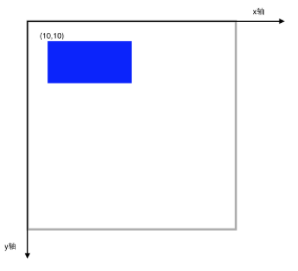
Translate
假如我们在绘制前,进行坐标系移动会是什么效果呢?
代码:
- (void)drawRect:(CGRect)rect {

    [super drawRect:rect];

    //画一个矩形

    CGContextRef context = UIGraphicsGetCurrentContext();

    //移动坐标系

    CGContextTranslateCTM(context, , );

    CGContextAddRect(context, CGRectMake(,,, ));

    CGContextSetFillColorWithColor(context,[UIColor blueColor].CGColor);

    CGContextFillPath(context);

}
效果:
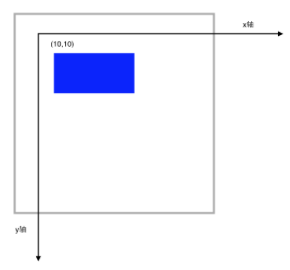
代码中 我们还是在(10,10)点绘制,但是要注意,当前坐标系的原点已经移动到(10,10)了。
Rotate
在Transform的基础上 我们再Rotate 45度,注意CGContextRotateCTM传入的参数是弧度
代码
- (void)drawRect:(CGRect)rect {

    [super drawRect:rect];

    //画一个矩形

    CGContextRef context = UIGraphicsGetCurrentContext();

    //移动坐标系

    CGContextTranslateCTM(context, , );

    //旋转坐标系

    CGContextRotateCTM(context, M_PI_4);

    CGContextAddRect(context, CGRectMake(,,, ));

    CGContextSetFillColorWithColor(context,[UIColor blueColor].CGColor);

    CGContextFillPath(context);

}
效果
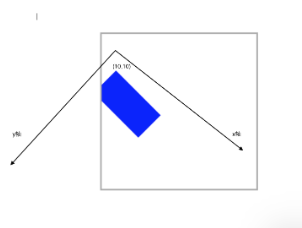
Scale
对于Scale相对来说,好理解一些,无非就是成比例放大或缩小
代码
- (void)drawRect:(CGRect)rect {

    [super drawRect:rect];

    //画一个矩形

    CGContextRef context = UIGraphicsGetCurrentContext();

    //移动坐标系

    CGContextTranslateCTM(context, , );

    //旋转坐标系

    CGContextRotateCTM(context, M_PI_4);

    //缩放坐标系

    CGContextScaleCTM(context, 0.5, 0.5);

    CGContextAddRect(context, CGRectMake(,,, ));

    CGContextSetFillColorWithColor(context,[UIColor blueColor].CGColor);

    CGContextFillPath(context);

}
效果
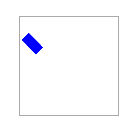
状态保存 恢复
在复杂的绘制图中,我们可能指向对一个subPath进行缩放移动旋转。这个时候,状态堆栈就起到作用了。
代码
- (void)drawRect:(CGRect)rect {

    [super drawRect:rect];

    //画一个矩形

    CGContextRef context = UIGraphicsGetCurrentContext();

    //保存状态 入栈

    CGContextSaveGState(context);

    //移动坐标系

    CGContextTranslateCTM(context, , );

    //旋转坐标系

    CGContextRotateCTM(context, M_PI_4);

    //缩放坐标系

    CGContextScaleCTM(context, 0.5, 0.5);

    CGContextAddRect(context, CGRectMake(,,, ));

    CGContextSetFillColorWithColor(context,[UIColor blueColor].CGColor);

    CGContextFillPath(context);

    //推出栈顶部状态

    CGContextRestoreGState(context);

    //这里坐标系已经回到了最开始的状态

    CGContextAddRect(context, CGRectMake(, , , ));

    CGContextFillPath(context);

}
效果

Affine Transforms
可以通过以下方法先创建放射矩阵,然后在把放射矩阵映射到CTM
CGAffineTransform
CGAffineTransformTranslate
CGAffineTransformMakeRotation
CGAffineTransformRotate
CGAffineTransformMakeScale
CGAffineTransformScale
iOS 2D绘图 (Quartz2D)之Transform(CTM,Translate,Rotate,scale)的更多相关文章
- iOS 2D绘图详解(Quartz 2D)之Transform(CTM,Translate,Rotate,Scale)
前言:Quartz默认采用设备无关的user space来进行绘图,当context(画板)建立之后,默认的坐标系原点以及方向也就确认了,可以通过CTM(current transformation ...
- iOS 2D绘图 (Quartz2D)之阴影和渐变(shadow,Gradient)
原博地址:http://blog.csdn.net/hello_hwc/article/details/49507881 Shadow Shadow(阴影) 的目的是为了使UI更有立体感,如图 sha ...
- iOS 2D绘图 (Quartz2D)之路径(stroke,fill,clip,subpath,blend)
像往常一样 这个系列的博客是跟着大神的脚步来的.按照往例 在此贴出原博客的出处: http://blog.csdn.net/hello_hwc?viewmode=list我对大神的崇拜之情 如滔滔江水 ...
- iOS 2D绘图 (Quartz2D)之路径(点,直线,虚线,曲线,圆弧,椭圆,矩形)
博客原地址:http://blog.csdn.net/hello_hwc?viewmode=list 让我们继续跟着大神的脚步前进吧.这一次 我们学习一些Quartz 2D 最基本的一些用法. 前言: ...
- iOS 2D绘图详解(Quartz 2D)之路径(点,直线,虚线,曲线,圆弧,椭圆,矩形)
前言:一个路径可以包含由一个或者多个shape以及子路径subpath,quartz提供了很多方便的shape可以直接调用.例如:point,line,Arc(圆弧),Curves(曲线),Ellip ...
- iOS 2D绘图 (Quartz 2D) 概述
本篇博客原文地址:http://blog.csdn.net/hello_hwc?viewmode=list 由于自己的项目需要,从网络上下载了许多关于绘制图形的demo,只是用在自己的项目中,很多地方 ...
- iOS 2D绘图详解(Quartz 2D)之概述
前言:最近在研究自定义控件,由于想要彻底的定制控件的视图还是要继承UIView,虽然对CALayer及其子类很熟练,但是对Quartz 2D这个强大的框架仍然概念模棱两可.于是,决定学习下,暂定7篇文 ...
- iOS 2D绘图详解(Quartz 2D)之Bitmap
什么是Bitmap? Bitmap叫做位图,每一个像素点由1-32bit组成.每个像素点包括多个颜色组件和一个Alpha组件(例如:RGBA). iOS中指出如下格式的图片 JPEG, GIF, PN ...
- iOS 2D绘图详解(Quartz 2D)之阴影和渐变(Shadow,Gradient)
前言:这个系列写道这里已经是第五篇了,本文会介绍下阴影和渐变的基础知识,以及一些基本的Demo Code展示,应该还会有两篇,介绍下Bitmap绘制以及Pattern等知识. Shadow shado ...
随机推荐
- Linux中设定umask的作用
在linux中,常常都要提示设置: umask 022 其作用如下: 功能说明:指定在建立文件时预设的权限掩码.语 法:umask [-S][权限掩码]补充说明:umask可用来设定[权限掩 ...
- patch 打补丁,和diff 生成制作补丁
一.diff 命令: diff命令就是比较两个文件的差异,然后生成差异文件,即补丁文件. 参数:diff --help获得,最常用的 1.-N --new-file 在比较时,如果没有就拿一个空的文件 ...
- tomcat 7 WARNING: A context path must either be an empty string or start with a '/' and do not end with a '/'. The path [/] does not meet these criteria and has been changed to []
tomcat 7 WARNING: A context path must either be an empty string or start with a '/' and do not end w ...
- CSS Hack解决浏览器IE部分属性兼容性问题
1.Css Hack 不同厂商的流览器或某浏览器的不同版本(如IE6-IE11,Firefox/Safari/Opera/Chrome等),对CSS的支持.解析不一样,导致在不同浏览器的环境中呈现出不 ...
- jgGrid中的editrules使用函数来进行验证
jgGrid中的editrules 用于设置一些用于可编辑列的colModel的额外属性,大多数的时候是用来在提交到服务器之前验证用户的输入合法性的.比如editrules:{edithidden:t ...
- webpack CommonsChunkPlugin详细教程
1.demo结构: 2.package.json配置: { "name": "webpack-simple-demo", "version" ...
- 原生JS:RegExp对象详解
@import url(http://i.cnblogs.com/Load.ashx?type=style&file=SyntaxHighlighter.css);@import url(/c ...
- 【高级功能】使用canvas元素(第一部分)
1. 开始使用 canvas 元素 canvas 元素非常简单,这是指它所有的功能都体现在一个JavaScript对象上,因此该元素本身只有两个属性:width 和 height. canvas 元素 ...
- 移动AD的计算机到对应的OU的powershell脚本
#//************************************************************* #//编辑人: #//编辑单位: #//编辑作用:移动计算机到对应的O ...
- elk查询语法
查询指定IP段,如123.123.123.* geo.ip=123.123.123.*