
Convolutional Neural Network-week1编程题(TensorFlow实现手势数字识别)
1. TensorFlow model
import math

import numpy as np

import h5py

import matplotlib.pyplot as plt

import scipy

from PIL import Image

from scipy import ndimage

import tensorflow as tf

from tensorflow.python.framework import ops

from cnn_utils import *

%matplotlib inline

np.random.seed(1)
导入数据
# Loading the data (signs)

X_train_orig, Y_train_orig, X_test_orig, Y_test_orig, classes = load_dataset()
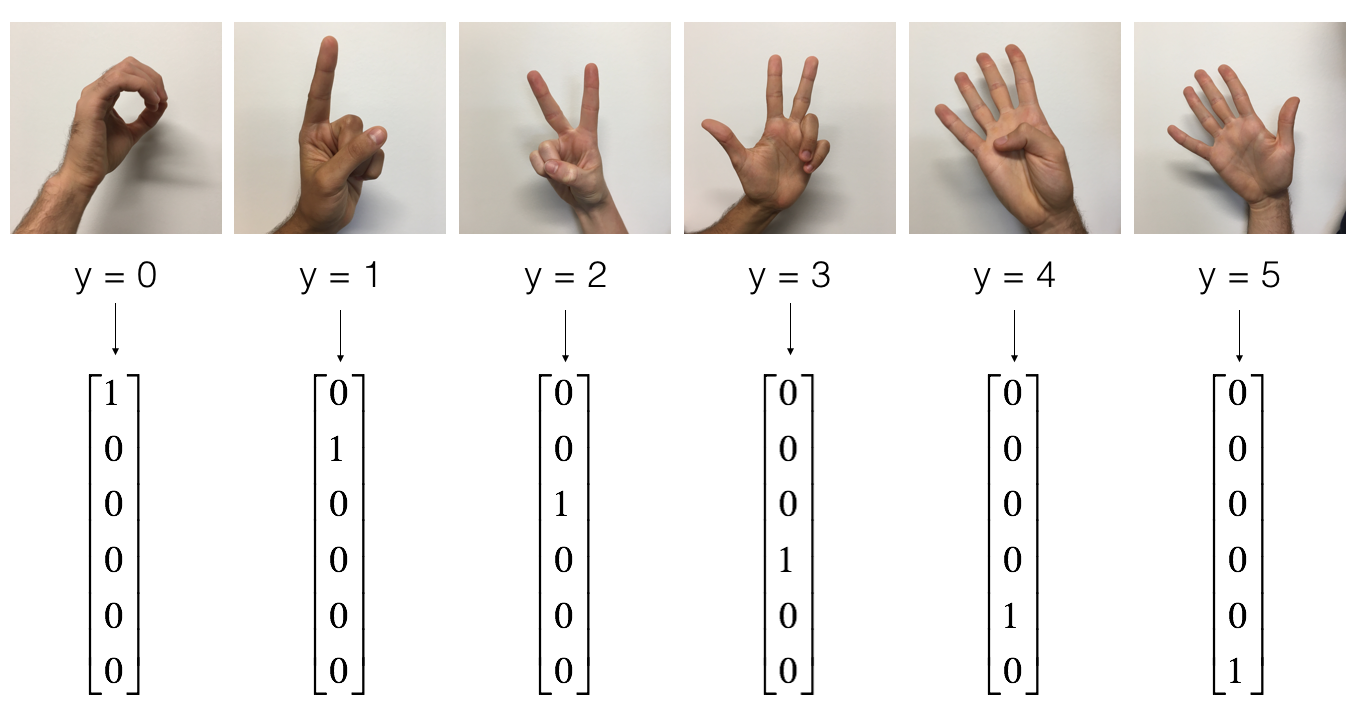
the SIGNS dataset is a collection of 6 signs representing numbers from 0 to 5.
展示数据
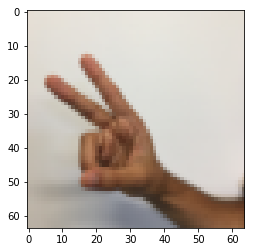
# Example of a picture

index = 6

plt.imshow(X_train_orig[index])

print ("y = " + str(np.squeeze(Y_train_orig[:, index])))
y = 2
数据的维度
X_train = X_train_orig/255.

X_test = X_test_orig/255.

Y_train = convert_to_one_hot(Y_train_orig, 6).T

Y_test = convert_to_one_hot(Y_test_orig, 6).T

print ("number of training examples = " + str(X_train.shape[0]))

print ("number of test examples = " + str(X_test.shape[0]))

print ("X_train shape: " + str(X_train.shape))

print ("Y_train shape: " + str(Y_train.shape))

print ("X_test shape: " + str(X_test.shape))

print ("Y_test shape: " + str(Y_test.shape))

conv_layers = {}
number of training examples = 1080
number of test examples = 120
X_train shape: (1080, 64, 64, 3)
Y_train shape: (1080, 6)
X_test shape: (120, 64, 64, 3)
Y_test shape: (120, 6)
1.1 Create placeholders
TensorFlow requires that you create placeholders for the input data that will be fed into the model when running the session.
Exercise: Implement the function below to create placeholders for the input image X and the output Y.
You should not define the number of training examples for the moment.
To do so, you could use "None" as the batch size, it will give you the flexibility to choose it later.
Hence X should be of dimension [None, n_H0, n_W0, n_C0] and Y should be of dimension [None, n_y]. Hint.
# GRADED FUNCTION: create_placeholders

def create_placeholders(n_H0, n_W0, n_C0, n_y):

    """

    Creates the placeholders for the tensorflow session.

    Arguments:

    n_H0 -- scalar, height of an input image

    n_W0 -- scalar, width of an input image

    n_C0 -- scalar, number of channels of the input

    n_y -- scalar, number of classes

    Returns:

    X -- placeholder for the data input, of shape [None, n_H0, n_W0, n_C0] and dtype "float"

    Y -- placeholder for the input labels, of shape [None, n_y] and dtype "float"

    """

    ### START CODE HERE ### (≈2 lines)

    X = tf.placeholder(tf.float32, shape=[None, n_H0, n_W0, n_C0])

    Y = tf.placeholder(tf.float32, shape=[None, n_y])

    ### END CODE HERE ###

    return X, Y
测试:
X, Y = create_placeholders(64, 64, 3, 6)

print ("X = " + str(X))

print ("Y = " + str(Y))
输出:
X = Tensor("Placeholder:0", shape=(?, 64, 64, 3), dtype=float32)
Y = Tensor("Placeholder_1:0", shape=(?, 6), dtype=float32)
1.2 Initialize parameters
You will initialize weights/filters \(W1\) and \(W2\) using
tf.contrib.layers.xavier_initializer(seed = 0).You don't need to worry about bias variables as you will soon see that TensorFlow functions take care of the bias.
Note also that you will only initialize the weights/filters for the conv2d functions. TensorFlow initializes the layers for the fully connected part automatically. We will talk more about that later in this assignment.
Exercise: Implement initialize_parameters(). The dimensions for each group of filters are provided below. Reminder - to initialize a parameter \(W\) of shape [1,2,3,4] in Tensorflow, use:
W = tf.get_variable("W", [1,2,3,4], initializer = ...)
# GRADED FUNCTION: initialize_parameters

def initialize_parameters():

    """

    Initializes weight parameters to build a neural network with tensorflow. The shapes are:

                        W1 : [4, 4, 3, 8]

                        W2 : [2, 2, 8, 16]

    Returns:

    parameters -- a dictionary of tensors containing W1, W2

    """

    tf.set_random_seed(1)                              # so that your "random" numbers match ours

    ### START CODE HERE ### (approx. 2 lines of code)

    # (f, f, n_C_prev, n_C)

    W1 = tf.get_variable('W1',[4, 4, 3, 8], initializer = tf.contrib.layers.xavier_initializer(seed = 0))

    W2 = tf.get_variable('W2',[2, 2, 8, 16], initializer = tf.contrib.layers.xavier_initializer(seed = 0))

    ### END CODE HERE ###

    parameters = {"W1": W1,

                  "W2": W2}

    return parameters
测试
tf.reset_default_graph()

with tf.Session() as sess_test:

    parameters = initialize_parameters()

    init = tf.global_variables_initializer()

    sess_test.run(init)

    print("W1 = " + str(parameters["W1"].eval()[1,1,1]))

    print("W2 = " + str(parameters["W2"].eval()[1,1,1]))
1.2 Forward propagation
In TensorFlow, there are built-in functions that carry out the convolution steps for you.
tf.nn.conv2d(X,W1, strides = [1,s,s,1], padding = 'SAME'): given an input \(X\) and a group of filters \(W1\), this function convolves \(W1\)'s filters on X. The third input ([1,f,f,1]) represents the strides for each dimension of the input (m, n_H_prev, n_W_prev, n_C_prev). You can read the full documentation here
tf.nn.max_pool(A, ksize = [1,f,f,1], strides = [1,s,s,1], padding = 'SAME'): given an input A, this function uses a window of size (f, f) and strides of size (s, s) to carry out max pooling over each window. You can read the full documentation here
tf.nn.relu(Z1): computes the elementwise ReLU of Z1 (which can be any shape). You can read the full documentation here.
tf.contrib.layers.flatten(P): given an input P, this function flattens each example into a 1D vector it while maintaining the batch-size. It returns a flattened tensor with shape [batch_size, k]. You can read the full documentation here.
tf.contrib.layers.fully_connected(F, num_outputs): given a the flattened input F, it returns the output computed using a fully connected layer. You can read the full documentation here.
In the last function above (tf.contrib.layers.fully_connected), the fully connected layer automatically initializes weights in the graph and keeps on training them as you train the model. Hence, you did not need to initialize those weights when initializing the parameters.
Exercise:
Implement the forward_propagation function below to build the following model: CONV2D -> RELU -> MAXPOOL -> CONV2D -> RELU -> MAXPOOL -> FLATTEN -> FULLYCONNECTED. You should use the functions above.
In detail, we will use the following parameters for all the steps:
Conv2D: stride 1, padding is "SAME"
ReLU
Max pool: Use an 8 by 8 filter size and an 8 by 8 stride, padding is "SAME"
Conv2D: stride 1, padding is "SAME"
ReLU
Max pool: Use a 4 by 4 filter size and a 4 by 4 stride, padding is "SAME"
Flatten the previous output.
FULLYCONNECTED (FC) layer: Apply a fully connected layer without an non-linear activation function. Do not call the softmax here. This will result in 6 neurons in the output layer, which then get passed later to a softmax. In TensorFlow, the softmax and cost function are lumped together into a single function, which you'll call in a different function when computing the cost.
# GRADED FUNCTION: forward_propagation

def forward_propagation(X, parameters):

    """

    Implements the forward propagation for the model:

    CONV2D -> RELU -> MAXPOOL -> CONV2D -> RELU -> MAXPOOL -> FLATTEN -> FULLYCONNECTED

    Arguments:

    X -- input dataset placeholder, of shape (input size, number of examples)

    parameters -- python dictionary containing your parameters "W1", "W2"

                  the shapes are given in initialize_parameters

    Returns:

    Z3 -- the output of the last LINEAR unit

    """

    # Retrieve the parameters from the dictionary "parameters"

    W1 = parameters['W1']

    W2 = parameters['W2']

    ### START CODE HERE ###

    # CONV2D: stride of 1, padding 'SAME'

    Z1 = tf.nn.conv2d(X, W1, strides = [1, 1, 1, 1], padding = 'SAME')

    # RELU

    A1 = tf.nn.relu(Z1)

    # MAXPOOL: window 8x8, sride 8, padding 'SAME'

    P1 = tf.nn.max_pool(A1, ksize = [1,8,8,1], strides = [1,8,8,1], padding = 'SAME')

    # CONV2D: filters W2, stride 1, padding 'SAME'

    Z2 = tf.nn.conv2d(P1,W2, strides = [1,1,1,1], padding = 'SAME')

    # RELU

    A2 = tf.nn.relu(Z2)

    # MAXPOOL: window 4x4, stride 4, padding 'SAME'

    P2 = tf.nn.max_pool(A2, ksize = [1,4,4,1], strides = [1,4,4,1], padding = 'SAME')

    # FLATTEN

    P2 = tf.contrib.layers.flatten(P2)

    # FULLY-CONNECTED without non-linear activation function (not not call softmax).

    # 6 neurons in output layer. Hint: one of the arguments should be "activation_fn=None"

    Z3 = tf.contrib.layers.fully_connected(P2, 6, activation_fn=None)

    ### END CODE HERE ###

    return Z3
测试:
tf.reset_default_graph()

with tf.Session() as sess:

    np.random.seed(1)

    X, Y = create_placeholders(64, 64, 3, 6)

    parameters = initialize_parameters()

    Z3 = forward_propagation(X, parameters)

    init = tf.global_variables_initializer()

    sess.run(init)

    a = sess.run(Z3, {X: np.random.randn(2,64,64,3), Y: np.random.randn(2,6)})

    print("Z3 = " + str(a))
1.3 Compute cost
Implement the compute cost function below. You might find these two functions helpful:
tf.nn.softmax_cross_entropy_with_logits(logits = Z3, labels = Y):
computes the softmax entropy loss. This function both computes the softmax activation function as well as the resulting loss.
You can check the full documentation here.
tf.reduce_mean: computes the mean of elements across dimensions of a tensor.
- Use this to sum the losses over all the examples to get the overall cost. You can check the full documentation here.
** Exercise**: Compute the cost below using the function above.
# GRADED FUNCTION: compute_cost

def compute_cost(Z3, Y):

    """

    Computes the cost

    Arguments:

    Z3 -- output of forward propagation (output of the last LINEAR unit), of shape (6, number of examples)

    Y -- "true" labels vector placeholder, same shape as Z3

    Returns:

    cost - Tensor of the cost function

    """

    ### START CODE HERE ### (1 line of code)

    cost = tf.nn.softmax_cross_entropy_with_logits(logits = Z3, labels = Y)

    cost = tf.reduce_mean(cost)

    ### END CODE HERE ###

    return cost
测试:
tf.reset_default_graph()

with tf.Session() as sess:

    np.random.seed(1)

    X, Y = create_placeholders(64, 64, 3, 6)

    parameters = initialize_parameters()

    Z3 = forward_propagation(X, parameters)

    cost = compute_cost(Z3, Y)

    init = tf.global_variables_initializer()

    sess.run(init)

    a = sess.run(cost, {X: np.random.randn(4,64,64,3), Y: np.random.randn(4,6)})

    print("cost = " + str(a))
cost = 2.91034
1.4 Model
Finally you will merge the helper functions you implemented above to build a model. You will train it on the SIGNS dataset.
You have implemented random_mini_batches() in the Optimization programming assignment of course 2. Remember that this function returns a list of mini-batches.
Exercise: Complete the function below.
The model below should:
- create placeholders
- initialize parameters
- forward propagate
- compute the cost
- create an optimizer
Finally you will create a session and run a for loop for num_epochs, get the mini-batches, and then for each mini-batch you will optimize the function. Hint for initializing the variables
# GRADED FUNCTION: model

def model(X_train, Y_train, X_test, Y_test, learning_rate = 0.009,

          num_epochs = 100, minibatch_size = 64, print_cost = True):

    """

    Implements a three-layer ConvNet in Tensorflow:

    CONV2D -> RELU -> MAXPOOL -> CONV2D -> RELU -> MAXPOOL -> FLATTEN -> FULLYCONNECTED

    Arguments:

    X_train -- training set, of shape (None, 64, 64, 3)

    Y_train -- test set, of shape (None, n_y = 6)

    X_test -- training set, of shape (None, 64, 64, 3)

    Y_test -- test set, of shape (None, n_y = 6)

    learning_rate -- learning rate of the optimization

    num_epochs -- number of epochs of the optimization loop

    minibatch_size -- size of a minibatch

    print_cost -- True to print the cost every 100 epochs

    Returns:

    train_accuracy -- real number, accuracy on the train set (X_train)

    test_accuracy -- real number, testing accuracy on the test set (X_test)

    parameters -- parameters learnt by the model. They can then be used to predict.

    """

    ops.reset_default_graph()                         # to be able to rerun the model without overwriting tf variables

    tf.set_random_seed(1)                             # to keep results consistent (tensorflow seed)

    seed = 3                                          # to keep results consistent (numpy seed)

    (m, n_H0, n_W0, n_C0) = X_train.shape

    n_y = Y_train.shape[1]

    costs = []                                        # To keep track of the cost

    # Create Placeholders of the correct shape

    ### START CODE HERE ### (1 line)

    X, Y = create_placeholders(n_H0, n_W0, n_C0, n_y)

    ### END CODE HERE ###

    # Initialize parameters

    ### START CODE HERE ### (1 line)

    parameters = initialize_parameters()

    ### END CODE HERE ###

    # Forward propagation: Build the forward propagation in the tensorflow graph

    ### START CODE HERE ### (1 line)

    Z3 = forward_propagation(X, parameters)

    ### END CODE HERE ###

    # Cost function: Add cost function to tensorflow graph

    ### START CODE HERE ### (1 line)

    cost = compute_cost(Z3, Y)

    ### END CODE HERE ###

    # Backpropagation: Define the tensorflow optimizer. Use an AdamOptimizer that minimizes the cost.

    ### START CODE HERE ### (1 line)

    optimizer = tf.train.AdamOptimizer(learning_rate=learning_rate).minimize(cost)

    ### END CODE HERE ###

    # Initialize all the variables globally

    init = tf.global_variables_initializer()

    # Start the session to compute the tensorflow graph

    with tf.Session() as sess:

        # Run the initialization

        sess.run(init)

        # Do the training loop

        for epoch in range(num_epochs):

            minibatch_cost = 0.

            num_minibatches = int(m / minibatch_size) # number of minibatches of size minibatch_size in the train set

            seed = seed + 1

            minibatches = random_mini_batches(X_train, Y_train, minibatch_size, seed)

            for minibatch in minibatches:

                # Select a minibatch

                (minibatch_X, minibatch_Y) = minibatch

                # IMPORTANT: The line that runs the graph on a minibatch.

                # Run the session to execute the optimizer and the cost, the feedict should contain a minibatch for (X,Y).

                ### START CODE HERE ### (1 line)

                _ , temp_cost = sess.run([optimizer, cost], feed_dict={X: minibatch_X, Y: minibatch_Y})

                ### END CODE HERE ###

                minibatch_cost += temp_cost / num_minibatches

            # Print the cost every epoch

            if print_cost == True and epoch % 5 == 0:

                print ("Cost after epoch %i: %f" % (epoch, minibatch_cost))

            if print_cost == True and epoch % 1 == 0:

                costs.append(minibatch_cost)

        # plot the cost

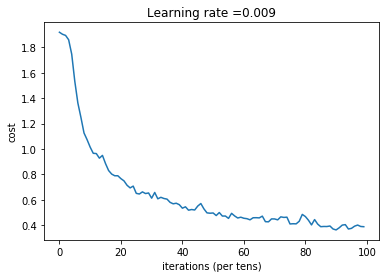
        plt.plot(np.squeeze(costs))

        plt.ylabel('cost')

        plt.xlabel('iterations (per tens)')

        plt.title("Learning rate =" + str(learning_rate))

        plt.show()

        # Calculate the correct predictions

        predict_op = tf.argmax(Z3, 1)

        correct_prediction = tf.equal(predict_op, tf.argmax(Y, 1))

        # Calculate accuracy on the test set

        accuracy = tf.reduce_mean(tf.cast(correct_prediction, "float"))

        print(accuracy)

        train_accuracy = accuracy.eval({X: X_train, Y: Y_train})

        test_accuracy = accuracy.eval({X: X_test, Y: Y_test})

        print("Train Accuracy:", train_accuracy)

        print("Test Accuracy:", test_accuracy)

        return train_accuracy, test_accuracy, parameters
测试:
_, _, parameters = model(X_train, Y_train, X_test, Y_test)
Cost after epoch 0: 1.917920
Cost after epoch 5: 1.532475
Cost after epoch 10: 1.014804
Cost after epoch 15: 0.885137
Cost after epoch 20: 0.766963
Cost after epoch 25: 0.651208
Cost after epoch 30: 0.613356
Cost after epoch 35: 0.605931
Cost after epoch 40: 0.534713
Cost after epoch 45: 0.551402
Cost after epoch 50: 0.496976
Cost after epoch 55: 0.454438
Cost after epoch 60: 0.455496
Cost after epoch 65: 0.458359
Cost after epoch 70: 0.450040
Cost after epoch 75: 0.410687
Cost after epoch 80: 0.469005
Cost after epoch 85: 0.389253
Cost after epoch 90: 0.363808
Cost after epoch 95: 0.376132
Tensor("Mean_1:0", shape=(), dtype=float32)
Train Accuracy: 0.86851853
Test Accuracy: 0.73333335
Convolutional Neural Network-week1编程题(TensorFlow实现手势数字识别)的更多相关文章
- Convolutional Neural Network in TensorFlow
翻译自Build a Convolutional Neural Network using Estimators TensorFlow的layer模块提供了一个轻松构建神经网络的高端API,它提供了创 ...
- Tensorflow - Implement for a Convolutional Neural Network on MNIST.
Coding according to TensorFlow 官方文档中文版 中文注释源于:tf.truncated_normal与tf.random_normal TF-卷积函数 tf.nn.con ...
- tensorflow MNIST Convolutional Neural Network
tensorflow MNIST Convolutional Neural Network MNIST CNN 包含的几个部分: Weight Initialization Convolution a ...
- 卷积神经网络(Convolutional Neural Network,CNN)
全连接神经网络(Fully connected neural network)处理图像最大的问题在于全连接层的参数太多.参数增多除了导致计算速度减慢,还很容易导致过拟合问题.所以需要一个更合理的神经网 ...
- ISSCC 2017论文导读 Session 14 Deep Learning Processors,A 2.9TOPS/W Deep Convolutional Neural Network
最近ISSCC2017大会刚刚举行,看了关于Deep Learning处理器的Session 14,有一些不错的东西,在这里记录一下. A 2.9TOPS/W Deep Convolutional N ...
- ISSCC 2017论文导读 Session 14 Deep Learning Processors,A 2.9TOPS/W Deep Convolutional Neural Network SOC
最近ISSCC2017大会刚刚举行,看了关于Deep Learning处理器的Session 14,有一些不错的东西,在这里记录一下. A 2.9TOPS/W Deep Convolutional N ...
- 【转载】 卷积神经网络(Convolutional Neural Network,CNN)
作者:wuliytTaotao 出处:https://www.cnblogs.com/wuliytTaotao/ 本作品采用知识共享署名-非商业性使用-相同方式共享 4.0 国际许可协议进行许可,欢迎 ...
- 论文阅读(Weilin Huang——【TIP2016】Text-Attentional Convolutional Neural Network for Scene Text Detection)
Weilin Huang--[TIP2015]Text-Attentional Convolutional Neural Network for Scene Text Detection) 目录 作者 ...
- 卷积神经网络(Convolutional Neural Network, CNN)简析
目录 1 神经网络 2 卷积神经网络 2.1 局部感知 2.2 参数共享 2.3 多卷积核 2.4 Down-pooling 2.5 多层卷积 3 ImageNet-2010网络结构 4 DeepID ...
随机推荐
- NOIP模拟39:树
他们说这题与之前树剖的一道叫染色的题类似,好像真的是这样. 就是我们考虑这样一件事,就是每一次染白都可以看作是给链上的点打一个时间戳,那么可以发现,如果相邻的两个点的时间戳不同,那么他们之间的 ...
- Python - 面向对象编程 - 三大特性之多态
前置知识 封装 详解文章:https://www.cnblogs.com/poloyy/p/15203989.html 封装根据职责将属性.方法封装到一个抽象的类中 定义类的准则-封装 继承 详解文章 ...
- ABP VNext发布遇到的坑
本地调试没有问题,发布后通过Token调用其他API时,出现返回JSON中提示:Authorization failed! Given policy has not granted. 需要修改apps ...
- 常量&&变量
一.常量:程序运行期间不变 常量使用: 二.八大基本数据类型变量: 其中,一个Byte类型数据占八个bit位,所以范围是(-2^7 ~ 2^7-1),数据最小的存储单位,是四分之一的int类型空间,所 ...
- 密码学系列之:海绵函数sponge function
目录 简介 海绵函数的结构 海绵函数的应用 简介 海绵函数sponge function是密码学中使用的一种函数,它接收一定长度的输入,然后输出一定长度的输出,中间包含了有限个内部状态. 因为海绵函数 ...
- Fastjson 1.2.22-24 反序列化漏洞分析(2)
Fastjson 1.2.22-24 反序列化漏洞分析(2) 1.环境搭建 我们以ubuntu作为被攻击的服务器,本机电脑作为攻击者 本机地址:192.168.202.1 ubuntu地址:192.1 ...
- (2)java Spring Cloud+Spring boot+mybatis企业快速开发架构之SpringCloud-Spring Cloud是什么?Spring Cloud版本介绍
Spring Cloud 是一系列框架的有序集合.它利用 Spring Boot 的开发便利性,巧妙地简化了分布式系统基础设施的开发,如服务注册.服务发现.配置中心.消息总线.负载均衡.断路器.数 ...
- 制作Windows服务和安装程序(C#版)
http://blog.sina.com.cn/s/blog_5f4ffa170100vt2b.html 1.创建服务项目: 打开VS 2005 编程环境,在C#中新建Windows服务程序 2.将安 ...
- 在Jupyter Notebook添加代码自动补全功能
在使用Jupyter notebook时发现没有代码补全功能,于是在网上查找了一些资料,最后总结了以下内容. 1 安装显示目录功能: pip install jupyter_contrib_nbext ...
- gentoo(贱兔) Linux作业系统的基本使用
emerge是gentoo linux的portage包管理器的命令行工具emerge的基础使用:emerge 软件包名:安装某软件包 emerge nanoemerge --ask 软件包名:交互式 ...