
Springboot源码分析之jar探秘
摘要:
- 利用IDEA等工具打包会出现springboot-0.0.1-SNAPSHOT.jar,springboot-0.0.1-SNAPSHOT.jar.original,前面说过它们之间的关系了,接下来我们就一探究竟,它们之间到底有什么联系。
文件对比:
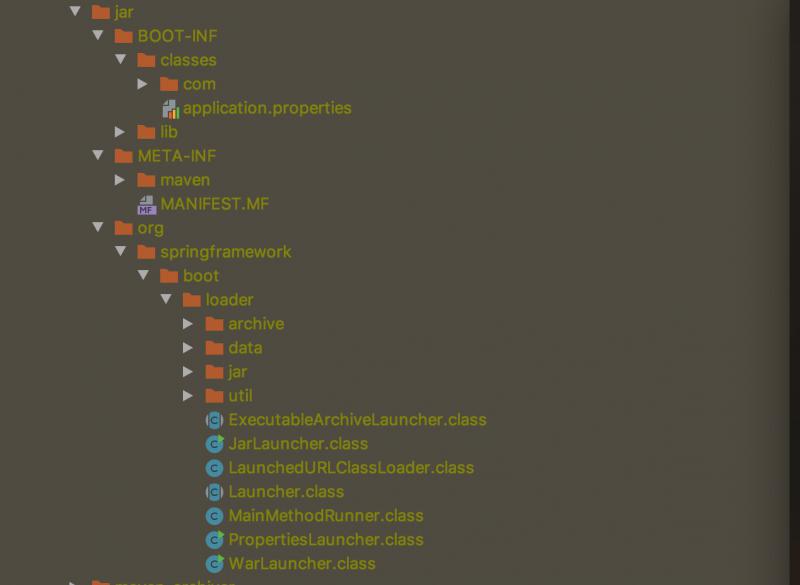
进入target目录,unzip springboot-0.0.1-SNAPSHOT.jar -d jar命令将springboot-0.0.1-SNAPSHOT.jar解压到jar目录
进入target目录,unzip springboot-0.0.1-SNAPSHOT.jar.original -d original命令将springboot-0.0.1-SNAPSHOT.jar.original解压到original目录
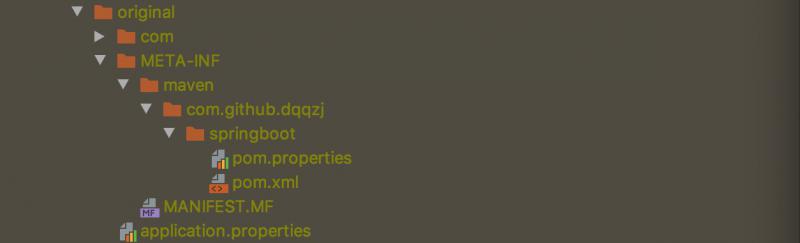
前面文章分析过springboot-0.0.1-SNAPSHOT.jar.original不能执行,将它进行repackage后生成springboot-0.0.1-SNAPSHOT.jar就成了我们的可执行fat jar,对比上面文件会发现可执行 fat jar和original jar目录不一样,最关键的地方是多了org.springframework.boot.loader这个包,这个就是我们平时java -jar springboot-0.0.1-SNAPSHOT.jar命令启动的奥妙所在。MANIFEST.MF文件里面的内容包含了很多关键的信息
Manifest-Version: 1.0

Start-Class: com.github.dqqzj.springboot.SpringbootApplication

Spring-Boot-Classes: BOOT-INF/classes/

Spring-Boot-Lib: BOOT-INF/lib/

Build-Jdk-Spec: 1.8

Spring-Boot-Version: 2.1.6.RELEASE

Created-By: Maven Archiver 3.4.0

Main-Class: org.springframework.boot.loader.JarLauncher
相信不用多说大家都能明白Main-Class: org.springframework.boot.loader.JarLauncher是我们 java -jar命令启动的入口,后续会进行分析,Start-Class: com.github.dqqzj.springboot.SpringbootApplication才是我们程序的入口主函数。
Springboot jar启动源码分析
public class JarLauncher extends ExecutableArchiveLauncher {

    static final String BOOT_INF_CLASSES = "BOOT-INF/classes/";

    static final String BOOT_INF_LIB = "BOOT-INF/lib/";

    public JarLauncher() {

    }

    protected JarLauncher(Archive archive) {

        super(archive);

    }

   /**

    * 判断是否归档文件还是文件系统的目录 可以猜想基于文件系统一样是可以启动的

    */

    protected boolean isNestedArchive(Entry entry) {

        return entry.isDirectory() ? entry.getName().equals("BOOT-INF/classes/") : entry.getName().startsWith("BOOT-INF/lib/");

    }

    public static void main(String[] args) throws Exception {

    /**

     * 进入父类初始化构造器ExecutableArchiveLauncher

     * launch方法交给Launcher执行

     */

        (new JarLauncher()).launch(args);

    }

}

public abstract class ExecutableArchiveLauncher extends Launcher {

    private final Archive archive;

    public ExecutableArchiveLauncher() {

        try {

    /**

     * 使用父类Launcher加载资源,包括BOOT-INF的classes和lib下面的所有归档文件

     */

            this.archive = this.createArchive();

        } catch (Exception var2) {

            throw new IllegalStateException(var2);

        }

    }

    protected ExecutableArchiveLauncher(Archive archive) {

        this.archive = archive;

    }

    protected final Archive getArchive() {

        return this.archive;

    }

    /**

     * 从归档文件中获取我们的应用程序主函数

     */

    protected String getMainClass() throws Exception {

        Manifest manifest = this.archive.getManifest();

        String mainClass = null;

        if (manifest != null) {

            mainClass = manifest.getMainAttributes().getValue("Start-Class");

        }

        if (mainClass == null) {

            throw new IllegalStateException("No 'Start-Class' manifest entry specified in " + this);

        } else {

            return mainClass;

        }

    }

    protected List<Archive> getClassPathArchives() throws Exception {

        List<Archive> archives = new ArrayList(this.archive.getNestedArchives(this::isNestedArchive));

        this.postProcessClassPathArchives(archives);

        return archives;

    }

    protected abstract boolean isNestedArchive(Entry entry);

    protected void postProcessClassPathArchives(List<Archive> archives) throws Exception {

    }

}

public abstract class Launcher {

    public Launcher() {

    }

    protected void launch(String[] args) throws Exception {

      /**

       *注册协议处理器,由于Springboot是 jar in jar 所以要重写jar协议才能读取归档文件

       */

        JarFile.registerUrlProtocolHandler();

        ClassLoader classLoader = this.createClassLoader(this.getClassPathArchives());

      /**

       * this.getMainClass()交给子类ExecutableArchiveLauncher实现

       */

        this.launch(args, this.getMainClass(), classLoader);

    }

    protected ClassLoader createClassLoader(List<Archive> archives) throws Exception {

        List<URL> urls = new ArrayList(archives.size());

        Iterator var3 = archives.iterator();

        while(var3.hasNext()) {

            Archive archive = (Archive)var3.next();

            urls.add(archive.getUrl());

        }

        return this.createClassLoader((URL[])urls.toArray(new URL[0]));

    }

    /**

     * 该类加载器是fat jar的关键的一处,因为传统的类加载器无法读取jar in jar模型,所以springboot进行了自己实现

     */

    protected ClassLoader createClassLoader(URL[] urls) throws Exception {

        return new LaunchedURLClassLoader(urls, this.getClass().getClassLoader());

    }

    protected void launch(String[] args, String mainClass, ClassLoader classLoader) throws Exception {

        Thread.currentThread().setContextClassLoader(classLoader);

        this.createMainMethodRunner(mainClass, args, classLoader).run();

    }

    /**

     * 创建应用程序主函数运行器

     */

    protected MainMethodRunner createMainMethodRunner(String mainClass, String[] args, ClassLoader classLoader) {

        return new MainMethodRunner(mainClass, args);

    }

    protected abstract String getMainClass() throws Exception;

    protected abstract List<Archive> getClassPathArchives() throws Exception;

   /**

		  * 得到我们的启动jar的归档文件

			*/

    protected final Archive createArchive() throws Exception {

        ProtectionDomain protectionDomain = this.getClass().getProtectionDomain();

        CodeSource codeSource = protectionDomain.getCodeSource();

        URI location = codeSource != null ? codeSource.getLocation().toURI() : null;

        String path = location != null ? location.getSchemeSpecificPart() : null;

        if (path == null) {

            throw new IllegalStateException("Unable to determine code source archive");

        } else {

            File root = new File(path);

            if (!root.exists()) {

                throw new IllegalStateException("Unable to determine code source archive from " + root);

            } else {

                return (Archive)(root.isDirectory() ? new ExplodedArchive(root) : new JarFileArchive(root));

            }

        }

    }

}

public class MainMethodRunner {

    private final String mainClassName;

    private final String[] args;

    public MainMethodRunner(String mainClass, String[] args) {

        this.mainClassName = mainClass;

        this.args = args != null ? (String[])args.clone() : null;

    }

    /**

     * 最终执行的方法,可以发现是利用的反射调用的我们应用程序的主函数

     */

    public void run() throws Exception {

        Class<?> mainClass = Thread.currentThread().getContextClassLoader().loadClass(this.mainClassName);

        Method mainMethod = mainClass.getDeclaredMethod("main", String[].class);

        mainMethod.invoke((Object)null, this.args);

    }

}
小结:
内容太多了,未涉及归档文件,协议处理器,打包war同样的可以用命令启动等,感兴趣的读者请亲自去调试一番,添加依赖
        <dependency>

            <groupId>org.springframework.boot</groupId>

            <artifactId>spring-boot-loader</artifactId>

        </dependency>
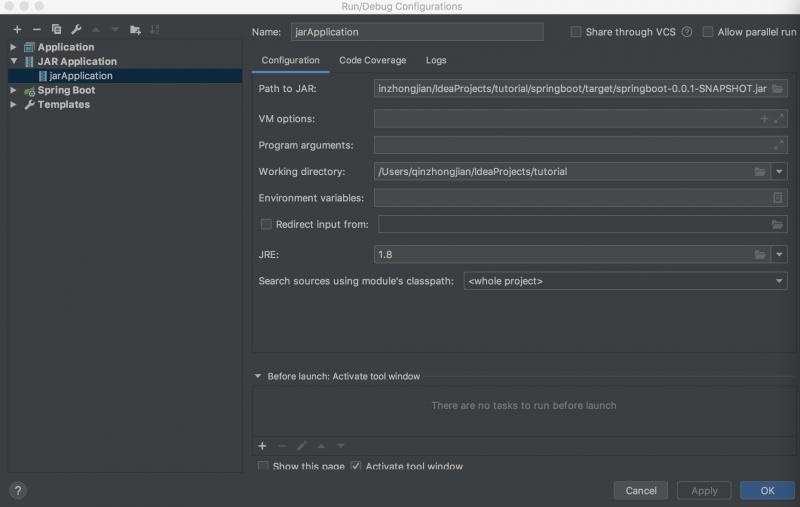
IDEA进行启动类的配置
Springboot源码分析之jar探秘的更多相关文章
- Springboot源码分析之项目结构
Springboot源码分析之项目结构 摘要: 无论是从IDEA还是其他的SDS开发工具亦或是https://start.spring.io/ 进行解压,我们都会得到同样的一个pom.xml文件 4. ...
- SpringBoot源码分析之SpringBoot的启动过程
SpringBoot源码分析之SpringBoot的启动过程 发表于 2017-04-30 | 分类于 springboot | 0 Comments | 阅读次数 SpringB ...
- 从SpringBoot源码分析 配置文件的加载原理和优先级
本文从SpringBoot源码分析 配置文件的加载原理和配置文件的优先级 跟入源码之前,先提一个问题: SpringBoot 既可以加载指定目录下的配置文件获取配置项,也可以通过启动参数( ...
- SpringBoot源码分析(二)启动原理
Springboot的jar启动方式,是通过IOC容器启动 带动了Web容器的启动 而Springboot的war启动方式,是通过Web容器(如Tomcat)的启动 带动了IOC容器相关的启动 一.不 ...
- springboot源码分析-SpringApplication
SpringApplication SpringApplication类提供了一种方便的方法来引导从main()方法启动的Spring应用程序 SpringBoot 包扫描注解源码分析 @Spring ...
- Springboot源码分析之代理三板斧
摘要: 在Spring的版本变迁过程中,注解发生了很多的变化,然而代理的设计也发生了微妙的变化,从Spring1.x的ProxyFactoryBean的硬编码岛Spring2.x的Aspectj注解, ...
- Springboot源码分析之事务拦截和管理
摘要: 在springboot的自动装配事务里面,InfrastructureAdvisorAutoProxyCreator ,TransactionInterceptor,PlatformTrans ...
- Springboot源码分析之Spring循环依赖揭秘
摘要: 若你是一个有经验的程序员,那你在开发中必然碰到过这种现象:事务不生效.或许刚说到这,有的小伙伴就会大惊失色了.Spring不是解决了循环依赖问题吗,它是怎么又会发生循环依赖的呢?,接下来就让我 ...
- 从SpringBoot源码分析 主程序配置类加载过程
1.@Import(AutoConfigurationPackages.Registrar.class) 初始SpringBoot 我们知道在SpringBoot 启动类上有一个@SpringBoot ...
随机推荐
- Centos6.5安装Redis3.2.8
1 - Redis安装 redis安装 在网上一搜一大把,但是还是在这里想要能够统一吧,所以这个安装步骤是在Centos6.5 Minimal 上安装redis3.4.8,本次安装是在root 用户下 ...
- 基于百度EasyDL定制化图像识别平台的海洋鱼类识别方法
[目的]鱼类识别对渔业资源的开发利用有着重要的意义.针对海底环境恶劣.拍摄环境亮度低.场景模糊的实际情况导致海底观测视频品质差,视频中的鱼类识别难的问题以及现有鱼类识别方法存在的鱼类标注数据集过少导致 ...
- [HAOI2006]聪明的猴子 题解
题意: 在一个热带雨林中生存着一群猴子,它们以树上的果子为生.昨天下了一场大雨,现在雨过天晴,但整个雨林的地表还是被大水淹没着,部分植物的树冠露在水面上.猴子不会游泳,但跳跃能力比较强,它们仍然可以在 ...
- 个人永久性免费-Excel催化剂功能第24波-批量发送邮件并指点不同附件不同变量
批量发送邮件功能,对高级OFFICE用户来说,第1时间会想到使用WORD的邮件合并功能.但对于需要发送附件来说,邮件合并功能就无能为力,同样还有的限制是用户电脑上没有安装OUTLOOK,同样也不能发送 ...
- linux初学者-延迟及定时任务篇
linux初学者-延迟及定时任务篇 在linux系统的学习工作中,南面会遇到需要延迟进行的任务和需要定时去完成的任务,就像手机的闹钟一样,这时候就需要用到linux系统当中的系统延迟和定时任务的设置了 ...
- Web访问原理-从输入URL到页面加载完成的过程中都发生了什么事情?
从输入URL到页面加载完成的过程中都发生了什么事情?--这是一个经典的面试题: 主要是关于计算机网络方面的知识基础,对于非科班计算机自学web开发的同学可能理解起来就很困难. StackOverFlo ...
- Spring源码分析之环境搭建
写在最前面 最近突然心血来潮,想看看源码,看看大牛都怎么码代码,膜拜下.首选肯定是spring大法,于是说干就干,从GitHub上下载spring-framework源码编译拜读. 环境搭建 安装JD ...
- HPU暑期集训积分赛1
A. Nth power of n 单点时限: 1.0 sec 内存限制: 512 MB 求 nn 的个位数. 输入格式 多组输入,处理到文件结束.每组数据输入一个 n.(1≤n≤109) 输出格式 ...
- python Django编写接口并用Jmeter测试
一.环境准备 python3.6.7 Pycharm 二.创建项目 我这里是在Django项目中新建了个APP,目录结构如下图所示: 那么怎么在已有的Django项目中新建APP并进行配置呢: 2.1 ...
- 2019杭电多校第二场hdu6602 Longest Subarray(线段树)
Longest Subarray 题目传送门 解题思路 本题求一个最大的子区间,满足区间内的数字要么出现次数大于等于k次,要么没出现过.给定区间内的数字范围是1~c. 如果r为右边界,对于一种数字x, ...