
scrapy实战3利用fiddler对手机app进行抓包爬虫图片下载(重写ImagesPipeline):
关于fiddler的使用方法参考(http://jingyan.baidu.com/article/03b2f78c7b6bb05ea237aed2.html)
本案例爬取斗鱼 app
先利用fiddler分析抓包json数据如下图
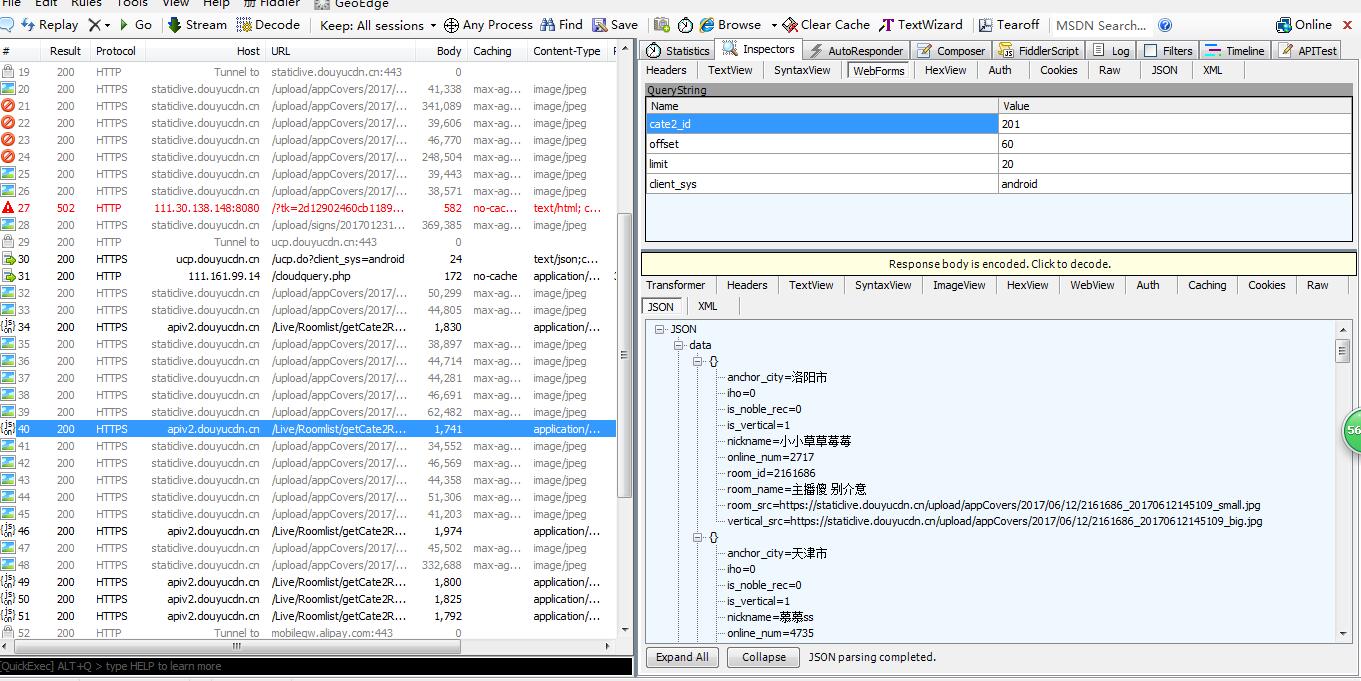
通过分析发现变化的只有offset 确定item字段 开始编写代码
items.py
 import scrapy

 class DouyuItem(scrapy.Item):

     # define the fields for your item here like:

     # name = scrapy.Field()

     # 存储照片的名字

     nickname=scrapy.Field()

     # 照片的url路径

     imagelink=scrapy.Field()

     # 照片保存在本地的路径

     imagepath=scrapy.Field()
spider/Douyu.py
 import scrapy

 import json

 from douyu.items import DouyuItem

 class DouyuSpider(scrapy.Spider):

     name = "Douyu"

     allowed_domains = ["capi.douyucdn.cn"]

     offset=0

     url="http://capi.douyucdn.cn/api/v1/getVerticalRoom?limit=20&offset="

     start_urls = [url+str(offset)]

     def parse(self, response):

         # 将从json里获取的数据转换成python对象 data段数据集合 response.text获取内容

         data=json.loads(response.text)["data"]

         for each in data:

             item=DouyuItem()

             item["nickname"]=each["nickname"]

             item["imagelink"]=each["vertical_src"]

             yield item

         self.offset+=100

         yield scrapy.Request(self.url+str(self.offset),callback=self.parse)
pipelines.py
import scrapy

from scrapy.pipelines.images import ImagesPipeline

from douyu.items import DouyuItem

from scrapy.utils.project import get_project_settings

import os

class DouyuPipeline(object):

    def process_item(self, item, spider):

        return item

class ImagesPipelines(ImagesPipeline):

    IMAGES_STORE=get_project_settings().get("IMAGES_STORE")

    def get_media_requests(self, item, info):

        # get_media_requests的作用就是为每一个图片链接生成一个Request对象,这个方法的输出将作为item_completed的输入中的results,results是一个元组,

        # 每个元组包括(success, imageinfoorfailure)。如果success=true,imageinfoor_failure是一个字典,包括url/path/checksum三个key。

        image_url=item["imagelink"]

        yield scrapy.Request(image_url)

    def item_completed(self, results, item, info):

        # 固定写法,获取图片路径,同时判断这个路径是否正确,如果正确,就放到 image_path里,ImagesPipeline源码剖析可见

        image_path=[x["path"] for ok,x in results if ok]

        print(image_path)

        os.rename(self.IMAGES_STORE+'/'+image_path[0],self.IMAGES_STORE+"/"+item["nickname"]+".jpg")

        item["imagepath"]=self.IMAGES_STORE+"/"+item["nickname"]
settints.py
 # -*- coding: utf-8 -*-

 # Scrapy settings for douyu project

 #

 # For simplicity, this file contains only settings considered important or

 # commonly used. You can find more settings consulting the documentation:

 #

 #     http://doc.scrapy.org/en/latest/topics/settings.html

 #     http://scrapy.readthedocs.org/en/latest/topics/downloader-middleware.html

 #     http://scrapy.readthedocs.org/en/latest/topics/spider-middleware.html

 import os

 BOT_NAME = 'douyu'

 SPIDER_MODULES = ['douyu.spiders']

 NEWSPIDER_MODULE = 'douyu.spiders'

 # Crawl responsibly by identifying yourself (and your website) on the user-agent

 #USER_AGENT = 'douyu (+http://www.yourdomain.com)'

 # Obey robots.txt rules

 ROBOTSTXT_OBEY = False

 # Configure maximum concurrent requests performed by Scrapy (default: 16)

 #CONCURRENT_REQUESTS = 32

 # Configure a delay for requests for the same website (default: 0)

 # See http://scrapy.readthedocs.org/en/latest/topics/settings.html#download-delay

 # See also autothrottle settings and docs

 #DOWNLOAD_DELAY = 3

 # The download delay setting will honor only one of:

 #CONCURRENT_REQUESTS_PER_DOMAIN = 16

 #CONCURRENT_REQUESTS_PER_IP = 16

 # Disable cookies (enabled by default)

 #COOKIES_ENABLED = False

 # Disable Telnet Console (enabled by default)

 #TELNETCONSOLE_ENABLED = False

 # Override the default request headers:

 DEFAULT_REQUEST_HEADERS = {

     "USER_AGENT" : 'DYZB/2.290 (iPhone; iOS 9.3.4; Scale/2.00)'

 #   'Accept': 'text/html,application/xhtml+xml,application/xml;q=0.9,*/*;q=0.8',

 #   'Accept-Language': 'en',

 }

 # Enable or disable spider middlewares

 # See http://scrapy.readthedocs.org/en/latest/topics/spider-middleware.html

 #SPIDER_MIDDLEWARES = {

 #    'douyu.middlewares.DouyuSpiderMiddleware': 543,

 #}

 # Enable or disable downloader middlewares

 # See http://scrapy.readthedocs.org/en/latest/topics/downloader-middleware.html

 #DOWNLOADER_MIDDLEWARES = {

 #    'douyu.middlewares.MyCustomDownloaderMiddleware': 543,

 #}

 # Enable or disable extensions

 # See http://scrapy.readthedocs.org/en/latest/topics/extensions.html

 #EXTENSIONS = {

 #    'scrapy.extensions.telnet.TelnetConsole': None,

 #}

 # Configure item pipelines

 # See http://scrapy.readthedocs.org/en/latest/topics/item-pipeline.html

 ITEM_PIPELINES = {

     # 'scrapy.pipelines.images.ImagesPipeline': 1,

      'douyu.pipelines.ImagesPipelines': 300,

 }

 # Images 的存放位置,之后会在pipelines.py里调用

 project_dir=os.path.abspath(os.path.dirname(__file__))

 IMAGES_STORE=os.path.join(project_dir,'images') #images可以随便取名

 # Enable and configure the AutoThrottle extension (disabled by default)

 # See http://doc.scrapy.org/en/latest/topics/autothrottle.html

 #AUTOTHROTTLE_ENABLED = True

 # The initial download delay

 #AUTOTHROTTLE_START_DELAY = 5

 # The maximum download delay to be set in case of high latencies

 #AUTOTHROTTLE_MAX_DELAY = 60

 # The average number of requests Scrapy should be sending in parallel to

 # each remote server

 #AUTOTHROTTLE_TARGET_CONCURRENCY = 1.0

 # Enable showing throttling stats for every response received:

 #AUTOTHROTTLE_DEBUG = False

 # Enable and configure HTTP caching (disabled by default)

 # See http://scrapy.readthedocs.org/en/latest/topics/downloader-middleware.html#httpcache-middleware-settings

 #HTTPCACHE_ENABLED = True

 #HTTPCACHE_EXPIRATION_SECS = 0

 #HTTPCACHE_DIR = 'httpcache'

 #HTTPCACHE_IGNORE_HTTP_CODES = []

 #HTTPCACHE_STORAGE = 'scrapy.extensions.httpcache.FilesystemCacheStorage'
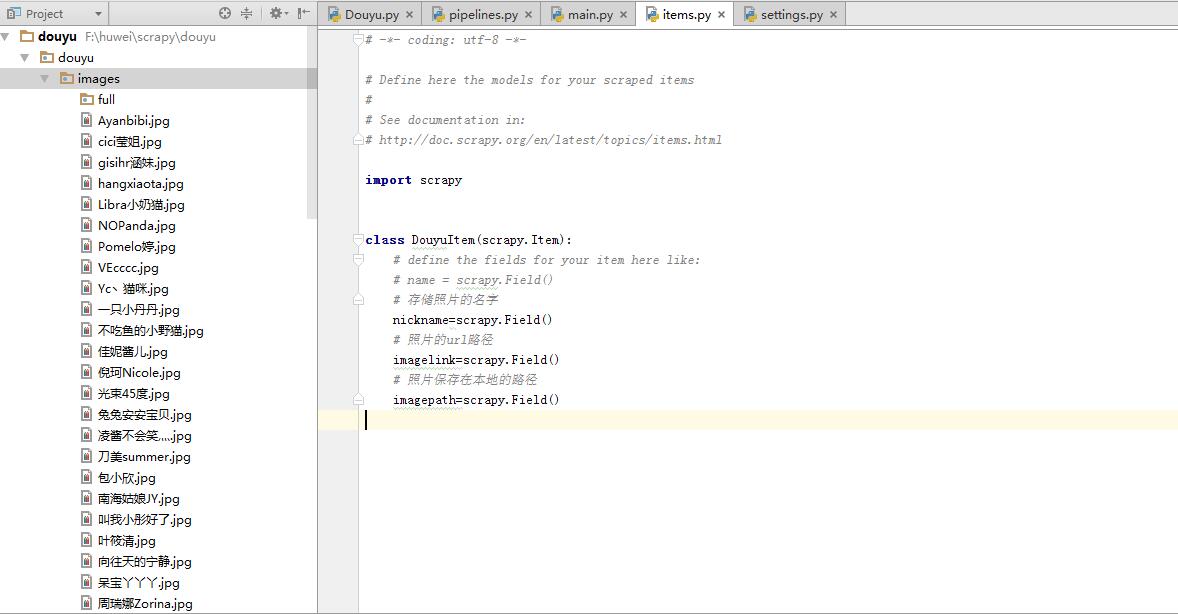
数据:
scrapy实战3利用fiddler对手机app进行抓包爬虫图片下载(重写ImagesPipeline):的更多相关文章
- 使用fiddler对手机APP进行抓包
在做手机或移动端APP的接口测试时,需要从开发人员那里获取接口文档,接口文档应该包括完整的功能接口.接口请求方式.接口请求URL.接口请求参数.接口返回参数.如果当前项目没有接口文档,则可以使用fid ...
- 应用Fiddler对手机应用来抓包
Fiddler是一款非常流行并且实用的http抓包工具,它的原理是在本机开启了一个http的代理服务器,然后它会转发所有的http请求和响应,因此,它比一般的firebug或者是chrome自带的抓包 ...
- Fiddler 4 实现手机App的抓包
Fiddler不但能截获各种浏览器发出的HTTP请求, 也可以截获各种智能手机发出的HTTP/HTTPS请求. Fiddler能捕获IOS设备发出的请求,比如IPhone, IPad, MacBook ...
- 使用电脑热点和Fiddler对Android app进行抓包
如果没有路由器,怎么对app抓包?如果你的电脑可以开热点的话也可以. 打开Fiddler,菜单栏选择Tools->Options->Connections,勾选Allow remote c ...
- 手机APP无法抓包HTTPS解决方案
问题表现:某个APP的HTTPS流量抓取不到,Fiddler报错,但可以正常抓取其它的HTTPS流量 可能原因: 1.Flutter应用,解决方案:https://www.cnblogs.com/lu ...
- 手机APP无法抓包(无法连接服务器)
一. 把证书放到系统信任区 前提:手机已root 详细步骤 计算证书名 openssl x509 -subject_hash_old -in charles-ssl-proxying-certific ...
- fiddler对安卓APP进行抓包
操作流程: 1.fiddler导出ca证书 操作路径: Tools -> Fiddler Options -> HTTPS -> Export Fiddler Root Certif ...
- Python 爬虫——抖音App视频抓包
APP抓包 前面我们了解了一些关于 Python 爬虫的知识,不过都是基于 PC 端浏览器网页中的内容进行爬取.现在手机 App 用的越来越多,而且很多也没有网页端,比如抖音就没有网页版,那么上面的视 ...
- win10笔记本用Fiddler对手机App抓包
移动客户端项目有时需要针对手机app进行抓包,这时一般有两种办法:直接下个手机抓包工具的app,在手机上抓:pc机上装上抓包工具,pc和手机连接同一个无线,在pc机上抓.第一种比较简单,但抓包工具自然 ...
随机推荐
- MySQL 执行原生sql
public class MySqlHelper { private YourContext _context; public MySqlHelper(YourContext context) { _ ...
- SyncML是一平台无关的信息同步标准协议集
SyncML (Synchronization Markup Language)是一平台无关的信息同步标准协议集.分为SyncML数据传输协议(SyncML-DS)和SyncML设备管理协议(Sync ...
- 【全面解禁!真正的Expression Blend实战开发技巧】第五章 从最常用ButtonStyle开始 - ImageButton
原文:[全面解禁!真正的Expression Blend实战开发技巧]第五章 从最常用ButtonStyle开始 - ImageButton 本章围绕ImageButton深入讨论,为什么是Image ...
- Win8Metro(C#)数字图像处理--2.6图像对比度调整
原文:Win8Metro(C#)数字图像处理--2.6图像对比度调整 2.6图像对比度调整函数 [函数名称] 图像对比度调整函数ContrastAdjustProcess(WriteableBi ...
- SQLServer 订阅过期解决方法
原文:SQLServer 订阅过期解决方法 由于分发数据库执行一个较长的事务,达到了系统预定的72小时,导致了该订阅过期,数据库分发代理已不可再启用,提示错误如下: 错误信息:已将此(这些)订阅标记为 ...
- Android零基础入门第27节:正确使用padding和margin
原文:Android零基础入门第27节:正确使用padding和margin 前面两期我们学习了LinearLayout线性布局的方向.填充模型.权重和对齐,那么本期我们来学习LinearLayout ...
- 通过SSIS的“查找”组件进行不同数据源之间数据的合并操作
原文:通过SSIS的"查找"组件进行不同数据源之间数据的合并操作 为了协助开发还原生产环境中的某些bug,需要将将生产环境的某些特定表数据导入到测试环境做测试,之前一直都是暴力地t ...
- Docker笔记02-日志平台ELK搭建
OS: Centos7 准备工作: 虚拟机中安装Centos, 搭建Docker环境 ELK简介: 略 文档地址 https://elk-docker.readthedocs.io/ 需要注意的是在B ...
- Westciv Tools主要为CSS3提供了渐变gradients、盒子阴影box-shadow、变形transform和文字描边四种在线生成效果的工具
Westciv Tools主要为CSS3提供了渐变gradients.盒子阴影box-shadow.变形transform和文字描边四种在线生成效果的工具 1.Westciv Tools 彩蛋爆料直击 ...
- win7如何开启快速启动栏
设置步骤如下: 1.右键任务栏空白区域,检查是否解除锁定任务栏,需解锁: 2.右键任务栏空白区域,点击工具栏---新建工具栏: 3.选择C:\Users\Administrator\AppData\R ...