
Navicat 软件的使用以及pymysql
Navicat 软件的使用以及pymysql
一、navicate的安装及使用
下载
直接百度搜索navicate ,如下图

连接数据库
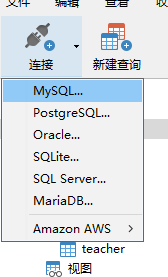
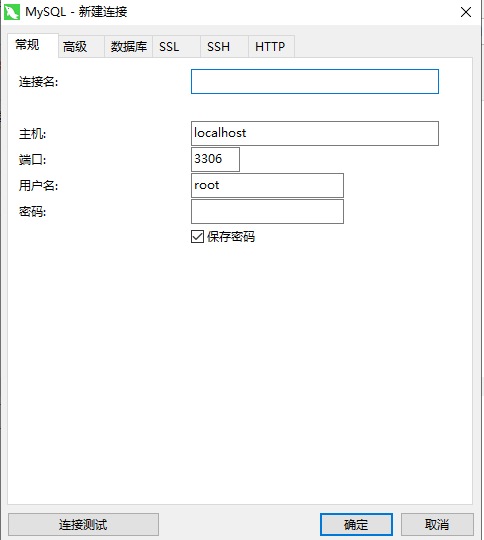
新建数据库以及新建表
选中然后鼠标右键
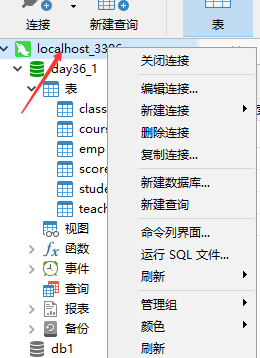
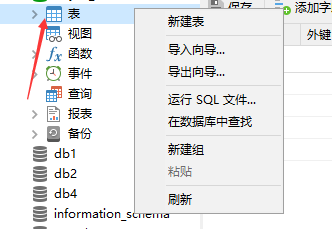
- 建模


- 利用navicate去查询练习
-- 查询所有的课程的名称以及对应的任课老师的姓名

-- SELECT

-- 	course.cname,

-- 	teacher.tname

-- FROM

-- 	course

-- 	INNER JOIN teacher ON course.teacher_id = teacher.tid;

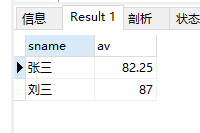
-- 查询平均成绩大于80分的同学的姓名和平均成绩

SELECT

	student.sname,

	t1.av

FROM

	student

	INNER JOIN (

SELECT

	score.student_id,

	avg( score.num ) AS av

FROM

	score

GROUP BY

	score.student_id

HAVING

	avg( score.num ) > 80

	) AS t1 ON student.sid = t1.student_id;
-- 查询没有同时报李平老师课的学生姓名

-- 1、查李平老师教授的课程id

-- 2、去score表中查询报了李平老师课程的学生id

-- 3、再去学生表中查学生的姓名

SELECT

	*

FROM

	student

WHERE

	student.sid NOT IN (

SELECT DISTINCT

	score.student_id

FROM

	score

WHERE

	score.course_id IN ( SELECT course.cid FROM course INNER JOIN teacher ON course.teacher_id = teacher.tid WHERE teacher.tname = '李平老师' )

	);

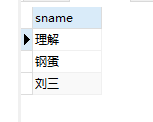
查询没有同时选修物理课程和体育课题的学生姓名(只能在两者间选一门)

-- 1、先查询物理以及体育的id号

#2、先拿到所有报了物理、体育的学生的id

SELECT

	student.sname

FROM

	student

WHERE

	student.sid IN (

SELECT

	score.student_id

FROM

	score

WHERE

	score.course_id IN ( SELECT course.cid FROM course WHERE course.cname IN ( '物理', '体育' ) )

GROUP BY

	score.student_id

HAVING

	COUNT( score.course_id ) = 1

	);
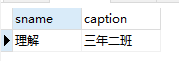
-- 查询挂科超过两门(包括两门)的学生姓名和班级

# 1、先拿所有分数小于60的

SELECT

	student.sname,

	class.caption

FROM

	student

	INNER JOIN class ON student.class_id = class.cid

WHERE

	student.sid IN ( SELECT score.student_id FROM score WHERE num < 60 GROUP BY score.student_id HAVING count( score.course_id ) >= 2 );
二、pymysql
- 初识
import pymysql

coon = pymysql.connect(

    user = 'root',

    password = '123456',

    host = '127.0.0.1',

    port = 3306,

    charset = 'utf8',

    database = 'day36_1'

)

cursor = coon.cursor(cursor=pymysql.cursors.DictCursor)  # 产生了一个游标对象

# cursor=pymysql.cursors.DictCursor 将查询出来的结果制作成字典的形式返回

sql = 'select * from student'

res = cursor.execute(sql)  # 执行sql语句

# print(res)   # execute返回的是当前SQL受影响的行数

# ret = cursor.fetchone()   # 只获取查询结果中的一条数据

# ret = cursor.fetchall()   # 获取查询结果中的所有数据

# ret = cursor.fetmany()   # 指定获取几条数据 如果数字超了也不会报错

# print(ret)

print(cursor.fetchone())

print(cursor.fetchone())

# 相对移动

cursor.scroll(2, 'relative')   # 基于指针所在的位置 往后偏移

# 绝对移动

# cursor.scroll(3, 'absolute')   # 基于起始位置 往后偏移

print(cursor.fetchall())
相对移动

绝对移动

- sql注入问题
import pymysql

coon = pymysql.connect(

    user = 'root',

    password = '123456',

    db = 'day36_1',

    host = '127.0.0.1',

    port = 3306,

    charset = 'utf8'

)

cursor = coon.cursor(cursor=pymysql.cursors.DictCursor)

#获取用户输入的用户名密码,然后去数据库中校验

username = input('username>>>:').strip()

password = input('password>>>:').strip()

sql = "select * from emp where name = '%s' and password = '%s'" %(username, password)

cursor.execute(sql)

res = cursor.fetchall()

if res:

    print(res)

else:

    print('username or password error!')

# 一、只知道用户名

# username>>>:yafeng ' -- daflakjflal

# password>>>:

# [{'id': 1, 'name': 'yafeng', 'password': '123'}]

# 二、用户名密码都不知道

# username>>>:xxx' or 1=1 -- dalfjakdaj

# password>>>:

# [{'id': 1, 'name': 'yafeng', 'password': '123'}]

'''

sql 注入问题

    利用特殊符号和注释语法,巧妙的绕过真正的sql校验

解决方案

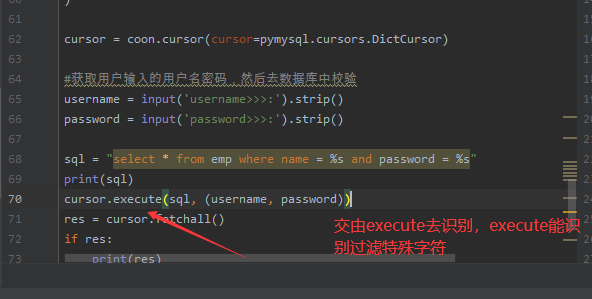
关键性的数据,不要自己手动去拼接, 而是交由execute帮你去做拼接

'''


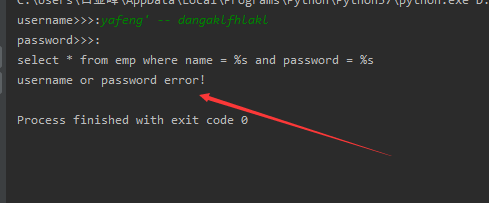
- 解决注入问题
import pymysql

coon = pymysql.connect(

    user = 'root',

    password = '123456',

    db = 'day36_1',

    host = '127.0.0.1',

    port = 3306,

    charset = 'utf8'

)

cursor = coon.cursor(cursor=pymysql.cursors.DictCursor)

#获取用户输入的用户名密码,然后去数据库中校验

username = input('username>>>:').strip()

password = input('password>>>:').strip()

sql = "select * from emp where name = %s and password = %s"

print(sql)

cursor.execute(sql, (username, password))

res = cursor.fetchall()

if res:

    print(res)

else:

    print('username or password error!')

- 数据的增删改查
import pymysql

coon = pymysql.connect(

    user = 'root',

    password = '123456',

    db = 'day36_1',

    host = '127.0.0.1',

    port = 3306,

    charset = 'utf8',

    autocommit = True   # 自动提交确认

)

cursor = coon.cursor(cursor=pymysql.cursors.DictCursor)

#

# # 获取用户输入的用户名和密码, 然后去数据库中校验

# username = input('username>>>:').strip()

# password = input('password>>>:').strip()

#

# sql = "select * from userinfo where name=%s and password=%s"

# print(sql)

'''

针对增删改的操作 执行重要程度偏高

如果真想要操作 必须有进一步确认操作(commit)

'''

# 增

# sql = "insert into emp(name,password) values('jason',456)"

# 改

# sql = "update emp set name='jason_nb' where id = 2"

# 删

sql = "delete from emp where id = 1"

res = cursor.execute(sql)

print(res)
Navicat 软件的使用以及pymysql的更多相关文章
- Navicat,SQL注入,pymysql模块
# 关键字exists(了解) 只返回布尔值 True False 返回True的时候外层查询语句执行 返回False的时候外层查询语句不再执行 select * from emp where exi ...
- MySQL聚合函数、控制流程函数(含navicat软件的介绍)
MySQL聚合函数.控制流程函数(含navicat软件的介绍) 一.navicat的引入:(第三方可视化的客户端,方便MySQL数据库的管理和维护) NavicatTM是一套快速.可靠并价格相宜的数据 ...
- navicat软件设置连接mysql数据库
navicat软件设置连接mysql数据库 适用范围及演示使用工具 适用范围:mysql全部系列(含Linux和Windows系统下的mysql) 演示使用工具:Navicat 8.0 MySQL 演 ...
- day43——多表查询、Navicat工具的使用、pymysql模块
day43 多表查询 笛卡尔积--不经常用 将两表所有的数据一一对应,生成一张大表 select * from dep,emp; # 两个表拼一起 select * from dep,emp wher ...
- navicat软件、 python操作MySQL
查询关键字之having过滤 having与where的功能是一模一样的 都是对数据进行筛选 where用在分组之前的筛选 havng用在分组之后的筛选 为了更好的区分 所以将where说成筛选 ha ...
- Navicat软件中mysql中int、bigint、smallint和tinyint的区别、布尔类型存储以及乱码问题的解决
很长时间不写博客了,最近一直在忙这学校的比赛都忘记更新博客了.新的任务又要开始了,我们要准备<2017年中国大学生计算机设计大赛软件服务外包竞赛>.这次不能再想像之前那样有PC端的功能作为 ...
- MySQL数据库学习笔记(四)----MySQL聚合函数、控制流程函数(含navicat软件的介绍)
[声明] 欢迎转载,但请保留文章原始出处→_→ 生命壹号:http://www.cnblogs.com/smyhvae/ 文章来源:http://www.cnblogs.com/smyhvae/p/4 ...
- Navicat软件安装
Navicat_10.1.7永久注册码 NAVH-WK6A-DMVK-DKW3
- python 全栈开发,Day63(子查询,MySQl创建用户和授权,可视化工具Navicat的使用,pymysql模块的使用)
昨日内容回顾 外键的变种三种关系: 多对一: 左表的多 对右表一 成立 左边的一 对右表多 不成立 foreign key(从表的id) refreences 主表的(id) 多对多 建立第三张表(f ...
随机推荐
- 模拟实现 Promise(小白版)
模拟实现 Promise(小白版) 本篇来讲讲如何模拟实现一个 Promise 的基本功能,网上这类文章已经很多,本篇笔墨会比较多,因为想用自己的理解,用白话文来讲讲 Promise 的基本规范,参考 ...
- Java 将Excel转为图片、html、XPS、XML、CSV
通过文档格式转换,可满足不同办公场合对文档操作的需求.本文将介绍转换Excel文档为其他常见文档格式的方法.通过文中的方法,可支持将Excel转换为包括PDF.图片.html.XPS.XML.CSV. ...
- Python3 函数基础1
目录 定义函数 定义函数的三种形式 空函数 有参函数 无参函数 函数的调用 函数的返回值 函数的参数 形参 (parameter) 实参(argument) 位置形参与位置实参 默认形参 关键字实参 ...
- 关于页面打印window.print()的样式问题
当我们打印网页的时候.有时候会发现.打印出来的.跟网页上看到的样式的差别有点大.这其中可能有的问题是.样式问题. 当调用打印(window.print())方法时.打印机会在网页的样式中查找 @med ...
- JSP注册登录页教程
转载请标明原文地址:http://www.cnblogs.com/zhangyukof/p/6785258.html 一.准备工作 已搭建好的SSH框架工程一个,如果没有,请参考我的上一篇文章< ...
- python将数据库修改,数据库操作同步到数据库中
*****************数据库迁移(同步)命令******************************** 1.python manage.py makemigrations 将数据库的 ...
- AQS系列(五)- CountDownLatch的使用及原理
前言 前面四节学完了AQS最难的两种重入锁应用,下面两节进入实战学习,看看JUC包中其他的工具类是如何运用AQS实现特定功能的.今天一起看一下CountDownLatch. CountDownLatc ...
- 我在知识星球上创建了免费的Web3D学习的星球~
大家好,我是YYC. 我在知识星球创建了一个免费的星球-"YYC的Web 3D旅程",欢迎大家加入- 本星球完全免费,致力于打造专业的Web 3D技术学习区,分享各种3D技术和信息 ...
- 使用littlefs-fuse在PC端调试littlefs文件系统
背景 littlefs是arm面向嵌入式设备推出的一款掉电安全的小型文件系统,具有抗掉电,动态磨损均衡,RAM/ROM需求少等特点,具体介绍可见 https://github.com/ARMmbed/ ...
- 简单实现vue列表点击某个高亮显示
比如ul下有4个li元素. 给每个li绑定点击事件@click="select_li(index),然后这个点击时间会将一个全局变量 selectLi 赋值为 index 的值. 然后在每个 ...