
.NET Core 学习笔记之 WebSocketsSample
1. 服务端
代码如下:
Program:
using Microsoft.AspNetCore;

using Microsoft.AspNetCore.Hosting;

namespace WebSocketsServer

{

    public class Program

    {

        public static void Main(string[] args)

        {

            BuildWebHost(args).Run();

        }

        public static IWebHost BuildWebHost(string[] args) =>

            WebHost.CreateDefaultBuilder(args)

                .UseStartup<Startup>()

                .Build();

    }

}
Startup:
using Microsoft.AspNetCore.Builder;

using Microsoft.AspNetCore.Hosting;

using Microsoft.AspNetCore.Http;

using Microsoft.Extensions.DependencyInjection;

using Microsoft.Extensions.Logging;

using System;

using System.Net.WebSockets;

using System.Text;

using System.Threading;

using System.Threading.Tasks;

namespace WebSocketsServer

{

    public class Startup

    {

        // This method gets called by the runtime. Use this method to add services to the container.

        // For more information on how to configure your application, visit https://go.microsoft.com/fwlink/?LinkID=398940

        public void ConfigureServices(IServiceCollection services)

        {

        }

        // This method gets called by the runtime. Use this method to configure the HTTP request pipeline.

        public void Configure(IApplicationBuilder app, IHostingEnvironment env, ILoggerFactory loggerFactory)

        {

            if (env.IsDevelopment())

            {

                app.UseDeveloperExceptionPage();

            }

            // configure keep alive interval, receive buffer size

            app.UseWebSockets();

            app.Map("/samplesockets", app2 =>

            {

                // middleware to handle websocket request

                app2.Use(async (context, next) =>

                {

                    if (context.WebSockets.IsWebSocketRequest)

                    {

                        var webSocket = await context.WebSockets.AcceptWebSocketAsync();

                        await SendMessagesAsync(context, webSocket, loggerFactory.CreateLogger("SendMessages"));

                    }

                    else

                    {

                        await next();

                    }

                });

            });

            app.Run(async (context) =>

            {

                await context.Response.WriteAsync("Web Sockets sample");

            });

        }

        private async Task SendMessagesAsync(HttpContext context, WebSocket webSocket, ILogger logger)

        {

            var buffer = new byte[];

            WebSocketReceiveResult result = await webSocket.ReceiveAsync(new ArraySegment<byte>(buffer), CancellationToken.None);

            while (!result.CloseStatus.HasValue)

            {

                if (result.MessageType == WebSocketMessageType.Text)

                {

                    string content = Encoding.UTF8.GetString(buffer, , result.Count);

                    if (content.StartsWith("REQUESTMESSAGES:"))

                    {

                        string message = content.Substring("REQUESTMESSAGES:".Length);

                        for (int i = ; i < ; i++)

                        {

                            string messageToSend = $"{message} - {i}";

                            if (i == )

                            {

                                messageToSend += ";EOS"; // send end of sequence to not let the client wait for another message

                            }

                            byte[] sendBuffer = Encoding.UTF8.GetBytes(messageToSend);

                            await webSocket.SendAsync(new ArraySegment<byte>(sendBuffer), WebSocketMessageType.Text, endOfMessage: true, CancellationToken.None);

                            logger.LogDebug("sent message {0}", messageToSend);

                            await Task.Delay();

                        }

                    }

                    if (content.Equals("SERVERCLOSE"))

                    {

                        await webSocket.CloseAsync(WebSocketCloseStatus.NormalClosure, "Bye for now", CancellationToken.None);

                        logger.LogDebug("client sent close request, socket closing");

                        return;

                    }

                    else if (content.Equals("SERVERABORT"))

                    {

                        context.Abort();

                    }

                }

                result = await webSocket.ReceiveAsync(buffer, CancellationToken.None);

            }

        }

    }

}
launchSettings.json
{

  "iisSettings": {

    "windowsAuthentication": false,

    "anonymousAuthentication": true,

    "iisExpress": {

      "applicationUrl": "http://localhost:58167/",

      "sslPort":

    }

  },

  "profiles": {

    "IIS Express": {

      "commandName": "IISExpress",

      "launchBrowser": true,

      "environmentVariables": {

        "ASPNETCORE_ENVIRONMENT": "Development"

      }

    },

    "WebSocketsServer": {

      "commandName": "Project",

      "launchBrowser": true,

      "environmentVariables": {

        "ASPNETCORE_ENVIRONMENT": "Development"

      },

      "applicationUrl": "http://localhost:58168/"

    }

  }

}
2. 客户端
Program.cs
代码如下:
using System;

using System.Net.WebSockets;

using System.Text;

using System.Threading;

using System.Threading.Tasks;

namespace WebSocketClient

{

    class Program

    {

        static async Task Main()

        {

            Console.WriteLine("Client - wait for server");

            Console.ReadLine();

            await InitiateWebSocketCommunication("ws://localhost:58167/samplesockets");

            //"ws://localhost:6295/samplesockets"

            //http://localhost:58167/

            Console.WriteLine("Program end");

            Console.ReadLine();

        }

        static async Task InitiateWebSocketCommunication(string address)

        {

            try

            {

                var webSocket = new ClientWebSocket();

                await webSocket.ConnectAsync(new Uri(address), CancellationToken.None);

                await SendAndReceiveAsync(webSocket, "A");

                await SendAndReceiveAsync(webSocket, "B");

                await webSocket.SendAsync(new ArraySegment<byte>(Encoding.UTF8.GetBytes("SERVERCLOSE")),

                    WebSocketMessageType.Text,

                    endOfMessage: true,

                    CancellationToken.None);

                var buffer = new byte[];

                var result = await webSocket.ReceiveAsync(new ArraySegment<byte>(buffer),

                    CancellationToken.None);

                Console.WriteLine($"received for close: " +

                    $"{result.CloseStatus} " +

                    $"{result.CloseStatusDescription} " +

                    $"{Encoding.UTF8.GetString(buffer, 0, result.Count)}");

                await webSocket.CloseAsync(WebSocketCloseStatus.NormalClosure,

                    "Bye",

                    CancellationToken.None);

            }

            catch (Exception ex)

            {

                Console.WriteLine(ex.Message);

            }

        }

        static async Task SendAndReceiveAsync(WebSocket webSocket, string term)

        {

            byte[] data = Encoding.UTF8.GetBytes($"REQUESTMESSAGES:{term}");

            var buffer = new byte[];

            await webSocket.SendAsync(new ArraySegment<byte>(data),

                WebSocketMessageType.Text,

                endOfMessage: true,

                CancellationToken.None);

            WebSocketReceiveResult result;

            bool sequenceEnd = false;

            do

            {

                result = await webSocket.ReceiveAsync(new ArraySegment<byte>(buffer),

                    CancellationToken.None);

                string dataReceived = Encoding.UTF8.GetString(buffer, , result.Count);

                Console.WriteLine($"received {dataReceived}");

                if (dataReceived.Contains("EOS"))

                {

                    sequenceEnd = true;

                }

            } while (!(result?.CloseStatus.HasValue ?? false) && !sequenceEnd);

        }

    }

}
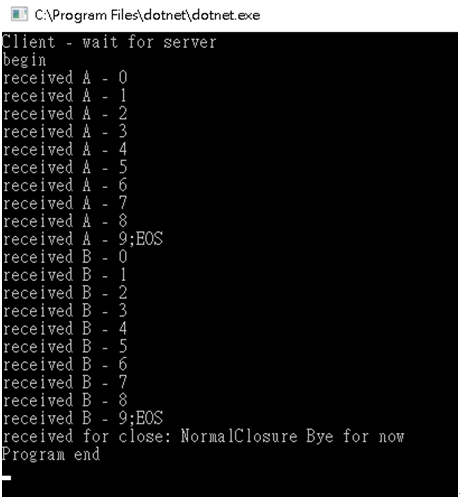
运行截图
谢谢浏览!
.NET Core 学习笔记之 WebSocketsSample的更多相关文章
- .NET CORE学习笔记系列(2)——依赖注入[7]: .NET Core DI框架[服务注册]
原文https://www.cnblogs.com/artech/p/net-core-di-07.html 包含服务注册信息的IServiceCollection对象最终被用来创建作为DI容器的IS ...
- .NET CORE学习笔记系列(2)——依赖注入[6]: .NET Core DI框架[编程体验]
原文https://www.cnblogs.com/artech/p/net-core-di-06.html 毫不夸张地说,整个ASP.NET Core框架是建立在一个依赖注入框架之上的,它在应用启动 ...
- .NET CORE学习笔记系列(2)——依赖注入[5]: 创建一个简易版的DI框架[下篇]
为了让读者朋友们能够对.NET Core DI框架的实现原理具有一个深刻而认识,我们采用与之类似的设计构架了一个名为Cat的DI框架.在上篇中我们介绍了Cat的基本编程模式,接下来我们就来聊聊Cat的 ...
- .NET CORE学习笔记系列(2)——依赖注入[4]: 创建一个简易版的DI框架[上篇]
原文https://www.cnblogs.com/artech/p/net-core-di-04.html 本系列文章旨在剖析.NET Core的依赖注入框架的实现原理,到目前为止我们通过三篇文章从 ...
- .NET CORE学习笔记系列(2)——依赖注入【3】依赖注入模式
原文:https://www.cnblogs.com/artech/p/net-core-di-03.html IoC主要体现了这样一种设计思想:通过将一组通用流程的控制权从应用转移到框架中以实现对流 ...
- .NET CORE学习笔记系列(2)——依赖注入【2】基于IoC的设计模式
原文:https://www.cnblogs.com/artech/p/net-core-di-02.html 正如我们在<控制反转>提到过的,很多人将IoC理解为一种“面向对象的设计模式 ...
- .NET CORE学习笔记系列(2)——依赖注入【1】控制反转IOC
原文:https://www.cnblogs.com/artech/p/net-core-di-01.html 一.流程控制的反转 IoC的全名Inverse of Control,翻译成中文就是“控 ...
- .NET Core学习笔记(7)——Exception最佳实践
1.为什么不要给每个方法都写try catch 为每个方法都编写try catch是错误的做法,理由如下: a.重复嵌套的try catch是无用的,多余的. 这一点非常容易理解,下面的示例代码中,O ...
- .net core学习笔记,组件篇:服务的注册与发现(Consul)初篇
1.什么是服务注册中心? 在学习服务注册与发现时,我们要先搞明白到底什么是服务注册与发现. 在这里我举一个生活中非常普遍的例子——网购来简单说明,网购在我们日常生活中已经是非常普遍了,其实网购中的(商 ...
随机推荐
- java高并发系列 - 第10天:线程安全和synchronized关键字
这是并发系列第10篇文章. 什么是线程安全? 当多个线程去访问同一个类(对象或方法)的时候,该类都能表现出正常的行为(与自己预想的结果一致),那我们就可以所这个类是线程安全的. 看一段代码: pack ...
- C# System.Timers Demo
static void Main(string[] args) { SystemTimersDemo(); Console.ReadLine(); } static void SystemTimers ...
- 练手WPF(一)——模拟时钟与数字时钟的制作(中)
今天接着制作数字时钟 数字时钟主要用到Path控件,主要用于定义数字笔划的形状. (1)添加一个DigitLine类 数字时钟的数字8由7笔组成,看如下定义的字段字符串数组PathDatas,每个st ...
- 【随笔】CLR:向头对象(Object Header)迈进一大步!!!
前言 在我之前一篇随笔里(戳我),我们知道,一个引用类型的对象,包含了2个额外的开销,一个是头对象(object header),一个是MT.我们接下来看看头对象到底有多神秘... Object He ...
- Swagger UI in AspNetCore WebAPI
Swagger其实包含了三个部分,分别是Swagger Editor文档接口编辑器,根据接口文档生成code的Swagger Codegen,以及生成在线文档的Swagger UI.在AspNetCo ...
- linux权限管理-基本权限
目录 linux权限管理-基本权限 权限修改命令chmod linux权限管理-基本权限 权限 针对某些文件和进程,对用户进行限制 权限与用户的关系 rwx rwx r-x User Group Ot ...
- ORACLE ORA-1652的解决方法
原创 Oracle 作者:wzq609 时间:2015-02-04 22:11:07 17183 0 前言:在检查数据库的alert日志,发现数据库报了ORA-1652: unable to exte ...
- selenium python 脚本不支持中文问题
在 python shell 中执行以下脚本: ...... dr.find_element_by_xpath("//a[test()='查看']") ...... 点击 Run ...
- 02-webpack的基本配置-运行webpack
1安装webPack的方式 第一次全局安装 npm i webpack -g 第一次安装了之后以后就不需要在安装了 在项目根录中运行 npm i webpack --save-dev 安装到项目依赖中 ...
- SpringCloud学习笔记(六、SpringCloud Netflix Feign)
目录: feign简介 feign应用 feign简介: feign是一款Netflix开源的声明式.模板化的http客户端,它可以更加便捷.优雅的调用http api:SpringCloud对Net ...