
IDEA:No SLF4J providers were found.
如果您是用IDEA 的 maven 写的
将slf4j的导入包 更改 为下列代码
         <dependency>

            <groupId>org.slf4j</groupId>

            <artifactId>slf4j-api</artifactId>

            <version>1.8.0-beta2</version>

        </dependency>

        <dependency>

            <groupId>org.slf4j</groupId>

            <artifactId>slf4j-log4j12</artifactId>

            <version>1.8.0-beta2</version>

            <scope>test</scope>

        </dependency>
原因如下:
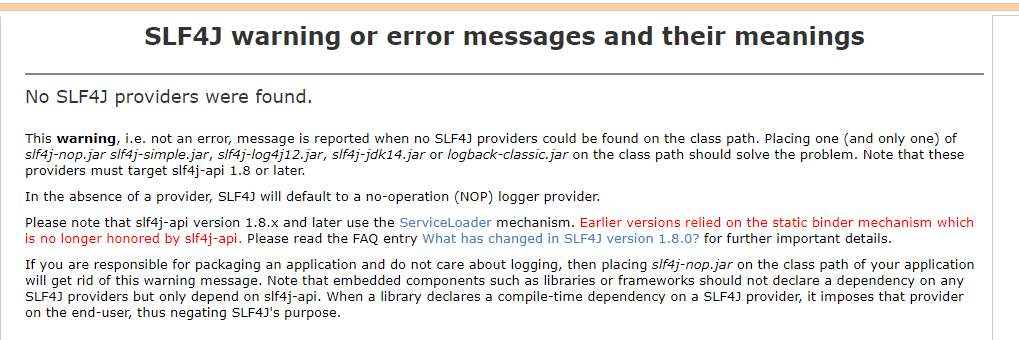
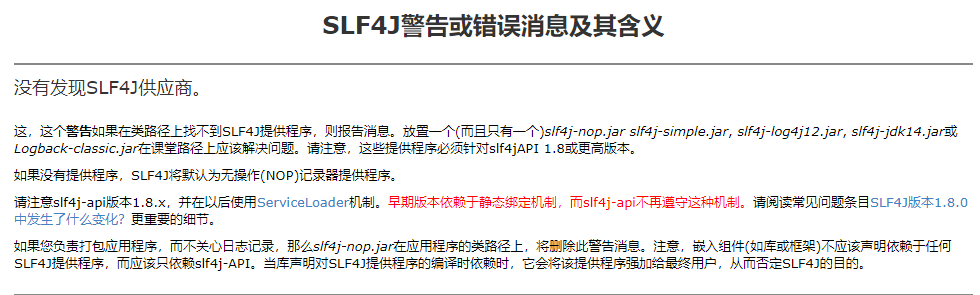
如果图片未加载成功,请看官方回答
No SLF4J providers were found.

This warning, i.e. not an error, message is reported when no SLF4J providers could be found on the class path. Placing one (and only one) of slf4j-nop.jar slf4j-simple.jar, slf4j-log4j12.jar, slf4j-jdk14.jar or logback-classic.jar on the class path should solve the problem. Note that these providers must target slf4j-api 1.8 or later.

In the absence of a provider, SLF4J will default to a no-operation (NOP) logger provider.

Please note that slf4j-api version 1.8.x and later use the ServiceLoader mechanism. Earlier versions relied on the static binder mechanism which is no longer honored by slf4j-api. Please read the FAQ entry What has changed in SLF4J version 1.8.0? for further important details.

If you are responsible for packaging an application and do not care about logging, then placing slf4j-nop.jar on the class path of your application will get rid of this warning message. Note that embedded components such as libraries or frameworks should not declare a dependency on any SLF4J providers but only depend on slf4j-api. When a library declares a compile-time dependency on a SLF4J provider, it imposes that provider on the end-user, thus negating SLF4J's purpose.
IDEA:No SLF4J providers were found.的更多相关文章
- SLF4J 报错解决:No SLF4J providers were found
1.解决SLF4J报错 我们在自己的项目中使用了SLF4J,或者引入了某开源项目时,他的项目中用了SLF4J,运行时会报如下的错误: SLF4J: Failed to load class " ...
- SLF4J 的几种实际应用模式--之三:JCL-Over-SLF4J+SLF4J
我们前面已经讲过了 SLF4J 的两种用法:SLF4J+Log4J 和 SLF4J+Logback,那是在比较理想的情况下,所用组件只使用了 SLF4J 这一种统一日志框架的时候.可是 JCL 一直 ...
- Error:【SLF4J: Class path contains multiple SLF4J bindings.】
ylbtech-Error:[SLF4J: Class path contains multiple SLF4J bindings.] 1.返回顶部 1. SLF4J: Class path cont ...
- logback:用slf4j+logback实现多功能日志解决方案
slf4j是原来log4j的作者写的一个新的日志组件,意思是简单日志门面接口,可以跟其他日志组件配合使用,常用的配合是slf4j+logback,无论从功能上还是从性能上都较之log4j有了很大的提升 ...
- 常见java日志系统的搭配详解:关于slf4j log4j log4j2 logback jul jcl commons-logging jdk-logging
先看一张图: 是不是有点晕, 晕就对了.这个仅仅是 slf4j 的情况,实际上, 我们不仅要接触到 slf4j ,有时候还会接触其他的日志系统.且看下文分解. 1 直接使用各个日志系统 1.1 直接使 ...
- Angular:ViewProviders和Providers的区别
在Angular中使用依赖注入(DI)的时候,我们一般会使用providers.其实要做同样的事我们还有另外一个选择:viewProviders. viewProviders允许我们定义只对组件的vi ...
- POJ 3911:Internet Service Providers
Internet Service Providers Time Limit: 2MS Memory Limit: 65536KB 64bit IO Format: %I64d & %I ...
- 转:java日志组件介绍(common-logging,log4j,slf4j,logback )
原网址:http://www.blogjava.net/daiyongzhi/archive/2014/04/13/412364.html common-logging common-logging是 ...
- Spring源码学习:第2步--使用SLF4j+Log4j日志框架替换掉其自身的commons-logging日志框架
正如Spring官方文档所述,其底层的实现选择了commons-logging作为日志框架.这一"失足"性的选择,竟连Spring自身都抱怨.但是,谁叫Spring如此优秀呢,即使 ...
随机推荐
- Ubuntu --- lamp环境下安装php扩展和开启apache重写
安装教程参考:http://www.laozuo.org/8303.html 1.安装php扩展(比如安装mbstring) 先搜索相关的包 apt-cache search php7 再安装 apt ...
- vue结合Ant Design实现后台系统的权限分配(支持无限子级嵌套)
最近公司的业务需要,要做一个后台管理系统的管理系统类似于这样子 功能需求如下: 左边是权限菜单,右边对应的是具体权限. 1.父级权限菜单选中,父级权限菜单的权限包括其中所有子级权限菜单的权限也要选中, ...
- SQL Server 2012链接服务器
第一步,在服务器对象,链接服务器那里新建链接服务器:输入要链接服务器的IP地址. 第二步,安全性输入连接数据的用户名和密码. 第三步,验证是不可以打开链接服务器库的表名,视图等数据. 第四步,如果要查 ...
- 使用回调的方式实现中间件-laravel
$app = function ($request) { echo $request . "\n"; return "项目运行中....."; }; // 现在 ...
- Fire! UVA - 11624 (两步bfs)
题目链接 题意 人要从迷宫走出去,火会向四个方向同时扩散 分析 两步bfs,先出火到达各地时的时间(设初始时间为0,人每走一步为1s,在着一步内火可以向四周可触及的方向同时扩散),然后在bfs人,人能 ...
- Cisco packet tracer下dhcp的配置的vlan的应用
话不多说,先上拓扑图. pc0和pc1分别接在三层交换机的F0/1.F0/2接口,ser接在F0/24接口,用ser用作dhcp的服务器. 0x01:配置server0 先配置server的IP地址. ...
- CentOS7搭建LNMP环境
以前写的过时了,重新发一篇新的. 安装PHP 下载官网:https://www.php.net/downloads.php 为了方便,我存了现成的 百度网盘:https://pan.baidu.com ...
- java网络爬虫,乱码问题终于完美解决
第一次写爬虫,被乱码问题困扰两天,试了很多方法都不可以,今天随便一试,居然好了. 在获取网页时创建了一个缓冲字节输入流,问题就在这个流上,添加标红代码即可 BufferedReader in = nu ...
- Dom4J的基本使用
初始化数据 <?xml version="1.0" encoding="UTF-8"?> <RESULT> <VALUE> ...
- HashMap源码分析(二):看完彻底了解HashMap
上文讲到HashMap的增加方法,现在继续 上文链接 HashMap在上一篇源码分析的文章中,如果使用put的时候如果元素数量超过threshold就会调用resize进行扩容 1.扩容机制 想要了解 ...