
SSM 轻量级框架构建:图书管理系统
一、接业务,作分析
1、大致业务要求
1.1 使用 SSM( Spring MVC + Spring + MyBatis )实现图书信息管理系统, MySQL5.5 作为后台数据库,该系统包括查询图书信息功能和增加图书信息功能
1.2 查询页面效果图
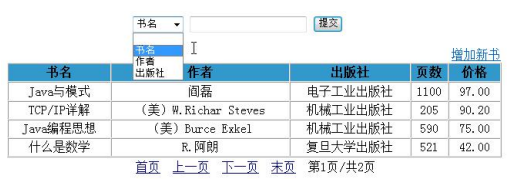
1.3 添加新信息页面效果图
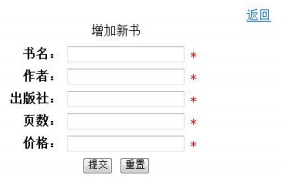
2、查询页面要求
2.1 打开图书信息管理系统首页,分页显示所有图书信息,图书信息按添加时间降序。提供查询表单和“增加新书”超链接
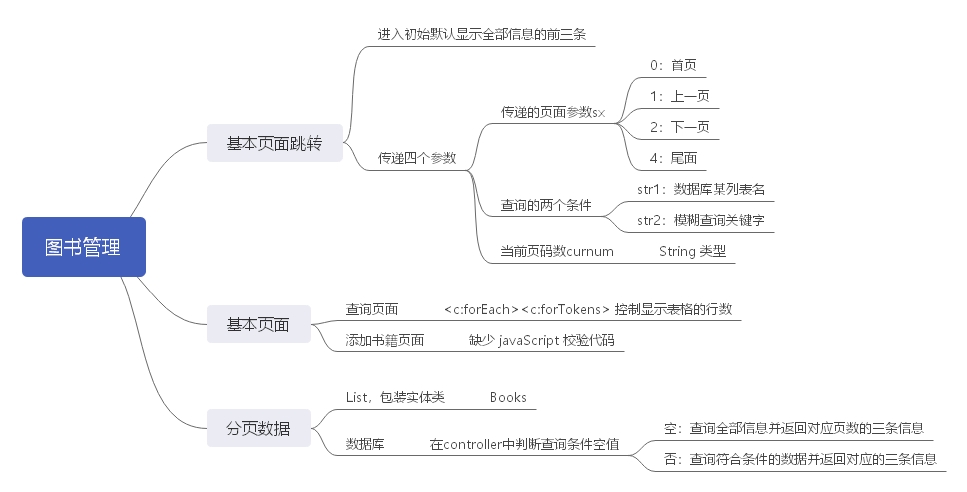
分析:在 controller 的的初始页面里便要给出 List 结果集。分面即是显示从第 N 条至 第 N 每条中的四条数据。降序是 order by 加个 desc
2.2 提供分别按书名、作者、出版社查询图书的动态条件查询的功能,支持模糊查询。查询结果按添加时间降序,分页展示
分析:两个输入框只有二种情况,即是全部查询和模糊查询两种情况。若仅出现单个查询条件,则默认查询全部信息
3、添加新图书页面要求
3.1 点击“增加新书”超链接跳转到增加新书页面。点击“返回”超链接返回图书信息管理系统首页。输入图书信息,使用 JavaScript 验证所有项不能为空,页数必须是整数,价格必须是数字类型
分析:页面的跳转因无特别要求,则使用 <a><\a> 标签即可,JavaScript 则要先获取所有输入框中的对象,再取值判断是否合法
3.2 输入增加新书每项信息后点击“提交”。添加日期取系统时间,保存成功或者失败都跳转到图书信息管理系统首页,列表下方显示“保存成功!”或“保存失败!”
分析:添加后直接跳转到主页面,默认显示所有信息,并且给出添加结果的反馈信息
二、架构设计思路
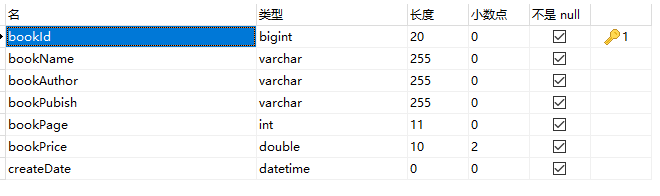
三、数据库设计
四、项目框架搭建
4.1 jsp 页面实现
4.1.1 查询信息的主页面
<div align="center">
共 ${pagecount} 页
|当前第 ${curnum } 页
|<a href="index2?curnum=${curnum }&str1=${str1}&str2=${str2}&sx=0">首页</a>
|<a href="index2?curnum=${curnum }&str1=${str1}&str2=${str2}&sx=1">上一页</a>
|<a href="index2?curnum=${curnum }&str1=${str1}&str2=${str2}&sx=2">下一页</a>
|<a href="index2?curnum=${curnum }&str1=${str1}&str2=${str2}&sx=4">尾页</a>
</div>
查询信息主页面分页代码
4.1.2 添加新信息的添加碳
 <script type="text/javascript">

 function check() {

 var name = document.getElementById("bookname").value;

 var author = document.getElementById("author").value;

 var pubish = document.getElementById("pubish").value;

 var pages = document.getElementById("pages").value;

 var price = document.getElementById("price").value;

 function isInteger(obj) {

     return typeof obj === 'number' && obj%1 === 0

 }

 if(name.length < 1){

     alert("书名不能为空");

     return false;

 }else if(author.length<1){

     alert("作者名不能为空");

     return false;

 }else if(pubish.length<1){

     alert("出版社名不能为空");

     return false;

 }else if(!isInteger(pages)) {

     alert("价格必须是数字类型");

     return false;

 }else if(isNaN(price)) {

     alert("价格必须是数字类型");

     return false;

 }

 return true;

 }

 </script>
添加新信息页面 JavaScript 代码
4.1.3 保存 jsp 页面
注:后续将 jsp 页面保存至 webapp \ WEB-INF \ jsp 中,此处可先至 H5 中编写 <body></body> 大体代码与 css 样式
4.2 配置文件实现
4.2.1 至 https://maven.apache.org/download.cgi 下载 Maven
4.2.2 配置 Maven 中的 \ conf \ settings.xml 中的 <localRepository></localRepositroy> 与 <mirror></mirror>
 <localRepository>D:\_wenJian\eclipse_maven\localRepository</localRepository>

 <mirror>

 <id>alimaven</id>

 <name>aliyun maven</name>

 <url>http://maven.aliyun.com/nexus/content/groups/public/</url>

 <mirrorOf>central</mirrorOf>

     </mirror>
本地仓库与镜像 mirror
4.2.3 给 eclipse 配置 Maven
4.3 工程架构实现
4.3.1 创建 Maven project 的 webapp 工程
4.3.2 修复工程 jdk 版本并更新 Maven 工程
4.3.3 配置 pom.xml 文件
<parent>

        <groupId>org.springframework.boot</groupId>

        <artifactId>spring-boot-starter-parent</artifactId>

        <version>2.1.8.RELEASE</version>

    </parent>

    <properties>

        <java.version>1.8</java.version>

    </properties>

  <dependencies>

        <dependency>

            <groupId>org.springframework.boot</groupId>

            <artifactId>spring-boot-starter-web</artifactId>

        </dependency>

        <dependency>

            <groupId>org.mybatis.spring.boot</groupId>

            <artifactId>mybatis-spring-boot-starter</artifactId>

            <version>1.3.2</version>

        </dependency>

        <dependency>

            <groupId>mysql</groupId>

            <artifactId>mysql-connector-java</artifactId>

            <scope>runtime</scope>

        </dependency>

        <!-- 添加servlet依赖模块 -->

        <dependency>

            <groupId>javax.servlet</groupId>

            <artifactId>javax.servlet-api</artifactId>

            <scope>provided</scope>

        </dependency>

        <!-- 添加jstl标签库依赖模块 -->

        <dependency>

            <groupId>javax.servlet</groupId>

            <artifactId>jstl</artifactId>

        </dependency>

        <!--添加tomcat依赖模块.-->

        <dependency>

            <groupId>org.springframework.boot</groupId>

            <artifactId>spring-boot-starter-tomcat</artifactId>

            <scope>provided</scope>

        </dependency>

        <!-- 使用jsp引擎,springboot内置tomcat没有此依赖 -->

        <dependency>

            <groupId>org.apache.tomcat.embed</groupId>

            <artifactId>tomcat-embed-jasper</artifactId>

            <scope>provided</scope>

        </dependency>

  </dependencies>
pom.xml
4.3.4 配置 application.properties 文件
#mysql

spring.datasource.url=jdbc:mysql://localhost:3306/j2ee?serverTimezone=UTC&characterEncoding=utf8

spring.datasource.password=root

spring.datasource.username=root

spring.datasource.driver-class-name=com.mysql.cj.jdbc.Driver

#mybatis

mybatis.mapper-locations=classpath:com/debj/mappers/*.xml

#JSP

spring.mvc.view.prefix=/WEB-INF/jsp/

spring.mvc.view.suffix=.jsp
application.properties
4.3.5 创建主包,创建 APP.java 文件
4.3.6 创建主包下的子包 controller、dao、pojo、service
4.3.7 在 resources 创建 mqpper.xml 子文件,位于 resources \ com \ debj \ mappers
4.4 具体细节实现
4.4.1 pojo
编写实体类 Books.java 并封装属性
4.4.2 dao
在 BooksDao 接口中,写方法
public List<Books> Initialization();
BooksDao 接口代码示例
4.4.3 service
使用 @Service 注解,在 BooksService 包中实现 BooksDao 中的方法
 public List<Books> Initialization(){

     return booksDao.Initialization();

 }
service 中代码示例
4.4.4 resources
创建子文件夹 com \ **** \ mappers,创建 BooksMapper.xml 在此文件中编写数据库查询语句
注:建议使用 <resultMap></resultMap> 标签,即防止数据库列名与实体类列名不一致导致错误。其中 column 为数据库列名 property 为实体类属性名
 <resultMap type="com.debj.pojo.Books" id="ResultMap">

     <result column="bookName" property="bookName" />

     <result column="bookAuthor" property="bookAuthor" />

     <result column="bookPubish" property="bookPubish" />

     <result column="bookPage" property="bookPage" />

     <result column="bookPrice" property="bookPrice" />

 </resultMap>

 <!-- 初始化方法 回到主页面查询全部的前三条记录 -->

 <select id="Initialization" resultMap="ResultMap">

     select * from books order by createDate DESC limit 0,3

 </select>
mappers 示例代码
4.4.5 controller
创建 BooksController.java,使用注释 @Controller 编写 @GetMapping / @PostMapping 等。
 //初始化页面

 @GetMapping("/index")

 public String index(Model model) {

     // 总页数

     int pagecount = bookService.getPageCount();

     pagecount = pagecount%3==0?pagecount/3:pagecount/3+1;

     model.addAttribute("pagecount",    pagecount);

     // 初始页数

     model.addAttribute("curnum","1");

     // 返回值

     List = bookService.Initialization();

     model.addAttribute("list", List);

     return "SelectBooks";

 }
controller 代码示例
4.4.6 注:
需要使用实体类 Books 的对象中的类,建议使用 @Autowired 注解
 @Autowired

 BooksDao booksDao;
@Autowired 示例
五、项目功能实现
5.1 JavaScript 验证模块
表单中添加 onsubmit="return check()" 属性,在 <head></head> 标签中编写 JavaScript 验证代码。
5.2 添加新信息页面判断页数是否为整数
5.2.1 方法一:根据输入的数据判断其是否为数据类型且为整型
 var pages = document.getElementById("pages").value;

 function isInteger(obj) {

     return typeof obj === 'number' && obj%1 === 0

 }

 if(!isInteger(pages)) {

     alert("价格必须是数字类型");

     return false;

 }
方法一
5.2.1 方法二:input 标签的 type 类型设为 number 即数值类型
<input type="number" name="pages" id="pages" value="" />
方法二
5.3 模糊查询
注:参考分页具体实现
5.4 分页具体实现
5.4.1 mapper 代码实现查询段
 <!-- 得到Books分类的返回集 -->

 <select id="getCSTypeBoksInfo" resultMap="ResultMap">

 SELECT * From books where ${param1} like '%${param2}%'  order by createDate DESC limit ${param3},3

 <!--  SELECT * From books where ${param1} like ${param2}  order by createDate DESC  有漏洞-->

 </select>
mappers 分页代码
5.4.2 controller 中控制查询代码实现
 @RequestMapping("/index2")

 public String getAllBooksInfoByStr(

         @RequestParam("str1") String str1,

 @RequestParam("str2") String str2,

 @RequestParam("curnum") String curnum,

 @RequestParam("sx") String sx,

     Model model) {

 int pagecount=0;

 // 保存参数

 model.addAttribute("str1", str1);

 model.addAttribute("str2", str2);

 // 返回值

 if(str1.length()>1) {

     // 总页数

 pagecount = bookService.getTypePageCount(str1,str2);

 pagecount = pagecount%3==0?pagecount/3:pagecount/3+1;

 model.addAttribute("pagecount",    pagecount);

 }else {

     // 总页数

 pagecount = bookService.getPageCount();

 pagecount = pagecount%3==0?pagecount/3:pagecount/3+1;

 model.addAttribute("pagecount",    pagecount);

 }

 // 初始页数

 if(sx.equals("1")){

 // 上一页

 if(curnum.equals("1")){

 curnum="1";

 model.addAttribute("curnum", curnum);

 }else {

     curnum = String.valueOf(Integer.valueOf(curnum)-1);

     model.addAttribute("curnum", curnum);

     }

 }else if(sx.equals("2")){

 // 下一页

 if(curnum.equals(String.valueOf(pagecount))){

     model.addAttribute("curnum", curnum);

 }else {

     curnum = String.valueOf(Integer.valueOf(curnum)+1);

     model.addAttribute("curnum", curnum);

     }

 }else {

     curnum= "1";

 model.addAttribute("curnum", curnum);

 }

 // 首尾页

 if(sx.equals("0")) {

 curnum="1";

 model.addAttribute("curnum", curnum);

 }

 if(sx.equals("4")) {

 curnum=String.valueOf(pagecount);

 model.addAttribute("curnum", curnum);

 }

 int curnumm = Integer.parseInt(curnum);

 // 返回值

 if(str1.length()>2) {

     List = bookService.getCSTypeBoksInfo(str1,str2,(curnumm-1)*3);

 }else {

     List = bookService.getCSInfo((curnumm-1)*3);

 }

 model.addAttribute("list", List);

 return "SelectBooks";

 }
Controller 分页代码
 Date time = new Date(System.currentTimeMillis());

 SimpleDateFormat sdf = new SimpleDateFormat("yyyy-MM-dd HH:mm:ss");

 String current = sdf.format(time);
获取系统时间
SSM 轻量级框架构建:图书管理系统的更多相关文章
- SSM整合案例:图书管理系统
目录 SSM整合案例:图书管理系统 1.搭建数据库环境 2.基本环境搭建 2.1.新建一个Maven项目,起名为:ssmbuild,添加web的支持 2.2.导入pom的相关依赖 2.3.Maven静 ...
- Python-Flask框架之——图书管理系统 , 附详解源码和效果图 !
该图书管理系统要实现的功能: 1. 可以通过添加窗口添加书籍或作者, 如果要添加的作者和书籍已存在于书架上, 则给出相应的提示. 2. 如果要添加的作者存在, 而要添加的书籍书架上没有, 则将该书籍添 ...
- Python-Flask框架之"图书管理系统"项目,附详解源代码及页面效果截图
该图书管理系统要实现的功能如下: 1. 可以通过添加窗口添加书籍或作者,如果要添加的作者和书籍已存在于书架上, 则给出相应的提示: 2. 如果要添加的作者存在,而要添加的书籍书架上没有,则将该书籍添加 ...
- Django框架之图书管理系统(一)
图书管理系统共分为两篇博客进行讲解,该篇博客主要记录图书与出版社之间的关系(一对一),记录图书的增删查改操作 ============================================= ...
- Django框架之图书管理系统(二)
该篇文章介绍多对多的关系介绍 一.数据库设计 一个作者对应多个书籍 一个书籍对应多个作者 总结也就是多对多之间的关系 通过模型类创建多对多之间的关系表的时候,Django框架通过ORM创建三个表,分别 ...
- 使用ssm框架搭建的图书管理系统
等下贴代码 学生图书管理系统 实现的功能: 1.图书信息查询(暂时未分页处理) 2.图书信息修改(点击保存按钮后返回修改后的图书信息界面) 3.删除一本图书(删除某一本书籍,在图书管理界面则不存在该条 ...
- Java EE互联网轻量级框架整合开发— SSM框架(中文版带书签)、原书代码
Java EE互联网轻量级框架整合开发 第1部分 入门和技术基础 第1章 认识SSM框架和Redis 2 1.1 Spring框架 2 1.2 MyBatis简介 6 1.3 Spring MVC简介 ...
- Python高级进阶(二)Python框架之Django写图书管理系统(LMS)
正式写项目准备前的工作 Django是一个Web框架,我们使用它就是因为它能够把前后端解耦合而且能够与数据库建立ORM,这样,一个Python开发工程师只需要干自己开发的事情就可以了,而在使用之前就我 ...
- 基于laravel框架构建最小内容管理系统
校园失物招领平台开发 --基于laravel框架构建最小内容管理系统 摘要 针对目前大学校园人口密度大.人群活动频繁.师生学习生活等物品容易遗失的基本现状,在分析传统失物招领过程中的工作效率低下. ...
随机推荐
- QKD 一些术语的含义
密钥率:每个信道使用的比特数. 系统开销:不能用来提取最终密钥的信号百分比. SNU:散粒噪声单元 RNG:随机数发生器 QRNG:量子随机数发生器 TRNG:真正的随机数生成器 PRNG:伪随机数发 ...
- nyoj 68-三点顺序(叉积)
68-三点顺序 内存限制:64MB 时间限制:1000ms 特判: No 通过数:3 提交数:5 难度:3 题目描述: 现在给你不共线的三个点A,B,C的坐标,它们一定能组成一个三角形,现在让你判断A ...
- Python自动化办公之操作Excel文件
模块导入 import openpyxl 读取Excel文件 打开Excel文件 workbook = openpyxl.load_workbook("test.xlsx") 输出 ...
- HTML建立超链接
链接是HTML文档的最基本特征之一.超文本链接英文名为hyperlink,它能够让浏览器在各个独立的页面之间方便地跳转.超链接有外部链接.电子邮件链接.锚点链接等. a标签 网页中<a& ...
- SpringBoot 源码解析 (九)----- Spring Boot的核心能力 - 整合Mybatis
本篇我们在SpringBoot中整合Mybatis这个orm框架,毕竟分析一下其自动配置的源码,我们先来回顾一下以前Spring中是如何整合Mybatis的,大家可以看看我这篇文章Mybaits 源码 ...
- Java工作流系统-驰骋BPM工作流 引擎的工作模式
关键字:驰骋工作流引擎 流程引擎工作模式 流程中间件工作模式 工作流快速开发平台 工作流流设计 业务流程管理 asp.net 开源工作流bpm工作流系统 java工作流主流框架 自定义工 ...
- 计蒜客 The Preliminary Contest for ICPC Asia Nanjing 2019
F Greedy Sequence You're given a permutation aa of length nn (1 \le n \le 10^51≤n≤105). For each ...
- Spring IOC初始化深度解析
1.前言 本文是基于JAVA配置方法对Spring IOC进行分析,掌握Spring IOC初始化流程对于我们更好的使用Spring.学习Spring还是很有帮助的,本文所使用的的Spring版本为5 ...
- CSS新特性之2D转换transform
transform是css3中具有颠覆性特征之一,可以实现元素的位移.旋转.缩放等效果 1.位移translate 1.1语法 transform: translate(x,y);//x,y分别表示x ...
- Django总结目录
Django总结目录 1. django框架简介及自定义简易版框架 2. 路由层 3. 视图层 4. 模板层 5. 模型层 5.1 基本操作 5.2 多表操作 5.3 进阶相关 6. 组件 6.1 a ...