
springboot项目快速搭建
1. 问题描述
springboot的面世,成为Java开发者的一大福音,大大提升了开发的效率,其实springboot只是在maven的基础上,对已有的maven gav进行了封装而已,今天用最简单的代码快速入门springboot。
2. 解决方案
强烈推荐大家使用Idea的付费版(破解感谢下蓝宇),Idea对maven、git等插件支持的更加好。
使用idea自带的spring Initializr(实际调用的是springboot的官网上的initializr),快速新建springboot项目。
2.1 新建Springboot项目
(1)file->new->project
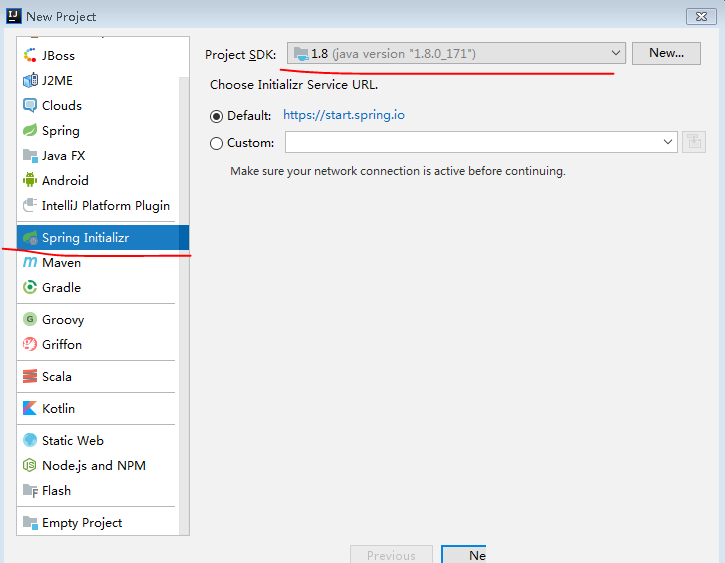
(2)点击next(第一个)
创建springboot项目(因为连接的国外的网站,next有时会几秒的延迟),将两个值改成自己的配置,Group:com.laowang ,Artifact:sptest,其他可以不用动,点击ok
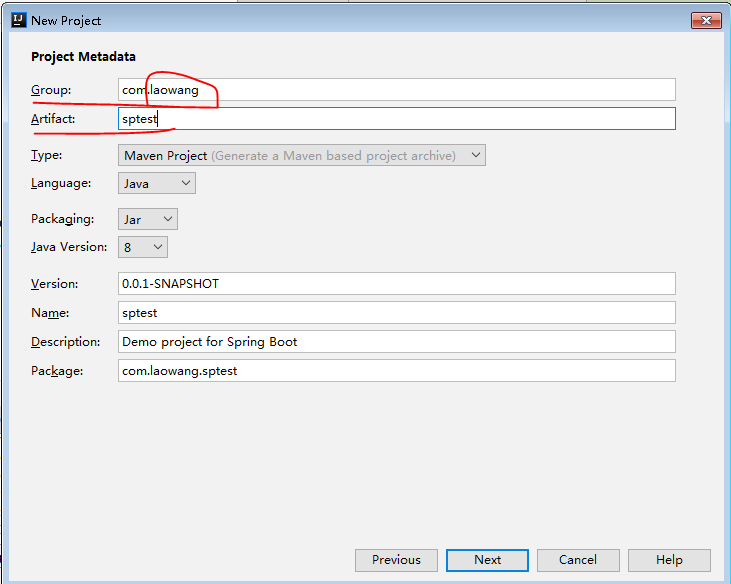
(3)点击next(第二个)
选择web-》spring web starter
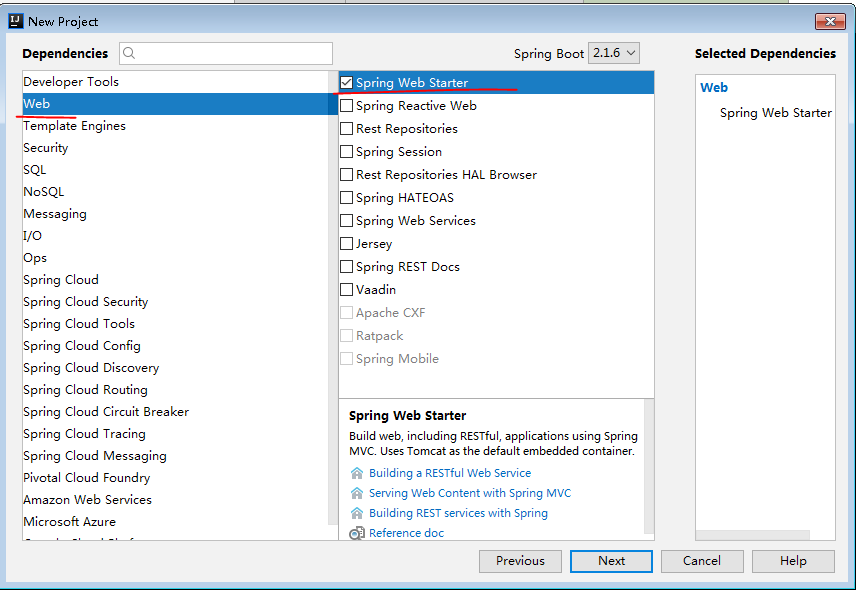
(4)点击next(第三个)
不用做修改,直接finish
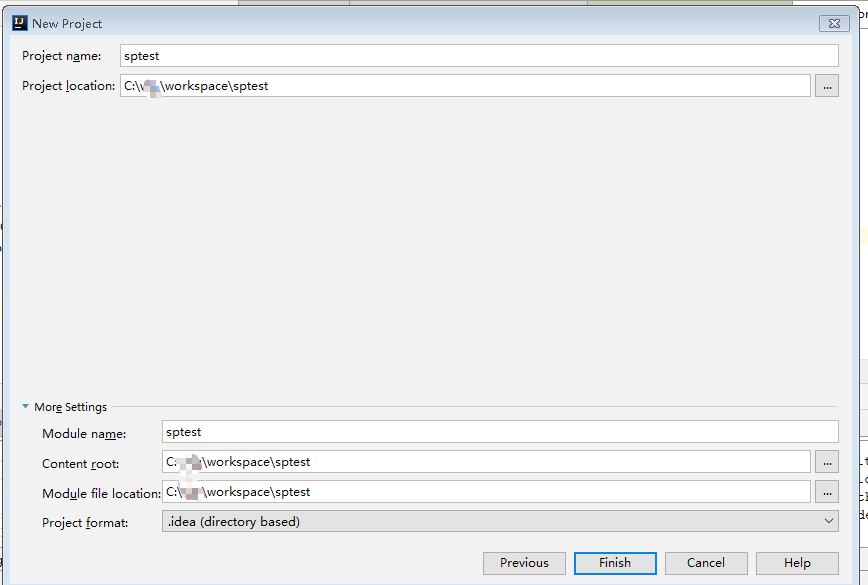
新建springboot项目已经完成。
2.2 springboot默认生成三个文件
默认生成的三个文件
2.2.1. pom.xml
<?xml version="1.0" encoding="UTF-8"?>

<project xmlns="http://maven.apache.org/POM/4.0.0" xmlns:xsi="http://www.w3.org/2001/XMLSchema-instance"

         xsi:schemaLocation="http://maven.apache.org/POM/4.0.0 http://maven.apache.org/xsd/maven-4.0.0.xsd">

    <modelVersion>4.0.0</modelVersion>

    <parent>

        <groupId>org.springframework.boot</groupId>

        <artifactId>spring-boot-starter-parent</artifactId>

        <version>2.1.4.RELEASE</version>

        <relativePath/> <!-- lookup parent from repository -->

    </parent>

    <groupId>com.laowang</groupId>

    <artifactId>sptest</artifactId>

    <version>0.0.1-SNAPSHOT</version>

    <name>sptest</name>

    <description>Demo project for Spring Boot</description>

    <properties>

        <java.version>1.8</java.version>

    </properties>

    <dependencies>

        <dependency>

            <groupId>org.springframework.boot</groupId>

            <artifactId>spring-boot-starter-web</artifactId>

        </dependency>

        <dependency>

            <groupId>org.springframework.boot</groupId>

            <artifactId>spring-boot-starter-test</artifactId>

            <scope>test</scope>

        </dependency>

    </dependencies>

    <build>

        <plugins>

            <plugin>

                <groupId>org.springframework.boot</groupId>

                <artifactId>spring-boot-maven-plugin</artifactId>

            </plugin>

        </plugins>

    </build>

</project>
重点就一个gav:spring-boot-starter-web,其他可以删除。
2.2.2 application.properties
该文件默认为空,springboot的默认启动端口号:8080,可以在改文件修改。
2.2.3 启动类文件(SptestApplication.java)
package com.laowang.sptest;

import org.springframework.boot.SpringApplication;

import org.springframework.boot.autoconfigure.SpringBootApplication;

@SpringBootApplication

public class SptestApplication {

    public static void main(String[] args) {

        SpringApplication.run(SptestApplication.class, args);

    }

}
重点是标签:@SpringBootApplication
2.3 验证springboot
在com.laowang.sptest报下新建ctroller包,并新建类:HelloController
package com.laowang.sptest.controller;

import org.springframework.stereotype.Controller;

import org.springframework.web.bind.annotation.RequestMapping;

import org.springframework.web.bind.annotation.ResponseBody;

import java.util.HashMap;

@Controller

public class HelloController {

    @RequestMapping("/")

    @ResponseBody

    public String getHello() {

        return "hello";

    }

}
执行效果:
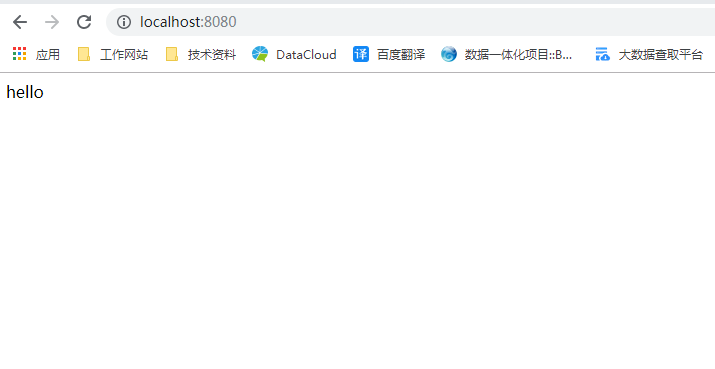
服务正常启动。
2.4 重点说明
需要说明两点:
(1)类文件要放在跟启动类同级或者下一目录下,本项目为:com.laowang.sptest包下面。因为springboot默认扫描加载启动类同级或者下级目录的标签类(@RestController,@Service ,@Configuraion,@Component等),假如真需要加载其他目录的标签类,可以通过在启动上配置标签@ComponentScan(具体包)来进行扫描加载。
(2)资源文件默认放到resources下面,templates默认放的是动态文件,比如:html文件,不过要搭配thymeleaf 使用(pom文件中需新加gav)。
其他也没什么了,springboot主要是通过spring提供的多个starter和一些默认约定,实现项目的快速搭建。
springboot项目快速搭建的更多相关文章
- 玩转 SpringBoot 2 快速搭建 | RESTful Api 篇
概述 RESTful 是一种架构风格,任何符合 RESTful 风格的架构,我们都可以称之为 RESTful 架构.我们常说的 RESTful Api 是符合 RESTful 原则和约束的 HTTP ...
- IDEA中SpringBoot项目快速创建单元测试
如何在IDEA中对于SpringBoot项目快速创建单元测试 创建测试用例 右键需要进行测试的方法,选择GO TO然后选择Test 点击Create New Test 勾选需要创建单元测试的方法 然后 ...
- 新巴巴运动网上商城 项目 快速搭建 教程 The new babar sports online mall project quickly builds a tutorial
新巴巴运动网上商城 项目 快速搭建 教程 The new babar sports online mall project quickly builds a tutorial 作者:韩梦飞沙 Auth ...
- SpringBoot项目快速启动停止脚本
SpringBoot项目快速启动停止脚本 1.在jar包同级目录下,创建 app.sh #!/bin/bash appName=`ls|grep .jar$` if [ -z $appName ] t ...
- 补习系列(1)-springboot项目基础搭建课
目录 前言 一.基础结构 二.添加代码 三.应用配置 四.日志配置 五.打包部署 小结 前言 springboot 最近火的不行,目前几乎已经是 spring 家族最耀眼的项目了.抛开微服务.技术社区 ...
- springboot项目快速构建
1. 问题描述 springboot的面世,成为Java开发者的一大福音,大大提升了开发的效率,其实springboot只是在maven的基础上,对已有的maven gav进行了封装而已,今天用最简单 ...
- 玩转SpringBoot 2 快速搭建 | Spring Initializr 篇
SpringBoot 为我们提供了外网 Spring Initializr 网页版来帮助我们快速搭建 SpringBoot 项目,如果你不想用 IDEA 中的插件,这种方式也是不错的选择.闲话少说,直 ...
- 玩转 SpringBoot 2 快速搭建 | Spring Tool Suite篇
Spring Tool Suite (STS) 工具介绍 我个人比较推荐使用 Spring Tool Suite(STS),之所以推荐使用 Spring Tool Suite(STS) ,是因为它是 ...
- 玩转 SpringBoot 2 快速搭建 | IntellJ IDEA篇
IntellJ IDEA 介绍 IntelliJ IDEA 简称 IDEA,目前被认为是最好用的开发Java 语言开发工具之一.不过是收费的.和其同类型的工具有 Eclipse 和 MyEclip ...
随机推荐
- XAML的命名空间 - CSDN博客
原文:XAML的命名空间 - CSDN博客 一个最简单的XAML例子 <Window x:Class="WpfApplication1.MainWindow" xmlns=& ...
- SQL Server 2017 SELECT…INTO 创建的新表指定到文件组
原文:SQL Server 2017 SELECT-INTO 创建的新表指定到文件组 SELECT-INTO 在 SQL Server 中也是常见的一个功能,过去用此方法创建的新表只能存储到默认的文件 ...
- 线程间操作无效: 从不是创建控件“labMessage”的线程访问它。
解决方法:1.在窗体加载时加上这一句 private void FormDate_Load(object sender, EventArgs e) { Control.CheckForIllegalC ...
- List<T>多字段排序的一个通用类
本文中的方法旨在解决通用的问题,非常注重效率的地方,还应该针对具体的类去写排序方法. 废话不多说,直接上代码 具体使用场景: 要排序的类 1 public class bb 2 { 3 public ...
- 我怎么忽略了身份框架魔法,只是使用OWIN验证的中间件,以获得要求我寻求什么呢?
该OWIN中间件的东西第三方登录集成到您的ASP.NET应用程序是非常酷的,但我似乎无法弄清楚如何就剜出来的新的ID,它取代了蹩脚的成员身份 API.我没有兴趣在坚持所产生的债权,并在英法为基础的数据 ...
- MFC中的模态对话框与非模态对话框,模态对话框测试
http://blog.csdn.net/u010839382/article/details/52972427 http://blog.csdn.net/u010839382/article/det ...
- inno setup 配合istools
istool,可以认为是inno setup的IDE吧 用用就知道了,istool用起来方便些,当然,脚本写好了,用不用istool就无所谓了
- Spring中如何获取request的方法汇总及其线程安全性分析
前言 本文将介绍在Spring MVC开发的web系统中,获取request对象的几种方法,并讨论其线程安全性.下面话不多说了,来一起看看详细的介绍吧. 概述 在使用Spring MVC开发Web系统 ...
- c++用参数返回堆上的空间
<高质量c++和c编程>7.4 指针参数是如何传递内存的一节中写道 void GetMemory(char *p, int num) { p = (char *)malloc(sizeof ...
- 01 Javascript简介(了解)
Web前端有三层: HTML:从语义的角度,描述页面结构 CSS:从审美的角度,描述样式(美化页面) JavaScript:从交互的角度,描述行为(提升用户体验) JavaScript历史背景介绍 布 ...