
IDEA中SpringBoot项目快速创建单元测试
如何在IDEA中对于SpringBoot项目快速创建单元测试
创建测试用例
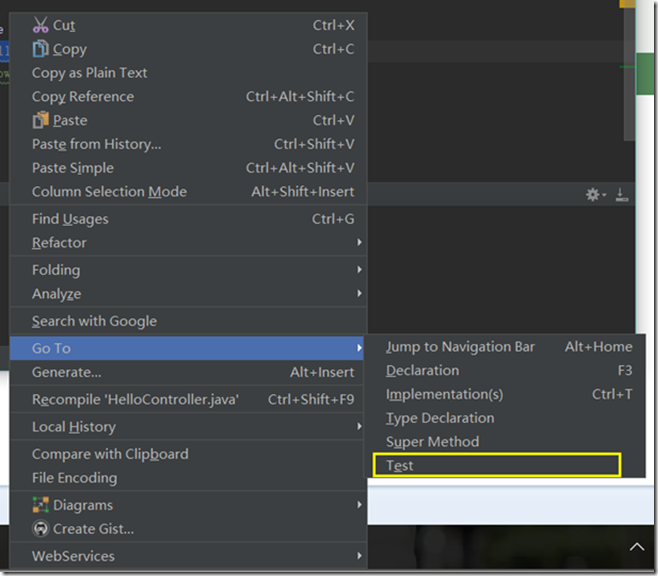
右键需要进行测试的方法,选择GO TO然后选择Test

点击Create New Test
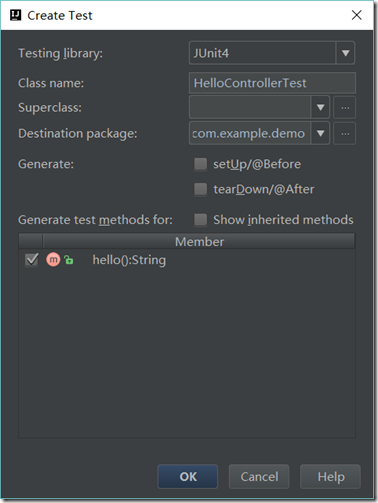
勾选需要创建单元测试的方法
然后点击OK就直接创建完成了。
修改测试用例
在类上面加上注解
@RunWith(SpringJUnit4ClassRunner.class)
@SpringBootTest
然后在下面注入需要测试的类然后在方法里面使用,使用方法和普通的单元测试一样
如果测试的是service
demo如下
package com.example.demo;

import org.junit.Test;

import org.junit.runner.RunWith;

import org.springframework.beans.factory.annotation.Autowired;

import org.springframework.boot.test.context.SpringBootTest;

import org.springframework.test.context.junit4.SpringJUnit4ClassRunner;

@RunWith(SpringJUnit4ClassRunner.class)

@SpringBootTest

public class HelloServiceTest {

    @Autowired

    private HelloService helloService;

    @Test

    public void hello(){

        helloService.hello();

    }

}
如果测试的是controller
需要加入@AutoConfigureMockMvc的注解
那么demo如下
package com.example.demo;

import org.junit.Test;

import org.junit.runner.RunWith;

import org.springframework.beans.factory.annotation.Autowired;

import org.springframework.boot.test.autoconfigure.web.servlet.AutoConfigureMockMvc;

import org.springframework.boot.test.context.SpringBootTest;

import org.springframework.test.context.junit4.SpringJUnit4ClassRunner;

import org.springframework.test.web.servlet.MockMvc;

import org.springframework.test.web.servlet.request.MockMvcRequestBuilders;

import org.springframework.test.web.servlet.result.MockMvcResultMatchers;

@RunWith(SpringJUnit4ClassRunner.class)

@SpringBootTest

@AutoConfigureMockMvc

public class HelloControllerTest {

    @Autowired

    private MockMvc mockMvc;

    @Test

    public void hello() throws Exception {

        mockMvc.perform(MockMvcRequestBuilders.get("/hello"))

                .andExpect(MockMvcResultMatchers.status().isOk());

    }

}
其中对于MockMvc的使用可以自己研究一下,里面有很多测试使用的东西,这边只是举个例子,只要访问是200不是404这种错误都会过测试用例
IDEA中SpringBoot项目快速创建单元测试的更多相关文章
- SpringBoot项目快速启动停止脚本
SpringBoot项目快速启动停止脚本 1.在jar包同级目录下,创建 app.sh #!/bin/bash appName=`ls|grep .jar$` if [ -z $appName ] t ...
- JAVA WEB快速入门之从编写一个基于SpringBoot+Mybatis快速创建的REST API项目了解SpringBoot、SpringMVC REST API、Mybatis等相关知识
JAVA WEB快速入门系列之前的相关文章如下:(文章全部本人[梦在旅途原创],文中内容可能部份图片.代码参照网上资源) 第一篇:JAVA WEB快速入门之环境搭建 第二篇:JAVA WEB快速入门之 ...
- springBoot(2)---快速创建项目,初解jackson
快速创建项目,初解jackson 一.快速创建项目 springboot官网提供了工具类自动创建web应用:网址:http://start.spring.io/ 官网页面 1.快速创建一个 选择web ...
- SpringBoot项目的创建流程(初步)
小伙伴们在学习的过程中大概也发现了这两个框架需要我们手动配置的地方非常多,不过做JavaEE开发的小伙伴们肯定也听说过“约定大于配置”这样一句话,就是说系统,类库,框架应该假定合理的默认值,而非要求提 ...
- springboot项目快速搭建
1. 问题描述 springboot的面世,成为Java开发者的一大福音,大大提升了开发的效率,其实springboot只是在maven的基础上,对已有的maven gav进行了封装而已,今天用最简单 ...
- springboot项目快速构建
1. 问题描述 springboot的面世,成为Java开发者的一大福音,大大提升了开发的效率,其实springboot只是在maven的基础上,对已有的maven gav进行了封装而已,今天用最简单 ...
- springboot项目的创建
创建springboot项目 包名和项目名 选择需要使用的框架,web 然后再点击下一步,完成即可创建springboot项目
- 在linux中部署项目并创建shell脚本
1.首先要在idea中父工程maven包下执行clean生成的target包 2.执行package打包,打包时候讲test勾去掉 3.将target包中生成的jar包cp出来 此处注意打包时必须要保 ...
- IDEA中springboot项目添加yml格式配置文件
1.先创建application.properties 文件,在resources文件夹,右键 new -> Resource Bundle 如下图所示,填写名称 2.生成如下图所示文件 3. ...
随机推荐
- tar --exclude排除指定目录打包
----before-upgrade./ --exclude=apache-tomcat-/logs --exclude=apache-tomcat-/work 注意,--exclude后面跟路径名称 ...
- unity3d 代码动态添加,修改BoxCollider2D
BoxCollider2D box = gameObject.AddComponent<BoxCollider2D>(); box.size = new Vector2(1.0f, 1.0 ...
- CentOS 6.7快速搭建lamp环境
安装前要关闭防火墙,防止外网不能访问,这一点很重要,要不然外网访问不了: ①关闭防火墙:service iptables stop ②永久关闭防火墙:chkconfig iptables off ③查 ...
- Piwis Tester II V18.100 with CF30 Laptop for Porsche
Porsche Piwis Tester II is the latest professional tester for Porshe,the most poweful diagnose and o ...
- js 定时更改div背景图片
今天遇到一个业务场景,使用js将一个div标签的背景图片定时更换一下. 之前百度了几个,有css+js,也有css3的,不过css3的兼容有问题,之后同事提示,可以使用js直接来更换div的北京图片, ...
- sqoop加载mysql数据库
./bin/sqoop list-databases --connect jdbc:mysql://node-001:3306/ --username root --password hadoop
- var
在函数中,使用var声明的变量,为局部变量,只能在函数内部访问. 不使用var声明的变量,为全局变量,在函数外边也能访问. 没有var的情况 <script type="text/ja ...
- 归并排序(递归排序and外排排序)
分析: /** * 归并排序 (先将数组利用归并排序排成 有序的左边数组和右边数组,再比较左边数组和右边数组的数值大小进行排序) * */ public class MergeSort { publi ...
- Unity、C#读取XML
有如下XML文件: <?xml version="1.0" encoding="UTF-8"?> <DataNode> <prov ...
- noip第17课资料