
Linux下使用docker 拉取 vsftpd 镜像搭建 Ftp 服务器,连接 Ftp 时遇到的错误(425 Failed to establish connection)
Ftp踩坑系列:
Linux上的ftp服务器 vsftpd 之配置满天飞--设置匿名用户访问(不弹出用户名密码框)以及其他用户可正常上传
一、前言
出现这个问题,在docker这类容器出现之前,原因可能是防火墙的问题:
FTP服务器一般默认使用被动模式,即,客户端一般会和服务端的21端口建立连接,该连接用来传输命令。真正传输数据时,服务端会返回一个随机端口,告诉客户端新建连接去连接这个随机端口,来传输数据。
一般来说,这个随机端口,肯定是没在防火墙里配置的,所以会无法建立连接。
此时,直接先关掉防火墙即可。
二、docker场景下,该问题的解决方案
现在容器越发流行,基于docker构建各类服务显得更加方便。但是,一不注意,还是会踩坑的。
昨天,同事就是遇到这么个问题,说是能连上,但是涉及到数据就看不到,比如查看目录等。
一开始,也怀疑是防火墙的问题,于是直接把防火墙关了,发现问题依旧。
后来经过一番定位,发现是vsftpd是基于docker的,其启动docker容器的命令如下:
docker run -d -v /my/data/directory:/home/vsftpd -v /var/log/vsftpd/:/var/log/vsftpd/ -p 20:20 -p 21:21 -p 21100-21110:21100-21110 -e FTP_USER=ROOT -e FTP_PASS=ROOT -e PASV_MIN_PORT=21100 -e PASV_MAX_PORT=21110 -e PASV_ADDRESS=0.0.0.0 -e LOG_STDOUT= --name vsftpd --restart=always fauria/vsftpd
注意以上红色部门,指定了各类端口相关的配置。
为了快速查找问题,停止了旧的容器后,用下面的命令重新起了个容器,(直接改成了使用宿主机的网络):
docker run -d -v /my/data/directory:/home/vsftpd -v /var/log/vsftpd/:/var/log/vsftpd/ --network=host -e FTP_USER=ROOT -e FTP_PASS=ROOT -e LOG_STDOUT= --name vsftpd1. --restart=always fauria/vsftpd
进行了上述的修改后,问题解决了。
具体原因还需要查找,找到了再更新。
三、基于docker构建vsftpd容器,相关配置
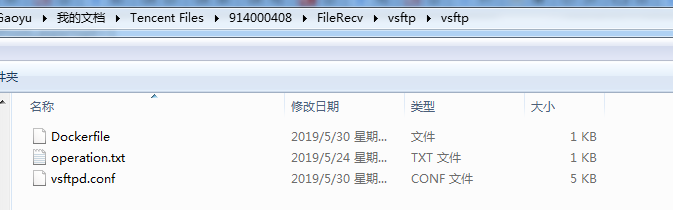
其中,DockerFile:
FROM centos:

MAINTAINER jason2019

RUN yum install -y vsftpd

#RUN mkdir -p /data/ftp

RUN useradd -d /data/ftp -s /bin/bash ROOT -p ROOT

RUN echo "ROOT:ROOT" | chpasswd

RUN chmod  /data/ftp

EXPOSE

ENTRYPOINT /usr/sbin/vsftpd && tail -f /etc/passwd

#RUN systemctl start vsftp.service
其中,operation.txt:
docker build -t ftp:1.0 .

docker run -dit -p : -p : -p -:- -v /data/vsftpd.conf:/etc/vsftpd/vsftpd.conf -v /data/ftp:/data/ftp --name ftp ftp:1.0

如果使用宿主机网络,可以像这样:

docker run -d -v /my/data/directory:/home/vsftpd -v /var/log/vsftpd/:/var/log/vsftpd/  --network=host -e FTP_USER=ROOT -e FTP_PASS=ROOT  -e LOG_STDOUT= --name vsftpd1. --restart=always fauria/vsftpd
其中,vsftpd.conf(支持匿名上传、下载等,为啥要匿名,因为业务的变态需求呗):
# Example config file /etc/vsftpd/vsftpd.conf

#

# The default compiled in settings are fairly paranoid. This sample file

# loosens things up a bit, to make the ftp daemon more usable.

# Please see vsftpd.conf. for all compiled in defaults.

#

# READ THIS: This example file is NOT an exhaustive list of vsftpd options.

# Please read the vsftpd.conf. manual page to get a full idea of vsftpd's

# capabilities.

#

# Allow anonymous FTP? (Beware - allowed by default if you comment this out).

anonymous_enable=YES

#https://blog.csdn.net/bluishglc/article/details/42399439

allow_writeable_chroot=YES

#

# Uncomment this to allow local users to log in.

local_enable=YES

#

# Uncomment this to enable any form of FTP write command.

write_enable=YES

#

# Default umask for local users is . You may wish to change this to ,

# if your users expect that ( is used by most other ftpd's)

local_umask=

#

# Uncomment this to allow the anonymous FTP user to upload files. This only

# has an effect if the above global write enable is activated. Also, you will

# obviously need to create a directory writable by the FTP user.

anon_upload_enable=YES

#

# Uncomment this if you want the anonymous FTP user to be able to create

# new directories.

anon_mkdir_write_enable=YES

anon_other_write_enable=YES

#

# Activate directory messages - messages given to remote users when they

# go into a certain directory.

dirmessage_enable=YES

#

# The target log file can be vsftpd_log_file or xferlog_file.

# This depends on setting xferlog_std_format parameter

xferlog_enable=YES

#

# Make sure PORT transfer connections originate from port  (ftp-data).

connect_from_port_20=YES

#

# If you want, you can arrange for uploaded anonymous files to be owned by

# a different user. Note! Using "root" for uploaded files is not

# recommended!

#chown_uploads=YES

#chown_username=whoever

#

# The name of log file when xferlog_enable=YES and xferlog_std_format=YES

# WARNING - changing this filename affects /etc/logrotate.d/vsftpd.log

#xferlog_file=/var/log/xferlog

#

# Switches between logging into vsftpd_log_file and xferlog_file files.

# NO writes to vsftpd_log_file, YES to xferlog_file

xferlog_std_format=YES

#

# You may change the default value for timing out an idle session.

#idle_session_timeout=

#

# You may change the default value for timing out a data connection.

#data_connection_timeout=

#

# It is recommended that you define on your system a unique user which the

# ftp server can use as a totally isolated and unprivileged user.

#nopriv_user=ftpsecure

#

# Enable this and the server will recognise asynchronous ABOR requests. Not

# recommended for security (the code is non-trivial). Not enabling it,

# however, may confuse older FTP clients.

#async_abor_enable=YES

#

# By default the server will pretend to allow ASCII mode but in fact ignore

# the request. Turn on the below options to have the server actually do ASCII

# mangling on files when in ASCII mode.

# Beware that on some FTP servers, ASCII support allows a denial of service

# attack (DoS) via the command "SIZE /big/file" in ASCII mode. vsftpd

# predicted this attack and has always been safe, reporting the size of the

# raw file.

# ASCII mangling is a horrible feature of the protocol.

#ascii_upload_enable=YES

#ascii_download_enable=YES

#

# You may fully customise the login banner string:

#ftpd_banner=Welcome to blah FTP service.

#

# You may specify a file of disallowed anonymous e-mail addresses. Apparently

# useful for combatting certain DoS attacks.

#deny_email_enable=YES

# (default follows)

#banned_email_file=/etc/vsftpd/banned_emails

#

# You may specify an explicit list of local users to chroot() to their home

# directory. If chroot_local_user is YES, then this list becomes a list of

# users to NOT chroot().

#chroot_local_user=YES

#chroot_list_enable=YES

# (default follows)

#chroot_list_file=/etc/vsftpd/chroot_list

#

# You may activate the "-R" option to the builtin ls. This is disabled by

# default to avoid remote users being able to cause excessive I/O on large

# sites. However, some broken FTP clients such as "ncftp" and "mirror" assume

# the presence of the "-R" option, so there is a strong case for enabling it.

#ls_recurse_enable=YES

#

# When "listen" directive is enabled, vsftpd runs in standalone mode and

# listens on IPv4 sockets. This directive cannot be used in conjunction

# with the listen_ipv6 directive.

listen=YES

#

# This directive enables listening on IPv6 sockets. To listen on IPv4 and IPv6

# sockets, you must run two copies of vsftpd with two configuration files.

# Make sure, that one of the listen options is commented !!

#listen_ipv6=YES

pam_service_name=vsftpd

userlist_enable=YES

tcp_wrappers=YES

anon_root=/data/ftp

no_anon_password=YES

local_root=/data/ftp

ftp_username=ROOT

pasv_enable=YES

pasv_min_port=

pasv_max_port=
其中,具体的选项名称,可参考:
Linux上的ftp服务器 vsftpd 之配置满天飞--设置匿名用户访问(不弹出用户名密码框)以及其他用户可正常上传

四、总结
总体来说,配置还是很繁杂的,有问题可以直接加我咨询。
Linux下使用docker 拉取 vsftpd 镜像搭建 Ftp 服务器,连接 Ftp 时遇到的错误(425 Failed to establish connection)的更多相关文章
- docker拉取oracle11g镜像配置
开始拉取oracle11g镜像 下载过程稍长,镜像大小6.8G(之前拉取过了,所以就不截图了) #docker pull registry.cn-hangzhou.aliyuncs.com/helow ...
- Window中的Docker 拉取Mysql镜像 并在本地Navicate链接
首先本地 拉取mysql镜像 以下是所有mysql镜像 我自己下载的为5.6 下面 以5.6为例:(拉取mysql5.6镜像) docker pull mysql:5.6 创建一个容器 doc ...
- Docker 拉取Nginx镜像 和运行
Docker 镜像拉取 docker pull [OPTIONS] NAME[:TAG|@DIGEST] 镜像拉取命令 OPTIONS说明: -a :拉取所有 tagged 镜像 --disable- ...
- 【docker】解决docker pull镜像 拉取镜像龟速的问题,docker拉取镜像使用阿里云docker镜像加速器
在docker拉取mysql镜像过程中,出现龟速的问题,解决这个问题的方法: 这个页面 停留了好久好久,依旧没有下载完成. 碰上这种情况 1.先退出Ctrl+C 2.在浏览器上进入阿里云docker库 ...
- 【docker】【mysql】docker安装mysql,阿里云docker镜像加速器,docker搜索查看远程仓库上的镜像,docker拉取镜像,查看本地所有镜像,查看容器的运行状况,查看容器的详细信息
在docker上安装mysql有两种方式 1.通过Dockerfile构建 2.直接在docker hub上拉取镜像安装 =================本篇采用方法2=============== ...
- [Docker]Docker拉取,上传镜像到Harbor仓库
需求 因为项目的需求,需要制作一个基于tomcat的镜像.那么前提就是,需要有tomcat的基础镜像. 怎么做 我的思路跑偏了,本来以为是需要将tomcat下载下来,然后通过docker命令,让它成为 ...
- docker拉取镜像报错:net/http: TLS handshake timeout.
docker拉取镜像报错:net/http: TLS handshake timeout. 启动一个后台的busybox容器 [yunva@node1 network-scripts]$ docker ...
- docker每次都重新拉取远程镜像的问题
将镜像上传到远程之后,dockerfile按理来说只需一次拉取远程镜像就好了,之后每次都是使用第一次拉取的远程镜像. 但是实际上出现的问题是:dockerfile每次都从远程拉取镜像,浪费了资源和时间 ...
- docker国内镜像拉取和镜像加速registry-mirrors配置修改
docker国内镜像拉取和镜像加速registry-mirrors配置修改 学习了:http://blog.csdn.net/u014231523/article/details/61197945 站 ...
随机推荐
- c 程序之 最大公约数 和 最小公倍数
1.最大公约数 30 10 -> 10 #include<stdio.h> /* 求最大公约数 辗转相减法 36 --16 4 */ int main(){ int a, ...
- Chrome插件安装的3种方法,解决拖放不能安装的情况,并提供插件下载
本文摘录于Chrome插件网站 方法一:拖放安装 下载插件的crx文件后,打开Chrome的扩展页面(chrome://extensions/或按Chrome菜单图标>更多工具>扩展程序) ...
- python_Django
1.Python用具 - pip 1.作用: Python的软件包管理器,有一些python包被集成到了pip中.只要被集成到pip中的包,都允许通过pip直接安装 2.安装 ...
- 3分钟了解ServiceStage 应用智能化运维【华为云分享】
[摘要] 微服务云应用平台(ServiceStage)是面向企业及开发者的一站式DevOps平台服务,支持基于微服务的应用开发.治理.部署及运维监控的全生命周期管理,并提供大规模容器集群管理及中间件服 ...
- 关于软件定义IT基础设施的未来,深信服是这么思考的
在今年的深信服创新大会上,软件定义IT基础设施成为非常重要的议题之一,深信服与2,000余位客户的CIO和合作伙伴一起围绕IT基础设施在数字化时代中的作用与价值进行了深入的探讨. 此外,深信服还联合I ...
- JS的对象、数组等处理方法:解构
对象方法简写 你可以在定义方法时省略function和 :: const obj = { insteadOfThis: function() { // do stuff }, youCanDoThis ...
- [leetcode] H-Index (Hash Table)
题目: Given an array of citations (each citation is a non-negative integer) of a researcher, write a f ...
- luogu P2401 不等数列 |动态规划
题目描述 将1到n任意排列,然后在排列的每两个数之间根据他们的大小关系插入">"和"<".问在所有排列中,有多少个排列恰好有k个"< ...
- 一台电脑如何管理多个ssh key
目录 一.生成ssh key 1.1 生成密钥(必须) 1.2 设置路径 (可选) 1.3 指定密语字符串(可选) 二.设置ssh key的代理 2.1. 首先查看代理 2.2. 添加私钥 三.添加公 ...
- 正则replace 回调函数里接收的参数是什么?
前言 我们都知道 replace 在做替换处理方面会很常用,通常也是第一个会想到的方法.replace 第一个参数可以传入 string 或 RegExp,第二个参数可以传入 string 或 一个回 ...