
TensorFlow图像预处理完整样例
参考书
《TensorFlow:实战Google深度学习框架》(第2版)
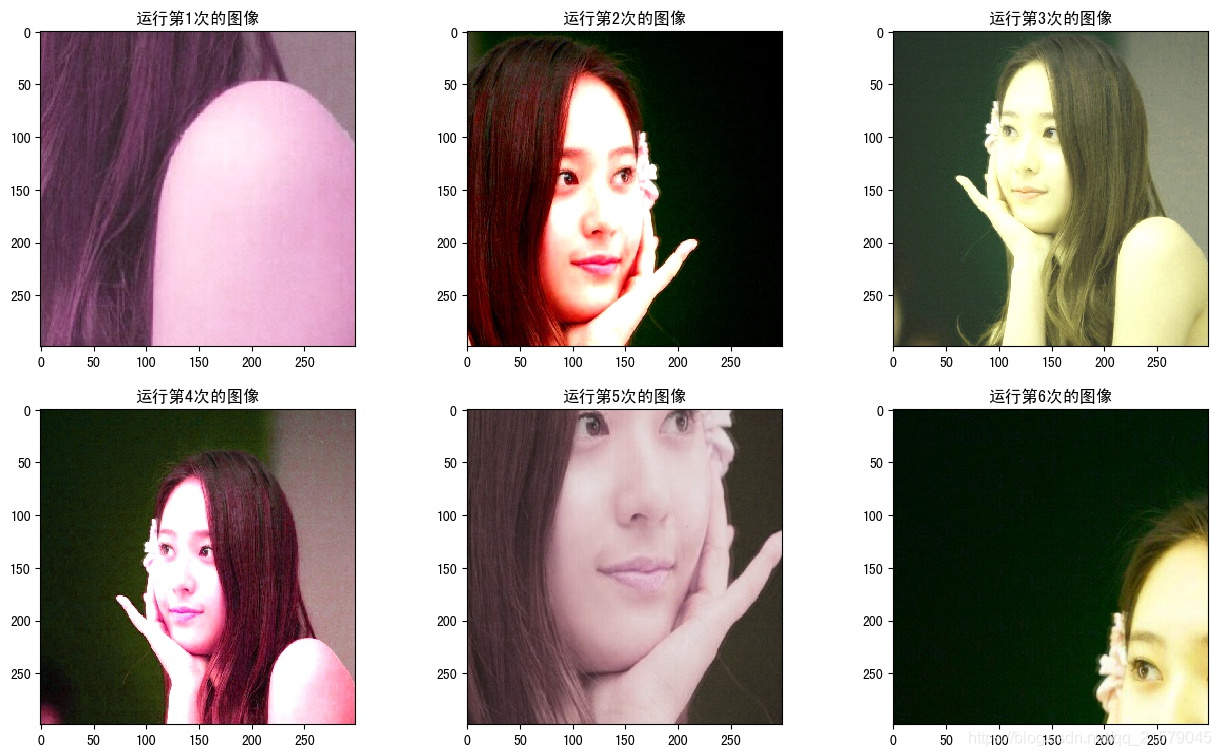
以下TensorFlow程序完成了从图像片段截取,到图像大小调整再到图像翻转及色彩调整的整个图像预处理过程。
#!/usr/bin/env python

# -*- coding: UTF-8 -*-

# coding=utf-8

"""

@author: Li Tian

@contact: 694317828@qq.com

@software: pycharm

@file: figure_deal_test2.py

@time: 2019/1/28 11:39

@desc: 图像预处理完整样例

"""

import tensorflow as tf

import numpy as np

import matplotlib.pyplot as plt

# 给定一张图像,随机调整图像的色彩。因为调整亮度,对比度,饱和度和色相的顺序会影响最后得到的结果。

# 所以可以定义多种不同的顺序。具体使用哪一种顺序可以在训练数据预处理时随机地选择一种。

# 这样可以进一步降低无关因素对模型的影响。

def distort_color(image, color_ordering=0):

    if color_ordering == 0:

        image = tf.image.random_brightness(image, max_delta=32. / 255.)

        image = tf.image.random_saturation(image, lower=0.5, upper=1.5)

        image = tf.image.random_hue(image, max_delta=0.2)

        image = tf.image.random_contrast(image, lower=0.5, upper=1.5)

    elif color_ordering == 1:

        image = tf.image.random_saturation(image, lower=0.5, upper=1.5)

        image = tf.image.random_brightness(image, max_delta=32. / 255.)

        image = tf.image.random_contrast(image, lower=0.5, upper=1.5)

        image = tf.image.random_hue(image, max_delta=0.2)

    elif color_ordering == 2:

        # 还可以定义其他的排列,但是在这里就不再一一列出了。

        # ...

        pass

    return tf.clip_by_value(image, 0.0, 1.0)

# 给定一张解码后的图像、目标图像的尺寸以及图像上的标注框,此函数可以对给出的图像进行预处理。

# 这个函数的输入图像是图像识别问题中原始的训练图像,而输出则是深井网络模型的输入层。注意这里

# 只是处理模型的训练数据,对于预测的数据,一般不需要使用随机变换的步骤。。

def preprocess_for_train(image, height, width, bbox):

    # 如果没有提供标注框,则认为整个图像就是需要关注的部分。

    if bbox is None:

        bbox = tf.constant([0.0, 0.0, 1.0, 1.0], dtype=tf.float32, shape=[1, 1, 4])

    # 转换图像张量的类型。

    if image.dtype != tf.float32:

        image = tf.image.convert_image_dtype(image, dtype=tf.float32)

    # 随机截取图像,减小需要关注的物体大小对图像识别算法的影响。

    bbox_begin, bbox_size, _ = tf.image.sample_distorted_bounding_box(tf.shape(image), bounding_boxes=bbox)

    distorted_image = tf.slice(image, bbox_begin, bbox_size)

    # 将随机截取的图像调整为神经网络层输入层的大小。大小调整的算法是随机选择的。

    distorted_image = tf.image.resize_images(distorted_image, [height, width], method=np.random.randint(4))

    # 随机左右翻转图像。

    distorted_image = tf.image.random_flip_left_right(distorted_image)

    # 使用一种随机的顺序调整图像色彩。

    distorted_image = distort_color(distorted_image, np.random.randint(2))

    return distorted_image

image_raw_data = tf.gfile.FastGFile('F:/Python3Space/figuredata_deal/krystal.jpg', "rb").read()

with tf.Session() as sess:

    img_data = tf.image.decode_jpeg(image_raw_data)

    boxes = tf.constant([[[0.05, 0.05, 0.9, 0.7], [0.35, 0.47, 0.5, 0.56]]])

    # 开始绘图

    plt.rcParams['font.sans-serif'] = ['SimHei']  # 步骤一(替换sans-serif字体)

    plt.rcParams['axes.unicode_minus'] = False  # 步骤二(解决坐标轴负数的负号显示问题)

    fig1 = plt.figure(1, (16, 9), dpi=100)

    # 运行6次获得6种不同的图像。

    for i in range(6):

        # 将图像的尺寸调整为299*299.

        ax = plt.subplot(2, 3, i+1)

        ax.set_title('运行第' + str(i+1) + '次的图像')

        result = preprocess_for_train(img_data, 299, 299, boxes)

        plt.imshow(result.eval())

    fig1.subplots_adjust(wspace=0.1)

    # plt.tight_layout()

    plt.savefig('F:/Python3Space/figuredata_deal/图像预处理完整样例.jpg', bbox_inches='tight')
运行结果:

TensorFlow图像预处理完整样例的更多相关文章
- 吴裕雄 python 神经网络——TensorFlow 图像预处理完整样例
import numpy as np import tensorflow as tf import matplotlib.pyplot as plt def distort_color(image, ...
- 吴裕雄--天生自然 pythonTensorFlow图形数据处理:图像预处理完整样例
import numpy as np import tensorflow as tf import matplotlib.pyplot as plt #随机调整图片的色彩,定义两种顺序. def di ...
- TensorFlow入门之MNIST样例代码分析
这几天想系统的学习一下TensorFlow,为之后的工作打下一些基础.看了下<TensorFlow:实战Google深度学习框架>这本书,目前个人觉得这本书还是对初学者挺友好的,作者站在初 ...
- TensorFlow图像预处理-函数
更多的基本的API请参看TensorFlow中文社区:http://www.tensorfly.cn/tfdoc/api_docs/python/array_ops.html 下面是实验的代码,可以参 ...
- TensorFlow 图像预处理(一) 图像编解码,图像尺寸调整
from: https://blog.csdn.net/chaipp0607/article/details/73029923 TensorFlow提供了几类图像处理函数,下面介绍图像的编码与解码,图 ...
- 『TensorFlow』第九弹_图像预处理_不爱红妆爱武装
部分代码单独测试: 这里实践了图像大小调整的代码,值得注意的是格式问题: 输入输出图像时一定要使用uint8编码, 但是数据处理过程中TF会自动把编码方式调整为float32,所以输入时没问题,输出时 ...
- 通过Canvas及File API缩放并上传图片完整演示样例
创建一个只管的用户界面,并同意你控制图片的大小.上传到server端的数据,并不须要处理enctype为 multi-part/form-data 的情况.只一个简单的POST表单处理程序就能够了. ...
- Nginx完整配置配置样例【官方版】
我们主要参考nginx官方给出的完整配置的样例: https://www.nginx.com/resources/wiki/start/topics/examples/full/# 完整摘录如下: n ...
- Android清理设备内存具体完整演示样例(二)
版权声明: https://blog.csdn.net/lfdfhl/article/details/27672913 MainActivity例如以下: package cc.c; import j ...
随机推荐
- FastDFS的配置、部署与API使用解读(3)以流的方式上传文件的客户端代码(转)
调用的API为: String[] upload_file( String group_name,//组名,不指定则可设为null long file_size,//文件大小,必须制定 UploadC ...
- java的多态以及重载,重写,前期绑定,后期绑定
多态的定义: 一个类实例的相同方法在不同情形有不同表现形式.多态机制使具有不同内部结构的对象可以共享相同的外部接口.这意味着,虽然针对不同对象的具体操作不同,但通过一个公共的类,它们(那些操作)可以通 ...
- mac下配置eclipse的maven环境
转自:http://www.cnblogs.com/yqskj/archive/2013/03/30/2990292.html 1.下载maven的bin包,解压,配置到环境变量里面去 1). 首先到 ...
- Hibernate quick start
Preface Working with both Object-Oriented software and Relational Databases can be cumbersome and ti ...
- object equal
package equals; public class EqualsTest { public static void main(String[] args) { Employee alice1 = ...
- TCO 2016 Round 1B
problem 250 Problem Statement Vasa likes to construct sequences of numbers. If you tell him a positi ...
- [Android6.0][RK3399] 修改默认按键 KEY-PAD 的功能【转】
本文转载自:http://m.blog.csdn.net/dearsq/article/details/70175637 Platform: RK3399 OS: Android 6.0 Kernel ...
- Linux内核中工作队列的使用work_struct,delayed_work【转】
本文转载自:http://blog.csdn.net/zahuopuboss/article/details/43268983 初始化工作队列 调度工作队列 取消工作队列 #include <l ...
- HDU 5178 pairs —— 思维 + 二分
题目链接:http://acm.hdu.edu.cn/showproblem.php?pid=5178 pairs Time Limit: 2000/1000 MS (Java/Others) ...
- YTU 2444: C++习题 对象转换
2444: C++习题 对象转换 时间限制: 1 Sec 内存限制: 128 MB 提交: 914 解决: 581 题目描述 定义一个Teacher(教师)类(教师号,姓名,性别,薪金)和一个St ...