
C#导出word [无规则表结构+模板遇到的坑]
1)当然可以考虑使用aspose.word。使用书签替换的方案替换模板中对应的书签值。
2)但是我使用了Interop.Word,下面记录使用类及要注意的地方
3)使用类
Report.cs 来自于网上 修改了在添加表格时焦点移动到最后并新建一页
using System;

using System.Collections.Generic;

using System.Text;

using Microsoft.Office.Interop.Word;

namespace Song_Public //这边需要换成自己的命名空间名

{

    public class Report

    {

        private _Application wordApp = null;

        private _Document wordDoc = null;

        public _Application Application

        {

            get

            {

                return wordApp;

            }

            set

            {

                wordApp = value;

            }

        }

        public _Document Document

        {

            get

            {

                return wordDoc;

            }

            set

            {

                wordDoc = value;

            }

        }

        //通过模板创建新文档

        public void CreateNewDocument(string filePath)

        {

            killWinWordProcess();

            wordApp = new ApplicationClass();//此类不被识别请看下列问题对应的解决方法

            wordApp.DisplayAlerts = WdAlertLevel.wdAlertsNone;

            wordApp.Visible = false;

            object missing = System.Reflection.Missing.Value;

            object templateName = filePath;

            wordDoc = wordApp.Documents.Open(ref templateName, ref missing,

              ref missing, ref missing, ref missing, ref missing, ref missing,

              ref missing, ref missing, ref missing, ref missing, ref missing,

              ref missing, ref missing, ref missing, ref missing);

        }

        //保存新文件

        public void SaveDocument(string filePath)

        {

            object fileName = filePath;

            object format = WdSaveFormat.wdFormatDocument;//保存格式

            object miss = System.Reflection.Missing.Value;

            wordDoc.SaveAs(ref fileName, ref format, ref miss,

              ref miss, ref miss, ref miss, ref miss,

              ref miss, ref miss, ref miss, ref miss,

              ref miss, ref miss, ref miss, ref miss,

              ref miss);

            //关闭wordDoc,wordApp对象

            object SaveChanges = WdSaveOptions.wdSaveChanges;

            object OriginalFormat = WdOriginalFormat.wdOriginalDocumentFormat;

            object RouteDocument = false;

            wordDoc.Close(ref SaveChanges, ref OriginalFormat, ref RouteDocument);

            wordApp.Quit(ref SaveChanges, ref OriginalFormat, ref RouteDocument);

        }

        //在书签处插入值

        public bool InsertValue(string bookmark, string value)

        {

            object bkObj = bookmark;

            if (wordApp.ActiveDocument.Bookmarks.Exists(bookmark))

            {

                wordApp.ActiveDocument.Bookmarks.get_Item(ref bkObj).Select();

                wordApp.Selection.TypeText(value);

                return true;

            }

            return false;

        }

        //插入表格,bookmark书签

        public Table InsertTable(string bookmark, int rows, int columns, float width)

        {

            object miss = System.Reflection.Missing.Value;

            object oStart = bookmark;

            //Range range = wordDoc.Bookmarks.get_Item(ref oStart).Range;//表格插入位置

            // Range range = wordDoc.Bookmarks.get_Item(ref oStart).Range;//表格插入位置

            // wordApp.Selection.EndKey(6, 0);

            wordApp.Selection.EndKey(WdUnits.wdStory);

            wordApp.Selection.InsertNewPage();

            //object start = 0;

            //object end = 0;

            //Range tableLocation = wordDoc.Range(ref start, ref end);

            Table newTable = wordDoc.Tables.Add(wordApp.Selection.Range, rows, columns, ref miss, ref miss);

            //设置表的格式

            newTable.Borders.Enable = 1; //允许有边框,默认没有边框(为0时报错,1为实线边框,2、3为虚线边框,以后的数字没试过)

            newTable.Borders.OutsideLineWidth = WdLineWidth.wdLineWidth050pt;//边框宽度

            if (width != 0)

            {

                newTable.PreferredWidth = width;//表格宽度

            }

            newTable.AllowPageBreaks = false;

            //object oMissing = System.Reflection.Missing.Value;

            //wordApp.Visible = true;

            //wordDoc = wordApp.Documents.Add(ref oMissing, ref oMissing, ref oMissing, ref oMissing);

            //object start = 0;

            //object end = 0;

            //Microsoft.Office.Interop.Word.Range tableLocation = wordDoc.Range(ref start, ref end);

            //Table newTable = wordDoc.Tables.Add(tableLocation, rows, columns, ref oMissing, ref oMissing);

            return newTable;

        }

        /// <summary>

        /// 添加一个新表 参考

        /// </summary>

        public  Table AddTable(int rows, int columns)

        {

            object oMissing = System.Reflection.Missing.Value;

            Microsoft.Office.Interop.Word.Application WordApp;

            Microsoft.Office.Interop.Word.Document WordDoc;

            WordApp = new Microsoft.Office.Interop.Word.ApplicationClass();

            WordApp.Visible = true;

            WordDoc = WordApp.Documents.Add(ref oMissing, ref oMissing, ref oMissing, ref oMissing);

            object start = 0;

            object end = 0;

            Microsoft.Office.Interop.Word.Range tableLocation = WordDoc.Range(ref start, ref end);

            Table newTable = WordDoc.Tables.Add(tableLocation, rows, columns, ref oMissing, ref oMissing);//3行4列的表

                                                                                                          //设置表的格式

            newTable.Borders.Enable = 1; //允许有边框,默认没有边框(为0时报错,1为实线边框,2、3为虚线边框,以后的数字没试过)

            newTable.Borders.OutsideLineWidth = WdLineWidth.wdLineWidth050pt;//边框宽度

            newTable.AllowPageBreaks = false;

            return newTable;

        }

        //合并单元格 表名,开始行号,开始列号,结束行号,结束列号

        public void MergeCell(Microsoft.Office.Interop.Word.Table table, int row1, int column1, int row2, int column2)

        {

            table.Cell(row1, column1).Merge(table.Cell(row2, column2));

        }

        //设置表格内容对齐方式Align水平方向,Vertical垂直方向(左对齐,居中对齐,右对齐分别对应Align和Vertical的值为-1,0,1)

        public void SetParagraph_Table(Microsoft.Office.Interop.Word.Table table, int Align, int Vertical)

        {

            switch (Align)

            {

                case -1: table.Range.ParagraphFormat.Alignment = WdParagraphAlignment.wdAlignParagraphLeft; break;//左对齐

                case 0: table.Range.ParagraphFormat.Alignment = WdParagraphAlignment.wdAlignParagraphCenter; break;//水平居中

                case 1: table.Range.ParagraphFormat.Alignment = WdParagraphAlignment.wdAlignParagraphRight; break;//右对齐

            }

            switch (Vertical)

            {

                case -1: table.Range.Cells.VerticalAlignment = WdCellVerticalAlignment.wdCellAlignVerticalTop; break;//顶端对齐

                case 0: table.Range.Cells.VerticalAlignment = WdCellVerticalAlignment.wdCellAlignVerticalCenter; break;//垂直居中

                case 1: table.Range.Cells.VerticalAlignment = WdCellVerticalAlignment.wdCellAlignVerticalBottom; break;//底端对齐

            }

        }

        //设置表格字体

        public void SetFont_Table(Microsoft.Office.Interop.Word.Table table, string fontName, double size)

        {

            if (size != 0)

            {

                table.Range.Font.Size = Convert.ToSingle(size);

            }

            if (fontName != "")

            {

                table.Range.Font.Name = fontName;

            }

        }

        //是否使用边框,n表格的序号,use是或否

        public void UseBorder(int n, bool use)

        {

            if (use)

            {

                wordDoc.Content.Tables[n].Borders.Enable = 1; //允许有边框,默认没有边框(为0时无边框,1为实线边框,2、3为虚线边框,以后的数字没试过)

            }

            else

            {

                wordDoc.Content.Tables[n].Borders.Enable = 2; //允许有边框,默认没有边框(为0时无边框,1为实线边框,2、3为虚线边框,以后的数字没试过)

            }

        }

        //给表格插入一行,n表格的序号从1开始记

        public void AddRow(int n)

        {

            object miss = System.Reflection.Missing.Value;

            wordDoc.Content.Tables[n].Rows.Add(ref miss);

            wordDoc.Content.Tables[n].Rows.Height = 100;//设置新增加的这行表格的高度

        }

        //给表格添加一行

        public void AddRow(Microsoft.Office.Interop.Word.Table table)

        {

            object miss = System.Reflection.Missing.Value;

            table.Rows.Height = 40;

            table.Rows.Add(ref miss);

        }

        //给表格插入rows行,n为表格的序号

        public void AddRow(int n, int rows)

        {

            object miss = System.Reflection.Missing.Value;

            Microsoft.Office.Interop.Word.Table table = wordDoc.Content.Tables[n];

            for (int i = 0; i < rows; i++)

            {

                table.Rows.Add(ref miss);

            }

        }

        //给表格中单元格插入元素,table所在表格,row行号,column列号,value插入的元素

        public void InsertCell(Microsoft.Office.Interop.Word.Table table, int row, int column, string value)

        {

            table.Cell(row, column).Range.Text = value;

        }

        //给表格中单元格插入元素,n表格的序号从1开始记,row行号,column列号,value插入的元素

        public void InsertCell(int n, int row, int column, string value)

        {

            wordDoc.Content.Tables[n].Cell(row, column).Range.Text = value;

        }

        //给表格插入一行数据,n为表格的序号,row行号,columns列数,values插入的值

        public void InsertCell(int n, int row, int columns, string[] values)

        {

            Microsoft.Office.Interop.Word.Table table = wordDoc.Content.Tables[n];

            for (int i = 0; i < columns; i++)

            {

                table.Cell(row, i + 1).Range.Text = values[i];

            }

        }

        //插入图片

        public void InsertPicture(string bookmark, string picturePath, float width, float hight)

        {

            object miss = System.Reflection.Missing.Value;

            object oStart = bookmark;

            Object linkToFile = false;    //图片是否为外部链接

            Object saveWithDocument = true; //图片是否随文档一起保存

            object range = wordDoc.Bookmarks.get_Item(ref oStart).Range;//图片插入位置

            wordDoc.InlineShapes.AddPicture(picturePath, ref linkToFile, ref saveWithDocument, ref range);

            wordDoc.Application.ActiveDocument.InlineShapes[1].Width = width; //设置图片宽度

            wordDoc.Application.ActiveDocument.InlineShapes[1].Height = hight; //设置图片高度

        }

        //插入一段文字,text为文字内容

        public void InsertText(string bookmark, string text)

        {

            object oStart = bookmark;

            object range = wordDoc.Bookmarks.get_Item(ref oStart).Range;

            Paragraph wp = wordDoc.Content.Paragraphs.Add(ref range);

            wp.Format.SpaceBefore = 6;

            wp.Range.Text = text;

            wp.Format.SpaceAfter = 24;

            wp.Range.InsertParagraphAfter();

            wordDoc.Paragraphs.Last.Range.Text = "\n";

        }

        //杀掉winword.exe进程

        public void killWinWordProcess()

        {

            System.Diagnostics.Process[] processes = System.Diagnostics.Process.GetProcessesByName("WINWORD");

            foreach (System.Diagnostics.Process process in processes)

            {

                bool b = process.MainWindowTitle == "";

                if (process.MainWindowTitle == "")

                {

                    process.Kill();

                }

            }

        }

    }

}
4)使用方式
1)按书签导入值 书签设置见下方
            Report report = new Report();

            var path = System.Web.HttpContext.Current.Server.MapPath("/files/word/2.doc");

            var savapath = System.Web.HttpContext.Current.Server.MapPath("/files/word/" + RandomStr.GetSerialNumber(4) + ".doc");

            report.CreateNewDocument(path); //模板路径

            report.InsertValue("name", "世界杯");//在书签“name”处插入值
2)导入表格
Table table2 = report.InsertTable("table2", 4, 4, 0); //在书签“table2”处插入2行3列行宽
3)导入表格数据
report.InsertCell(table2, 1, 1, "项目名称");//表名,行号,列号,值
4)合并单元格
report.MergeCell(table2, 1, 2, 1, 4); //表名,开始行号,开始列号,结束行号,结束列号
5)设置字体大小
report.SetFont_Table(table2, "宋体", 11);//宋体14磅
6)文档保存
report.SaveDocument(savapath);
7)类中可修改的叮当
table.Rows.Height = 40; //添加行时可 修改当前行的高度AddRow方法
//InsertTable方法修改回按书签的位置来添加表格 此方法不适用多个表格的导出
 public Table InsertTable(string bookmark, int rows, int columns, float width)

        {

            object miss = System.Reflection.Missing.Value;

            object oStart = bookmark;

            Range range = wordDoc.Bookmarks.get_Item(ref oStart).Range;//表格插入位置

            Table newTable = wordDoc.Tables.Add(range, rows, columns, ref miss, ref miss);

            //设置表的格式

            newTable.Borders.Enable = 1; //允许有边框,默认没有边框(为0时报错,1为实线边框,2、3为虚线边框,以后的数字没试过)

            newTable.Borders.OutsideLineWidth = WdLineWidth.wdLineWidth050pt;//边框宽度

            if (width != 0)

            {

                newTable.PreferredWidth = width;//表格宽度

            }

            newTable.AllowPageBreaks = false;

            return newTable;

        }
wordApp.Selection.EndKey(WdUnits.wdStory);//焦点放到文档最后
5)注意点
1)表格导出时会嵌套表
原因 :表格导入完成后 焦点的位置默认会在表格里 在次插入会导致在表格内嵌套
解决:把焦点放到文档末尾 wordApp.Selection.EndKey(WdUnits.wdStory);
2)合并时会报所要求的的成员不存在
原因:这个错误的原因就是没有找到单元格,会有几种情况1)没有代码中定义的书签,2)表格前一项合并完 多列合成一列 后面再用之前的列值来合并。肯定找不到
解决:先输出对应的列与值,最后在处理合并。每次合并都记录,当前行的合并列数 如下
                    //处理合并

                    var pans = 0;//合并数

                    foreach (var o in lo)   //lo为一个list<other>

                    {

                        report.MergeCell(table2, o.row, o.col1-pans, o.row, o.col2- pans);

                        pans++;

                    }
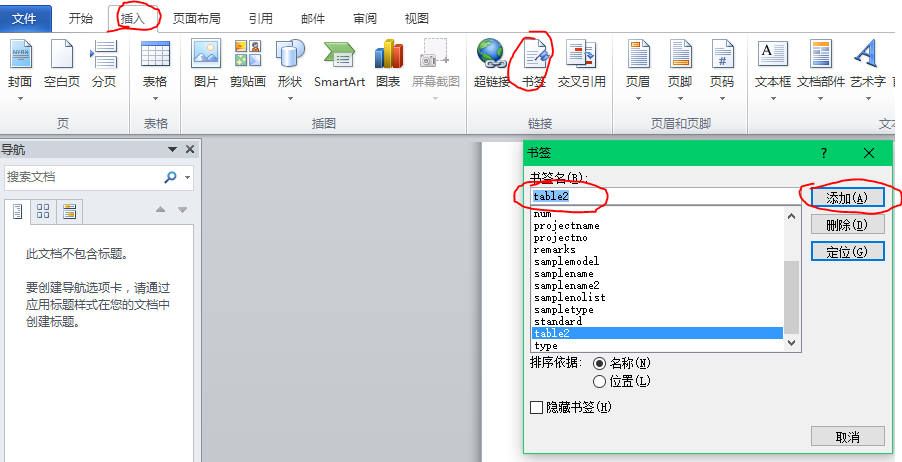
3)书签的插入
word->插入->书签->输入书签名称->添加
4)检索 COM 类工厂中 CLSID 为 {000209FF-0000-0000-C000-000000000046} 的组件失败,原因是出现以下错误: 80070005 拒绝访问
原因:没有权限读取word.dll
解决:http://blog.csdn.net/ououou123456789/article/details/6102036
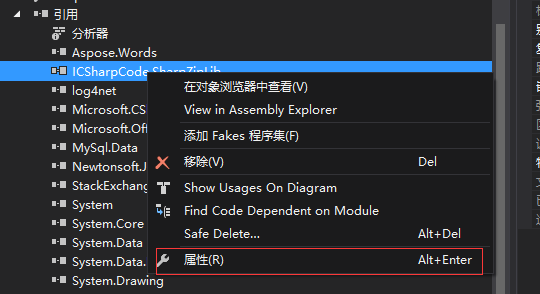
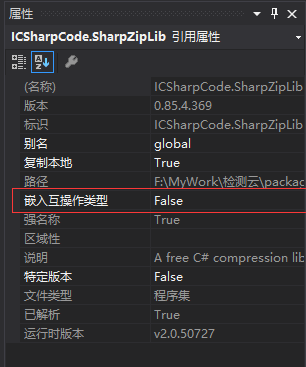
5)ApplicationClass() 不被识别
C#导出word [无规则表结构+模板遇到的坑]的更多相关文章
- 导入导出Mysql数据库、表结构、表数据
由sql文件导入 mysql -uusername -ppwd < ./abc.sql 导出整个数据库的表结构 mysqldump -uroot -pdbpasswd -d dbname > ...
- linux 之 导出远程oracle数据库表结构及数据
导出用户下所有表结构及数据 exp 用户名/密码@ip/数据库 file=文件路径/文件名.dmp owner='用户' 导出用户下所有表结构,不导出数据 exp 用户名/密码@ip/数据库 file ...
- 导出db2数据库的表结构和数据(转载)
对于db2数据库,导入和导出表结构和数据其实很简单,只需要用到db2look和db2move两个命令即可.这两个命令都需要在客户端的命令行处理器 中执行,但对于数据库服务器和客户端不在同一机器上的 ...
- Mysql 只导出数据,不包含表结构
mysqldump -u${user} -p${passwd} --no-create-info --database ${dbname} --table ${tablename} > ${ta ...
- MySQL导出数据库、数据库表结构、存储过程及函数【用】
一.导出数据库 我的mysql安装目录是D:\Program Files\MySQL\MySQL Server 5.5\bin\,导出文件预计放在D:\sql\ 在mysql的安装目录执行命令: my ...
- mysql导出数据库数据及表结构
1,导出远程数据库数据到本地 mysql -A wj_sms -h192.168.1.105 -uroot -p4321 -ss -e "set NAMES 'utf8';SELECT * ...
- freemarker 嵌套循环 (导出word时,修改ftl模板)
1.循环 (循环输出reportList列表的每行的姓名) <#list reportList as report> ${report.name} </$list> 2.嵌套循 ...
- Hive改表结构的两个坑|避坑指南
Hive在大数据中可能是数据工程师使用的最多的组件,常见的数据仓库一般都是基于Hive搭建的,在使用Hive时候,遇到了两个奇怪的现象,今天给大家聊一下,以后遇到此类问题知道如何避坑! 坑一:改变字段 ...
- mysql导出数据表结构,必须退出mysql命令.重新使用msyqldump命令
只导出数据库中所有表结构(-d 减去数据) 导出所有表结构和数据 mysqldump -uroot --default-character-set=utf8 -p123-d必须空格good>H: ...
随机推荐
- AutoIT: 处理GridView控件的一些折中方法
一般情况下,Gridview是无法通过AutoIT Window Info来获取控件信息的,但是可以有折中的办法对Gridview中的字段赋值. #include<array.au3> $ ...
- openpyxl操作excel
[转] openpyxl库可以读写xlsx格式的文件,对于xls旧格式的文件只能用xlrd读,xlwt写来完成了. python有很多模块都是用来操作excel的,比如xlrd,xlwt,pyExce ...
- Spark 大数据文本统计
此程序功能: 1.完成对10.4G.csv文件各个元素频率的统计 2.获得最大的统计个数 3.对获取到的统计个数进行降序排列 4.对各个元素出现次数频率的统计 import org.apache.sp ...
- 搭建CARDBOARD+ANDROID+unity3d的VR开发环境
一.下载最新unity3d(u3d官网) 二.下载最新cardboardsdkforunity(https://github.com/googlesamples/cardboard-unity) 三. ...
- 景女神与她的托福(BFS+状压)
景女神与她的托福 Time Limit : 3000/1000ms (Java/Other) Memory Limit : 65535/32768K (Java/Other) Total Submis ...
- bzoj 2784: [JLOI2012]时间流逝【树形期望dp】
来自lyd课件 发现s和last(s),next(s)成树结构,然后把式子化简成kx+b的形式,做树形dp即可 #include<iostream> #include<cstdio& ...
- spring进行事务管理
一:spring使用注解的方式进行事务声明 1.spring的声明式事务: 用jdbc的事务管理器:DataSourceTransactionManager 首先在applicationContext ...
- Android UI 设计规范
1. 基础常识 1.1 主流屏幕尺寸 标识 屏幕尺寸 hdpi 480 * 800 xhdpi 720 * 1280 xxhdpi 1080 * 1920 1.2 图标尺寸 标识 启动图标尺寸 菜单图 ...
- JMeter(十一)内存溢出解决方法
使用jmeter进行压力测试时遇到一段时间后报内存溢出outfmenmory错误,导致jmeter卡死了,先尝试在jmeter.bat中增加了JVM_ARGS="-Xmx2048m -Xms ...
- (2)《Head First HTML与CSS》学习笔记---img与基于标准的HTML5
1.浏览器处理图像的过程: 1.服务器获取文件,显示出文本结构,以及预留默认的大小给<img>(如果该<img>有width-1值和height-1值,则根据这个值提前设好页面 ...