
【C#】RGB,CMYK,HSB各种颜色表示的转换(转)
【C#】RGB,CMYK,HSB各种颜色表示的转换
一、表示颜色的方式有很多种,如RGB,CMYK,HSB,Hex等等
1、RGB:这种表示颜色由三原色构成,通过红,绿,蓝三种颜色分量的不同,组合成不同的颜色,例如,100%红+100%绿混合可以得到黄色,红绿蓝三种颜色叠加可以得到白色,基本上屏幕显示色彩都采用这种方式

2、CMYK:也称作印刷色彩模式,是一种依靠反光的色彩模式,主要用于印刷,和RGB类似,CMY是3种印刷油墨名称的首字母:青色Cyan、品红色Magenta、黄色Yellow。而K取的是black最后一个字母,之所以不取首字母,是为了避免与蓝色(Blue)混淆。从理论上来说,只需要CMY三种油墨就足够了,它们三个加在一起就应该得到黑色。但是由于目前制造工艺还不能造出高纯度的油墨,CMY相加的结果实际是一种暗红色。

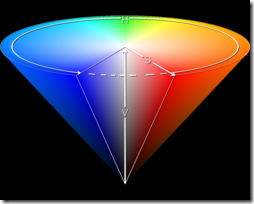
3、HSB:通过色相(hues),饱和度(saturation),亮度(brightness)来表示颜色
二、下面说说关于各种颜色之间的转换
1、RGB与CMYK之间的转换

        public static void RGB2CMYK(int red, int green, int blue, out double c, out double m, out double y, out double k)

        {

            c = (double)(255 - red) / 255;

            m = (double)(255 - green) / 255;

            y = (double)(255 - blue) / 255;

            k = (double)Math.Min(c, Math.Min(m, y));

            if (k == 1.0)

            {

                c = m = y = 0;

            }

            else

            {

                c = (c - k) / (1 - k);

                m = (m - k) / (1 - k);

                y = (y - k) / (1 - k);

            }

        }

        public static void CMYK2RGB(double c, double m, double y, double k, out int r, out int g, out int b)

        {

            r = Convert.ToInt32((1.0 - c) * (1.0 - k) * 255.0);

            g = Convert.ToInt32((1.0 - m) * (1.0 - k) * 255.0);

            b = Convert.ToInt32((1.0 - y) * (1.0 - k) * 255.0);

        }
2、RGB与HSB之间的转换
        public static void RGB2HSB(int red, int green, int blue, out double hue, out double sat, out double bri)

        {

            double r = ((double)red / 255.0);

            double g = ((double)green / 255.0);

            double b = ((double)blue / 255.0);

            double max = Math.Max(r, Math.Max(g, b));

            double min = Math.Min(r, Math.Min(g, b));

            hue = 0.0;

            if (max == r && g >= b)

            {

                if (max - min == 0) hue = 0.0;

                else hue = 60 * (g - b) / (max - min);

            }

            else if (max == r && g < b)

            {

                hue = 60 * (g - b) / (max - min) + 360;

            }

            else if (max == g)

            {

                hue = 60 * (b - r) / (max - min) + 120;

            }

            else if (max == b)

            {

                hue = 60 * (r - g) / (max - min) + 240;

            }

            sat = (max == 0) ? 0.0 : (1.0 - ((double)min / (double)max));

            bri = max;

        }

        public static void HSB2RGB(double hue, double sat, double bri, out int red, out int green ,out int blue)

        {

            double r = 0;

            double g = 0;

            double b = 0;

            if (sat == 0)

            {

                r = g = b = bri;

            }

            else

            {

                // the color wheel consists of 6 sectors. Figure out which sector you're in.

                double sectorPos = hue / 60.0;

                int sectorNumber = (int)(Math.Floor(sectorPos));

                // get the fractional part of the sector

                double fractionalSector = sectorPos - sectorNumber;

                // calculate values for the three axes of the color.

                double p = bri * (1.0 - sat);

                double q = bri * (1.0 - (sat * fractionalSector));

                double t = bri * (1.0 - (sat * (1 - fractionalSector)));

                // assign the fractional colors to r, g, and b based on the sector the angle is in.

                switch (sectorNumber)

                {

                    case 0:

                        r = bri;

                        g = t;

                        b = p;

                        break;

                    case 1:

                        r = q;

                        g = bri;

                        b = p;

                        break;

                    case 2:

                        r = p;

                        g = bri;

                        b = t;

                        break;

                    case 3:

                        r = p;

                        g = q;

                        b = bri;

                        break;

                    case 4:

                        r = t;

                        g = p;

                        b = bri;

                        break;

                    case 5:

                        r = bri;

                        g = p;

                        b = q;

                        break;

                }

            }

            red = Convert.ToInt32(r * 255);

            green = Convert.ToInt32(g * 255);

            blue = Convert.ToInt32(b * 255); ;

        }
3、RGB与十六进制Hex表示的转换
        public static string RGB2Hex(int r, int g, int b)

        {

            return String.Format("#{0:x2}{1:x2}{2:x2}", (int)r, (int)g, (int)b);

        }

        public static Color Hex2Color(string hexColor)

        {

            string r, g, b;

            if (hexColor != String.Empty)

            {

                hexColor = hexColor.Trim();

                if (hexColor[0] == '#') hexColor = hexColor.Substring(1, hexColor.Length - 1);

                r = hexColor.Substring(0, 2);

                g = hexColor.Substring(2, 2);

                b = hexColor.Substring(4, 2);

                r = Convert.ToString(16 * GetIntFromHex(r.Substring(0, 1)) + GetIntFromHex(r.Substring(1, 1)));

                g = Convert.ToString(16 * GetIntFromHex(g.Substring(0, 1)) + GetIntFromHex(g.Substring(1, 1)));

                b = Convert.ToString(16 * GetIntFromHex(b.Substring(0, 1)) + GetIntFromHex(b.Substring(1, 1)));

                return Color.FromArgb(Convert.ToInt32(r), Convert.ToInt32(g), Convert.ToInt32(b));

            }

            return Color.Empty;

        }

        private static int GetIntFromHex(string strHex)

        {

            switch (strHex)

            {

                case ("A"):

                    {

                        return 10;

                    }

                case ("B"):

                    {

                        return 11;

                    }

                case ("C"):

                    {

                        return 12;

                    }

                case ("D"):

                    {

                        return 13;

                    }

                case ("E"):

                    {

                        return 14;

                    }

                case ("F"):

                    {

                        return 15;

                    }

                default:

                    {

                        return int.Parse(strHex);

                    }

            }

        }
转换算法摘自:http://www.codeproject.com/Articles/19045/Manipulating-colors-in-NET-Part-1
【C#】RGB,CMYK,HSB各种颜色表示的转换(转)的更多相关文章
- RGB,CMYK,HSB各种颜色表示的转换 C#语言
Introduction Why an article on "colors"? It's the same question I asked myself before writ ...
- 色彩空间RGB/CMYK/HSL/HSB/HSV/Lab/YUV基础理论及转换方法:RGB与YUV
之前做个设计,现在从事IT,脑子里面关于RGB,RGBA,CMY,CMYK,YUV,但是具体理论还是不扎实.若干年前之前写过<水煮RGB与CMYK色彩模型—色彩与光学相关物理理论浅叙>&l ...
- c# 颜色RGB到HSB互相转换
/// <summary> /// 色相,饱和度,亮度转换成rgb值 /// </summary> /// <returns></returns> pu ...
- 颜色空间模型(HSV\LAB\RGB\CMYK)
通过Photoshop的拾色器,我们知道表征颜色的模型的不止一种,本文将系统并且详细讨论这四种模型(HSV.LAB.RGB和CMYK)之间的联系以及应用.本文部分章节整合了多位优秀博主的博客(链接见本 ...
- C# RGB和HSB相互转换
背景 最近做的项目中有这样一个场景,设置任意一种颜色,得到这种颜色偏深和偏浅的两种颜色.也就是说取该颜色同色系的深浅两种颜色.首先想到的是调节透明度,但效果不理想.后来尝试调节颜色亮度,发现这才是正解 ...
- RGB和HSB的转换推算
RGB三原色是基于人肉眼对光线的生理作用.人眼内有三种椎状体“对这三种光线频率所能感受的带宽最大,也能独立刺激这三种颜色的受光体”,因此RGB称为三原色.比如,黄色波长的光对人眼的刺激效果,和红色与绿 ...
- RGB与HSB之间的转换公式
先来了解一些概念: 1.RGB是一种加色模型,就是将不同比例的Red/Green/Blue混合在一起得到新颜色.通常RGB颜色模型表示为: 2.HSB(HSV) 通过色相/饱和度/亮度三要素来表达颜色 ...
- RGB与HSB之间转换
先来了解一些概念: 1.RGB是一种加色模型,就是将不同比例的Red/Green/Blue混合在一起得到新颜色.通常RGB颜色模型表示为: 2.HSB(HSV) 通过色相/饱和度/亮度三要素来表达颜色 ...
- 常用icon以及color颜色RGB值和对应颜色效果图
Android谷歌官方扁平化设计常用icon集合 Android谷歌官方扁平化设计color颜色RGB值和对应颜色效果图.
随机推荐
- Luogu P3727 曼哈顿计划E 点分治+hash
题目: P3727曼哈顿计划E 分析: 大长题面容易给人一种不可做的错觉,但是这题考的知识点都是我们熟悉的. 稍加分析我们可以得到,我们可以把每个点当成一个单独的游戏,如果k=1,就是简单的nim游戏 ...
- 【数学 exgcd】bzoj1407: [Noi2002]Savage
exgcd解不定方程时候$abs()$不能乱加 Description Input 第1行为一个整数N(1<=N<=15),即野人的数目. 第2行到第N+1每行为三个整数Ci, Pi, L ...
- 创建yum仓库
第1章 服务端)创建yum仓库目录 命令:(创建)mkdir -p /application/yum/centos6.6/x86_64/ 命令:(切换)cd /application/yum/cent ...
- redis:高可用分析
https://www.cnblogs.com/xuning/p/8464625.html 基于内存的Redis应该是目前各种web开发业务中最为常用的key-value数据库了,我们经常在业务中用其 ...
- Linux 权限设置和 SUID, SGID 以及粘滞位sticky bit
suid是指在执行suid程序的过程中,去访问其他文件时拥有suid程序属主的权限,而不是指对suid程序本身拥有suid程序属主的权限! 一. Linux 文件权限的表示方法 文件权限用 12 个二 ...
- POJ:2753-Seek the Name, Seek the Fame
Seek the Name, Seek the Fame Time Limit: 2000MS Memory Limit: 65536K Description The little cat is s ...
- 八、docker的常用命令
1 Docker常用命令 1.1 存储镜像 如果要导出镜像到本地文件,可以使用 docker save 命令. docker save -o log_v140.tar docker.io/vmware ...
- Linux下文件打包与解包
打包(.tar): tar -cvf Pro.tar /home/lin/Pro #将/home/lin/Pro文件夹下的所有文件打包成Pro.tar 打解包(.tar.gz) tar -cv ...
- caffe+vs2013+window10+GPU(CPU)配置
参考:http://www.echojb.com/cuda/2017/03/15/350138.html https://www.zhihu.com/question/56111727 第一步:首先确 ...
- 03-for循环in遍历
<!DOCTYPE html> <html> <head lang="en"> <meta charset="UTF-8&quo ...