
2016/2/19 position: fixed absolute relative z-index float 半透明效果
一、position:fixed
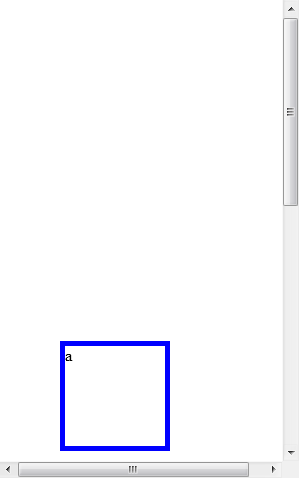
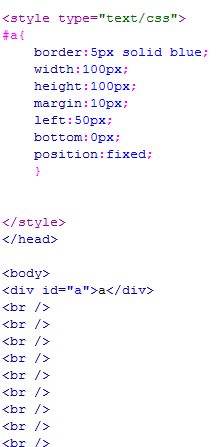
锁定位置(相对于浏览器的位置),例如有些网站的右下角的弹出窗口。
显示效果 无论滚动条怎么移动 都固定在显示页面的一个位置不动
二、position:absolute
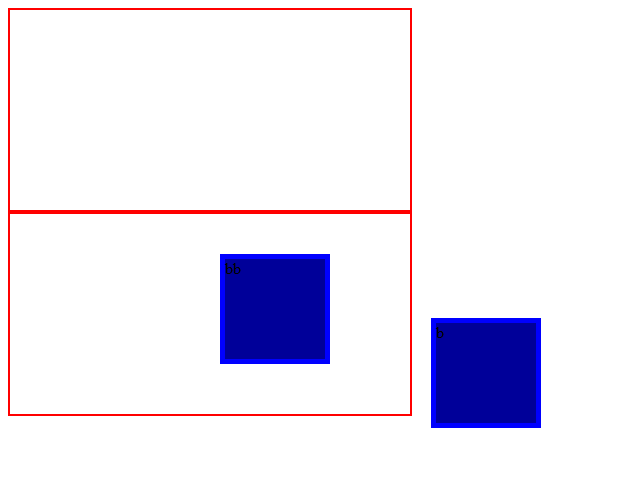
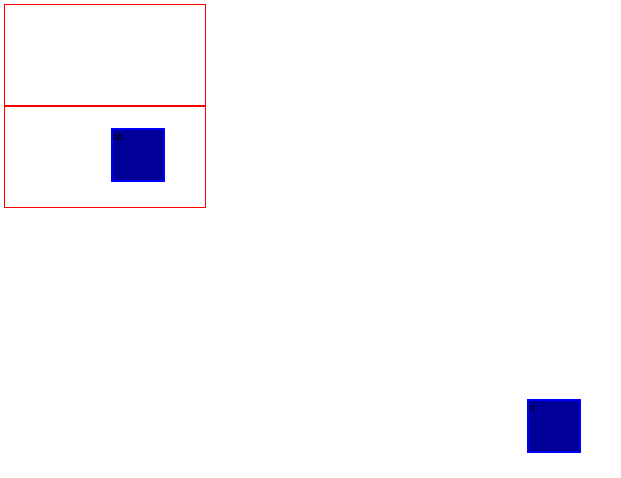
1.外层没有position:absolute(或relative);那么div相对于浏览器定位,如下图中b(距离浏览器右边框为50像素,距离下边框为20像素)。
2.外层有position:absolute(或relative);那么div相对于外层边框定位,如下图中bb(距离d的右边框50像素,距离d的下边框为20像素)。
示例:
 <!DOCTYPE html PUBLIC "-//W3C//DTD XHTML 1.0 Transitional//EN" "http://www.w3.org/TR/xhtml1/DTD/xhtml1-transitional.dtd">

 <html xmlns="http://www.w3.org/1999/xhtml">

 <head>

 <meta http-equiv="Content-Type" content="text/html; charset=utf-8" />

 <title>无标题文档</title>

 <style type="text/css">

 .b{

     border:5px solid blue;

     background-color:#009;

     width:100px;

     height:100px;

     margin:30px;

     right:50px;

     bottom:20px;

     position:absolute;

     }

 .c{

     width:400px;

     height:200px;

     border:2px solid red;

     }

 .d{

     border:2px solid red;

     width:400px;

     height:200px;

     position:absolute;

     }

 </style>

 </head>

 <body>

 <div class="c"><div class="b">b</div></div>

 <div class="d"><div class="b">bb</div></div>

 </body>

 </html>
不同比例的显示效果图,见下面。
三、position:relative
相对位置。
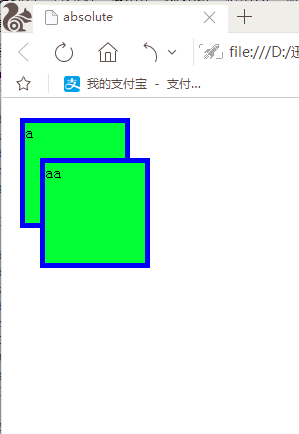
如下图,相对于把此div包含住的div的某个位置进行固定。如果外层没有包含他的,那就相对于浏览器进行相对位置的固定。
 <!DOCTYPE html PUBLIC "-//W3C//DTD XHTML 1.0 Transitional//EN" "http://www.w3.org/TR/xhtml1/DTD/xhtml1-transitional.dtd">

 <html xmlns="http://www.w3.org/1999/xhtml">

 <head>

 <meta http-equiv="Content-Type" content="text/html; charset=utf-8" />

 <title>absolute</title>

 <style type="text/css">

 #a{

     border:5px solid blue;

     background-color:#0F3;

     width:100px;

     height:100px;

     margin:10px;

     position:fixed;

     }

 #aa{

     border:5px solid blue;

     background-color:#0F3;

     width:100px;

     height:100px;

     margin:10px;

     left:20px;

     top:50px;

     position:relative;

     }

 </style>

 </head>

 <body>

 <div id="a">a</div>

 <div id="aa">aa</div>

 </body>

 </html>
显示效果
四、分层(z-index)
在z轴方向分层,可以理解为分成一摞纸,层数越高越靠上。
在上面relative的示例中,我们看到了aa遮住了a,这是因为后写代码的显示级别越靠前,那么在不改变代码顺序的情况下如何让a盖住aa?如下:
示例:
 <!DOCTYPE html PUBLIC "-//W3C//DTD XHTML 1.0 Transitional//EN" "http://www.w3.org/TR/xhtml1/DTD/xhtml1-transitional.dtd">

 <html xmlns="http://www.w3.org/1999/xhtml">

 <head>

 <meta http-equiv="Content-Type" content="text/html; charset=utf-8" />

 <title>无标题文档</title>

 <style type="text/css">

 .a{

     border:5px solid blue;

     width:100px;

     height:100px;

     background-color:#0F3;

     margin:10px;

     position:fixed;

     z-index:2;/*"2"这个参数可做修改,默认情况下,都是第一层*/

     }

 .aa{

     border:5px solid blue;

     width:100px;

     height:100px;

     margin:10px;

     background-color:#0F3;

     left:20px;

     top:50px;

     position:relative;

     }

 </style>

 </head>

 <body>

 <div class="a">a</div>

 <div class="aa">aa</div>

 </body>

 </html>

五、float:left、right
Left、right时不用给他规定位置(left、top),直接相对于浏览器。若外部被包裹,相对于外部div的除去一行的位置的左上或右上显示。
overflow:hidden; //超出部分隐藏;scroll,显示出滚动条;
<div style="clear:both"></div> //截断流
附:cursor:pointer 鼠标指到上面时的形状
© 版权符号©
 <!DOCTYPE html PUBLIC "-//W3C//DTD XHTML 1.0 Transitional//EN" "http://www.w3.org/TR/xhtml1/DTD/xhtml1-transitional.dtd">

 <html xmlns="http://www.w3.org/1999/xhtml">

 <head>

 <meta http-equiv="Content-Type" content="text/html; charset=utf-8" />

 <title>无标题文档</title>

 <style type="text/css">

 #a{

     background-color:#0F0;

     border:1px solid blue;

     margin:10px;

     height:100px;

     width:100px;

     float:right;

     overflow:hidden;/把hidden改为scroll,由隐藏溢出的文字方式,变为有滚动条显示的方式

     }

 </style>

 </head>

 <body>

 <div id="a">道可道非常道,名可名非常。无名,天地之始。有名,万物之母。常无欲观其妙,常有欲观其徼。此两者同出而异名。同谓之玄,玄而又玄,众妙之门。</div>

 </body>

 </html>
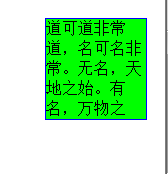

overflow:hidden;形式把溢出的隐藏 overflow:scroll;形式 带滚动条
半透明效果:
<div class="box">透明区域<div>
在样式表中的代码为:
.box
{
opacity:0.5; -moz-opacity:0.5 ; filter:alpha(opacity=50)
}
filter填充 alpha透明 opacity模糊
2016/2/19 position: fixed absolute relative z-index float 半透明效果的更多相关文章
- css 定位(fixed > absolute > relative)与层级zIndex 的权限认知
原则1: fixed > absolute > relative原则2: zIndex 越高越牛逼,不管你是谁无视身份.原则3: 青出于蓝而胜于蓝,儿子永远比父亲强原则4: 平台很重要. ...
- CSS position绝对定位absolute relative
常常使用position用于层的绝对定位,比如我们让一个层位于一个层内具体什么位置,为即可使用position:absolute和position:relative实现. 一.position语法与结 ...
- CSS position属性absolute relative等五个值的解释
DIV CSS position绝对定位absolute relative教程篇 常常使用position用于层的绝对定位,比如我们让一个层位于一个层内具体什么位置,为即可使用position:abs ...
- css总结1:position定位:absolute/relative/fixed
1 [Positioning(定位)] Positioning作用:指定了元素的定位类型.position包括四个值:static,relative,fixed,absolute. css定位解析:元 ...
- 一起学HTML基础-格式与布局fixed/absolute/relative/z-index/float
很多网页都存在一个悬浮的操作条或者广告区,无论如何上下滚动网页,操作条或广告区都不会动,这个就是div制作,位置锁定在屏幕指定位置,现在我们就学习下网页的格式与布局. position 位置,来给di ...
- HTML-★★★格式与布局fixed/absolute/relative/z-index/float★★★
很多网页都存在一个悬浮的操作条或者广告区,无论如何上下滚动网页,操作条或广告区都不会动,这个就是div制作,位置锁定在屏幕指定位置,现在我们就学习下网页的格式与布局. position 位置,来给di ...
- day2-设置position:fixed/absolute无法使用margin:auto调整居中
问题描述:父元素给定宽度,子元素给定宽度,设置子元素position为absolute/fixed后,无法使用margin:auto使子元素在父元素中水平居中 html代码如下: <div cl ...
- css中position属性(absolute|relative|static|fixed)概述及应用
position属性的相关定义: static:无特殊定位,对象遵循正常文档流; relative:对象遵循正常文档流; absolute:对象脱离正常文档流 fixed:对象脱离正常文档流 我们先来 ...
- 【转】CSS中position属性( absolute | relative | static | fixed )详解
我们先来看看CSS3 Api中对position属性的相关定义: static:无特殊定位,对象遵循正常文档流.top,right,bottom,left等属性不会被应用. relative:对象遵循 ...
随机推荐
- python爬取网页图片
# html:网页地址 def getImg2(html): soup = BeautifulSoup(html, 'html.parser') href_regex = re.compile(r'^ ...
- codevs1288 埃及分数
题目描述: 在古埃及,人们使用单位分数的和(形如1/a的, a是自然数)表示一切有理数. 如:2/3=1/2+1/6,但不允许2/3=1/3+1/3,因为加数中有相同的. 对于一个分数a/b,表示方法 ...
- wampsever修改数据库密码
①进入localhost中的mysql数据库 ②再进入mysql数据库中的user表 ③将user表中的三个root账号的密码全部改为你想要的密码(不需要经过MD5加密) ④保存后重新启动服务 如果在 ...
- 多.h项目出现的问题:使用了预编译头依然出现error LNK2005:***obj已在***obj中定义与c++ error C2011: “xxx”:“class”类型重定义解决办法
使用了预编译头依然出现error LNK2005:***obj已在***obj中定义 造成该问题的可能性比较多,本人将在今后遇到时添加进来,今天先放出本人遇到的一种情况. 多重包含含有变量定义的.h文 ...
- Linux Shell常用技巧(八) 系统运行状况
十八. 和系统运行状况相关的Shell命令: 1. Linux的实时监测命令(watch): watch 是一个非常实用的命令,可以帮你实时监测一个命令的运行结果,省得一遍又一遍的手动 ...
- poj 1456
#include<stdio.h> #include<string.h> #include<stdlib.h> #define N 10010 #define in ...
- DBA的40条军规
DBA操作规范 1.涉及业务上的修改/删除数据,在得到业务方.CTO的邮件批准后方可执行,执行前提前做好备份,必要时可逆. 2.所有上线需求必须走工单系统,口头通知视为无效. 3.在对大表做表结构变更 ...
- idea使用之maven本地索引更新
idea使用起来的确挺顺手的,但遇到一些问题时,直接百度很难有答案,只能自己慢慢摸索了. 今天在倒腾idea仓库索引的时候,就出事情啦. 先说idea更新本地仓库索引吧,打开settings--> ...
- 【Intellij 】Intellij IDEA 添加jar包的三种方式
一.直接复制:(不推荐) 方法:直接将硬盘上的jar包复制粘贴到项目的lib目录下即可. 注意: 1.对于导入的eclipse项目,该方式添加的jar包没有任何反应,用make编译项目会报错 2.对于 ...
- 2017-10-03-afternoon
P100 zhx 竞赛时间:????年??月??日??:??-??:?? 题目名称 a b c 名称 a b c 输入 a.in b.in c.in 输出 a.out b.out c.out 每个测试 ...