
HTML-★★★格式与布局fixed/absolute/relative/z-index/float★★★

很多网页都存在一个悬浮的操作条或者广告区,无论如何上下滚动网页,操作条或广告区都不会动,这个就是div制作,位置锁定在屏幕指定位置,现在我们就学习下网页的格式与布局。
position 位置,来给div定位
1、position:fixed;锁定位置(相当于浏览器窗口的位置),默认层数最高。例如有些网站的右下角弹窗。
练习:在右下角做一个弹窗,锁定位置,不随网页滚动而滚动。
步骤:
一、先做一个文字的弹窗
<head>

<meta http-equiv="Content-Type" content="text/html; charset=utf-8" />

<title>格式与布局</title>

<style type="text/css">

.wtc

{

    width:200px; height:150px; background-color:#F00;

    border:yellow solid 6px;

    line-height:150px; text-align:center;

}

</style>

</head>

<body>

<div class="wtc"><b><u>Welcom To China!</u></b></div>

</body>

</html>
welcome to china

二、将弹窗放置在屏幕右下角并锁定位置(插入空行加长页面来已显示滚动条)——若不写position:fixed;代码,弹窗设置的位置无法确定相对于谁的位置
<head>

<meta http-equiv="Content-Type" content="text/html; charset=utf-8" />

<title>格式与布局</title>

<style type="text/css">

.wtc

{

    width:200px; height:150px; background-color:#F00;

    border:yellow solid 6px;

    line-height:150px; text-align:center;

}

</style>

</head>

<body>

<div class="wtc" style="right:30px; bottom:30px; position:fixed;"><b><u>Welcom To China!</u></b></div><br />

<br />

<br />

<br />

<br />

<br />

<br />

<br />

<br />

<br />

<br />

<br />

<br />

<br />

<br />

<br />

<br />

<br />

<br />

<br />

<br />

<br />

<br />

<br />

<br />

<br />

<br />

<br />

<br />

<br />

<br />

<br />

<br />

<br />

<br />

<br />

<br />

<br />

<br />

<br />

<br />

<br />

<br />

<br />

<br />

<br />

<br />

<br />

<br />

<br />

<br />

<br />

<br />

<br />

<br />

<br />

<br />

<br />

<br />

<br />

<br />

</body>

</html>
position:fixed

2、position:absolute 绝对位置
外层没有position:absolute(或relative);那么div相对于浏览器定位,外层有position:absolute(或relative);那么div相对于外层边框定位
练习:a、指定一个div,蓝色边框背景白色,内部再指定一个div,红色背景有文字,外部div不指定position,两个div都不指定position
<head>

<meta http-equiv="Content-Type" content="text/html; charset=utf-8" />

<title>格式与布局</title>

<style type="text/css">

.wtc

{

    width:200px; height:150px; background-color:#F00;

    border:yellow solid 6px;

    line-height:150px; text-align:center;

}

</style>

</head>

<body>

<div style="border:10px blue solid; width:500px; height:400px;"><div class="wtc"><b><u>Welcom To China!</u></b></div></div>

</body>
不指定position

b、上述div,外部div指定一个position:absolute;后,外部div会带着内部div移动,且随着滚动条会移动位置,是相对于整个网页锁定了位置
absolute绝对位置,会跟随网页滚动而改变在窗口的位置,相对于整个网页位置不变
<head>

<meta http-equiv="Content-Type" content="text/html; charset=utf-8" />

<title>格式与布局</title>

<style type="text/css">

.wtc

{

    width:200px; height:150px; background-color:#F00;

    border:yellow solid 6px;

    line-height:150px; text-align:center;

}

</style>

</head>

<body>

<div style="border:10px blue solid; width:500px; height:400px; position:absolute; right:250px; top:100px;"><div class="wtc"><b><u>Welcom To China!</u></b></div></div><br />

<br />

<br />

<br />

<br />

<br />

<br />

<br />

<br />

<br />

<br />

<br />

<br />

<br />

<br />

<br />

<br />

<br />

<br />

<br />

<br />

<br />

<br />

<br />

<br />

<br />

<br />

<br />

<br />

<br />

<br />

<br />

<br />

<br />

<br />

<br />

<br />

<br />

<br />

<br />

<br />

<br />

<br />

<br />

<br />

<br />

<br />

<br />

<br />

<br />

<br />

<br />

<br />

<br />

<br />

<br />

<br />

<br />

</body>
外部div-position

c、上述div,外部div不指定position,内部div指定一个position:absolute;后,外部div没有改变位置,内部div相对于整个网页改变了位置
<head>

<meta http-equiv="Content-Type" content="text/html; charset=utf-8" />

<title>格式与布局</title>

<style type="text/css">

.wtc

{

    width:200px; height:150px; background-color:#F00;

    border:yellow solid 6px;

    line-height:150px; text-align:center;

}

</style>

</head>

<body>

<div style="border:10px blue solid; width:500px; height:400px;"><div class="wtc" style="position:absolute; right:25px; top:10px;"><b><u>Welcom To China!</u></b></div></div><br />

</body>
内部div-position

d、上述div,同时设置内外div的position,此时,外部div相对于网页确定位置,内部div相对于外边框(外部div)确定位置
<head>

<meta http-equiv="Content-Type" content="text/html; charset=utf-8" />

<title>格式与布局</title>

<style type="text/css">

.wtc

{

    width:200px; height:150px; background-color:#F00;

    border:yellow solid 6px;

    line-height:150px; text-align:center;

}

</style>

</head>

<body>

<div style="border:10px blue solid; width:500px; height:400px; position:absolute; right:250px; top:100px;"><div class="wtc" style="position:absolute; right:25px; top:10px;"><b><u>Welcom To China!</u></b></div></div>

</body>
内外position

3、position:relative;相对位置
a、输入三个div,仅指定长宽和背景颜色
<body>

<div style="background-color:#F00; width:200px; height:100px;"></div>

<div style="background-color:#CF0; width:200px; height:100px;"></div>

<div style="background-color:#0F0; width:200px; height:100px;"></div>

</body>
3个div

b、在a的基础上,设置第二个div黄色区域向下、向右移动,position用absolute定位,黄色区域相对于浏览器窗口定位,而绿色区域向上紧跟红色区域
<body>

<div style="background-color:#F00; width:200px; height:100px;"></div>

<div style="background-color:#CF0; width:200px; height:100px; top:50px; left:100px; position:absolute;"></div>

<div style="background-color:#0F0; width:200px; height:100px;"></div>

</body>
移动div-absolute定位

c、在a的基础上,设置第二个div黄色区域向下、向右移动,position用relative定位,黄色区域相对于原有位置定位,而绿色区域还在原黄色位置下方
<body>

<div style="background-color:#F00; width:200px; height:100px;"></div>

<div style="background-color:#CF0; width:200px; height:100px; top:50px; left:100px; position:relative;"></div>

<div style="background-color:#0F0; width:200px; height:100px;"></div>

</body>
移动div-relative定位

结合b和c,说明absolute绝对位置是相对于浏览器页面位置定位,此时div不占有实际位置,所以绿色区域紧跟红色区域;relative相对位置是相对于div原有位置定位,此时div是实际占有位置的,所以绿色区域保持在原来黄色区域下方。
4、分层(z-index)
屏幕显示窗口虽然是在二维页面上显示,但实际是三维显示,因为窗口是重叠的,有上下层之分,上层总是覆盖下层,就像是一摞纸。
在上述c中,黄色区域覆盖了绿色区域,如何让绿色区域覆盖黄色区域?在绿色区域div-style中添加代码“z-index:2; position:relative;”即可
<body>

<div style="background-color:#F00; width:200px; height:100px;"></div>

<div style="background-color:#CF0; width:200px; height:100px; top:50px; left:100px; position:relative;;"></div>

<div style="background-color:#0F0; width:200px; height:100px; position:relative; z-index:2;"></div>

</body>
z-index

5、float:left;(right)流式布局
left、right时不需要规定位置(top、right),直接相对于浏览器,若外部被包裹,相对于外部div的位置的左上或右上显示。
a、在新建的html中输入两个div,分别指定float:left;和float:right;
<body>

<div style="background-color:#0F0; width:100px; height:300px; float:left;"></div>

<div style="background-color:#FF0; width:100px; height:300px; float:right;"></div>

</body>
float:left(right)

b、用一个div包裹这两个div,并居中,这种样式就像网站中悬浮的广告框
<body>

<div style="border:#F00 solid 5px; width:700px; height:500px; margin:0px auto;">

<div style="background-color:#0F0; width:100px; height:300px; float:left;"></div>

<div style="background-color:#FF0; width:100px; height:300px; float:right;"></div>

</div>

</body>
用div包裹

c、在a的基础上,我们用边框代替背景色,复制粘贴多个float,发现,div是从左至右、从右至左的顺序进行排列
<body>

<div style="border:#F00 solid 5px; width:700px; height:500px; margin:0px auto;">

<div style="border:#0F0 solid 3px; width:100px; height:300px; float:left;">a</div>

<div style="border:#0F0 solid 3px; width:100px; height:300px; float:left;">b</div>

<div style="border:#0F0 solid 3px; width:100px; height:300px; float:left;">c</div>

<div style="border:#FF0 solid 3px; width:100px; height:300px; float:right;">d</div>

<div style="border:#FF0 solid 3px; width:100px; height:300px; float:right;">e</div>

<div style="border:#FF0 solid 3px; width:100px; height:300px; float:right;">f</div>

</div>

</body>
多个float

d、将多个div放在网页中,设置float
<body>

<div style="border:#0F0 solid 3px; width:100px; height:300px; float:left;">a</div>

<div style="border:#0F0 solid 3px; width:100px; height:300px; float:left;">b</div>

<div style="border:#0F0 solid 3px; width:100px; height:300px; float:left;">c</div>

<div style="border:#0F0 solid 3px; width:100px; height:300px; float:left;">d</div>

<div style="border:#0F0 solid 3px; width:100px; height:300px; float:left;">e</div>

<div style="border:#0F0 solid 3px; width:100px; height:300px; float:left;">f</div>

<div style="border:#FF0 solid 3px; width:100px; height:300px; float:right;">aa</div>

<div style="border:#FF0 solid 3px; width:100px; height:300px; float:right;">bb</div>

<div style="border:#FF0 solid 3px; width:100px; height:300px; float:right;">cc</div>

<div style="border:#FF0 solid 3px; width:100px; height:300px; float:right;">dd</div>

<div style="border:#FF0 solid 3px; width:100px; height:300px; float:right;">ee</div>

<div style="border:#FF0 solid 3px; width:100px; height:300px; float:right;">ff</div>

</body>
多个float
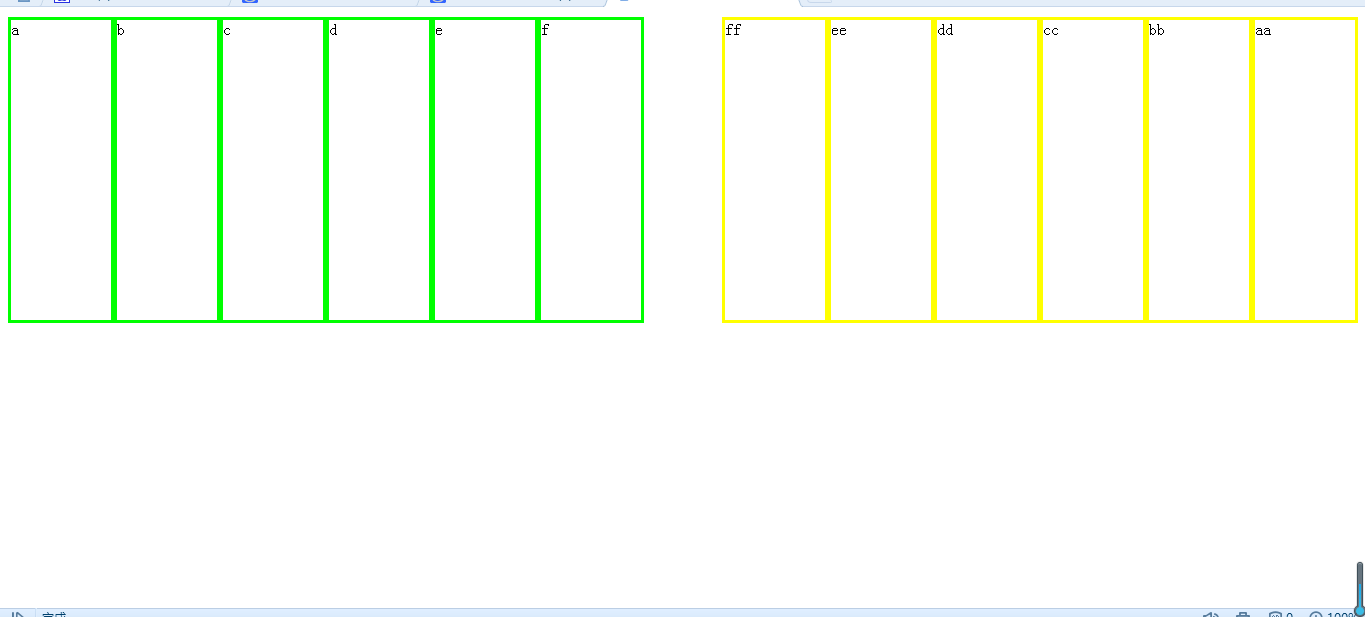
此时,缩小浏览器会发现,所有div像流水一样排列

e、练习
第一步:用float:left;排5个灰色区域
<head>

<meta http-equiv="Content-Type" content="text/html; charset=utf-8" />

<title>格式与布局</title>

<style type="text/css">

.a

{

background-color:#; width:100px; height:100px; margin:10px;    float:left;

}

</style>

</head>

<body>

<div class="a">AA</div>

<div class="a">BB</div>

<div class="a">CC</div>

<div class="a">DD</div>

<div class="a">EE</div>

</body>
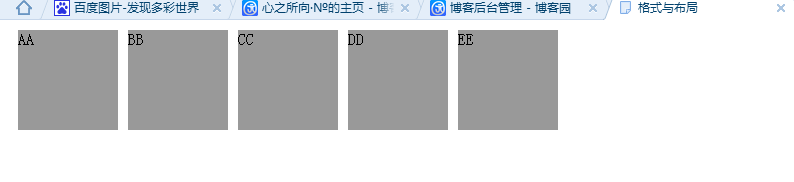
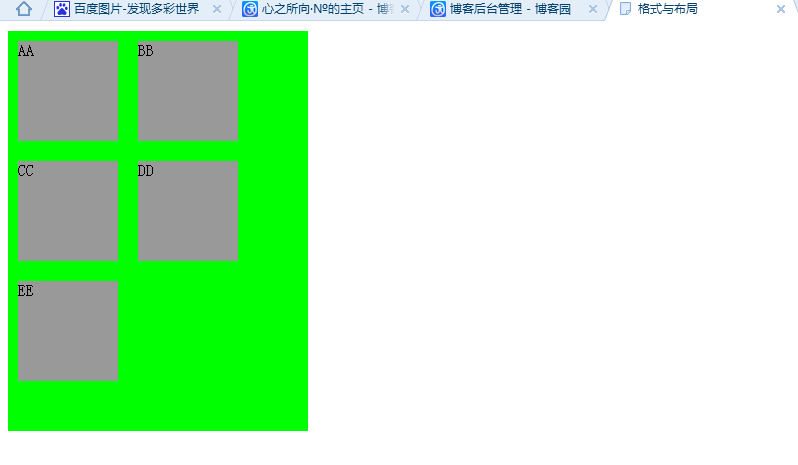
第二步:用一个div包含他们
<head>

<meta http-equiv="Content-Type" content="text/html; charset=utf-8" />

<title>格式与布局</title>

<style type="text/css">

.a

{

background-color:#; width:100px; height:100px; margin:10px;    float:left;

}

</style>

</head>

<body>

<div style="background-color:#0F0; width:300px; height:400px;">

<div class="a">AA</div>

<div class="a">BB</div>

<div class="a">CC</div>

<div class="a">DD</div>

<div class="a">EE</div>

</div>

</body>
HTML-★★★格式与布局fixed/absolute/relative/z-index/float★★★的更多相关文章
- 一起学HTML基础-格式与布局fixed/absolute/relative/z-index/float
很多网页都存在一个悬浮的操作条或者广告区,无论如何上下滚动网页,操作条或广告区都不会动,这个就是div制作,位置锁定在屏幕指定位置,现在我们就学习下网页的格式与布局. position 位置,来给di ...
- css 定位(fixed > absolute > relative)与层级zIndex 的权限认知
原则1: fixed > absolute > relative原则2: zIndex 越高越牛逼,不管你是谁无视身份.原则3: 青出于蓝而胜于蓝,儿子永远比父亲强原则4: 平台很重要. ...
- 2016/2/19 position: fixed absolute relative z-index float 半透明效果
一.position:fixed 锁定位置(相对于浏览器的位置),例如有些网站的右下角的弹出窗口. 显示效果 无论滚动条怎么移动 都固定在显示页面的一个位置不动 二.position:a ...
- position:absolute/relative/fixed小结
1.绝对定位:position:absolute; 当一个div块的位置被定义为绝对定位absolute时,也就意味着它失去了文档流的位置,后面的文档流会紧跟着补上来接替它的位置.如果上下左右的绝对偏 ...
- CSS+DIV布局中absolute和relative区别
原文:http://developer.51cto.com/art/201009/225201.htm 这里向大家简单介绍一下CSS+DIV布局中absolute和relative属性的用法和区别,定 ...
- css总结1:position定位:absolute/relative/fixed
1 [Positioning(定位)] Positioning作用:指定了元素的定位类型.position包括四个值:static,relative,fixed,absolute. css定位解析:元 ...
- 页面布局排版-block,inline,float,relative,absolute等
1.span和div的区别 div是块元素(block),span是行内元素(inline): span什么事也不会做,它存在的目的在与为开发者给它所围绕的元素指定样式.div类似,不过它引入了行分隔 ...
- CSS中Position属性static、absolute、fixed、relative
在html中网页可以看成一个立体的空间,一个完整的页面是由很多个页面堆积形成的,如下图所示 CSS中Position属性有四个可选值,它们分别是:static.absolute.fixed.rel ...
- 【学习笔记】HTML position(static、fixed、relative、absolute)
[本文转载] position的四个属性值:static.fixed.relative.absolute 下面分别讲述这四个属性:<div id="parent"> ...
随机推荐
- spring4-4-jdbc-02
1.简化 JDBC 模板查询 每次使用都创建一个 JdbcTemplate 的新实例, 这种做法效率很低下. JdbcTemplate 类被设计成为线程安全的, 所以可以再 IOC 容器中声明它的单个 ...
- tp5 $this/Db
- 【原创】cython and python for kenlm
未经允许不可转载 Kenlm相关知识 Kenlm下载地址 kenlm中文版本训练语言模型 如何使用kenlm训练出来的模型C++版本 关于Kenlm模块的使用及C++源码说明 加载Kenlm模块命令 ...
- JavaScript面向对象编程小游戏---贪吃蛇
1 面向对象编程思想在程序项目中有着非常明显的优势: 1- 1 代码可读性高.由于继承的存在,即使改变需求,那么维护也只是在局部模块 1- 2 维护非常方便并且成本较低. 2 这个demo是采用了 ...
- php 用csv文件导出大量数据初方案
背景:接手的项目中支持导出一批数据,全数量在50W左右.在接手的时候看代码是直接一次查询MySQL获得数据,然后用header函数直接写入csv,用户开始导出则自动下载.但是,在全导出的时候,功能出现 ...
- 在IE9中检查up6.2配置
1.按F12,打开调试模式 2.打开脚本选项卡 说明:在脚本选项卡中可看到IE加载的脚本信息是否正确.因为IE有缓存,导致脚本有时不是最新的. 3.打开脚本,up6.js 4. ...
- 常用的String方法Math方法
Arrays.sort();冒泡排序字符串.charAt(i);字符串索引i上的字符Integer.prsent(字符串) 字符串转整数equals(Object anObject) 将此字符串与指定 ...
- linux 权限机制
系统每个文件都拥有特定的权限,所属用户及所属组,通过这样的机制限制哪些用户.哪些组可以对特定文件进行什么样的操作,一般分为读.写.执行三种权限. 每个进程都是以某个用户的身份运行,所以进程的权限与该用 ...
- TSQL--SORT MERGE JOIN
算法:对两表排序,然后对两表依次扫描,找到符合条件的结果集 sort(T1); seort(T2); int k=0;--for T1 index int m=0;--for T2 index whi ...
- C#在线运行
初步完成c#代码的在线编辑. 首先,传回前端的c#在线代码,进行预编译,用CSharpCodeProvider这个方法.设置编译版本3.5 设置编译参数GenerateInMemory:是 ...