
2016/2/19 position: fixed absolute relative z-index float 半透明效果
一、position:fixed
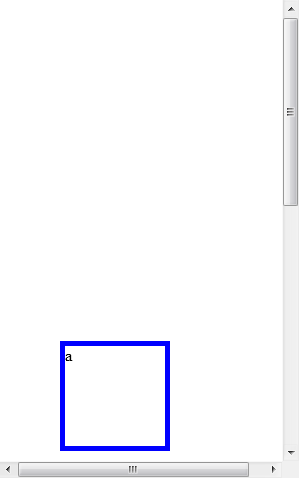
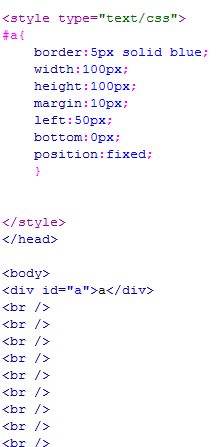
锁定位置(相对于浏览器的位置),例如有些网站的右下角的弹出窗口。
显示效果 无论滚动条怎么移动 都固定在显示页面的一个位置不动
二、position:absolute
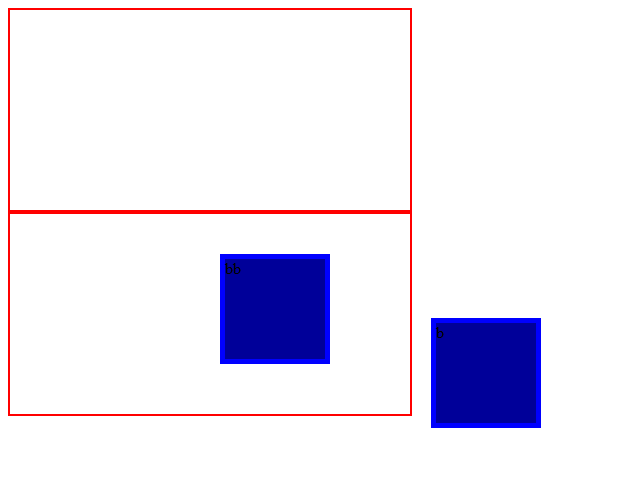
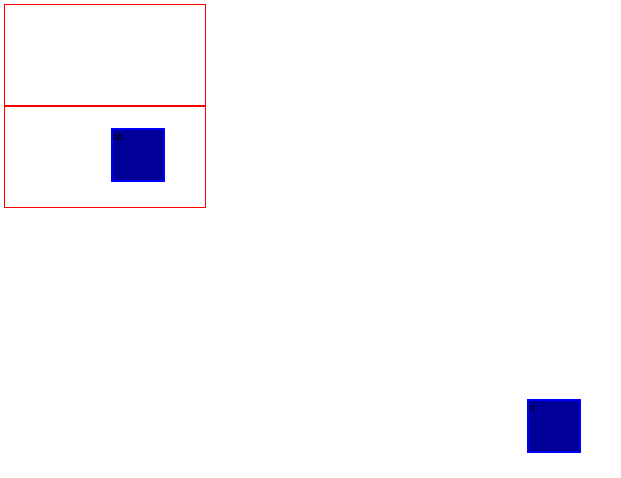
1.外层没有position:absolute(或relative);那么div相对于浏览器定位,如下图中b(距离浏览器右边框为50像素,距离下边框为20像素)。
2.外层有position:absolute(或relative);那么div相对于外层边框定位,如下图中bb(距离d的右边框50像素,距离d的下边框为20像素)。
示例:
 <!DOCTYPE html PUBLIC "-//W3C//DTD XHTML 1.0 Transitional//EN" "http://www.w3.org/TR/xhtml1/DTD/xhtml1-transitional.dtd">

 <html xmlns="http://www.w3.org/1999/xhtml">

 <head>

 <meta http-equiv="Content-Type" content="text/html; charset=utf-8" />

 <title>无标题文档</title>

 <style type="text/css">

 .b{

     border:5px solid blue;

     background-color:#009;

     width:100px;

     height:100px;

     margin:30px;

     right:50px;

     bottom:20px;

     position:absolute;

     }

 .c{

     width:400px;

     height:200px;

     border:2px solid red;

     }

 .d{

     border:2px solid red;

     width:400px;

     height:200px;

     position:absolute;

     }

 </style>

 </head>

 <body>

 <div class="c"><div class="b">b</div></div>

 <div class="d"><div class="b">bb</div></div>

 </body>

 </html>
不同比例的显示效果图,见下面。
三、position:relative
相对位置。
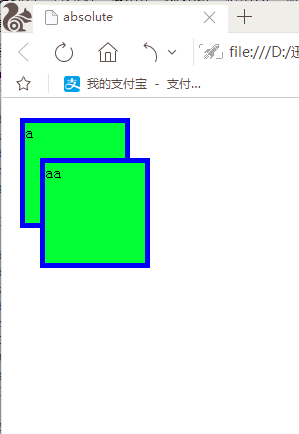
如下图,相对于把此div包含住的div的某个位置进行固定。如果外层没有包含他的,那就相对于浏览器进行相对位置的固定。
 <!DOCTYPE html PUBLIC "-//W3C//DTD XHTML 1.0 Transitional//EN" "http://www.w3.org/TR/xhtml1/DTD/xhtml1-transitional.dtd">

 <html xmlns="http://www.w3.org/1999/xhtml">

 <head>

 <meta http-equiv="Content-Type" content="text/html; charset=utf-8" />

 <title>absolute</title>

 <style type="text/css">

 #a{

     border:5px solid blue;

     background-color:#0F3;

     width:100px;

     height:100px;

     margin:10px;

     position:fixed;

     }

 #aa{

     border:5px solid blue;

     background-color:#0F3;

     width:100px;

     height:100px;

     margin:10px;

     left:20px;

     top:50px;

     position:relative;

     }

 </style>

 </head>

 <body>

 <div id="a">a</div>

 <div id="aa">aa</div>

 </body>

 </html>
显示效果
四、分层(z-index)
在z轴方向分层,可以理解为分成一摞纸,层数越高越靠上。
在上面relative的示例中,我们看到了aa遮住了a,这是因为后写代码的显示级别越靠前,那么在不改变代码顺序的情况下如何让a盖住aa?如下:
示例:
 <!DOCTYPE html PUBLIC "-//W3C//DTD XHTML 1.0 Transitional//EN" "http://www.w3.org/TR/xhtml1/DTD/xhtml1-transitional.dtd">

 <html xmlns="http://www.w3.org/1999/xhtml">

 <head>

 <meta http-equiv="Content-Type" content="text/html; charset=utf-8" />

 <title>无标题文档</title>

 <style type="text/css">

 .a{

     border:5px solid blue;

     width:100px;

     height:100px;

     background-color:#0F3;

     margin:10px;

     position:fixed;

     z-index:2;/*"2"这个参数可做修改,默认情况下,都是第一层*/

     }

 .aa{

     border:5px solid blue;

     width:100px;

     height:100px;

     margin:10px;

     background-color:#0F3;

     left:20px;

     top:50px;

     position:relative;

     }

 </style>

 </head>

 <body>

 <div class="a">a</div>

 <div class="aa">aa</div>

 </body>

 </html>

五、float:left、right
Left、right时不用给他规定位置(left、top),直接相对于浏览器。若外部被包裹,相对于外部div的除去一行的位置的左上或右上显示。
overflow:hidden; //超出部分隐藏;scroll,显示出滚动条;
<div style="clear:both"></div> //截断流
附:cursor:pointer 鼠标指到上面时的形状
© 版权符号©
 <!DOCTYPE html PUBLIC "-//W3C//DTD XHTML 1.0 Transitional//EN" "http://www.w3.org/TR/xhtml1/DTD/xhtml1-transitional.dtd">

 <html xmlns="http://www.w3.org/1999/xhtml">

 <head>

 <meta http-equiv="Content-Type" content="text/html; charset=utf-8" />

 <title>无标题文档</title>

 <style type="text/css">

 #a{

     background-color:#0F0;

     border:1px solid blue;

     margin:10px;

     height:100px;

     width:100px;

     float:right;

     overflow:hidden;/把hidden改为scroll,由隐藏溢出的文字方式,变为有滚动条显示的方式

     }

 </style>

 </head>

 <body>

 <div id="a">道可道非常道,名可名非常。无名,天地之始。有名,万物之母。常无欲观其妙,常有欲观其徼。此两者同出而异名。同谓之玄,玄而又玄,众妙之门。</div>

 </body>

 </html>
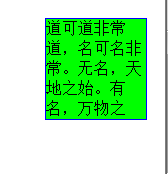

overflow:hidden;形式把溢出的隐藏 overflow:scroll;形式 带滚动条
半透明效果:
<div class="box">透明区域<div>
在样式表中的代码为:
.box
{
opacity:0.5; -moz-opacity:0.5 ; filter:alpha(opacity=50)
}
filter填充 alpha透明 opacity模糊
2016/2/19 position: fixed absolute relative z-index float 半透明效果的更多相关文章
- css 定位(fixed > absolute > relative)与层级zIndex 的权限认知
原则1: fixed > absolute > relative原则2: zIndex 越高越牛逼,不管你是谁无视身份.原则3: 青出于蓝而胜于蓝,儿子永远比父亲强原则4: 平台很重要. ...
- CSS position绝对定位absolute relative
常常使用position用于层的绝对定位,比如我们让一个层位于一个层内具体什么位置,为即可使用position:absolute和position:relative实现. 一.position语法与结 ...
- CSS position属性absolute relative等五个值的解释
DIV CSS position绝对定位absolute relative教程篇 常常使用position用于层的绝对定位,比如我们让一个层位于一个层内具体什么位置,为即可使用position:abs ...
- css总结1:position定位:absolute/relative/fixed
1 [Positioning(定位)] Positioning作用:指定了元素的定位类型.position包括四个值:static,relative,fixed,absolute. css定位解析:元 ...
- 一起学HTML基础-格式与布局fixed/absolute/relative/z-index/float
很多网页都存在一个悬浮的操作条或者广告区,无论如何上下滚动网页,操作条或广告区都不会动,这个就是div制作,位置锁定在屏幕指定位置,现在我们就学习下网页的格式与布局. position 位置,来给di ...
- HTML-★★★格式与布局fixed/absolute/relative/z-index/float★★★
很多网页都存在一个悬浮的操作条或者广告区,无论如何上下滚动网页,操作条或广告区都不会动,这个就是div制作,位置锁定在屏幕指定位置,现在我们就学习下网页的格式与布局. position 位置,来给di ...
- day2-设置position:fixed/absolute无法使用margin:auto调整居中
问题描述:父元素给定宽度,子元素给定宽度,设置子元素position为absolute/fixed后,无法使用margin:auto使子元素在父元素中水平居中 html代码如下: <div cl ...
- css中position属性(absolute|relative|static|fixed)概述及应用
position属性的相关定义: static:无特殊定位,对象遵循正常文档流; relative:对象遵循正常文档流; absolute:对象脱离正常文档流 fixed:对象脱离正常文档流 我们先来 ...
- 【转】CSS中position属性( absolute | relative | static | fixed )详解
我们先来看看CSS3 Api中对position属性的相关定义: static:无特殊定位,对象遵循正常文档流.top,right,bottom,left等属性不会被应用. relative:对象遵循 ...
随机推荐
- 面试之Spring
一.IoC IoC(Inversion of Control):控制反转(是把传统上由程序代码直接操控的对象的生成交给了容器来实现, 通过容器来实现对象组件的装配和管理.所谓"控制反转&qu ...
- 51nod 1175 区间第k大 整体二分
题意: 一个长度为N的整数序列,编号0 - N - 1.进行Q次查询,查询编号i至j的所有数中,第K大的数是多少. 分析: 仅仅就是一道整体二分的入门题而已,没听说过整体二分? 其实就是一个分治的函数 ...
- python3.6的requests库&HTMLTestRunner实现测试报告
'''1. 在suite.addTest时,可以把需要的用例先写入一个列表list中,list当做addTest的参数:2. 在unittest.main(verbosity=2)中,默认为1,设置为 ...
- ResNet实战
目录 Res Block ResNet18 Out of memory # Resnet.py #!/usr/bin/env python # -*- coding:utf-8 -*- import ...
- poj 3253 Fence Repair (优先队列,哈弗曼)
题目链接:http://poj.org/problem?id=3253 题意:给出n块木板的长度L1,L2...Ln,求在一块总长为这个木板和的大木板中如何切割出这n块木板花费最少,花费就是将木板切割 ...
- 【04】 CSS开发注意事项
[04] CSS注意事项 1. 页面编码规范 1.1. 统一使用 UTF-8 编码,用@charset "utf-8"指定页面编码. 1.2. 全局字体设置: windows 7系 ...
- 国内程序员的十大疑问之一:为什么老外不愿意用MyBatis?
老外用MyBatis吗 昨天我在我在知乎看到了一张比较Hibernate和MyBatis使用情况的图,顺手发了条朋友圈: Hibernate vs MyBatis ,谁能告诉我什么样的国情导致了这么大 ...
- Tyvj 1176 火焰巨魔的惆怅
Tyvj 1176 火焰巨魔的惆怅 背景 TYVJ2月月赛第一道 巨魔家族在某天受到了其他种族的屠杀,作为一个英雄,他主动担任了断后的任务,但是,在巨魔家族整体转移过后,火焰巨魔却被困住了,他出逃的方 ...
- Thinkphp5.0 的使用模型Model查询
Thinkphp5.0 的使用模型Model查询 一.查询多条记录 获取多个数据可以使用:select()方法和all()方法. 示例一:使用all()方法. //(1)筛选条件使用闭包函数 $res ...
- CALayer之 customizing timing of an animation
customizing timing of an animation Timing is an important part of animations, and with Core Animatio ...