
高级UI-DrawerLayout侧滑
侧滑的方案有很多种,早期的开源SliddingMenu,以及后来的DrawerLayout以及NavigationView等都可实现侧滑效果,这里介绍的是DrawerLayout,下一节将介绍NavigationView
原理
DrawerLayout位于v4包,为了做到最低限度的兼容,使得更低版本的Android也可以使用这个侧滑效果
其就是一个自定义的容器,继承自ViewGroup
在解析DrawerLayout布局的时候,根据android:layout_gravity="start"标签确定主布局和侧滑布局
例如下面的布局,就直接呈现出一个侧滑菜单
<?xml version="1.0" encoding="utf-8"?>

<android.support.v4.widget.DrawerLayout xmlns:android="http://schemas.android.com/apk/res/android"

    android:layout_width="match_parent"

    android:layout_height="match_parent">

    <!--内容部分-->

    <LinearLayout

        android:layout_width="match_parent"

        android:layout_height="match_parent"

        android:orientation="vertical">

        <TextView

            android:layout_width="match_parent"

            android:layout_height="match_parent"

            android:background="@android:color/holo_green_light"

            android:text="内容部分" />

    </LinearLayout>

    <!--侧滑菜单部分-->

    <LinearLayout

        android:layout_width="200dp"

        android:layout_height="match_parent"

        android:layout_gravity="start"

        android:orientation="vertical">

        <TextView

            android:layout_width="match_parent"

            android:layout_height="wrap_content"

            android:background="@android:color/holo_blue_light"

            android:text="item 1" />

        <TextView

            android:layout_width="match_parent"

            android:layout_height="wrap_content"

            android:background="@android:color/holo_orange_light"

            android:text="item 2" />

        <TextView

            android:layout_width="match_parent"

            android:layout_height="wrap_content"

            android:background="@android:color/holo_red_light"

            android:text="item 3" />

    </LinearLayout>

</android.support.v4.widget.DrawerLayout>
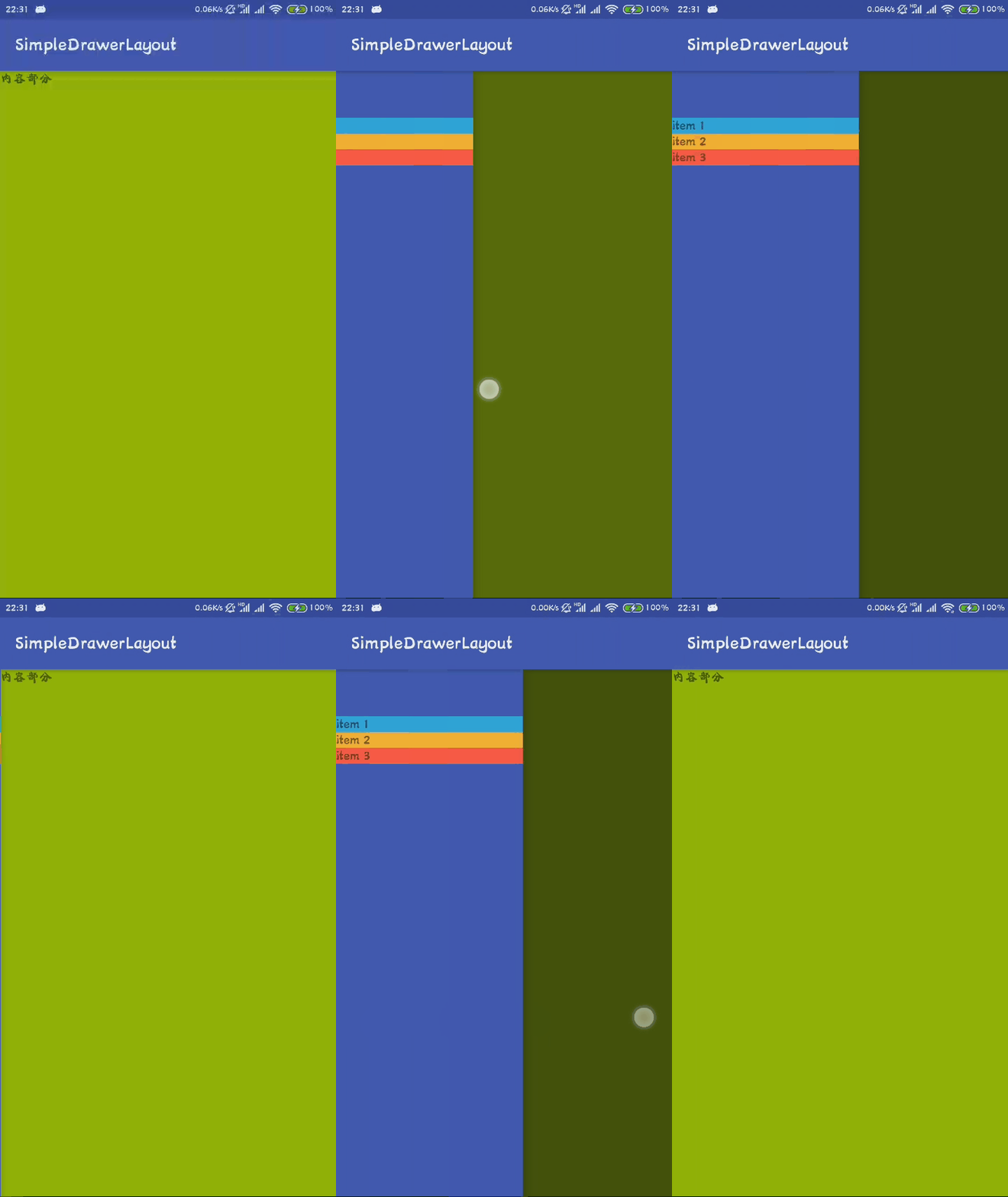
直接运行,效果图如下
使用Toolbar
因为要使用Toolbar,就要去掉其ActionBar,故直接修改style文件
<resources>

    <!-- Base application theme. -->

    <style name="AppTheme" parent="Theme.AppCompat.Light.NoActionBar">

        <!-- Customize your theme here. -->

        <item name="colorPrimary">@color/colorPrimary</item>

        <item name="colorPrimaryDark">@color/colorPrimaryDark</item>

        <item name="colorAccent">@color/colorAccent</item>

    </style>

</resources>
更改布局,使其符合MD标准
<?xml version="1.0" encoding="utf-8"?>

<LinearLayout xmlns:android="http://schemas.android.com/apk/res/android"

    android:layout_width="match_parent"

    android:layout_height="match_parent"

    android:orientation="vertical">

    <android.support.v7.widget.Toolbar

        android:id="@+id/tool_bar"

        android:layout_width="match_parent"

        android:layout_height="wrap_content"

        android:background="?attr/colorPrimary" />

    <android.support.v4.widget.DrawerLayout

        android:id="@+id/drawer_layout"

        android:layout_width="match_parent"

        android:layout_height="match_parent">

        <!--内容部分-->

        <LinearLayout

            android:layout_width="match_parent"

            android:layout_height="match_parent"

            android:orientation="vertical">

            <TextView

                android:layout_width="match_parent"

                android:layout_height="match_parent"

                android:background="@android:color/holo_green_light"

                android:text="内容部分" />

        </LinearLayout>

        <!--侧滑菜单部分-->

        <LinearLayout

            android:layout_width="200dp"

            android:layout_height="match_parent"

            android:layout_gravity="start"

            android:background="@color/colorPrimary"

            android:orientation="vertical"

            android:paddingTop="50dp">

            <TextView

                android:layout_width="match_parent"

                android:layout_height="wrap_content"

                android:background="@android:color/holo_blue_light"

                android:text="item 1" />

            <TextView

                android:layout_width="match_parent"

                android:layout_height="wrap_content"

                android:background="@android:color/holo_orange_light"

                android:text="item 2" />

            <TextView

                android:layout_width="match_parent"

                android:layout_height="wrap_content"

                android:background="@android:color/holo_red_light"

                android:text="item 3" />

        </LinearLayout>

    </android.support.v4.widget.DrawerLayout>

</LinearLayout>
在活动处设置Toolbar
public class MainActivity extends AppCompatActivity {

    private Toolbar toolbar;

    private DrawerLayout drawerLayout;

    @Override

    protected void onCreate(Bundle savedInstanceState) {

        super.onCreate(savedInstanceState);

        setContentView(R.layout.activity_main);

        toolbar = findViewById(R.id.tool_bar);

        //将ActionBar替换成Toolbar

        setSupportActionBar(toolbar);

        drawerLayout = findViewById(R.id.drawer_layout);

        ActionBarDrawerToggle drawerToggle = new ActionBarDrawerToggle(this,

                drawerLayout, toolbar, R.string.drawer_open, R.string.drawer_close);

        //同步状态

        drawerToggle.syncState();

        //给侧滑控件设置监听

        drawerLayout.setDrawerListener(drawerToggle);

    }

}
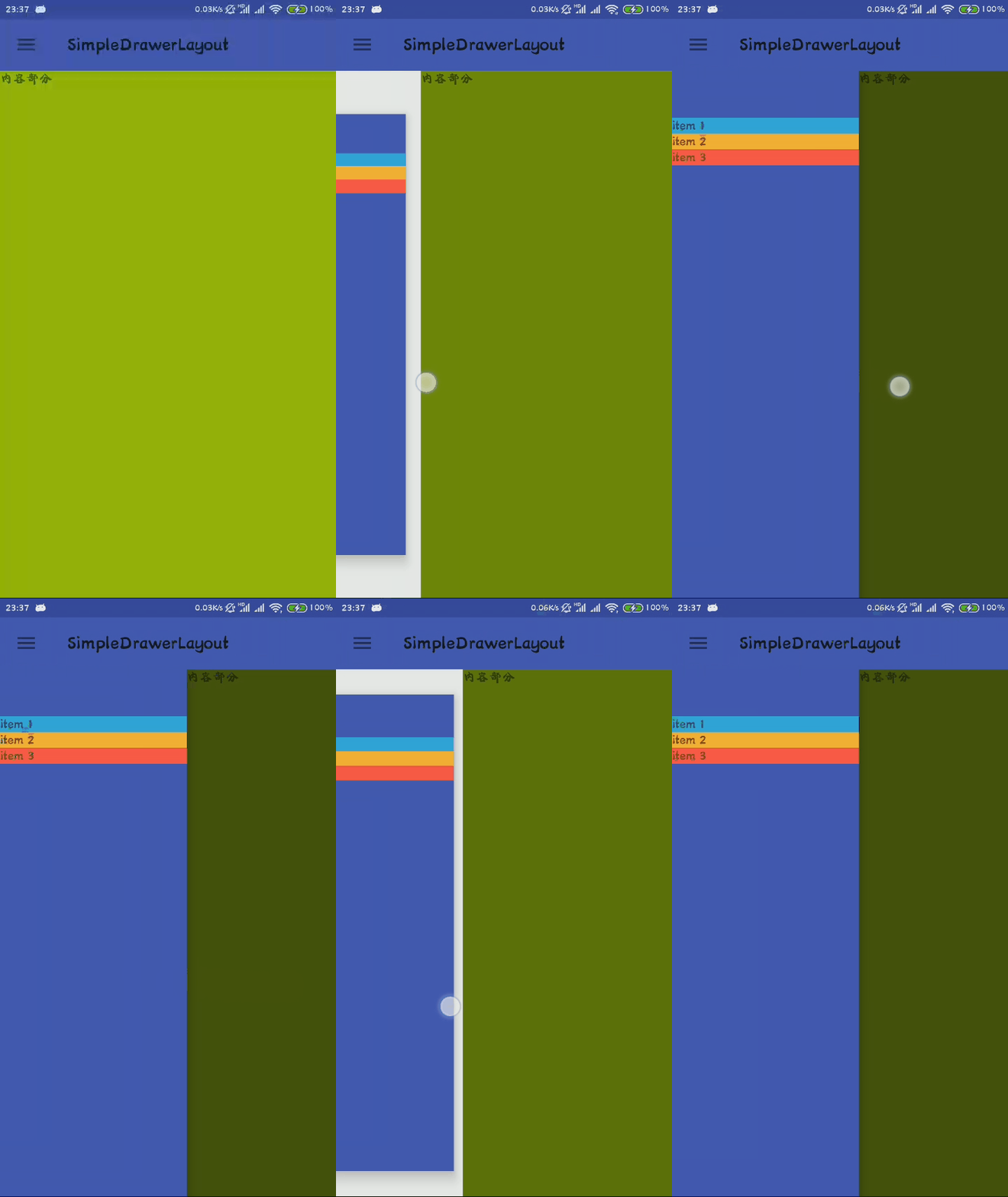
至此便完成了侧滑功能的实现,其效果图如下

实现右侧滑入,这个其实很简单,将之前设置的android:layout_gravity="start"更改为android:layout_gravity="end"便实现右侧滑入,同时还可以实现左右都可以滑入
实现类似QQ的效果
在监听的状态里面设置即可
public class MainActivity extends AppCompatActivity {

    private Toolbar toolbar;

    private DrawerLayout drawerLayout;

    @Override

    protected void onCreate(Bundle savedInstanceState) {

        super.onCreate(savedInstanceState);

        setContentView(R.layout.activity_main);

        toolbar = findViewById(R.id.tool_bar);

        //将ActionBar替换成Toolbar

        setSupportActionBar(toolbar);

        drawerLayout = findViewById(R.id.drawer_layout);

        ActionBarDrawerToggle drawerToggle = new ActionBarDrawerToggle(this,

                drawerLayout, toolbar, R.string.drawer_open, R.string.drawer_close);

        //同步状态

        drawerToggle.syncState();

        //给侧滑控件设置监听

        //drawerLayout.setDrawerListener(drawerToggle);

        drawerLayout.setDrawerListener(new DrawerLayout.DrawerListener() {

            @Override

            public void onDrawerSlide(@NonNull View view, float slideOffset) {

                //滑动过程中回调,其中slideOffset的值为 0~1

                View content = drawerLayout.getChildAt(0);

                View menu = view;

                float scale = 1 - slideOffset;//1~0

                float leftScale = (float) (1f - 0.3 * scale);//1~0.7

                //float rightScale = (float) (0.7f + 0.3 * scale);//0.7~1

                menu.setScaleX(leftScale);//1~0.7

                menu.setScaleY(leftScale);//1~0.7

                //content.setScaleX(rightScale);

                //content.setScaleY(rightScale);

                content.setTranslationX(menu.getMeasuredWidth() * (1 - scale));//0~width

            }

            @Override

            public void onDrawerOpened(@NonNull View view) {

                //打开时回调

            }

            @Override

            public void onDrawerClosed(@NonNull View view) {

                //关闭时回调

            }

            @Override

            public void onDrawerStateChanged(int i) {

                //状态改变时回调

            }

        });

    }

}
效果图如下
高级UI-DrawerLayout侧滑的更多相关文章
- firefox 扩展开发笔记(三):高级ui交互编程
firefox 扩展开发笔记(三):高级ui交互编程 前言 前两篇链接 1:firefox 扩展开发笔记(一):jpm 使用实践以及调试 2:firefox 扩展开发笔记(二):进阶开发之移动设备模拟 ...
- Android 高级UI设计笔记07:RecyclerView 的详解
1. 使用RecyclerView 在 Android 应用程序中列表是一个非常重要的控件,适用场合非常多,如新闻列表.应用列表.消息列表等等,但是从Android 一出生到现在并没有非常 ...
- 高级UI晋升之自定义View实战(六)
更多Android高级架构进阶视频学习请点击:https://space.bilibili.com/474380680本篇文章将从Android 自定义属性动画&Camera动画来介绍自定义V ...
- iOS开发——高级UI&带你玩转UITableView
带你玩装UITableView 在实际iOS开发中UITableView是使用最多,也是最重要的一个控件,如果你不会用它,那别说什么大神了,菜鸟都不如. 其实关于UItableView事非常简单的,实 ...
- Android: DrawerLayout 侧滑菜单栏
DrawerLayout是SupportLibrary包中实现的侧滑菜单效果的控件. 分为主内容区域和侧边菜单区域 drawerLayout本身就支持:侧边菜单根据手势展开与隐藏, 开发者只需要实现: ...
- Android学习总结——DrawerLayout 侧滑栏点击事件穿透
使用DrawerLayout实现侧滑栏功能时,点击侧滑栏空白处时,主界面会获得事件. 解决方法:侧滑栏布局添加 android:clickable="true"
- DrawerLayout侧滑
DrawerLayout是Support Library包中实现了侧滑菜单效果的控件,可以说DrawerLayout是因为第三方控件如SlidingMenu等出现之后,google借鉴而出现的产物.D ...
- 高级UI晋升之布局ViewGroup(四)
更多Android高级架构进阶视频学习请点击:https://space.bilibili.com/474380680本篇文章将从LinearLayout.RelativeLayout.FrameLa ...
- 高级UI晋升之常用View(三)中篇
更多Android高级架构进阶视频学习请点击:https://space.bilibili.com/474380680本篇文章将从ViewPager来介绍常用View:文章目录 一.简介 二.基本使用 ...
- 高级UI晋升之View渲染机制(二)
更多Android高级架构进阶视频学习请点击:https://space.bilibili.com/474380680 优化性能一般从渲染,运算与内存,电量三个方面进行,今天开始说聊一聊Android ...
随机推荐
- 入门指引之查看accesstoken
1. 测试工具查看 https://mp.weixin.qq.com/debug/ 2. 代码获取: # -*- coding: utf-8 -*- # filename: basic.py impo ...
- GreenPlum 数据库创建用户、文件空间、表空间、数据库
前几篇文章介绍了GreenPlum数据库的安装.启动.关闭.状态检查.登录等操作,数据库已经创建好了,接下来介绍如何使用数据库.按照习惯,需要先创建测试用户.表空间.数据库.先创建测试用户dbdrea ...
- 三十四.MySQL主从同步 、主从同步模式
mysql51:192.168.4.51 主 mysql52:192.168.4.52 从 mysql50:192.168.4.50 客户机 1.MySQL一主一从 1.1 51,52 安装m ...
- CF280C Game on Tree 概率与期望
利用期望的线性性,即 $E(a+b)=E(a)+E(b)$. 对于所有点分别求一下期望然后累加即可. code: #include <bits/stdc++.h> #define N 10 ...
- jQuery相关方法7----各种事件和绑定事件
一.jQuery事件 1.鼠标事件 click与dbclick事件 click事件其实是由mousedown与mouseup 2个动作构成,所以点击的动作只有在松手后才触发 $ele.click(): ...
- Nexus 3搭建及备份恢复
Nexus 3搭建 官网下载相应的软件版本:Nexus官网 配置仓库存放地址 # tar xf xxxx # more bin/nexus.vmoptions -Xms500M -Xmx500M -X ...
- dubbo+zookeeper搭建时报错java.lang.NoClassDefFoundError: org/apache/curator/RetryPolicy
说一下我的环境: jdk1.8 dubbo2.6.1 zookeeper3.4.10 maven3.3.9 搭建demo时报错:java.lang.NoClassDefFoundError: org/ ...
- [RK3399] 汇顶gt9xx触摸屏在RK原始代码调试
CPU:RK3399 系统:Android 7.1 触摸屏:1024x768 8inch 触摸IC:GT9271 基于RK3399,从瑞芯微服务器更新到最新的 Android 7.1 代码中,瑞芯 ...
- python datetime库使用和时间加减计算
datetime库使用 一.操作当前时间 1.获取当前时间 >>> import datetime >>> print datetime.datetime.now( ...
- Interacted Action-Driven Visual Tracking Algorithm
文章来源:Attentional Action-Driven Deep Network for Visual Object Tracking 博士论文(2017年8月份完稿) http://s-s ...