
restTemplate源码解析(四)执行ClientHttpRequest请求对象
所有文章
https://www.cnblogs.com/lay2017/p/11740855.html
正文
上一篇文章中,我们创建了一个ClientHttpRequest的实例。本文将继续阅读ClientHttpRequest的执行逻辑。
再次回顾一下restTemplate核心逻辑的代码
protected <T> T doExecute(URI url, @Nullable HttpMethod method, @Nullable RequestCallback requestCallback,

        @Nullable ResponseExtractor<T> responseExtractor) throws RestClientException {

    ClientHttpResponse response = null;

    try {

        // 生成请求

        ClientHttpRequest request = createRequest(url, method);

        if (requestCallback != null) {

            // 设置header

            requestCallback.doWithRequest(request);

        }

        // 执行请求,获取响应

        response = request.execute();

        // 处理响应

        handleResponse(url, method, response);

        // 获取响应体对象

        return (responseExtractor != null ? responseExtractor.extractData(response) : null);

    }

    catch (IOException ex) {

        // ... 抛出异常

    }

    finally {

        if (response != null) {

            // 关闭响应流

            response.close();

        }

    }

}
ClientHttpRequest的默认实现类是SimpleBufferingClientHttpRequest,我们先看看它的继承关系
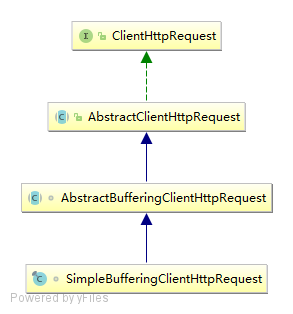
可以看到,ClientHttpRequest直接被AbstractClientHttpRequest继承,所以我们先从AbstractClientHttpRequest实现的execute方法开始
跟进execute方法
@Override

public final ClientHttpResponse execute() throws IOException {

    assertNotExecuted();

    ClientHttpResponse result = executeInternal(this.headers);

    this.executed = true;

    return result;

}
execute方法前置校验executed这个flag,executeInternal执行完后打了个true的标记。所以一个ClientHttpRequest将只能被执行一次。
继续跟进executeInternal方法,executeInternal方法由AbstractBufferingClientHttpRequest实现
@Override

protected ClientHttpResponse executeInternal(HttpHeaders headers) throws IOException {

    byte[] bytes = this.bufferedOutput.toByteArray();

    if (headers.getContentLength() < 0) {

        headers.setContentLength(bytes.length);

    }

    ClientHttpResponse result = executeInternal(headers, bytes);

    this.bufferedOutput = new ByteArrayOutputStream(0);

    return result;

}
核心逻辑在executeInternal(headers, bytes)里,继续跟进它
executeInternal(headers, bytes)由SimpleBufferingClientHttpRequest实现
@Override

protected ClientHttpResponse executeInternal(HttpHeaders headers, byte[] bufferedOutput) throws IOException {

    addHeaders(this.connection, headers);

    // JDK <1.8 doesn't support getOutputStream with HTTP DELETE

    if (getMethod() == HttpMethod.DELETE && bufferedOutput.length == 0) {

        this.connection.setDoOutput(false);

    }

    if (this.connection.getDoOutput() && this.outputStreaming) {

        this.connection.setFixedLengthStreamingMode(bufferedOutput.length);

    }

    this.connection.connect();

    if (this.connection.getDoOutput()) {

        // 写到输出流上

        FileCopyUtils.copy(bufferedOutput, this.connection.getOutputStream());

    }

    else {

        // Immediately trigger the request in a no-output scenario as well

        this.connection.getResponseCode();

    }

    // 响应一个ClientHttpResponse对象

    return new SimpleClientHttpResponse(this.connection);

}
如果开启了输出流,那么FileCopyUtils.copy方法将会把缓冲数据写入到输出流里面。
注意:FileCopyUtils.copy方法在写入完毕后会关闭输出流,所以不需要外部显式关闭。我们看copy方法
public static void copy(byte[] in, OutputStream out) throws IOException {

    Assert.notNull(in, "No input byte array specified");

    Assert.notNull(out, "No OutputStream specified");

    try {

        out.write(in);

    }

    finally {

        try {

            out.close();

        }

        catch (IOException ex) {

        }

    }

}
executerInternal(headers, bytes)方法最后会响应一个SimpleClientHttpResponse实例对象,单纯地包装了Connection对象。
SimpleClientHttpResponse(HttpURLConnection connection) {

    this.connection = connection;

}
显然,后续的处理就是从ClientHttpResponse中读取输入流,然后格式化成一个响应体,最后回收资源。下一篇内容讲述这个
总结
执行ClientHttpRequest逻辑其实就是与服务端创建Connection连接(如果有需要写入数据则写入到输出流),整体还是比较简单的。
restTemplate源码解析(四)执行ClientHttpRequest请求对象的更多相关文章
- restTemplate源码解析(目录)
restTemplate是spring实现的,基于restful风格的http请求模板.使用restTemplate可以简化请求操作的复杂性,同时规范了代码风格.本系列文章,将根据以下目录顺序,从源码 ...
- Mybatis源码解析(四) —— SqlSession是如何实现数据库操作的?
Mybatis源码解析(四) -- SqlSession是如何实现数据库操作的? 如果拿一次数据库请求操作做比喻,那么前面3篇文章就是在做请求准备,真正执行操作的是本篇文章要讲述的内容.正如标题一 ...
- Sentinel源码解析四(流控策略和流控效果)
引言 在分析Sentinel的上一篇文章中,我们知道了它是基于滑动窗口做的流量统计,那么在当我们能够根据流量统计算法拿到流量的实时数据后,下一步要做的事情自然就是基于这些数据做流控.在介绍Sentin ...
- MySQL源码解析之执行计划
MySQL源码解析之执行计划 MySQL执行计划介绍 MySQL执行计划代码概览 MySQL执行计划总结 一.MySQL执行计划介绍 在MySQL中,执行计划的实现是基于JOIN和QEP_TAB这两个 ...
- Dubbo 源码解析四 —— 负载均衡LoadBalance
欢迎来我的 Star Followers 后期后继续更新Dubbo别的文章 Dubbo 源码分析系列之一环境搭建 Dubbo 入门之二 --- 项目结构解析 Dubbo 源码分析系列之三 -- 架构原 ...
- iOS即时通讯之CocoaAsyncSocket源码解析四
原文 前言: 本文为CocoaAsyncSocket源码系列中第二篇:Read篇,将重点涉及该框架是如何利用缓冲区对数据进行读取.以及各种情况下的数据包处理,其中还包括普通的.和基于TLS的不同读取操 ...
- React的React.createContext()源码解析(四)
一.产生context原因 从父组件直接传值到孙子组件,而不必一层一层的通过props进行传值,相比较以前的那种传值更加的方便.简介. 二.context的两种实现方式 1.老版本(React16.x ...
- restTemplate源码解析(五)处理ClientHttpResponse响应对象
所有文章 https://www.cnblogs.com/lay2017/p/11740855.html 正文 上一篇文章中,我们执行了ClientHttpRequest与服务端进行交互.并返回了一个 ...
- 【原创】angularjs1.3.0源码解析之执行流程
Angular执行流程 前言 发现最近angularjs在我厂的应用变得很广泛,下周刚好也有个angular项目要着手开始做,所以先做了下功课,从源代码开始入手会更深刻点,可能讲的没那么细,侧重点在于 ...
随机推荐
- 简易的CRM系统案例之Servlet+Jsp+MySQL版本
数据库配置 datebase.properties driver=com.mysql.jdbc.Driver url=jdbc:mysql://127.0.0.1:3306/infos usernam ...
- 批量删除Maven 仓库未下载成功.lastupdate 的文件
Windows: @echo off echo 开始... for /f "delims=" %%i in ('dir /b /s "./*lastUpdated&quo ...
- osg 3ds模型加载与操作
QString item1 = QString::fromStdString(groupParam->getChild(k)->getName()); QStandardItem* ite ...
- 阶段5 3.微服务项目【学成在线】_day17 用户认证 Zuul_12-用户退出-服务端
实现退出 用户退出要以下动作: 1.删除redis中的token 2.删除cookie中的token controller内定义 spring securety config内放行 对这个url放行 ...
- (十八)Centos之firewall 防火墙命令
如果你的系统上没有安装使用命令安装 #yum install firewalld //安装firewalld 防火墙 开启服务 # systemctl start firewalld.service ...
- .NET实体框架EF之CodeFirst
ADO.NET Entity Framework 以 Entity Data Model (EDM) 为主,将数据逻辑层切分为三块,分别为 Conceptual Schema, Mapping Sch ...
- JS时间转换,url编码,jquery返回类型等问题
1.当时间被转换为json格式后会被转换成 /Date(...)/ 这种格式,其中...为时间转换成妙后的一串整数 function changeDateFormat(cellval) { )); v ...
- WebStorm 2018.2安装激活教程
1.下载解压,得到jetbrains webstorm 2018.2主程序,破解文件和中文语言包: 2.运行“WebStorm-2018.2.exe”开始安装,默认安装目录[C:\Program Fi ...
- Linux系统目录的学习
1.在公司中linux 都是没有界面 2.系统路径 2.1 /表示根目录 2.2 ~表示/root 2.3etc:存放系统配置文件 2.4 home 除了root 以外所有用 ...
- stub_status监控Nginx使用情况!
stub_status监控Nginx使用情况! 查看nginx安装的模块! # /usr/local/nginx/sbin/nginx -V nginx version: nginx/1.8.1 bu ...