
[android] 开启新的activity获取他的返回值
应用场景:打开一个新的activity,在这个activity上获取数据,返回给打开它的界面
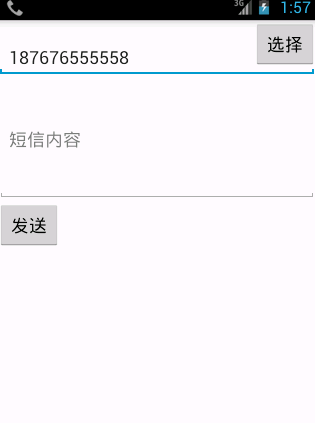
短信发送时,可以直接选择系统联系人
界面布局是一个线性布局,里面右侧选择联系人在EditText的右上,因此使用相对布局对输入框进行包裹,按钮使用android:layout_alignParentRight=”true”处理
下面的内容有多行,使用 属性android:inputType=”textMultiLine” 属性android:minLines=”5”
我们使用hvg的屏幕进行预览
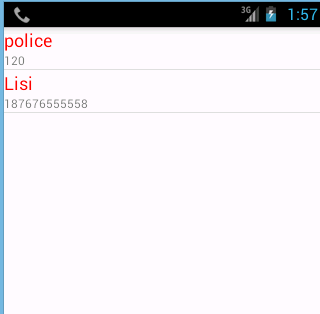
打开一个新的界面展示系统联系人,采用ListView控件实现列表,继承BaseAdapter来实现适配器,通过ContentProvider读取系统的联系人。
MainActivity(主界面)
package com.tsh.gaojisms;

import android.app.Activity;

import android.content.Intent;

import android.os.Bundle;

import android.view.Menu;

import android.view.MenuItem;

import android.view.View;

import android.widget.EditText;

public class MainActivity extends Activity {

    private EditText et_number;

    @Override

    protected void onCreate(Bundle savedInstanceState) {

        super.onCreate(savedInstanceState);

        setContentView(R.layout.activity_main);

        et_number=(EditText) findViewById(R.id.et_number);

    }

    /**

     * 选择联系人

     * @param v

     */

    public void selectContacts(View v){

        Intent intent=new Intent(this,SelectContactActivity.class);

        startActivityForResult(intent, 0);

    }

    /**

     * 接受返回的结果

     */

    @Override

    protected void onActivityResult(int requestCode, int resultCode, Intent data) {

        super.onActivityResult(requestCode, resultCode, data);

        String number=data.getStringExtra("number");

        et_number.setText(number);

    }

}
SelectContactActivity(联系人界面)
package com.tsh.gaojisms;

import java.util.List;

import com.tsh.gaojisms.domain.ContactInfo;

import com.tsh.gaojisms.service.ContactInfosService;

import android.app.Activity;

import android.content.Intent;

import android.os.Bundle;

import android.view.View;

import android.view.ViewGroup;

import android.widget.AdapterView;

import android.widget.AdapterView.OnItemClickListener;

import android.widget.BaseAdapter;

import android.widget.ListView;

import android.widget.TextView;

public class SelectContactActivity extends Activity {

    private ListView lv_contacts;

    public List<ContactInfo> contactInfos;

    @Override

    protected void onCreate(Bundle savedInstanceState) {

        super.onCreate(savedInstanceState);

        setContentView(R.layout.activity_select_contact);

        lv_contacts=(ListView) findViewById(R.id.lv_contacts);

        //获取数据

        contactInfos=ContactInfosService.getContactInfos(this);

        lv_contacts.setAdapter(new MyAdapter());

        //设置点击

        lv_contacts.setOnItemClickListener(new OnItemClickListener() {

            @Override

            public void onItemClick(AdapterView<?> parent, View view,

                    int position, long id) {

                ContactInfo info=contactInfos.get(position);

                String number=info.getNumber();

                Intent intent=new Intent();

                intent.putExtra("number", number);

                setResult(0,intent);

                finish();

            }

        });

    }

    /*

     * 适配器

     */

    private class MyAdapter extends BaseAdapter {

        @Override

        public int getCount() {

            // TODO Auto-generated method stub

            return contactInfos.size();

        }

        @Override

        public Object getItem(int position) {

            // TODO Auto-generated method stub

            return null;

        }

        @Override

        public long getItemId(int position) {

            // TODO Auto-generated method stub

            return 0;

        }

        @Override

        public View getView(int position, View convertView, ViewGroup parent) {

            View view=View.inflate(SelectContactActivity.this, R.layout.contact_item, null);

            TextView tv_name=(TextView) view.findViewById(R.id.tv_name);

            TextView tv_number=(TextView) view.findViewById(R.id.tv_number);

            String name=contactInfos.get(position).getName();

            String number=contactInfos.get(position).getNumber();

            tv_name.setText(name);

            tv_number.setText(number);

            return view;

        }}

}
ContactInfoService(获取联系人信息Service)
package com.tsh.gaojisms.service;

import java.util.ArrayList;

import java.util.List;

import android.content.ContentResolver;

import android.content.Context;

import android.database.Cursor;

import android.net.Uri;

import com.tsh.gaojisms.domain.ContactInfo;

public class ContactInfosService {

    public static List<ContactInfo> getContactInfos(Context context) {

        List<ContactInfo> contactInfos = new ArrayList<ContactInfo>();

        ContentResolver resolver = context.getContentResolver();

        Uri uri = Uri.parse("content://com.android.contacts/raw_contacts");

        Uri dataUri = Uri.parse("content://com.android.contacts/data");

        // 循环联系人表

        Cursor cursor = resolver.query(uri, null, null, null, null);

        while (cursor.moveToNext()) {

            String id = cursor.getString(cursor.getColumnIndex("contact_id"));

            if (id != null) {

                // 查找数据表

                Cursor dataCursor = resolver.query(dataUri, null,

                        "raw_contact_id=?", new String[] { id }, null);

                ContactInfo info = new ContactInfo();

                while (dataCursor.moveToNext()) {

                    String data1 = dataCursor.getString(dataCursor

                            .getColumnIndex("data1"));

                    String mimetype = dataCursor.getString(dataCursor

                            .getColumnIndex("mimetype"));

                    if (mimetype.equals("vnd.android.cursor.item/name")) {

                        info.setName(data1);

                    } else if (mimetype

                            .equals("vnd.android.cursor.item/phone_v2")) {

                        info.setNumber(data1);

                    }

                }

                contactInfos.add(info);

            }

        }

        return contactInfos;

    }

}
ContactInfo(联系人信息bean)
package com.tsh.gaojisms.domain;

/**

 * 联系人业务bean

 * @author taoshihan

 *

 */

public class ContactInfo {

    private String name;

    private String number;

    public ContactInfo() {

    }

    public ContactInfo(String name, String number) {

        super();

        this.name = name;

        this.number = number;

    }

    @Override

    public String toString() {

        return "ContactInfo [name=" + name + ", number=" + number + "]";

    }

    public String getName() {

        return name;

    }

    public void setName(String name) {

        this.name = name;

    }

    public String getNumber() {

        return number;

    }

    public void setNumber(String number) {

        this.number = number;

    }

}
activity_main.xml(主布局界面)
<LinearLayout xmlns:android="http://schemas.android.com/apk/res/android"

    xmlns:tools="http://schemas.android.com/tools"

    android:layout_width="match_parent"

    android:layout_height="match_parent"

    android:orientation="vertical"

    tools:context="${relativePackage}.${activityClass}" >

    <RelativeLayout

        android:layout_width="match_parent"

        android:layout_height="wrap_content" >

        <EditText

            android:id="@+id/et_number"

            android:layout_marginTop="17dp"

            android:layout_width="match_parent"

            android:layout_height="wrap_content"

            android:hint="请输入号码" />

        <Button

            android:onClick="selectContacts"

            android:layout_alignParentRight="true"

            android:layout_width="wrap_content"

            android:layout_height="wrap_content"

            android:text="选择" />

    </RelativeLayout>

    <EditText

        android:layout_width="match_parent"

        android:layout_height="wrap_content"

        android:hint="短信内容"

        android:inputType="textMultiLine"

        android:minLines="5"/>

    <Button

        android:layout_width="wrap_content"

        android:layout_height="wrap_content"

        android:text="发送"/>

</LinearLayout>
activity_select_contact.xml(联系人列表界面)
<?xml version="1.0" encoding="utf-8"?>

<LinearLayout xmlns:android="http://schemas.android.com/apk/res/android"

    android:layout_width="match_parent"

    android:layout_height="match_parent"

    android:orientation="vertical" >

    <ListView

        android:id="@+id/lv_contacts"

        android:layout_width="match_parent"

        android:layout_height="match_parent" >

    </ListView>

</LinearLayout>
contact_item.xml(联系人列表单条界面)
<?xml version="1.0" encoding="utf-8"?>

<LinearLayout xmlns:android="http://schemas.android.com/apk/res/android"

    android:layout_width="match_parent"

    android:layout_height="match_parent"

    android:orientation="vertical" >

    <TextView

        android:layout_width="match_parent"

        android:layout_height="wrap_content"

        android:id="@+id/tv_name"

        android:text="用户名"

        android:textSize="18sp"

        android:textColor="#ff0000"/>

    <TextView

        android:layout_width="match_parent"

        android:layout_height="wrap_content"

        android:id="@+id/tv_number"

        android:text="电话号码"

        android:textSize="12sp"

        android:textColor="#80000000"/>

</LinearLayout>
这里开启activity需要用到一个新的api,startActivityForResult(intent,requestCode),开启一个新的activity并且获取这个activity执行完毕后返回的结果,参数:Intent对象,int类型请求码,此时用不到给个0
当新开启的activity关闭的时候,会调用onActivityResult()方法。传递过来的参数里面有个Intent对象,通过这个Intent对象获取到数据,展示到界面上
给ListView条目设置点击事件,调用ListView对象的setOnItemClickListener(listener)方法,参数:OnitemClickListener对象,它是一个接口类型,直接new这个接口,实现以下onItemClick(parent,view,id)方法,如果不知道函数的参数,我们可以采用断点调试的方法,查看一下参数代表的是什么值,调用ContactInfos对象的get(position)方法,得到ConatctInfo对象,调用ContactInfo对象的getNumber()方法,得到电话号码
传递数据给调用它的activity,调用setResult(requestCode,data)方法,参数:请求码,Intent对象,点击完成之后调用Activity对象的finish()方法
[android] 开启新的activity获取他的返回值的更多相关文章
- 无废话Android之activity的生命周期、activity的启动模式、activity横竖屏切换的生命周期、开启新的activity获取他的返回值、利用广播实现ip拨号、短信接收广播、短信监听器(6)
1.activity的生命周期 这七个方法定义了Activity的完整生命周期.实现这些方法可以帮助我们监视其中的三个嵌套生命周期循环: (1)Activity的完整生命周期 自第一次调用onCrea ...
- 开启新的activity获取它的返回值
1.开始界面 <LinearLayout xmlns:android="http://schemas.android.com/apk/res/android" xmlns:t ...
- 关于Android 打开新的Activity 虚拟键盘的弹出与不弹出
关于Android 打开新的Activity 虚拟键盘的弹出与不弹出 打开Activity 时 在相应的情况 弹出虚拟键盘 或者 隐藏虚拟键盘 会给用户非常好的用户体验 , 实现起来也比较简单 只需 ...
- python asyncio 获取协程返回值和使用callback
1. 获取协程返回值,实质就是future中的task import asyncioimport timeasync def get_html(url): print("start get ...
- 统计文件种类数+获取子shell返回值的其它方法
前言 只是作为一个shell的小小练习和日常统计用,瞎折腾的过程中也是摸到了获取子shell返回值的几种方法: 肯定还有别的方法,跟进程间的通信相关,希望你能提出建议和补充,谢谢~ 完整程序: #! ...
- web3调用call()方法获取不到返回值
一.web3的call()获取不到返回值问题和解决方法 在彩票小合约中,遇到一个问题:合约中 有两个方法 第一个返回一个账户地址,没有使用到当前方法调用者信息: 第二个使用到了当前方法调用者信息 在w ...
- 利用SQLServer查询分析器获取存储过程的返回值,检查测试存储过程
1.存储过程没有返回值的情况(即存储过程语句中没有return之类的语句)用方法 int count = ExecuteNonQuery(..)执行存储过程其返回值只有两种情况(1)如果通过查询分析器 ...
- python使用threading获取线程函数返回值的实现方法
python使用threading获取线程函数返回值的实现方法 这篇文章主要介绍了python使用threading获取线程函数返回值的实现方法,需要的朋友可以参考下 threading用于提供线程相 ...
- Android -- 在一个Activity开启另一个Activity 并 获取他的返回值。
1. 视图示例, 按选择弹出 2界面, 选择选项 回显到1 2. 示例代码 MainActivity.java, 第一个activity public class MainActivity e ...
随机推荐
- django查询数据库无法过滤月份的解决
我试过,当settings里的:USE_TZ = False时也可以查询,但是数据库里的时间就会显示错的 解决方法是可以再终端输入 mysql_tzinfo_to_sql /usr/share/zon ...
- .net反混淆脱壳工具de4dot的使用
de4dot是一个开源的.net反混淆脱壳工具,是用C#编写的,介绍一下它的使用方法 首先 pushd 到de4dot.exe所在文件夹,然后调用 de4dot.exe 路径+dll名称 如果显示: ...
- 背水一战 Windows 10 (121) - 后台任务: 推送通知
[源码下载] 背水一战 Windows 10 (121) - 后台任务: 推送通知 作者:webabcd 介绍背水一战 Windows 10 之 后台任务 推送通知 示例演示如何接收推送通知/WebA ...
- JAVA对象 向上转型upcasting,向下转型downcasting
1:向上转型 向上转型,就是java多态中的父类引用指向子类对象.但要注意的是 父类引用不可以访问子类新增加的成员(属性和方法) 代码举例: /** * 定义一个父类 */ public class ...
- swiper轮播在ie浏览器上遇到的显示问题探索
前言: 最近项目有一个需求,想要下图效果,鼠标指向头像图片,图片会放大同时上面的轮播会跟着切换: 鼠标移开头像图片,图片变回原来的大小 注:下图是我根据上面需求已经实现的效果,所以截图方便说明 思考: ...
- apollo入门(一)
1. apollo入门(一) 1.1. 核心概念 1.1.1. 应用 注意:每个应用需要配置一个appid 1.1.2. 环境 dev 开发环境 fat 功能测试环境 uat 用户接受测试环境 pro ...
- 三、activiti工作流-流程设计工具
首先在diagrams下面新建一个文件夹 然后在这个文件夹下new一个Activiti Diagram new好后出现bpmn文件, 可以通过右键以xml方式打开bpmn文件查看源码 双击打开文件然后 ...
- jsp进阶
Jsp,前段的数据读取到后端 获取前段输入框数据 request.getParameter(前段输入框的name值) Request.代表转发,(代码在服务器内部执行的一次性请求,url地址不会发生改 ...
- Linux 用脚本编写搭建yum本地仓库
Linux 用脚本编写搭建yum本地仓库 源码如下: #!/bin/bash #该脚本用于自动化搭建本地yum仓库 #挂载光盘 #作者:雨中落叶 #博客:https://www.cnblogs.com ...
- python+appium的物理按键代码
代码就一句driver.keyevent()括号内填入的是物理按键的数字代号 代号表: 电话键 KEYCODE_CALL 拨号键 5 KEYCODE_ENDCALL 挂机键 6 KEYCODE_HOM ...