
ajax调用WebService实现数据库操作
首先说下测试环境和思路:
前端收集数据转换成json格式传输到后端,处理并存入数据库
1.数据库操作:
[WebMethod]

        public string InsertPoint(string data)

        {

            //解决跨域问题

            //Context.Response.AddHeader("Access-Control-Allow-Origin", "*");

            string database = "Data Source=.;Initial Catalog=test;Persist Security Info=True;User ID=sa;Password=password1633";

            //string data = HttpContext.Current.Request["data"];

            try

            {

                if (data.Equals("") || data == null)

                {

                    return "data is null";

                }

                else

                {

                    OverlaysPoint opoint = JsonConvert.DeserializeObject<OverlaysPoint>(data);// 将接收的参数data实例化为一个对象(方便操作),注意该类的变量名要和json的key值对应

                    /*foreach (Data_Opoint dtpoint in opoint.overlays)

                    {

                        sql = "insert into Map_Overlays(wf_pictureid,wf_picturename,wf_railid,wf_name,wf_location,wf_createtime,wf_pid,wf_lng,wf_lat) values('" + "123456789" + "','" + opoint.picturename + "','" + opoint.id + "','" + opoint.name + "','" + opoint.location + "','" + opoint.createime + "','" + dtpoint.pid + "','" + dtpoint.lng.ToString() + "','" + dtpoint.lat.ToString() + "')";

                        ExecuteUpdate(sql, database);

                    }*/

                    string[] xyArray = opoint.position.Split(new string[] { "(", ",", ")" }, StringSplitOptions.RemoveEmptyEntries); //处理json字符串
                     //执行sql语句

                    string sql = "insert into map_img_points(miid,pointtype,pointid, pointcode, positionx, positiony, pointinfo) values ('地图id', '" + opoint.point_type + "', '" + opoint.point_bm + "','" + opoint.point_code + "','" + xyArray[] + "','" + xyArray[] + "', '" + opoint.point_info + "')";

                    executeUpdate(sql, database);

                    return "success";

                }

            }

            catch (NullReferenceException e)

            {

                return e.StackTrace;

            }

        }
Data Source : 一个点默认为本地数据库,其他数据库填写相应ip ;
Initial Catelog:是目标数据库名称
我们接收一个json数据,将其value填入一个实例化的类对象,通过这个类的实例化对象来使用它
OverlaysPoint opoint = JsonConvert.DeserializeObject<OverlaysPoint>(data);
根据json创建的OverPoint类:
public class OverlaysPoint

    {

        public string point_type;

        public string point_bm;

        public string point_code;

        public string position;

        public string point_info;

        public string con_bussiness;

        public string con_entity;

        public string con_fields;

        public string showpic;

        public string showtext;

        public string showdata;

        public string create_time;

        public string data_refresh_rate;

    }
executeQuery和executeUpdate方法(可重用):
//对数据库操作

        //用于查询

        private DataTable executeQuery(string sqlStr, string sqlCon)

        {

            SqlConnection con = new SqlConnection(@sqlCon);

            con.Open();

            SqlCommand cmd = new SqlCommand();

            cmd.Connection = con;

            cmd.CommandType = CommandType.Text;

            cmd.CommandText = sqlStr;

            DataTable dt = new DataTable();        //实例化数据表

            SqlDataAdapter msda;

            msda = new SqlDataAdapter(cmd);        //实例化适配器

            msda.Fill(dt);                        //保存数据

            con.Close();

            return dt;

        }

        //用于增删改;

        private int executeUpdate(string sqlStr, string sqlCon)

        {

            SqlConnection con = new SqlConnection(@sqlCon);

            con.Open();

            SqlCommand cmd = new SqlCommand();

            cmd.Connection = con;

            cmd.CommandType = CommandType.Text;

            cmd.CommandText = sqlStr;

            int iud = ;

            iud = cmd.ExecuteNonQuery();

            con.Close();

            return iud;

        }
要使用JsonConvert需要引入外部依赖包 Newtonsoft.Json.dll 。
右键项目解决方案-添加引用-
2.ajax调用:
var jsonOverlays = JSON.stringify(data.field).replace(/\"/g,"'");// 将json数据的双引号替换为单引号
$.ajax({

                type:"POST",

                contentType: "application/json; charset=utf-8",

                url:"http://192.168.21.1:7777/WebService1.asmx/InsertPoint",

                data: "{\"data\":\"" + jsonOverlays + "\"}",  //这是post请求要传递的参数

                dataType: 'json', //预期返回类型

                success: function(result){    //回调函数

                    layer.msg('ajax调用成功' + result.d);

                    console.log(result.d);

                },

                error: function (data) {

                    //200的响应有可能被认为error, responseText中没有Message部分

                    alert('error');

                },

                complete: function (data) {

                    ; //after success ot error

                }

            });
注意:1.双引号替换为单引号 2.构造data的参数
ps:报错:
No 'Access-Control-Allow-Origin' header is present on the requested resource. Origin 'http://localhost:63342' is therefore not allowed access.
解决跨域问题:
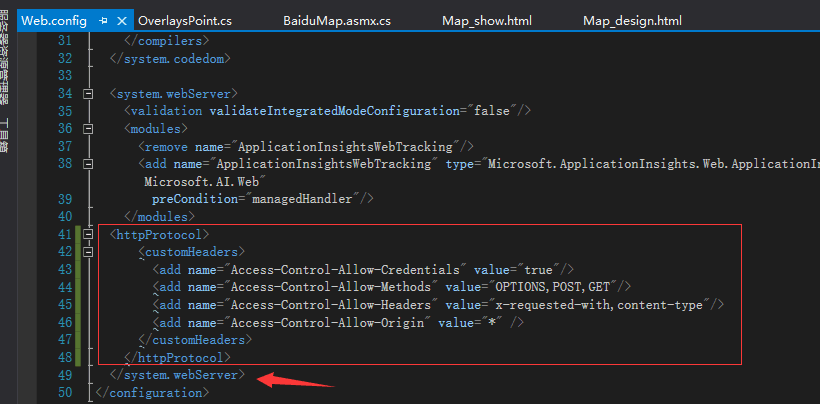
<httpProtocol>

        <customHeaders>

            <add name="Access-Control-Allow-Credentials" value="true"/>

            <add name="Access-Control-Allow-Methods" value="OPTIONS,POST,GET"/>

            <add name="Access-Control-Allow-Headers" value="x-requested-with,content-type"/>

            <add name="Access-Control-Allow-Origin" value="*"/>

        </customHeaders>

    </httpProtocol>
2019-1-22测试无误:
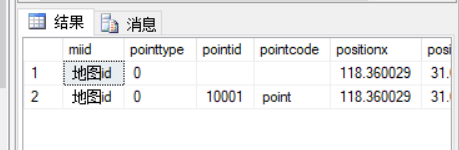
如果出错,注意查看浏览器端控制台报错(ajax出错)和vs输出窗口(c#方法出错)
ajax调用WebService实现数据库操作的更多相关文章
- ASP.NET实现二维码 ASP.Net上传文件 SQL基础语法 C# 动态创建数据库三(MySQL) Net Core 实现谷歌翻译ApI 免费版 C#发布和调试WebService ajax调用WebService实现数据库操作 C# 实体类转json数据过滤掉字段为null的字段
ASP.NET实现二维码 using System;using System.Collections.Generic;using System.Drawing;using System.Linq;us ...
- Ajax调用WebService(一)
Ajax调用WebService(一) http://www.cnblogs.com/leslies2/archive/2011/01/26/1934889.html 分类: Ajax 使用技术 We ...
- 使用ajax调用webservice加载table
写了个ajax调用webservice动态加载表格的案例 不废话直接上代码 webservice代码: /// <summary> /// 首页显示会员信息 /// </summar ...
- AJAX 调用WebService 、WebApi 增删改查
WebService 页面: 1 2 3 4 5 6 7 8 9 10 11 12 13 14 15 16 17 18 19 20 21 22 23 24 25 26 27 28 29 30 31 3 ...
- AJAX 调用WebService 、WebApi 增删改查(笔记)
经过大半天努力,终于完成增删改查了!心情有点小激动!!对于初学者的我来说,一路上都是迷茫,坑!!虽说网上有资料,可动手起来却不易(初学者的我).(苦逼啊!) WebService 页面: /// &l ...
- Jquery ajax调用webservice总结
jquery ajax调用webservice(C#)要注意的几个事项: 1.web.config里需要配置2个地方 <httpHandlers> <remove verb ...
- Ajax调用WebService
前台代码: <%@ Page Language="C#" AutoEventWireup="true" CodeBehind="WebForm1 ...
- Jquery Ajax 调用 WebService
原文:http://www.cnblogs.com/andiki/archive/2010/05/17/1737254.html jquery ajax调用webservice(C#)要注意的几个事项 ...
- ajax调用webservice服务
ajax调用是 html方向调用的, 而sqlconnection是 java代码调用的,本质差不多 <html> <head> <title>通过ajax调用we ...
随机推荐
- 使用数组制作简易的用户管理系统【java】
思路: 一.分析用户管理功能模块 - User类型属性值设定 private String username; // 用户id(唯一字段) private String nickname; // 昵称 ...
- HTTPS过程以及详细案例
1.HTTPS的过程 1.客户端向服务端发送请求,客户端主要向服务器提供以下信息: 支持的协议版本,比如TLS 1.0版. 一个客户端生成的随机数,稍后用于生成"对话密钥". 支持 ...
- 怎么样使用CLion调试分析MySQL Server
由于在写MySQL日志订阅服务时候,需要确定在什么event之后保存position,所以就开始研究MySQL的源码,刚开始采用最原始的打印输出的方式去调试,然后每次改完编译运行,效率好低,让我很绝望 ...
- 网络编程第三讲UDP编写
网络编程第三讲UDP编写 一丶UDP简介 UDP是面向无连接的.就是说数据传输会丢掉.网络延时比较大的情况下.会早上丢包.例如视频通话.就是UDP UDP不需要建立建立. 下面有UDP编写流程图 下图 ...
- kubernetes之收集集群的events,监控集群行为
一.概述 线上部署的k8s已经扛过了双11的洗礼,期间先是通过对网络和监控的优化顺利度过了双11并且表现良好.先简单介绍一下我们kubernetes的使用方式: 物理机系统:Ubuntu-16.04( ...
- [总结] 动态DP学习笔记
学习了一下动态DP 问题的来源: 给定一棵 \(n\) 个节点的树,点有点权,有 \(m\) 次修改单点点权的操作,回答每次操作之后的最大带权独立集大小. 首先一个显然的 \(O(nm)\) 的做法就 ...
- shell的命令替换和命令组合
bash&shell系列文章:http://www.cnblogs.com/f-ck-need-u/p/7048359.html Linux中使用反引号"``"(在波浪线的 ...
- Ajax的初级使用
一.AJAX简介(本文的例子都使用的是原生的ajax) 老技术新用法二.异步和同步区别三.XMLHttpRequest对象(面试题) 属性: readyState: 0:未初始化 1:open方法已经 ...
- 《深入理解Java虚拟机》(三)垃圾收集器与内存分配策略
垃圾收集器与内存分配策略 详解 3.1 概述 本文参考的是周志明的 <深入理解Java虚拟机>第三章 ,为了整理思路,简单记录一下,方便后期查阅. 3.2 对象已死吗 在垃圾收集器进行回收 ...
- Revit二次开发: 文件损坏
哪些因素可能会导致损坏? 损坏的原因也各不相同,包括但不限于 无法读取/写入存储介质 程序发生崩溃(特别是在数据写入 RVT 模型时) 附加模块以通过正常 UI 无法或意外的方式修改图元 未经测试的多 ...