
GPU Tips
<1> Basic
#include <stdio.h>

#include <cuda_runtime.h>

#include <device_launch_parameters.h>

#define NUM 15

__global__ void square(float *dout,float *din)

{

    int idx = threadIdx.x;

    float f  = din[idx];

    dout[idx] = f*f;

}

int main(int argc,char **argv)

{

    const int bytes = sizeof(float) * NUM;

    float host_in[NUM];

    // save some value

    for(int i=;i<NUM;i++)

    {

        host_in[i] = float(i);

    }

    float host_out[NUM];

    cudaError_t cudaStatus;

    // GPU SETTINGS

    // Choose which GPU to run on, change this on a multi-GPU system.

    cudaStatus = cudaSetDevice();

    if (cudaStatus != cudaSuccess) {

        fprintf(stderr, "cudaSetDevice failed!  Do you have a CUDA-capable GPU installed?");

        return;

    }

    // define gpu memory, GPU memory allocation

    float *device_in =  ;

    float *device_out = ;

    cudaStatus = cudaMalloc((void**)&device_in, bytes);

    cudaStatus = cudaMalloc((void**)&device_out,bytes);

    cudaStatus = cudaMemcpy(device_in,host_in,bytes,cudaMemcpyHostToDevice);

    // GPU kernel

    // 1 block,Num threads

    square<<<,NUM>>>(device_out,device_in);

    cudaStatus = cudaDeviceSynchronize();

    if (cudaStatus != cudaSuccess) {

        fprintf(stderr, "cudaDeviceSynchronize returned error code %d after launching addKernel!\n", cudaStatus);

    }

    cudaStatus = cudaMemcpy(host_out, device_out, bytes, cudaMemcpyDeviceToHost);

    if (cudaStatus != cudaSuccess) {

        fprintf(stderr, "cudaMemcpy failed!");

    }

    // Free GPU memory

    cudaFree(device_in);

    cudaFree(device_out);

    for(int i=;i<NUM;i++)

    {

        fprintf(stdout,"%f \n",host_out[i]);

    }

    getchar();

    return ;

}
<2> N blocks and block's threads one dim
#include <cuda_runtime.h>

#include <device_launch_parameters.h>

#include <stdio.h>

#include <stdlib.h>

#define ARRAYSize 50000000

#define THREADS_PER_BLOCK 1024

#define fnvalue(a,size)\

{\

    for(int i=;i<size;i++)    \

    {\

       a[i] = float(i);\

    }\

}\

#define CHECK_CUDA_STATUS(STATUS)\

{\

    if (STATUS != cudaSuccess)\

    {\

        fprintf(stdout,"Error in line %d\n ",__LINE__);\

    }\

}\

__global__ void add(float *d_out,float *d_x, float *d_y)

{

    int index = blockIdx.x * blockDim.x + threadIdx.x;

    if (index<ARRAYSize)

    {

        d_out[index] = d_x[index] + d_y[index];

    }

}

int main(int argc,char **argv)

{

    const int bytes = sizeof(float)*ARRAYSize;

    // host memory

    float *h_x   = (float*)malloc(bytes);

    float *h_y   = (float*)malloc(bytes);

    float *h_out = (float*)malloc(bytes);

    // give host value

    fnvalue(h_x,ARRAYSize);

    fnvalue(h_y,ARRAYSize);

    // device memory

    float *d_x,*d_y,*d_out;

    // cuda setttings

    cudaError_t dstat;

    dstat = cudaSetDevice();

    CHECK_CUDA_STATUS(dstat);

    dstat = cudaMalloc((void**)&d_x, bytes);

    CHECK_CUDA_STATUS(dstat);

    dstat = cudaMalloc((void**)&d_y, bytes);

    CHECK_CUDA_STATUS(dstat);

    dstat = cudaMalloc((void**)&d_out, bytes);

    CHECK_CUDA_STATUS(dstat);

    fprintf(stdout,"Copy data go GPU\n");

    cudaMemcpy(d_x,h_x,bytes,cudaMemcpyHostToDevice);

    cudaMemcpy(d_y,h_y,bytes,cudaMemcpyHostToDevice);

    add<<<ARRAYSize/THREADS_PER_BLOCK,THREADS_PER_BLOCK>>>(d_out,d_x,d_y);

    fprintf(stdout,"Copy GPU data to cpu\n");

    dstat = cudaMemcpy(h_out,d_out,bytes,cudaMemcpyDeviceToHost);

    cudaDeviceSynchronize();

    // DEBUG SOME VALUE

    for(int i=;i<;i++)

    {

        if ((i+)%==)

        {

            fprintf(stdout,"%f\n", h_out[i]);

        }

        else

        {

            fprintf(stdout,"%f ", h_out[i]);

        }

    }

    getchar();

    // FREE CPU MEMORY

    free(h_x);

    free(h_y);

    free(h_out);

    // FREE GPU MEMORY

    dstat = cudaFree(d_x);

    CHECK_CUDA_STATUS(dstat);

    dstat = cudaFree(d_y);

    CHECK_CUDA_STATUS(dstat);

    dstat = cudaFree(d_out);

    CHECK_CUDA_STATUS(dstat);

    return ;

}
<3> Unified memory:
#include <iostream>

#include <math.h>

// Kernel function to add the elements of two arrays

__global__

void add(int n, float *x, float *y)

{

  for (int i = ; i < n; i++)

    y[i] = x[i] + y[i];

}

int main(void)

{

  int N = <<;

  float *x, *y;

  // Allocate Unified Memory – accessible from CPU or GPU

  cudaMallocManaged(&x, N*sizeof(float));

  cudaMallocManaged(&y, N*sizeof(float));

  // initialize x and y arrays on the host

  for (int i = ; i < N; i++) {

    x[i] = 1.0f;

    y[i] = 2.0f;

  }

  // Run kernel on 1M elements on the GPU

  add<<<, >>>(N, x, y);

  // Wait for GPU to finish before accessing on host

  cudaDeviceSynchronize();

  // Check for errors (all values should be 3.0f)

  float maxError = 0.0f;

  for (int i = ; i < N; i++)

    maxError = fmax(maxError, fabs(y[i]-3.0f));

  std::cout << "Max error: " << maxError << std::endl;

  // Free memory

  cudaFree(x);

  cudaFree(y);

  return ;

}
<4>Some tips
(1)
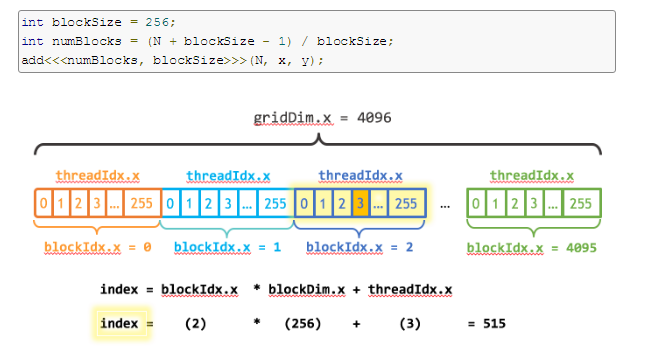
下图表示一维的block是由grid生成的。
__global__

void add(int n, float *x, float *y)

{

  int index = blockIdx.x * blockDim.x + threadIdx.x;

  int stride = blockDim.x * gridDim.x;

  for (int i = index; i < n; i += stride)

    y[i] = x[i] + y[i];

}
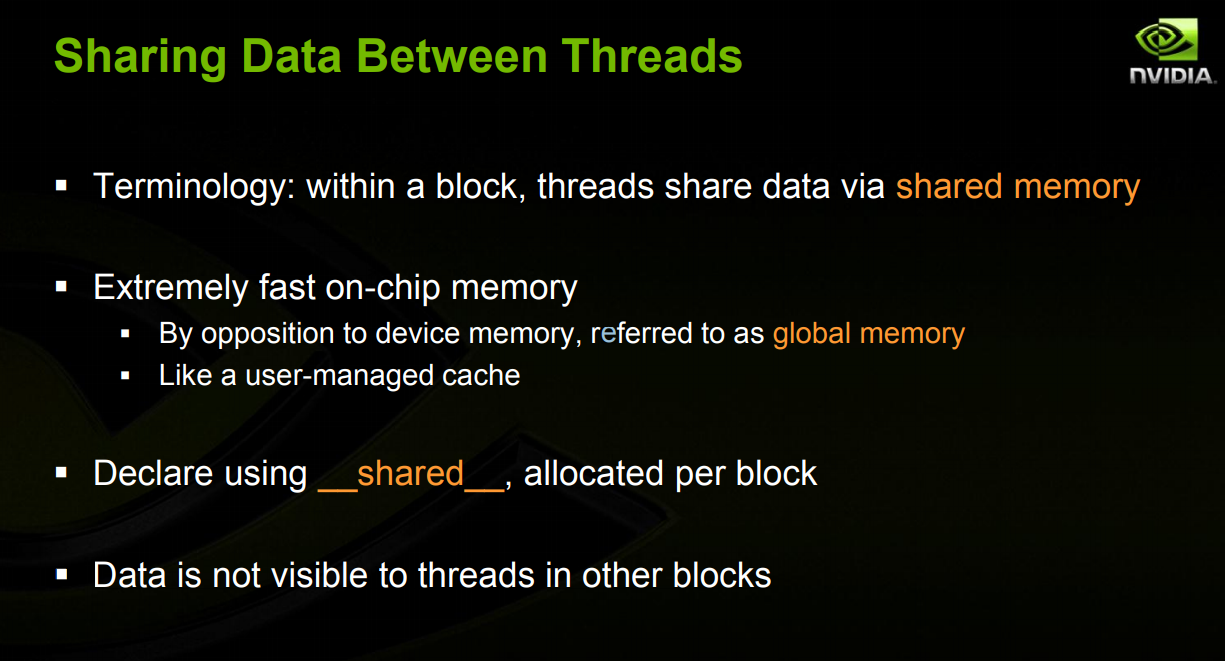
(2) 关于SharedMemory ,其实是在一个block上的共享memory
code:
#include <cuda_runtime.h>

#include <device_launch_parameters.h>

#include <device_functions.h>

#define RADIUS 3

#define BLOCKSIZE 10

__global__ void process(int *d_out,int *d_in,int *shared_mem)

{

    __shared__ int temp[BLOCKSIZE + * RADIUS ];

    int gindex = threadIdx.x + blockIdx.x * blockDim.x;

    int lindex = threadIdx.x + RADIUS;

    //printf("%d ",lindex);

    // Read input elements into shared memory

    temp[lindex] = d_in[gindex];

    if (threadIdx.x < RADIUS)

    {

        temp[lindex - RADIUS] = d_in[gindex - RADIUS];

        temp[lindex + BLOCKSIZE] = d_in[gindex + BLOCKSIZE];

    }

    shared_mem[lindex] = lindex;

    // this code for debug

    __syncthreads();

    // Apply the stencil

     int result = ;

     for (int offset = -RADIUS ; offset <= RADIUS ; offset++)

     {

         result += temp[lindex + offset];

     }

     // Store the result

     d_out[gindex] = result;

}

int main(int argc,char**argv)

{

    // allocation of memory

    int host_rawSize = ;

    int host_bytes = sizeof(int) * host_rawSize;

    int shared_bytes = (host_rawSize+*RADIUS) * sizeof(int);

    int *host_data          = (int*)malloc(host_bytes);

    int *host_outData       = (int*)malloc(host_bytes);

    int *host_sharedMemData = (int*)malloc(shared_bytes);

    for(int i=;i<host_rawSize;i++)

    {

        host_data[i] = int(i)+;

    }

    for(int i=;i<host_rawSize;i++)

    {

        fprintf(stdout,"%d   ",host_data[i]);

    }

    fprintf(stdout,"\n");

    int *dev_in;

    cudaMallocManaged((void**)&dev_in  , host_bytes);

    //cudaMallocManaged(&dev_in  , host_bytes);

    //cudaMalloc((void**)&dev_rawdata,bytes);

    cudaMemcpy(dev_in,host_data,host_bytes,cudaMemcpyHostToDevice);

    int dev_out_bytes  = host_rawSize *sizeof(int);  // 4*sizeof(float)

    int *dev_out;

    int *dev_shared;

    cudaMallocManaged(&dev_out    , dev_out_bytes);

    cudaMallocManaged(&dev_shared , shared_bytes);

    process<<<,host_rawSize>>>(dev_out,dev_in,dev_shared);

    cudaMemcpy(host_outData,      dev_out,   dev_out_bytes,cudaMemcpyDeviceToHost);

    cudaMemcpy(host_sharedMemData,dev_shared,shared_bytes,cudaMemcpyDeviceToHost);

    printf("===============Debug the gpu shared memory=======================\n");

    for(int i=;i<host_rawSize + *RADIUS;i++)

    {

        fprintf(stdout,"%d   ",host_sharedMemData[i]);

    }

    printf("\n===============Debug the gpu shared memory=======================\n");

    for(int i=;i<host_rawSize;i++)

    {

        fprintf(stdout,"%d   ",host_outData[i]);

    }

    fprintf(stdout,"\n");

    getchar();

    return ;

}

<1>simple caculation:
I = (R+G+B)/3
I = R*0.299f + G*0.587f + 0.114f*B
CPU:
// Serial implementation for running on CPU using a single thread.

void rgbaToGreyscaleCpu(const uchar4* const rgbaImage, unsigned char *const greyImage,

        const size_t numRows, const size_t numCols)

{

    for (size_t r = ; r < numRows; ++r) {

        for (size_t c = ; c < numCols; ++c) {

            const uchar4 rgba = rgbaImage[r * numCols + c];

            const float channelSum = .299f * rgba.x + .587f * rgba.y + .114f * rgba.z;

            greyImage[r * numCols + c] = channelSum;

        }

    }

}
GPU:
// CUDA kernel which is run in parallel by many GPU threads.

__global__

void rgbaToGreyscaleCudaKernel(const uchar4* const rgbaImage,

        unsigned char* const greyImage,

        const int numRows, const int numCols)

{

    //First create a mapping from the 2D block and grid locations

    //to an absolute 2D location in the image, then use that to

    //calculate a 1D offset

    const long pointIndex = threadIdx.x + blockDim.x*blockIdx.x;

    if(pointIndex<numRows*numCols) { // this is necessary only if too many threads are started

        uchar4 const imagePoint = rgbaImage[pointIndex];

        greyImage[pointIndex] = .299f*imagePoint.x + .587f*imagePoint.y  + .114f*imagePoint.z;

    }

}

// Parallel implementation for running on GPU using multiple threads.

void rgbaToGreyscaleCuda(const uchar4 * const h_rgbaImage, uchar4 * const d_rgbaImage,

        unsigned char* const d_greyImage, const size_t numRows, const size_t numCols)

{

    const int blockThreadSize = ;

    const int numberOfBlocks =  + ((numRows*numCols - ) / blockThreadSize); // a/b rounded up

    const dim3 blockSize(blockThreadSize, , );

    const dim3 gridSize(numberOfBlocks , , );

    rgbaToGreyscaleCudaKernel<<<gridSize, blockSize>>>(d_rgbaImage, d_greyImage, numRows, numCols);

}
GPU Tips的更多相关文章
- Optimizing graphics performance
看U3D文档,心得:对于3D场景,使用分层次的距离裁剪,小物件分到一个层,稍远时就被裁掉,大物体分到一个层,距离很远时才裁掉,甚至不载.中物体介于二者之间. 文档如下: Good performanc ...
- 玩转渗透神器Kali:Kali Linux作为主系统使用的正确姿势TIPS
Kali Linux 前身是著名渗透测试系统BackTrack ,是一个基于 Debian 的 Linux 发行版,包含很多安全和取证方面的相关工具. 本文假设你在新装好的kali linux环境下… ...
- shader程序员需要注意的优化Tips
在写shader的时候,其实一些写法对于其执行影响非常大,而且由于gpu和cpu在架构上的不同,代码的优化思想也不一样,最近一直在写几个shader,为了性能问题,查阅了很多资料,把一些tips总结下 ...
- Ubuntu16 编译源码安装MXNet 可变卷积Deformable-ConvNets GPU版
[引言]最近接手了公司的关于虫子识别的项目,使用MXNet框架开发,但是实际用的是Deformable-ConvNets. Deformable-ConvNets为微软研究研究院提出的可变卷积网络,可 ...
- 动画性能优化-requestAnimationFrame、GPU等
最近在做一个场景动画,有一个欢迎界面和一个主动画界面,两个界面之间的连接通过一个进度条来完成,当进度条完成,提供通往主动画的按钮. 画面会从一个个的场景移动过去,用户可通过点击抽奖.查看气泡商铺等进行 ...
- ubuntu16.04 Detectron目标检测库配置(包含GPU驱动,Cuda,Caffee2等配置梳理)
Detectron概述 Detectron是Facebook FAIR开源了的一个目标检测(Object Detection)平台. 用一幅图简单说明下Object Detection.如Mask R ...
- Tensorflow、Pytorch、Keras的多GPU使用
Tensorflow.Pytorch.Keras的多GPU的并行操作 方法一 :使用深度学习工具提供的 API指定 1.1 Tesorflow tensroflow指定GPU的多卡并行的时候,也是可以 ...
- Adreno GPU Profiler工具使用总结
Adreno Profiler介绍 Adreno Profiler 是高通公司开发的一款针对运行在高通骁龙处理器上用于图形和GPGPU技术应用的性能分析和帧调试工具.工具本质上是一个OpenGL ES ...
- Generating Complex Procedural Terrains Using GPU
前言:感慨于居然不用tesselation也可以产生这么复杂的地形,当然致命的那个关于不能有洞的缺陷还是没有办法,但是这个赶脚生成的已经足够好了,再加上其它模型估 计效果还是比较震撼的.总之好文共分享 ...
随机推荐
- 【强大的Java集成开发工具】MyEclipse 2015 Stable 2.0 for Mac
[简介] MyEclipse是一款 Mac 上的Java 强大的集成开发工具,今天和大家分享最新的 MyEclipse 2015 Stable 2.0 版本,MyEclipse 2015 基于 Ecl ...
- Ado.NET基础必备
一.SqlConnection对象 第一次需要连接数据库时要和服务器握手,解析连接字符串,授权,约束的检查等等操作,而物理连接建立后,这些操作就不会去做了(默认使用了连接池技术). SqlConnec ...
- linux unknown host 问题【转】
如果某台Linux(CentOS)服务器ping域名, 如下提示: # ping www.sina.comping: unknown host www.sina.com 确认网络没问题的情况下, 可以 ...
- thymeleaf 基础
(一)Thymeleaf 是个什么? 简单说, Thymeleaf 是一个跟 Velocity.FreeMarker 类似的模板引擎,它可以完全替代 JSP .相较与其他的模板引擎,它有如下 ...
- HDU - 5073 Galaxy(数学)
题目 题意:n个点,运行移动k个点到任何位置,允许多个点在同一位置上.求移动k个点后,所有点到整体中心的距离的平方和最小. 分析:这题题目真的有点迷...一开始看不懂.得知最后是选取一个中心,于是看出 ...
- Openresty 学习笔记(三)扩展库之neturl
github地址:https://github.com/golgote/neturl 最近在搞一个视频加密播放,中间使用要用lua 匹配一个域名,判断该域名是否正确 PS:使用PHP很好做,lua 的 ...
- GNU Screen Usage
分屏: 1.在终端输入screen命令 2.Ctrl+a 然后shift+s 上下分屏,切换到下方Ctrl+a tab然后新建一个window(Ctrl+a c) 3.切换到上方,Ctrl+a tab ...
- Postman 安装及使用入门教程 (谷歌浏览器插件版)
postman 在 谷歌浏览器中插件版 http://www.cnblogs.com/mafly/p/postman.html Postman 4.1.2 下载地址: http://files.cnb ...
- 传入mybatis的xml为Long型时报There is no getter for property named 'VARCHAR' in
修改前 <insert id="insert" parameterType="com.taotao.pojo.TbContent" > i ...
- office 2016 破解教程
骤: 下载安装包——>安装(断网状态)——>下载破解工具——>破解完成 1. 下载 office2016,大家进入下面的链接进行 http://pan.baidu.com/s/1mi ...