
bouncing-balls-evil-circle
效果如下

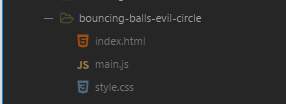
代码目录
<!DOCTYPE html>

<html lang="zh-CN">

  <head>

    <meta charset="utf-8">

    <title>弹球</title>

    <link rel="stylesheet" href="style.css">

    <script src="main.js" defer></script>

  </head>

  <body>

    <h1>弹球</h1>

    <p></p>

    <canvas></canvas>

  </body>

</html>
//main.js

const BALLS_COUNT = 25;

const BALL_SIZE_MIN = 10;

const BALL_SIZE_MAX = 20;

const BALL_SPEED_MAX = 7;

// 设定画布和初始数据

const para = document.querySelector('p');

const canvas = document.querySelector('canvas');

const ctx = canvas.getContext('2d');

// 将画布窗尺寸置为窗口内尺寸

const width = canvas.width = window.innerWidth;

const height = canvas.height = window.innerHeight;

// 设定形状类层次结构

class Shape {

  constructor(x, y, velX, velY, exists) {

    this.x = x;

    this.y = y;

    this.velX = velX;

    this.velY = velY;

    this.exists = exists;

  }

}

//es6中的继承

class Ball extends Shape {

  constructor(x, y, velX, velY, color, size, exists) {

    super(x, y, velX, velY, exists);

    this.color = color;

    this.size = size;

  }

  //绘制

  draw() {

    ctx.beginPath();

    ctx.fillStyle = this.color;

    ctx.arc(this.x, this.y, this.size, 0, 2 * Math.PI);

    ctx.fill();

  }

//更新

  update() {

    if ((this.x + this.size) >= width) {

      this.velX = -(this.velX);

    }

    if ((this.x - this.size) <= 0) {

      this.velX = -(this.velX);

    }

    if ((this.y + this.size) >= height) {

      this.velY = -(this.velY);

    }

    if ((this.y - this.size) <= 0) {

      this.velY = -(this.velY);

    }

    this.x += this.velX;

    this.y += this.velY;

  }

//碰撞检测

  collisionDetect() {

    for (let j = 0; j < balls.length; j++) {

      if ( this !== balls[j] ) {

        const dx = this.x - balls[j].x;

        const dy = this.y - balls[j].y;

        const distance = Math.sqrt(dx * dx + dy * dy);

        if (distance < this.size + balls[j].size && balls[j].exists) {

          balls[j].color = this.color = randomColor();

        }

      }

    }

  }

}

//恶魔圈也继承自shape

class EvilCircle extends Shape {

  constructor(x, y, exists) {

    super(x, y, exists);

    this.velX = BALL_SPEED_MAX;

    this.velY = BALL_SPEED_MAX;

    this.color = "white";

    this.size = 10;

    this.setControls();

  }

// 绘制

  draw() {

    ctx.beginPath();

    ctx.strokeStyle = this.color;

    ctx.lineWidth = 3;

    ctx.arc(this.x, this.y, this.size, 0, 2 * Math.PI);

    ctx.stroke();

  }

  checkBounds() {

    if ((this.x + this.size) >= width) {

      this.x -= this.size;

    }

    if ((this.x - this.size) <= 0) {

      this.x += this.size;

    }

    if ((this.y + this.size) >= height) {

      this.y -= this.size;

    }

    if ((this.y - this.size) <= 0) {

      this.y += this.size;

    }

  }

  setControls() {

    window.onkeydown = e => {

      switch(e.key) {

      case 'a':

      case 'A':

      case 'ArrowLeft':

        this.x -= this.velX;

        break;

      case 'd':

      case 'D':

      case 'ArrowRight':

        this.x += this.velX;

        break;

      case 'w':

      case 'W':

      case 'ArrowUp':

        this.y -= this.velY;

        break;

      case 's':

      case 'S':

      case 'ArrowDown':

        this.y += this.velY;

        break;

      }

    };

  }

  collisionDetect() {

    for (let j = 0; j < balls.length; j++) {

      if (balls[j].exists) {

        const dx = this.x - balls[j].x;

        const dy = this.y - balls[j].y;

        const distance = Math.sqrt(dx * dx + dy * dy);

        if (distance < this.size + balls[j].size) {

          balls[j].exists = false;

          count--;

          para.textContent = '还剩 ' + count + ' 个球';

        }

      }

    }

  }

}

// 球和恶魔圈

const balls = [];

const evilBall = new EvilCircle(

  random(0, width),

  random(0, height),

  true

);

let count = 0;

// 执行动画

loop();

// 生成随机数的函数

function random(min, max) {

  return Math.floor(Math.random()*(max-min)) + min;

}

// 生成随机颜色的函数

function randomColor() {

  return 'rgb(' +

         random(0, 255) + ', ' +

         random(0, 255) + ', ' +

         random(0, 255) + ')';

}

// 定义一个循环来不停地播放

function loop() {

  ctx.fillStyle = 'rgba(0, 0, 0, 0.25)';

  ctx.fillRect(0, 0, width, height);

  while (balls.length < BALLS_COUNT) {

    const size = random(BALL_SIZE_MIN, BALL_SIZE_MAX);

    //绘制球

    const ball = new Ball(

      // 为避免绘制错误,球至少离画布边缘球本身一倍宽度的距离

      random(0 + size, width - size),

      random(0 + size, height - size),

      random(-BALL_SPEED_MAX, BALL_SPEED_MAX),

      random(-BALL_SPEED_MAX, BALL_SPEED_MAX),

      randomColor(),

      size,

      true

    );

    balls.push(ball);

    count++;

    para.textContent = '还剩 ' + count + ' 个球';

  }

  for (let i = 0; i < balls.length; i++) {

    //绘制球

    if (balls[i].exists) {

      balls[i].draw();

      balls[i].update();

      balls[i].collisionDetect();

    }

  }

  evilBall.draw();

  evilBall.checkBounds();

  evilBall.collisionDetect();

  requestAnimationFrame(loop);

}
//style.css

body {

  margin: 0;

  overflow: hidden;

  font-family: '微软雅黑', sans-serif;

  height: 100%;

}

h1 {

  font-size: 2rem;

  letter-spacing: -1px;

  position: absolute;

  margin: 0;

  top: -4px;

  right: 5px;

  color: transparent;

  text-shadow: 0 0 4px white;

}

p {

  position: absolute;

  margin: 0;

  top: 35px;

  right: 5px;

  color: #aaa;

}
bouncing-balls-evil-circle的更多相关文章
- JavaScript对象入门指南
前言 不少开发对JavaScript实现面向对象编程存在一知半解,并且不少的在项目实践中写的都是面向过程编程的代码,因此,希望能从零入手介绍面向对象的一些概念到实现简单的面向对象的例子让大家包括我自己 ...
- HTML5 Canvas核心技术图形动画与游戏开发(读书笔记)----第一章,基础知识
一,canvas元素 1 为了防止浏览器不支持canvas元素,我们设置“后备内容”(fallback content),下面紫色的字即为后备内容 <canvas id="canvas ...
- Android Animation简述
Android Animation简述 一.动画(Animation) Android框架提供了两种动画系统:属性动画(Android3.0)和视图动画.同时使用两种动画是可行的,但 ...
- 论文笔记之:RATM: RECURRENT ATTENTIVE TRACKING MODEL
RATM: RECURRENT ATTENTIVE TRACKING MODEL ICLR 2016 本文主要内容是 结合 RNN 和 attention model 用来做目标跟踪. 其中模型的组成 ...
- android 动画NineOldAndroid
NineOldAndroid 1.之前我们用到的第动画是frame和tween动画也就是帧动画,补间动画现在多了一种动画,它包含完了前面动画的所有状态. 属性动画(Property Anmation) ...
- 201771010126 王燕《面向对象程序设计(Java)》第十六周学习总结
实验十六 线程技术 实验时间 2017-12-8 1.实验目的与要求 (1) 掌握线程概念: ‐多线程 是进程执行过中产生的多条线索. 是进程执行过中产生的多条线索. 是进程执行过中产生的多条线索. ...
- 马凯军201771010116《面向对象与程序设计Java》第十六周知识学习总结
一:理论知识部分 1.线程的概念: 程序是一段静态的代码,它是应用程序执行的蓝 本. ‐进程是程序的一次动态执行,它对应了从代码加 载.执行至执行完毕的一个完整过程. 多线程是进程执行过程中产生的多条 ...
- 第三部分:Android 应用程序接口指南---第四节:动画和图形---第一章 属性动画及动画与图形概述
第1章 属性动画及动画与图形概述 Android提供了一系列强大的API来把动画加到UI元素中,以及绘制自定义的2D和3D图像中去.下面的几节将综述这些可用的API以及系统的功能,同时帮你做出最优的选 ...
- JS-Object (3) JSON; Event Object相关知识(事件冒泡,事件监听, stopPropagation()
通常用于在网站上表示和传输数据 使用JavaScript处理JSON的所有工作,包括访问JSON对象中的数据项并编写自己的JSON. JSON text基本上就像是一个JavaScript对象,这句话 ...
- iPhone Tutorials
http://www.raywenderlich.com/tutorials This site contains a ton of fun written tutorials – so many t ...
随机推荐
- MySQL中and和or的优先级的问题
参考资料: 关于MySQL中AND和OR的优先级的问题 SQL语句中的AND和OR执行顺序问题 MySQL带OR关键字的多条件查询
- $mount(“#app”)手动挂载
没有el属性时,证明vue还没绑定到特定的dom上,需要延迟加载,则使用.$mount("")进行手动挂载 https://blog.csdn.net/longzhoufeng/a ...
- SpringBoot之修改单个文件后立刻生效
问题: 在使用SpringBoot进行开发时,如果修改了某个文件比如前端页面html,不能立刻起效. 解决: 在idea中打开修改后的文件,使用快捷键Ctrl+Shift+F9 进行重新编译,然后刷新 ...
- python 读取csv 数据并画图分析
数据源 : https://pan.baidu.com/s/1eR593Uy 密码: yqjh python环境 python3 #encoding: utf-8 import csv impo ...
- Ubuntu install flash
Software&Updates - Other Software - Canonical Parners sudo apt install adobe-flashplugin
- codeforces630C
Lucky Numbers CodeForces - 630C 小希称只含7和8的数是幸运数,那么不超过n位的幸运数有多少个? Input 一个整数 n (1 ≤ n ≤ 55) Output 输出幸 ...
- import logging报错raise notimplementederror 'emit must be implemented ' ^
在导入logging的时候出现这个错误 大概看了一下,就是因为python内置里面已经有logging这个模块,所以不需要再安装 在site-packages里面找到关于logging的文件,删掉 重 ...
- css溢出显示省略号
单行溢出省略号 .show-detail li .info-name { width:278px; display:inline-block; /*下面是重点*/ overflow: hidden; ...
- Spring MVC启动过程(1):ContextLoaderListener初始化
此文来自https://my.oschina.net/pkpk1234/blog/61971 (写的特别好)故引来借鉴 Spring MVC启动过程 以Tomcat为例,想在Web容器中使用Spirn ...
- POJ1151-扫面线+线段树+离散化//入门题
比较水的入门题 记录矩形竖边的x坐标,离散化排序.以被标记的边建树. 扫描线段树,查询线段树内被标记的边.遇到矩形的右边就删除此边 每一段的面积是查询结果乘边的横坐标之差,求和就是答案 #includ ...