
RxJS之Subject主题 ( Angular环境 )
一 Subject主题
Subject是Observable的子类。- Subject是多播的,允许将值多播给多个观察者。普通的 Observable 是单播的。
在 Subject 的内部,subscribe 不会调用发送值的新执行。它只是将给定的观察者注册到观察者列表中,类似于其他库或语言中的 addListener 的工作方式。
要给 Subject 提供新值,只要调用 next(theValue),它会将值多播给已注册监听该 Subject 的观察者们。
import { Component, OnInit } from '@angular/core';

import { Subject } from 'rxjs/Subject';

import { Subscription } from 'rxjs/Subscription';

@Component({

  selector: 'app-subject',

  templateUrl: './subject.component.html',

  styleUrls: ['./subject.component.css']

})

export class SubjectComponent implements OnInit {

  constructor() { }

  ngOnInit() {

    const subject: Subject<string> = new Subject<string>();

    const subscriptionA: Subscription = subject.subscribe(

      (val: string) => {

        console.log(`observerA: ${val}`);

      }

    );

    const subscriptionB: Subscription = subject.subscribe(

      (val: string) => {

        console.log(`observerB: ${val}`);

      }

    );

    subject.next('Mikey');

    subject.next('Leo');

    subscriptionA.unsubscribe(); // 取消订阅

    subscriptionB.unsubscribe(); // 取消订阅

    subject.next('Raph');

    subject.complete();

  }

}
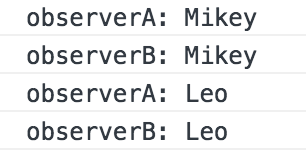
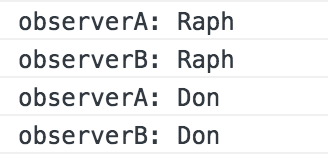
每个 Subject 都是观察者。 - Subject 是一个有如下方法的对象: next(v)、error(e) 和 complete() ,可以把 Subject 作为参数传给任何 Observable 的 subscribe 方法。
import { Component, OnInit } from '@angular/core';

import { Subject } from 'rxjs/Subject';

import { Subscription } from 'rxjs/Subscription';

import { from } from 'rxjs/observable/from';

import { Observable } from 'rxjs/Observable';

@Component({

  selector: 'app-subject',

  templateUrl: './subject.component.html',

  styleUrls: ['./subject.component.css']

})

export class SubjectComponent implements OnInit {

  constructor() { }

  ngOnInit() {

    const subject: Subject<string> = new Subject<string>();

    const subscriptionA: Subscription = subject.subscribe(

      (val: string) => {

        console.log(`observerA: ${val}`);

      }

    );

    const subscriptionB: Subscription = subject.subscribe(

      (val: string) => {

        console.log(`observerB: ${val}`);

      }

    );

    const observable: Observable<string> = from(['Raph', 'Don']);

    observable.subscribe(subject);

  }

}
RxJS之Subject主题 ( Angular环境 )的更多相关文章
- RxJS之工具操作符 ( Angular环境 )
一 delay操作符 源Observable延迟指定时间,再开始发射值. import { Component, OnInit } from '@angular/core'; import { of ...
- RxJS之转化操作符 ( Angular环境 )
一 map操作符 类似于大家所熟知的 Array.prototype.map 方法,此操作符将投射函数应用于每个值 并且在输出 Observable 中发出投射后的结果. import { Compo ...
- RxJS之过滤操作符 ( Angular环境 )
一 take操作符 只发出源 Observable 最初发出的的N个值 (N = count). 如果源发出值的数量小于 count 的话,那么它的所有值都将发出.然后它便完成,无论源 Observa ...
- RxJS之组合操作符 ( Angular环境 )
一 merge操作符 把多个 Observables 的值混合到一个 Observable 中 import { Component, OnInit } from '@angular/core'; i ...
- dtGrid插件集成到Angular环境实现表格化数据展现
00没有抱怨的世界 周末效率好低,两天没更了,看看这看看那,装了个win10发现触摸板驱动不适配,然后找了好久都不行,23333. AngularJS用的时间很短,高级的用法有点吃不消了,$diges ...
- angular环境搭建时的坑
安装angular环境踩过一些坑,最终还是把工程跑起来了,这里描述一下我的步骤,不排除有些步骤是多余的,希望能对遇到同样问题的小伙伴有帮助. 下载最新版node.js. 安装node,安装过程一路点下 ...
- Rxjs之创建操作符(Angular环境)
一 of操作符 import { Component, OnInit } from '@angular/core'; import { of } from 'rxjs/observable/of'; ...
- Angular环境准备和Angular cli
Angular4.0来了,更小,更快,改动少 接下来为Angular4.0准备环境和学会使用Angular cli项目 1.环境准备: 1)在开始工作之前我们必须设置好开发环境 如果你的机器上还没有安 ...
- 使用 Immutable Subject 来驱动 Angular 应用
现状 最近在重构手上的一个 Angular 项目,之前是用的自己写的一个仿 Elm 架构的库来进行的状态管理,期间遇到了这些痛点: 样板代码太多 异步处理太过繁琐 需要单独维护一个 npm 包 其中, ...
随机推荐
- 深度学习原理与框架-RNN网络框架-LSTM框架 1.控制门单元 2.遗忘门单元 3.记忆门单元 4.控制门单元更新 5.输出门单元 6.LSTM网络结构
LSTM网络是有LSTM每个单元所串接而成的, 从下面可以看出RNN与LSTM网络的差异, LSTM主要有控制门单元和输出门单元组成 控制门单元又是由遗忘门单元和记忆门单元的加和组成. 1.控制门单元 ...
- jquery 属性-记住
$("").attr(); $("").removeAttr(); $("").prop(); $("").remove ...
- mysql每天凌晨0点准时启动taskeng.exe如何关闭
MySQL弹出一个taskeng.exe. 内容如下:=====================Start Initialization====================mysql Instal ...
- UI5-学习篇-15-云连接SAP Cloud Connector
请关注地址:http://blog.itpub.net/29829936/viewspace-2128829/ 1.SCC下载及安装 https://tools.hana.ondemand.com/# ...
- Python爬虫示例
#!/usr/bin/python #coding:utf8 import re import urllib def gethtml(url): page=urllib.urlopen(url) ht ...
- NETIF_F_LLTX 的属性
在bond初始化的时候,我们可以看到如下属性: /* don't acquire bond device's netif_tx_lock when transmitting */ bond_d ...
- Think you can pronounce these 10 words correctly? You might be
Think you can pronounce these 10 words correctly? You might be surprised! Share Tweet Share Tagged ...
- 如何进行SQL排序
order by 语法如下: SELECT "栏位名" FROM "表格名" [WHERE "条件"] ORDER BY "栏位名 ...
- Excel导入oracle的几种方法
http://www.jb51.net/list/list_154_1.htm 方法一.使用SQL*Loader这个是用的较多的方法,前提必须oracle数据中目的表已经存在.大体步骤如下:1.将ex ...
- Hibernate学习笔记2.4(Hibernate的Id生成策略)
通过设置告诉id该怎么设置. 1.通过xml方式 1.assigned 主键由外部程序负责生成,在 save() 之前必须指定一个.Hibernate不负责维护主键生成.与Hibernate和底层数据 ...