
戴尔PowerEdge R430 机架式服务器 安装ubuntu server 14.04.1 LTS 64 位
硬件配置:
服务编号:5Z04X72
软件配置
1、Ubuntu 系统下载地址:
https://certification.ubuntu.com/certification/hardware/201412-16241/
2、uiso9_cn_9.6.6.3300.exe 下载

3、ubuntu server12.04系统U盘安装详细教程
https://wenku.baidu.com/view/64e4c33c2b160b4e777fcf28.html
4、Ubuntu 14.04 Server开发者安装指南
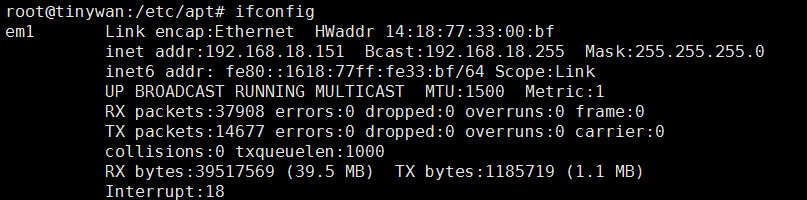
5、网卡信息看查看(cat /proc/version Ubuntu 系统查看)
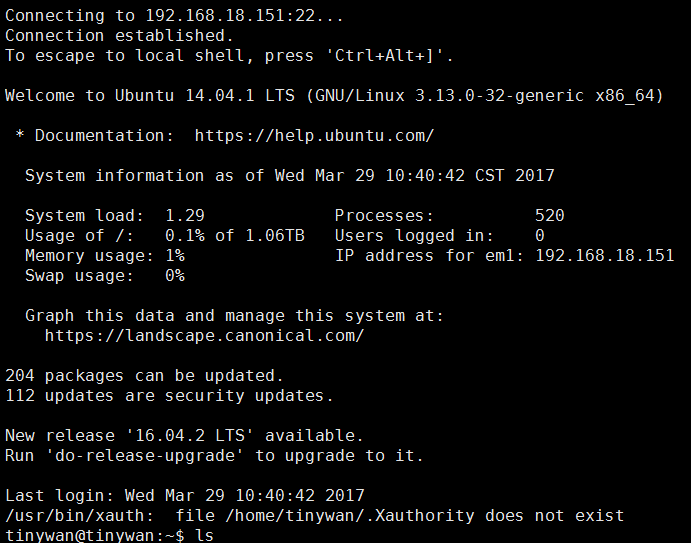
6、SSh 远程登录

登录失败
在服务器本机,安装ssh
ps -e |grep ssh
安装: apt-get install ssh ( 安装后会自动开启给服务)
再次链接了,链接成功
7、修改root 密码
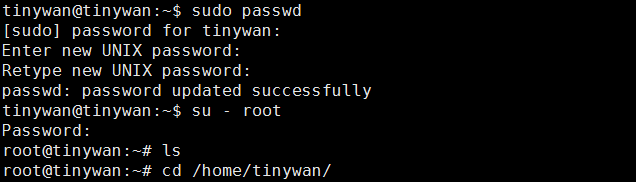
sudo passwd
8、更新阿里云源(切换到root账户)

注意:我在这里直接是备份原有的一份,然后直接把给文件删除,重新新建一个文件即可
sources.list 添加以下内容
deb http://mirrors.aliyun.com/ubuntu/ trusty main restricted universe multiverse

deb http://mirrors.aliyun.com/ubuntu/ trusty-security main restricted universe multiverse

deb http://mirrors.aliyun.com/ubuntu/ trusty-updates main restricted universe multiverse

deb http://mirrors.aliyun.com/ubuntu/ trusty-proposed main restricted universe multiverse

deb http://mirrors.aliyun.com/ubuntu/ trusty-backports main restricted universe multiverse

deb-src http://mirrors.aliyun.com/ubuntu/ trusty main restricted universe multiverse

deb-src http://mirrors.aliyun.com/ubuntu/ trusty-security main restricted universe multiverse

deb-src http://mirrors.aliyun.com/ubuntu/ trusty-updates main restricted universe multiverse

deb-src http://mirrors.aliyun.com/ubuntu/ trusty-proposed main restricted universe multiverse

deb-src http://mirrors.aliyun.com/ubuntu/ trusty-backports main restricted universe multiverse
安装nginx
错误1
root@tinywan:/home/tinywan/nginx-1.10.3# ./configure

checking for OS

 + Linux 3.13.0-32-generic x86_64

checking for C compiler ... not found

./configure: error: C compiler cc is not found
解决办法:apt-get install build-essential
错误2
./configure: error: the HTTP rewrite module requires the PCRE library.

You can either disable the module by using --without-http_rewrite_module

option, or install the PCRE library into the system, or build the PCRE library

statically from the source with nginx by using --with-pcre=<path> option.
方法:
apt-get install libreadline-dev libncurses5-dev libpcre3-dev \

libssl-dev perl make build-essential curl
编译、安装、浏览器访问
http://192.168.18.151/
结束安装
戴尔PowerEdge R430 机架式服务器 安装ubuntu server 14.04.1 LTS 64 位的更多相关文章
- PowerEdge R430 机架式服务器安装( Ubuntu server 14.04.1 、PHP5.5.9、PHP-redis2.8、Phalcon3.1)
未解决问题:换成静态路由的话,怎么就 apt-get udpate 出现错误信息! 解决办法:么有设置网关 一.Ubuntu 系统下载地址: https://certification.ubuntu. ...
- Ubuntu Server 16.04.1 LTS 64位 搭建LNMP环境
安装配置 Nginx 为了确保获得最新的 Nginx,先使用sudo apt-get update命令更新源列表.安装 Nginx,输入命令:sudo apt-get install nginx. 启 ...
- U盘安装ubuntu server 14.04
U盘安装ubuntu server 14.04 U盘安装ubuntu server 14.04 1.制作启动u盘 2.开始安装 1 将u盘插入主机,重启后从u盘启动 2 选择语言(随便挑,随便选),我 ...
- u盘安装ubuntu server 14.04 以及No CD-ROM drive was detected 错误
u盘安装ubuntu server 14.04 1:下载ubuntu server14的 iso镜像文件 2:下载 UltraISO U盘镜像制作工具 : 3:使用Ultra iOS 将下载好的 is ...
- vmware 10虚拟机安装ubuntu server 14.04
-開始安装ubuntu server- 1.首先是安装系统时的语言,推荐选择English 然后安装系统 这里选择语言非常重要,我開始选择了中文,安装完毕后会乱码,所以推荐选择英文 由于在中国.所以选 ...
- [原创]安装Ubuntu Server 14.04后
安装后许多软件都没有,需要进行安装. 官方指南:https://help.ubuntu.com/lts/serverguide/index.html 1.修改网络配置文件 用ifconfig查看本地网 ...
- ubuntu server 14.04 LTS下搭建LAMP环境之最详细笔记之一U盘安装双系统
前言: 一直在WIN上使用PHP,不喜欢用WAMP,每次都是手动在windows配置环境,偶尔有一次装了小红帽玩了两天,感觉不是很习惯就换了回来,过了没几天见讨论LAMP环境,于是安装了ubuntu的 ...
- U盘安装ubuntu server 12.04的问题检测不到CDROM的解决
U盘安装ubuntu server 12.04的问题检测不到CDROM的解决 ========================== 我是u盘安装ubuntu 14 64Bit 也是出现同样的问题 用u ...
- 在虚拟机中安装Ubuntu Server 15.04
学Linux,上红联! 红联Linux门户|Linux通用技术|Linux发行版技术|Linux企业应用|Linux实验室|红联Linux论坛 Linux系统教程 Linux入门 Linux管理 Li ...
随机推荐
- “吃神么,买神么”的第二个Sprint计划(总结)
“吃神么,买神么”项目Sprint计划 ——5.28 星期四(第八天)第一次Spring计划结束 第一阶段Spring的目标以及完成情况: 时间:5月21号~5月28号(7天) 目标:第二阶段主 ...
- es6箭头函数的注意要点
具有一个参数的简单函数 var single = a => a single('hello, world') // 'hello, world' 没有参数的需要用在箭头前加上小括号 var lo ...
- msg: ReferenceError: Can't find variable: urchinTracker
在调试的时候发现selenium在启动浏览器打开url地址的时候报这个错误 msg: ReferenceError: Can't find variable: urchinTracker 检查了脚本发 ...
- Linux 下安装mysql 8.0.11(CentOS 7.4 系统)
CentOS 7 自带MariaDB (前mysql开发工程师开发的,因此与吗,mysql 有很多相似之处) 1.检查卸载自带的MariaDB rpm -qa|grep mariadb //查询出来已 ...
- [Cnbeta]龙芯处理器性能怎么样
龙芯处理器性能怎么样?下一代CPU同频性能可达英特尔90% 在高性能处理器领域,英特尔是天花顶一般的存在(先不算地位特殊的IBM公司),国内发展CPU处理器的公司很多,绝大多数实力跟英特尔相比都差很远 ...
- android获取view宽高的几种方法
在onCreate方法中我们通过mView.getWidth()和mView.getHeight()获取到的view的宽高都是0,那么下面几种方法就可以在onCreate方法中获取到view的宽高. ...
- 【Linux笔记】在后台执行scp,实现服务器间无密码文件拷贝。
远程备份大容量时常会有这样的情形:从远程备份的文件很大,需要很长时间,想在退出ssh后程序依然能继续在后台下载,可以通过建立服务器间安全信息关系和nohup的方式解决. 有两台服务器:A服务器IP 1 ...
- STM32CubeMX介绍、下载与安装
一.简介 STM32CubeMX是一个配置STM32代码的工具,它把很多东西封装的比较好,硬件抽象层.中间层.示例代码等.现在ST公司升级和维护的库主要就是STM32CubeMX的HAL库和标准外设库 ...
- Qt 删除目录
删除目标的目录,若该目录下有子目录,一并删除. //判断是否存在子目录 bool judgeDir(QDir dir) { dir.setFilter(QDir::AllEntries | QDir: ...
- Trailing Zeroes (I) LightOJ - 1028(求因子个数)
题意: 给出一个N 求N有多少个别的进制的数有后导零 解析: 对于一个别的进制的数要转化为10进制 (我们暂且只分析二进制就好啦) An * 2^(n-1) + An-1 * 2^(n-2) + `` ...