
解决UITableView在iOS7中UINavigationController里的顶部留白问题
解决UITableView在iOS7中UINavigationController里的顶部留白问题

出现问题时候的截图:
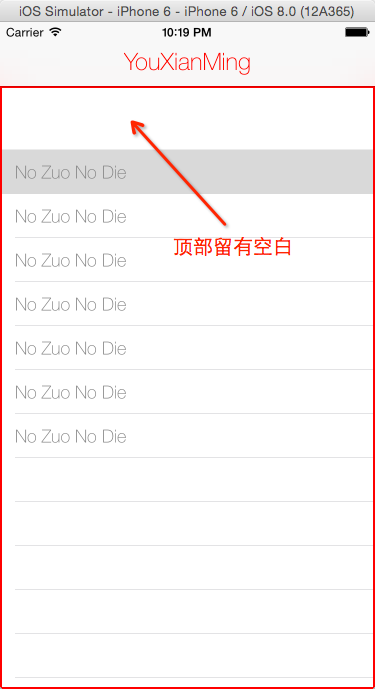
源码:
用到的类:
UIViewController+TitleTextAttributes.h 与 UIViewController+TitleTextAttributes.m
//

//  UIViewController+TitleTextAttributes.h

//  YouXianMing

//

//  Created by YouXianMing on 14-9-20.

//  Copyright (c) 2014年 YouXianMing. All rights reserved.

//

#import <UIKit/UIKit.h>

#import "NCTitleAttribute.h"

@interface UIViewController (TitleTextAttributes)

/**

 *  设置当前控制器的标题属性

 *

 *  @param attribute 属性对象

 */

- (void)titleTextAttributes:(NCTitleAttribute *)attribute;

@end
//

//  UIViewController+TitleTextAttributes.m

//  YouXianMing

//

//  Created by YouXianMing on 14-9-20.

//  Copyright (c) 2014年 YouXianMing. All rights reserved.

//

#import "UIViewController+TitleTextAttributes.h"

@implementation UIViewController (TitleTextAttributes)

#pragma mark - public

- (void)titleTextAttributes:(NCTitleAttribute *)attribute

{

    [self controller:self

 titleTextAttributes:[attribute transformToDictionary]];

}

#pragma mark - private

- (void)controller:(UIViewController *)controller titleTextAttributes:(NSDictionary *)dictionary

{

    if ([controller isKindOfClass:[UIViewController class]]) {

        [controller.navigationController.navigationBar setTitleTextAttributes:dictionary];

    }

}

@end
NCTitleAttribute.h 与 NCTitleAttribute.m
//

//  NCTitleAttribute.h

//  YouXianMing

//

//  Created by YouXianMing on 14-9-20.

//  Copyright (c) 2014年 YouXianMing. All rights reserved.

//

#import <Foundation/Foundation.h>

@interface NCTitleAttribute : NSObject

@property (nonatomic, strong) UIColor *titleColor;   // 标题颜色

@property (nonatomic, strong) UIFont  *titleFont;    // 标题字体

@property (nonatomic, strong) UIColor *shadowColor;  // 阴影颜色

@property (nonatomic, assign) CGSize   shadowOffset; // 阴影偏移量

// 将参数转换为字典

- (NSDictionary *)transformToDictionary;

@end
//

//  NCTitleAttribute.m

//  YouXianMing

//

//  Created by YouXianMing on 14-9-20.

//  Copyright (c) 2014年 YouXianMing. All rights reserved.

//

#import "NCTitleAttribute.h"

@implementation NCTitleAttribute

- (NSDictionary *)transformToDictionary

{

    NSMutableDictionary *dic = [NSMutableDictionary new];

    if (_titleColor)

    {

        [dic setObject:_titleColor forKey:NSForegroundColorAttributeName];

    }

    else

    {

        [dic setObject:[UIColor blackColor] forKey:NSForegroundColorAttributeName];

    }

    if (_titleFont)

    {

        [dic setObject:_titleFont forKey:NSFontAttributeName];

    }

    if (_shadowOffset.height && _shadowOffset.width)

    {

        NSShadow *shadow = [NSShadow new];

        shadow.shadowColor  = _shadowColor;

        shadow.shadowOffset = _shadowOffset;

        [dic setObject:shadow forKey:NSShadowAttributeName];

    }

    return dic;

}

@end
控制器源码:
//

//  ViewController.m

//  UIRectEdgeNone

//

//  Created by YouXianMing on 14/10/29.

//  Copyright (c) 2014年 YouXianMing. All rights reserved.

//

#import "ViewController.h"

#import "UIViewController+TitleTextAttributes.h"

#import "NCTitleAttribute.h"

#import "WxHxD.h"

@interface ViewController ()<UITableViewDataSource, UITableViewDelegate>

@property (nonatomic, strong) UITableView *tableView;

@end

@implementation ViewController

- (void)viewDidLoad {

    [super viewDidLoad];

    // 初始化标题

    [self initTitle];

    // 背景view

    UIView *backView = [[UIView alloc] initWithFrame:\

                            CGRectMake(, [WxHxD statusBarAndNavigationBarHeight],

                                       [WxHxD screenWidth],

                                       [WxHxD screenHeight] - [WxHxD  statusBarAndNavigationBarHeight])];

    backView.layer.borderWidth = .f;

    backView.layer.borderColor = [UIColor redColor].CGColor;

    [self.view addSubview:backView];

    // tableView

    _tableView = [[UITableView alloc] initWithFrame:backView.bounds

                                              style:UITableViewStylePlain];

    _tableView.delegate   = self;

    _tableView.dataSource = self;

    [backView addSubview:_tableView];

}

- (void)initTitle {

    self.title                = @"YouXianMing";

    NCTitleAttribute *NCTitle = [NCTitleAttribute new];

    NCTitle.titleColor        = [UIColor redColor];

    NCTitle.titleFont         = [UIFont fontWithName:@"HelveticaNeue-Thin" size:.f];

    [self titleTextAttributes:NCTitle];

}

#pragma mark - 代理

- (NSInteger)tableView:(UITableView *)tableView numberOfRowsInSection:(NSInteger)section {

    return ;

}

- (UITableViewCell *)tableView:(UITableView *)tableView cellForRowAtIndexPath:(NSIndexPath *)indexPath {

    static NSString *reusedFlag = @"YouXianMing";

    UITableViewCell *cell = [tableView dequeueReusableCellWithIdentifier:reusedFlag];

    if (cell == nil) {

        cell = [[UITableViewCell alloc] initWithStyle:UITableViewCellStyleDefault

                                      reuseIdentifier:reusedFlag];

    }

    cell.textLabel.font      = [UIFont fontWithName:@"HelveticaNeue-Thin" size:.f];

    cell.textLabel.text      = @"No Zuo No Die";

    cell.textLabel.textColor = [UIColor grayColor];

    return cell;

}

@end
如何解决呢?很简单:
添加以下代码:
// 让边缘留白为空
float systemVersion = [[[UIDevice currentDevice] systemVersion] floatValue];
if (systemVersion >= 7.0) {
self.edgesForExtendedLayout = UIRectEdgeNone;
}
效果:

注意:此种问题只有在iOS7以上才会出现
解决UITableView在iOS7中UINavigationController里的顶部留白问题的更多相关文章
- UITableView中cell里的UITextField不被弹出键盘挡住
UITableView中cell里的UITextField不被弹出键盘挡住 本人视频教程系类 iOS中CALayer的使用 效果如下: 源码: EditCell.h 与 EditCell.m // ...
- WWDC 2013 Session笔记 - iOS7中的多任务
这是我的WWDC2013系列笔记中的一篇,完整的笔记列表请参看这篇总览.本文仅作为个人记录使用,也欢迎在许可协议范围内转载或使用,但是还烦请保留原文链接,谢谢您的理解合作.如果您觉得本站对您能有帮助, ...
- ios7中的多任务
转自:http://onevcat.com/2013/08/ios7-background-multitask/ WWDC 2013 Session笔记 - iOS7中的多任务 iOS7的后台多任务特 ...
- [ios-必看] WWDC 2013 Session笔记 - iOS7中的多任务【转】
感谢:http://onevcat.com/2013/08/ios7-background-multitask/ http://www.objc.io/issue-5/multitasking.htm ...
- UITableView使用过程中可能遇到的问题
前言:记录一些UITableView使用过程中可能遇到的问题 环境:Xcode9 解决UITableViewStyleGrouped类型的TableView的cell距离顶部有距离的问题: table ...
- iOS7中的多任务 - Background Fetch,Silent Remote Notifications,Background Transfer Service
转自:http://onevcat.com/2013/08/ios7-background-multitask/ 在IOS 7 出来不就,公司内部也组织了一次关于IOS 7 特性的的分享,今天看见on ...
- iOS7中的多任务I
[改变了后台任务的运行方式] 在iOS6和之前的系统中,系统在用户退出应用后,如果应用正在执行后台任务的话,系统会保持活跃状态直到后台任务完成或者是超时以后,才会进入真正的低功耗休眠状态. 而在iOS ...
- iOS7中的ViewController切换
转自:https://onevcat.com/2013/10/vc-transition-in-ios7/ iOS 7 SDK之前的VC切换解决方案 在深入iOS 7的VC切换效果的新API实现之前, ...
- iOS7中计算UILabel中字符串的高度
iOS7中计算UILabel中字符串的高度 iOS7中出现了新的方法计算UILabel中根据给定的Font以及str计算UILabel的frameSize的方法.本人提供category如下: UIL ...
随机推荐
- nginx 超时问题: upstream timed out (110: Connection timed out) while reading response header from upstream
目录 错误内容 错误原因 错误解决办法 错误内容 我们可以在error.log 里面可以看到 错误内容:upstream timed out (110: Connection timed out) w ...
- WPF获取相对位置、坐标的方法
1.获取鼠标在控件中的坐标: private void item_MouseDown(object sender, MouseButtonEventArgs e) { Point point = e. ...
- The number of object passed must be even but was [1]
1.失败,使用TransportClient public static void bulkInsert(TransportClient client) throws IOException { Li ...
- Ubuntu18---VMware虚拟机中Ubuntu18.04系统,开机输入密码后无响应黑屏
系统崩坏了,重装过几次,这次决定不充装了. 搜索大神解决方案后,了解到是图形界面程序损坏,可能是在更新内核或者安装软件的时候,把与xorg相关的文件给清除了. 解决方案如下: 1.登录系统进入,黑屏后 ...
- 边框圆角Css
.box{ background:grey; //灰色背景 height:50px; //高500像素 width:200px; //宽200像素 border-top-left-radius:15p ...
- MyEclipse关闭当前正在编辑的页面
如果要关闭当前正在编辑的页面Ctrl + W 例如: 按下Ctrl + W 只会关闭Const.java这个页面 如果要关闭所有打开的页面Ctrl + Shift + W 例如:按下Ctrl + Sh ...
- Java学习--Cookie 和session
- 第一次搭建dns服务器
CentOS 7 搭建DNS服务器 主要参考的是小左先森的一篇博客:https://blog.51cto.com/13525470/2054121. 1.搭建过程中遇到的几个问题说一下: a.在重启服 ...
- LeetCode刷题第二天
2.给出两个 非空 的链表用来表示两个非负的整数.其中,它们各自的位数是按照 逆序 的方式存储的,并且它们的每个节点只能存储 一位 数字. 如果,我们将这两个数相加起来,则会返回一个新的链表来表示它们 ...
- ActiveMQ Could not connect to broker URL
javax.jms.JMSException: Could not connect to broker URL: http://localhost:8161/. Reason: java.io.IOE ...