
如何让WCF服务更好地支持Web Request和AJAX调用
WCF的确不错,它大大地简化和统一了服务的开发。但也有不少朋友问过我,说是在非.NET客户程序中,有何很好的方法直接调用服务吗?还有就是在AJAX的代码中(js)如何更好地调用WCF服务呢?
我首先比较推荐的是可以通过页面静态方法等方式来转接对WCF的服务。尤其是WCF是属于别的网站的一部分的时候。
但今天我要讲解一下,如果和WCF在一个网站内部,那么js脚本应该如何更好地调用WCF呢?或者说,为了支持js更好地访问,WCF服务在设计的时候应该注意什么呢?
1. 创建服务
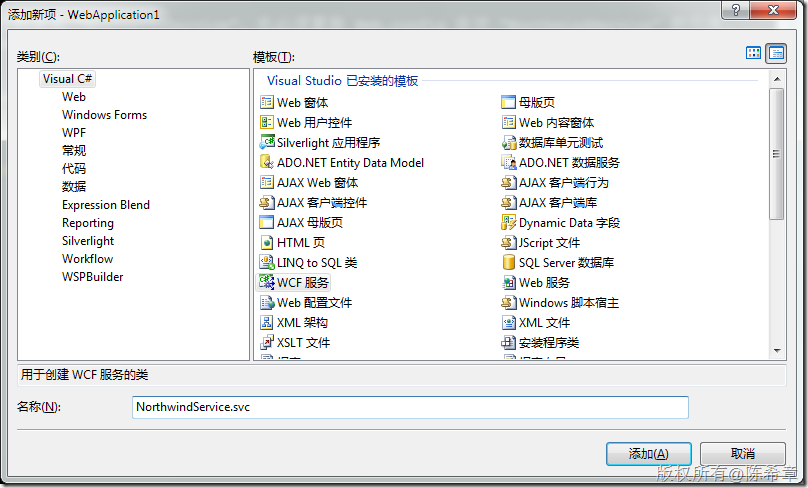
2. 修改接口
为了做演示,我们将默认的那个Operation修改一下
using System;

using System.Collections.Generic;

using System.Linq;

using System.Runtime.Serialization;

using System.ServiceModel;

using System.Text;

using System.ServiceModel.Web;

namespace WebApplication1

{

    // 注意: 如果更改此处的接口名称 "INorthwindService",也必须更新 Web.config 中对 "INorthwindService" 的引用。

    [ServiceContract]

    public interface INorthwindService

    {

        [OperationContract]

        [WebGet(UriTemplate="HelloWorld")]

        string HelloWorld();

    }

}
注意,我们这里加了一个WebGet的Attribute,这将允许WCF服务直接通过地址调用
3. 实现服务
using System;

using System.Collections.Generic;

using System.Linq;

using System.Runtime.Serialization;

using System.ServiceModel;

using System.Text;

namespace WebApplication1

{

    // 注意: 如果更改此处的类名 "NorthwindService",也必须更新 Web.config 中对 "NorthwindService" 的引用。

    public class NorthwindService : INorthwindService

    {

        #region INorthwindService 成员

        public string HelloWorld()

        {

            return "Hello,world";

        }

        #endregion

    }

}
这里的实现依然是我最喜欢的HelloWorld
4. 修改配置文件(web.config),要支持直接通过WebGet的方法调用WCF服务,必须用一个特殊的binding,是webHttpBinding
 <system.serviceModel>

  <behaviors>

   <serviceBehaviors>

    <behavior name="WebApplication1.NorthwindServiceBehavior">

     <serviceMetadata httpGetEnabled="true" />

     <serviceDebug includeExceptionDetailInFaults="false" />

    </behavior>

   </serviceBehaviors>

    <endpointBehaviors>

      <behavior name="test">

        <webHttp/>

      </behavior>

    </endpointBehaviors>

  </behaviors>

  <services>

   <service behaviorConfiguration="WebApplication1.NorthwindServiceBehavior"

    name="WebApplication1.NorthwindService">

    <endpoint address="" binding="webHttpBinding" contract="WebApplication1.INorthwindService" behaviorConfiguration="test">

     <identity>

      <dns value="localhost" />

     </identity>

    </endpoint>

    <endpoint address="mex" binding="mexHttpBinding" contract="IMetadataExchange" />

   </service>

  </services>

 </system.serviceModel>
上面的粗斜体部分是要添加或者修改的
5. 浏览该服务
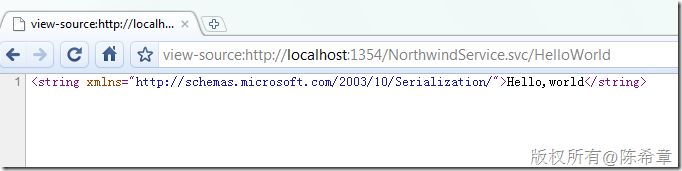
我们看到,通过这样的地址就可以实现调用了。默认情况下,它返回的数据格式是XML的
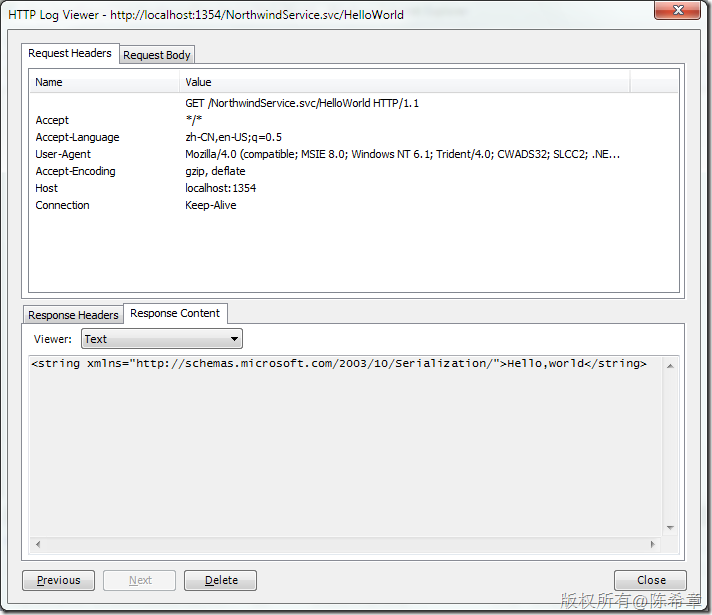
6. 修改合约,让它返回json数据
using System;

using System.Collections.Generic;

using System.Linq;

using System.Runtime.Serialization;

using System.ServiceModel;

using System.Text;

using System.ServiceModel.Web;

namespace WebApplication1

{

    // 注意: 如果更改此处的接口名称 "INorthwindService",也必须更新 Web.config 中对 "INorthwindService" 的引用。

    [ServiceContract]

    public interface INorthwindService

    {

        [OperationContract]

        [WebGet(UriTemplate="HelloWorld",ResponseFormat=WebMessageFormat.Json)]

        string HelloWorld();

    }

}
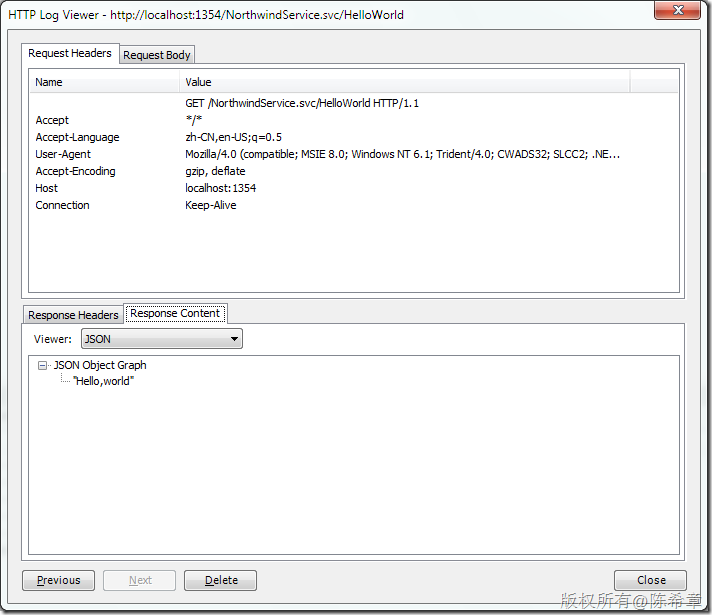
7. 在客户端脚本js中实现对WCF的调用
<%@ Page Language="C#" AutoEventWireup="true" CodeBehind="Default.aspx.cs" Inherits="WebApplication1._Default" %>

<!DOCTYPE html PUBLIC "-//W3C//DTD XHTML 1.0 Transitional//EN" "http://www.w3.org/TR/xhtml1/DTD/xhtml1-transitional.dtd">

<html xmlns="http://www.w3.org/1999/xhtml">

<head runat="server">

    <title></title>

    <script src="jquery-1.3.2-vsdoc.js" type="text/javascript"></script>

    <script type="text/javascript" language="javascript">

        $(function() {

            $("#helloWorld").click(function() {

                var url = "NorthwindService.svc/HelloWorld";

                $.ajax({

                    url: url,

                    dataType: "json",

                    success: function(result) {

                        alert(result);

                    }

                });

            });

        });

    </script>

</head>

<body>

    <form id="form1" runat="server">

    <input type="button" value="HelloWorld" id="helloWorld" />

    </form>

</body>

</html>
这样是不是就很容易了呢?
8. 实现复杂数据的处理
注意下面代码中的黑斜体部分
服务合约
using System;

using System.Collections.Generic;

using System.Linq;

using System.Runtime.Serialization;

using System.ServiceModel;

using System.Text;

using System.ServiceModel.Web;

namespace WebApplication1

{

    // 注意: 如果更改此处的接口名称 "INorthwindService",也必须更新 Web.config 中对 "INorthwindService" 的引用。

    [ServiceContract]

    public interface INorthwindService

    {

        [OperationContract]

        [WebGet(UriTemplate="HelloWorld",ResponseFormat=WebMessageFormat.Json)]

        string HelloWorld();

        [OperationContract]

        [WebGet(UriTemplate = "GetEmployee?id={id}", ResponseFormat = WebMessageFormat.Json)]

        Employee GetEmployeeInfo(int id);

    }

    public class Employee {

        public int ID { get; set; }

        public string Name { get; set; }

    }

}
服务实现
using System;

using System.Collections.Generic;

using System.Linq;

using System.Runtime.Serialization;

using System.ServiceModel;

using System.Text;

namespace WebApplication1

{

    // 注意: 如果更改此处的类名 "NorthwindService",也必须更新 Web.config 中对 "NorthwindService" 的引用。

    public class NorthwindService : INorthwindService

    {

        #region INorthwindService 成员

        public string HelloWorld()

        {

            return "Hello,world";

        }

        #endregion

        #region INorthwindService 成员

        public Employee GetEmployeeInfo(int id)

        {

            return new Employee

            {

                ID = id,

                Name = "chenxizhang"

            };

        }

        #endregion

    }

}

页面代码
<%@ Page Language="C#" AutoEventWireup="true" CodeBehind="Default.aspx.cs" Inherits="WebApplication1._Default" %>

<!DOCTYPE html PUBLIC "-//W3C//DTD XHTML 1.0 Transitional//EN" "http://www.w3.org/TR/xhtml1/DTD/xhtml1-transitional.dtd">

<html xmlns="http://www.w3.org/1999/xhtml">

<head runat="server">

    <title></title>

    <script src="jquery-1.3.2-vsdoc.js" type="text/javascript"></script>

    <script type="text/javascript" language="javascript">

        $(function() {

            $("#helloWorld").click(function() {

                var url = "NorthwindService.svc/HelloWorld";

                $.ajax({

                    url: url,

                    dataType: "json",

                    success: function(result) {

                        alert(result);

                    }

                });

            });

            $("#getEmployee").click(function() {

                var url = "NorthwindService.svc/GetEmployee?id=1";

                $.ajax({

                    url: url,

                    dataType: "json",

                    success: function(result) {

                        alert(result.Name);

                    }

                });

            });

        });

    </script>

</head>

<body>

    <form id="form1" runat="server">

    <input type="button" value="HelloWorld" id="helloWorld" />

    <input type="button" value="Get Employee" id="getEmployee" />

    </form>

</body>

</html>
没错,就是这么清晰易懂的代码。
那么,如何实现POST,或者PUT以及DELETE这种请求呢?
9. 实现POST或者PUT,DELETE请求
服务合约
using System;

using System.Collections.Generic;

using System.Linq;

using System.Runtime.Serialization;

using System.ServiceModel;

using System.Text;

using System.ServiceModel.Web;

namespace WebApplication1

{

    // 注意: 如果更改此处的接口名称 "INorthwindService",也必须更新 Web.config 中对 "INorthwindService" 的引用。

    [ServiceContract]

    public interface INorthwindService

    {

        [OperationContract]

        [WebGet(UriTemplate="HelloWorld",ResponseFormat=WebMessageFormat.Json)]

        string HelloWorld();

        [OperationContract]

        [WebGet(UriTemplate = "GetEmployee?id={id}", ResponseFormat = WebMessageFormat.Json)]

        Employee GetEmployeeInfo(int id);

        [OperationContract]

        [WebInvoke(UriTemplate = "SubmitEmployee?id={id}&Name={name}", ResponseFormat = WebMessageFormat.Json)]

        ActionResult SubmitEmployee(int id, string name);

    }

    public class Employee {

        public int ID { get; set; }

        public string Name { get; set; }

    }

    public class ActionResult{

        public int Code { get; set; }

        public string Message { get; set; }

    }

}
实现服务
using System;

using System.Collections.Generic;

using System.Linq;

using System.Runtime.Serialization;

using System.ServiceModel;

using System.Text;

namespace WebApplication1

{

    // 注意: 如果更改此处的类名 "NorthwindService",也必须更新 Web.config 中对 "NorthwindService" 的引用。

    public class NorthwindService : INorthwindService

    {

        #region INorthwindService 成员

        public string HelloWorld()

        {

            return "Hello,world";

        }

        #endregion

        #region INorthwindService 成员

        public Employee GetEmployeeInfo(int id)

        {

            return new Employee

            {

                ID = id,

                Name = "chenxizhang"

            };

        }

        #endregion

        #region INorthwindService 成员

        public ActionResult SubmitEmployee(int id, string name)

        {

            //这里可以将该员工提交到数据库,并且根据结果返回相应的ActionResult

            //作为演示,直接返回

            return new ActionResult

            {

                Code = 200,

                Message = string.Format("你提交了一个员工,编号为:{0},姓名为:{1}", id, name)

            };

        }

        #endregion

    }

}
页面代码
<%@ Page Language="C#" AutoEventWireup="true" CodeBehind="Default.aspx.cs" Inherits="WebApplication1._Default" %>

<!DOCTYPE html PUBLIC "-//W3C//DTD XHTML 1.0 Transitional//EN" "http://www.w3.org/TR/xhtml1/DTD/xhtml1-transitional.dtd">

<html xmlns="http://www.w3.org/1999/xhtml">

<head runat="server">

    <title></title>

    <script src="jquery-1.3.2-vsdoc.js" type="text/javascript"></script>

    <script type="text/javascript" language="javascript">

        $(function() {

            $("#helloWorld").click(function() {

                var url = "NorthwindService.svc/HelloWorld";

                $.ajax({

                    url: url,

                    dataType: "json",

                    success: function(result) {

                        alert(result);

                    }

                });

            });

            $("#getEmployee").click(function() {

                var url = "NorthwindService.svc/GetEmployee?id=1";

                $.ajax({

                    url: url,

                    dataType: "json",

                    success: function(result) {

                        alert(result.Name);

                    }

                });

            });

            $("#submitEmployee").click(function() {

                var url = "NorthwindService.svc/SubmitEmployee?id=1&Name=chenxizhang";

                $.ajax({

                    type: "POST",

                    url: url,

                    dataType: "json",

                    success: function(result) {

                        alert(result.Code + "," + result.Message);

                    }

                });

            });

        });

    </script>

</head>

<body>

    <form id="form1" runat="server">

    <input type="button" value="HelloWorld" id="helloWorld" />

    <input type="button" value="Get Employee" id="getEmployee" />

    <input type="button" value="Submit Employee" id="submitEmployee" />

    </form>

</body>

</html>
如何让WCF服务更好地支持Web Request和AJAX调用的更多相关文章
- 实现在GET请求下调用WCF服务时传递对象(复合类型)参数
WCF实现RESETFUL架构很容易,说白了,就是使WCF能够响应HTTP请求并返回所需的资源,如果有人不知道如何实现WCF支持HTTP请求的,可参见我之前的文章<实现jquery.ajax及原 ...
- Ajax请求WCF服务以及跨域的问题解决
Ajax请求WCF服务以及跨域的问题解决 这两天准备重构一下项目,准备用纯html+js做前台,然后通过ajax+WCF的方式来传递数据,所以就先研究了一下ajax访问的wcf的问题,还想到还折腾了一 ...
- 完全使用接口方式调用WCF 服务
客户端调用WCF服务可以通过添加服务引用的方式添加,这种方式使用起来比较简单,适合小项目使用.服务端与服务端的耦合较深,而且添加服务引用的方式生成一大堆臃肿的文件.本例探讨一种使用接口的方式使用WCF ...
- 实现jquery.ajax及原生的XMLHttpRequest跨域调用WCF服务的方法
关于ajax跨域调用WCF服务的方法很多,经过我反复的代码测试,认为如下方法是最为简便的,当然也不能说别人的方法是错误的,下面就来上代码,WCF服务定义还是延用上次的,如: namespace Wcf ...
- 创建WCF服务寄宿到IIS
一.WCF简介: Windows Communication Foundation(WCF)是由微软开发的一系列支持数据通信的应用程序框架,可以翻译为Windows 通讯开发平台. 整合了原有的win ...
- WCF入门(八)---WCF服务绑定
WCF服务绑定是一个集合,每个元素定义了服务与客户端进行通信方式的几个元素.传输元素和一个消息编码元素各自结合两个最重要的组成部分.这里是WCF服务绑定常用的列表. 基础绑定 基础约束是由basicH ...
- WCF服务使用(IIS+Http)和(Winform宿主+Tcp)两种方式进行发布
1.写在前面 刚接触WCF不久,有很多地方知其然不知其所以然.当我在[创建服务->发布服务->使用服务]这一过程出现过许多问题.如客户端找不到服务引用:客户端只在本机环境中才能访问服务,移 ...
- WCF服务创建到发布(SqlServer版)
在本示例开始之前,让我们先来了解一下什么是wcf? wcf有哪些特点? wcf是一个面向服务编程的综合分层架构.该架构的项层为服务模型层. 使用户用最少的时间和精力建立自己的软件产品和外界通信的模型. ...
- WCF服务调用超时错误:套接字连接已中止。这可能是由于处理消息时出错或远程主机超过接收超时或者潜在的网络资源问题导致的。本地套接字超时是“00:05:30”(已解决)
问题: 线上正式环境调用WCF服务正常,但是每次使用本地测试环境调用WCF服务时长就是出现:套接字连接已中止.这可能是由于处理消息时出错或远程主机超过接收超时或者潜在的网络资源问题导致的.本地套接字超 ...
随机推荐
- putIfAbsent
public static HashSet<Long> getOrInitHashMapCacheValue(Long mId){ // HashSet<Long> set = ...
- c语言双向循环链表
双向循环链表,先来说说双向链表,双向链表也叫双链表,是链表的一种,它的每个数据结点中都有两个指针,分别指向直接后继和直接前驱.所以,从双向链表中的任意一个结点开始,都可以很方便地访问它的前驱结点和后继 ...
- sicily 1198. Substring (递归全排列+排序)
DescriptionDr lee cuts a string S into N pieces,s[1],…,s[N]. Now, Dr lee gives you these N sub-strin ...
- Java第三阶段学习(三、字符流、转换流)
一.字节流读取中文时出现的问题: 文件中有中文时,用字节流读取会出现乱码的问题,因为一个中文为两个字节. 二.字符编码表 编码表:其实就是生活中字符和计算机二进制的对应关系表. 1.ascii: 一个 ...
- 8-8 Ddfense Line uva1471 优先级队列
题意:给你一串长度为n的序列 你的任务是删除一个连续的子序列 使得剩下的序列中有一个长度最大的连续递增子序列 例如 将 5 3 4 9 2 8 6 7 1 中的9 2 8 删除 得到5 3 ...
- 004 爬虫(最初的爬虫方式,以及urllib2)
一:最初的爬取方式 1.代码示例 # coding=utf-8 import urllib2 request=urllib2.Request("http://www.baidu.com&qu ...
- 41-2:和为S的连续正数序列
import java.util.ArrayList; /** * 面试题41-题目2:和为S的连续正数序列 * 小明很喜欢数学,有一天他在做数学作业时,要求计算出9~16的和,他马上就写出了正确答案 ...
- RMQ_第一弹_Sparse Table
title: RMQ_第一弹_Sparse Table date: 2018-09-21 21:33:45 tags: acm RMQ ST dp 数据结构 算法 categories: ACM 概述 ...
- mysql正则表达式,实现多个字段匹配多个like模糊查询
现在有这么一个需求 一个questions表,字段有题目(TestSubject),选项(AnswerA,AnswerB,AnswerC,AnswerD,AnswerE) 要求字段不包含png,jpg ...
- C# 操作 access 数据库
随笔: (1) 命名空间 using System.Data.OleDb; (2) 连接字符串 private staticstring connStr = @"Provider= ...