
编码实战Web端联系人的增删改查
首先画出分析图
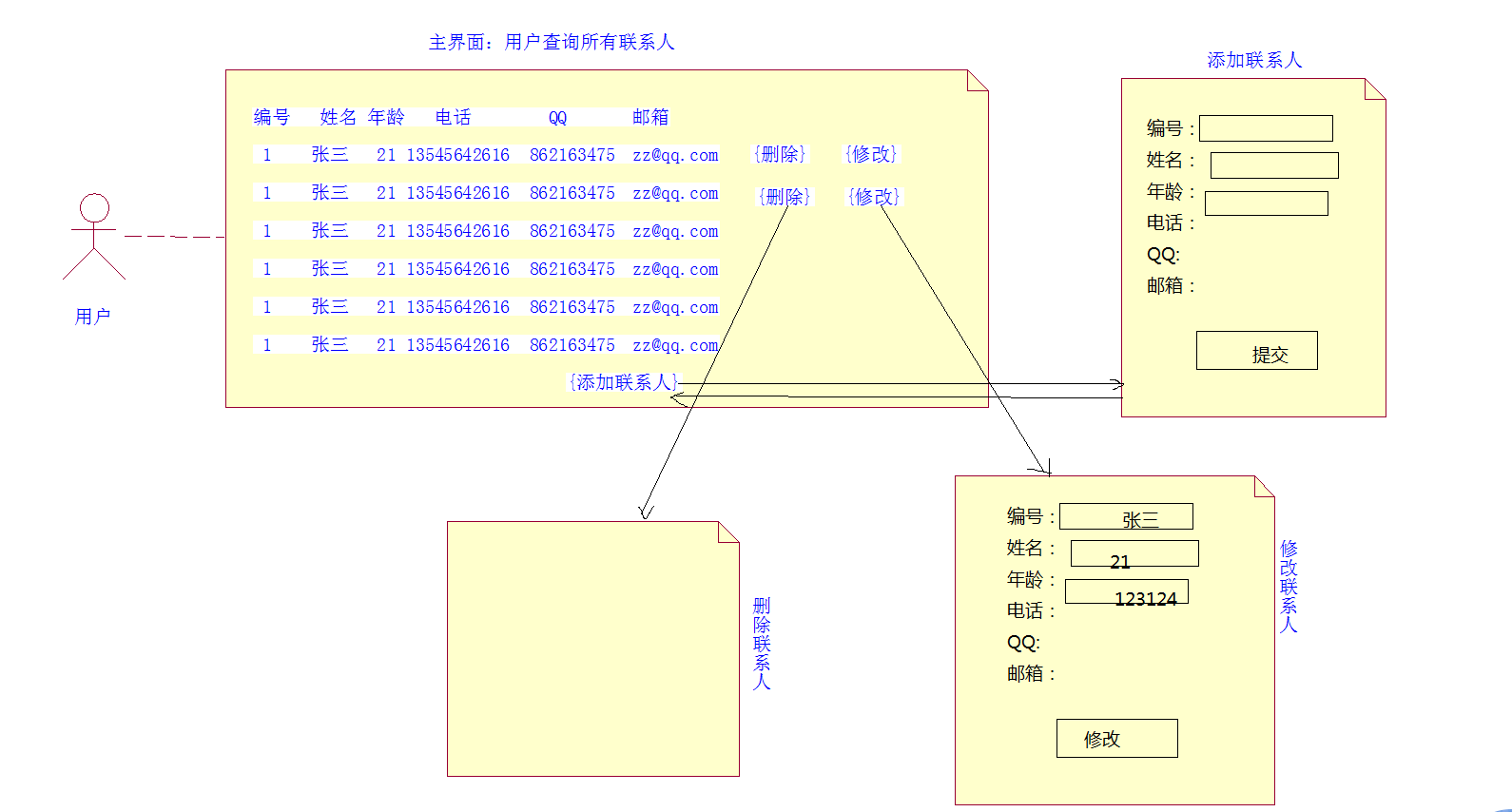 实现效果如图

项目下的包如图:
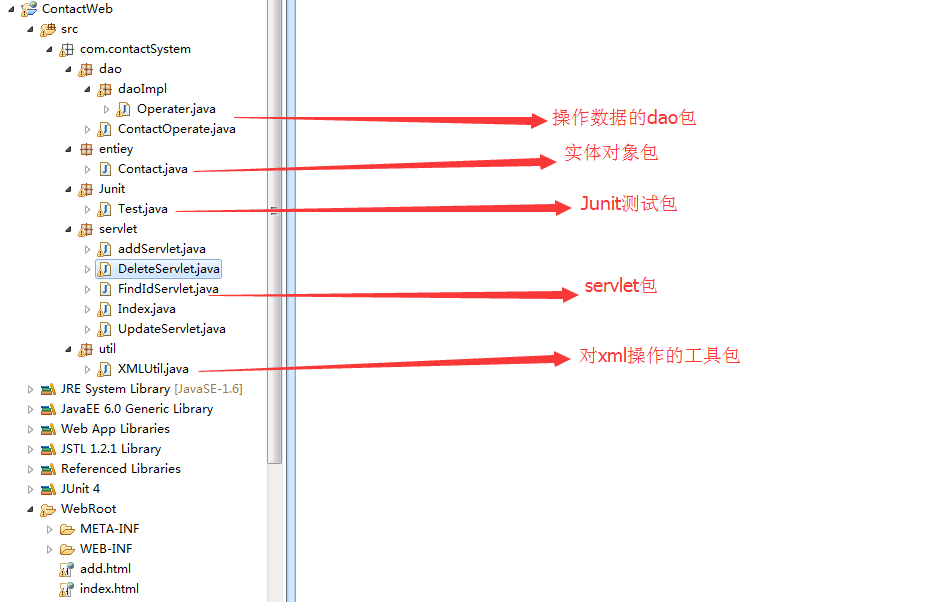
实体包
package com.contactSystem.entiey;

public class Contact {

	private String Id;

	private String name;

	private String sex;

	private String age;

	private String phone;

	private String qq;

	private String email;

	public String getId() {

		return Id;

	}

	public void setId(String id) {

		Id = id;

	}

	public String getName() {

		return name;

	}

	public void setName(String name) {

		this.name = name;

	}

	public String getSex() {

		return sex;

	}

	public void setSex(String sex) {

		this.sex = sex;

	}

	public String getAge() {

		return age;

	}

	public void setAge(String age) {

		this.age = age;

	}

	public String getPhone() {

		return phone;

	}

	public void setPhone(String phone) {

		this.phone = phone;

	}

	public String getQq() {

		return qq;

	}

	public void setQq(String qq) {

		this.qq = qq;

	}

	public String getEmail() {

		return email;

	}

	public void setEmail(String email) {

		this.email = email;

	}

	@Override

	public String toString() {

		return "Contact [Id=" + Id + ", name=" + name + ", sex=" + sex

				+ ", age=" + age + ", phone=" + phone + ", qq=" + qq

				+ ", email=" + email + "]";

	}

}
XML的工具包(只是避免了代码的重复使用,将其放进工具包中)
package com.contactSystem.util;

import java.io.FileNotFoundException;

import java.io.FileOutputStream;

import java.io.OutputStream;

import javax.management.RuntimeErrorException;

import org.dom4j.Document;

import org.dom4j.DocumentException;

import org.dom4j.io.OutputFormat;

import org.dom4j.io.SAXReader;

import org.dom4j.io.XMLWriter;

/*

 * xml操作的工具类

 */

public class XMLUtil {

	//写出一个xml文件

	public static void write2xml(Document doc) throws Exception{

		OutputStream out=new FileOutputStream("e:/contact.xml");

		OutputFormat format=OutputFormat.createPrettyPrint();

		format.setEncoding("utf-8");

		XMLWriter writer=new XMLWriter(out,format);

		writer.write(doc);

		writer.close();

	}

	//读取本地xml文件的方法

	public static Document getDocument(){

		Document doc;

		try {

			doc = new SAXReader().read("e:/contact.xml");

			return doc;

		} catch (DocumentException e) {

			// TODO Auto-generated catch block

			e.printStackTrace();

			throw new RuntimeException(e);

		}

	}

}
抽象的接口
package com.contactSystem.dao;

import java.io.FileNotFoundException;

import java.io.UnsupportedEncodingException;

import java.util.List;

import org.dom4j.DocumentException;

import com.contactSystem.entiey.Contact;

public interface ContactOperate {

	public void addContact(Contact contact) throws Exception;

	public void updateContact(Contact contact) throws Exception;

	public void removeContact(String id) throws Exception;

	public Contact findContact(String id) throws Exception;

	public List<Contact>  allContacts();

}
具体的实现方法和操作
package com.contactSystem.dao.daoImpl;

import java.io.File;

import java.util.ArrayList;

import java.util.List;

import java.util.UUID;

import javax.persistence.Id;

import org.dom4j.Document;

import org.dom4j.DocumentHelper;

import org.dom4j.Element;

import org.dom4j.io.SAXReader;

import com.contactSystem.dao.ContactOperate;

import com.contactSystem.entiey.Contact;

import com.contactSystem.util.XMLUtil;

public class Operater implements ContactOperate {

	@Override

	//添加联系人

	public void addContact(Contact contact) throws Exception {

		// TODO Auto-generated method stub

		File file=new File("e:/contact.xml");

		Document doc=null;

		Element rootElem=null;

		if (file.exists()) {

			doc=new SAXReader().read(file);

			rootElem=doc.getRootElement();

		}else {

			doc=DocumentHelper.createDocument();

			rootElem=doc.addElement("ContactList");

		}

		//开始添加个体

		Element element=rootElem.addElement("contact");

		//有系统自动生成一随机且唯一的ID,赋给联系人Id,系统提供了一个包UUID包

		String uuid=UUID.randomUUID().toString().replace("-", "");

		element.addAttribute("Id", uuid);

		element.addElement("姓名").setText(contact.getName());

		element.addElement("name").setText(contact.getName());

		element.addElement("sex").setText(contact.getSex());

		element.addElement("age").setText(contact.getAge());

		element.addElement("phone").setText(contact.getPhone());

		element.addElement("email").setText(contact.getEmail());

		element.addElement("qq").setText(contact.getQq());

		//写入到本地的xml文档中

		XMLUtil.write2xml(doc);

	}

	@Override

	public void updateContact(Contact contact) throws Exception {

		// TODO Auto-generated method stub

		//通过xpath查找对应id的联系人

		Document document=XMLUtil.getDocument();

		Element element=(Element) document.selectSingleNode("//contact[@Id='"+contact.getId()+"']");

		//根据标签改文本

		System.out.println(element);

		element.element("name").setText(contact.getName());

		element.element("age").setText(contact.getAge());

		element.element("email").setText(contact.getEmail());

		element.element("phone").setText(contact.getPhone());

		element.element("sex").setText(contact.getSex());

		element.element("qq").setText(contact.getQq());

		XMLUtil.write2xml(document);

	}

	@Override

	public void removeContact(String id) throws Exception {

		// TODO Auto-generated method stub

		//通过xpath去查找对应的contact

		Document document=XMLUtil.getDocument();

		Element element=(Element) document.selectSingleNode("//contact[@Id='"+id+"']");

		/**

		 * 如果是火狐浏览器,其本身有一个bug,对于一个get请求,它会重复做两次,

		 * 第一次会把一个唯一的id给删除掉,但是在第二次的时候,它会继续去删,而这个时候查找不到,会报错,会发生错误,

		 * 为了解决这个bug,我们在这里验证其是否为空

		 */

		if (element!=null) {

			element.detach();

			XMLUtil.write2xml(document);

		}

	}

	@Override

	public Contact findContact(String id) throws Exception {

		// TODO Auto-generated method stub

		Document document=XMLUtil.getDocument();

		Element e=(Element) document.selectSingleNode("//contact[@Id='"+id+"']");

		Contact contact=null;

		if (e!=null) {

			contact=new Contact();

			contact.setAge(e.elementText("age"));

			contact.setEmail(e.elementText("email"));

			contact.setId(e.attributeValue("id"));

			contact.setName(e.elementText("name"));

			contact.setPhone(e.elementText("phone"));

			contact.setSex(e.elementText("sex"));

			contact.setQq(e.elementText("qq"));

		}

		return contact;

	}

	@Override

	public List<Contact> allContacts() {

		// TODO Auto-generated method stub

		Document document=XMLUtil.getDocument();

		List<Contact> list=new ArrayList<Contact>();

		List<Element> conElements=(List<Element>)document.selectNodes("//contact");

		for (Element element : conElements) {

			Contact contact=new Contact();

			contact.setId(element.attributeValue("Id"));

			contact.setAge(element.elementText("age"));

			contact.setEmail(element.elementText("email"));

			contact.setName(element.elementText("name"));

			contact.setPhone(element.elementText("phone"));

			contact.setQq(element.elementText("qq"));

			contact.setSex(element.elementText("sex"));

			list.add(contact);

		}

		return list;

	}

}
添加联系人的html页面
<!DOCTYPE html>

<html>

<head>

    <meta charset="utf-8">

    <title>添加联系人</title>

    <style media="screen">

      #btn{

        width:40px;

        width: 50px;

        background: green;

        color: white;

        font-size:14px;

      }

    </style>

</head>

<body>

    <center>

        <h2>添加联系人</h2>

    </center>

    <form action="/ContactWeb/addServlet" method="post">

        <table border="1" align="center">

            <tbody>

                <tr>

                    <th>姓名</th>

                    <td><input type="text" name="userName" /></td>

                </tr>

                <tr>

                    <th>年龄</th>

                    <td><input type="text" name="age" /></td>

                </tr>

                <tr>

                  <th>性别</th>

                  <td>

                    <input type="radio" name="sex"  value="男"/>男

                    <input type="radio" name="sex" value="女" />女

                  </td>

                </tr>

                <tr>

                    <th>电话</th>

                    <td><input type="text" name="phone" /></td>

                </tr>

                <tr>

                    <th>QQ</th>

                    <td><input type="text" name="qq" /></td>

                </tr>

                <tr>

                    <th>邮箱</th>

                    <td><input type="text" name="email" /></td>

                </tr>

                <tr>

                  <td colspan="3" align="center">

                    <input type="submit"  value="提交" id="btn"/>

                  </td>

                </tr>

            </tbody>

        </table>

    </form>

</body>

</html>
接下来则是最重要的servlet(显示首页,所有联系人)
package com.contactSystem.servlet;

import java.io.IOException;

import java.io.PrintWriter;

import java.util.ArrayList;

import java.util.List;

import javax.servlet.ServletException;

import javax.servlet.http.HttpServlet;

import javax.servlet.http.HttpServletRequest;

import javax.servlet.http.HttpServletResponse;

import com.contactSystem.dao.daoImpl.Operater;

import com.contactSystem.entiey.Contact;

public class Index extends HttpServlet {

	/**

	 * 显示所有联系人的逻辑方式

	 */

	private static final long serialVersionUID = 1L;

	public void doGet(HttpServletRequest request, HttpServletResponse response)

			throws ServletException, IOException {

		response.setContentType("text/html;charset=utf-8");

		Operater operater=new Operater();

		List<Contact> contacts=operater.allContacts();

		PrintWriter writer=response.getWriter();

		/**

		 * shift+alt+A ——>区域选择

		 * 正则表达式:“."表示任意字符,"*"表示多个字符

		 *             “/1”表示一行代表匹配一行内容

		 */

		String html="";

		html+= "<!DOCTYPE html>";

		html+= "<html>";

		html+= "";

		html+= "<head>";

		html+= "    <meta charset='utf-8'>";

		html+= "    <title>查询所有联系人</title>";

		html+= "    <style media='screen'>";

		html+= "        table td {";

		html+= "            text-align: center;";

		html+= "        }";

		html+= "";

		html+= "        table {";

		html+= "            border-collapse: collapse;";

		html+= "        }";

		html+= "    </style>";

		html+= "</head>";

		html+= "";

		html+= "<body>";

		html+= "    <center>";

		html+= "        <h2>查询所有联系人</h2>";

		html+= "    </center>";

		html+= "    <table border='1' align='center'>";

		html+= "        <tbody>";

		html+= "            <thead>";

		html+= "                <th>编号</th>";

		html+= "                <th>姓名</th>";

		html+= "                <th>性别</th>";

		html+= "                <th>年龄</th>";

		html+= "                <th>电话</th>";

		html+= "                <th>QQ</th>";

		html+= "                <th>邮箱</th>";

		html+= "                <th>操作</th>";

		html+= "            </thead>";

		html+= "            ";

		html+= "            <tr>";

		if (contacts!=null) {

			for (Contact contact : contacts) {

				html+= "                <td>"+contact.getId()+"</td>";

				html+= "                <td>"+contact.getName()+"</td>";

				html+= "                <td>"+contact.getSex()+"</td>";

				html+= "                <td>"+contact.getAge()+"</td>";

				html+= "                <td>"+contact.getPhone()+"</td>";

				html+= "                <td>"+contact.getQq()+"</td>";

				html+= "                <td>"+contact.getEmail()+"</td>";

				html+= "                <td><a href='"+request.getContextPath()+"/FindIdServlet?id="+contact.getId()+"'>修改</a>  <a href='"+request.getContextPath()+"/DeleteServlet?id="+contact.getId()+"'>删除</a></td>";

				html+= "            </tr>";

			}

		}

		html+= "            <tr>";

		html+= "                <td colspan='8'>";

		html+= "                    <a href='"+request.getContextPath()+"/add.html'''>添加联系人</a>";

		html+= "                </td>";

		html+= "            </tr>";

		html+= "        </tbody>";

		html+= "    </table>";

		html+= "</body>";

		html+= "";

		html+= "</html>";

		writer.write(html);

	}

	public void doPost(HttpServletRequest request, HttpServletResponse response)

			throws ServletException, IOException {

		this.doGet(request, response);

	}

}
添加联系人的servlet
package com.contactSystem.servlet;

import java.io.IOException;

import java.io.PrintWriter;

import javax.servlet.ServletException;

import javax.servlet.http.HttpServlet;

import javax.servlet.http.HttpServletRequest;

import javax.servlet.http.HttpServletResponse;

import com.contactSystem.dao.daoImpl.Operater;

import com.contactSystem.entiey.Contact;

public class addServlet extends HttpServlet {

	/**

	 * 处理添加联系人的逻辑

	 */

	private static final long serialVersionUID = 1L;

	public void doGet(HttpServletRequest request, HttpServletResponse response)

			throws ServletException, IOException {

		request.setCharacterEncoding("utf-8");

		String userName=request.getParameter("userName");

		String age=request.getParameter("age");

		String sex=request.getParameter("sex");

		String phone=request.getParameter("phone");

		String qq=request.getParameter("qq");

		String email=request.getParameter("email");

		Operater operater=new Operater();

		Contact contact=new Contact();

		contact.setName(userName);

		contact.setAge(age);

		contact.setSex(sex);

		contact.setPhone(phone);

		contact.setQq(qq);

		contact.setEmail(email);

		try {

			operater.addContact(contact);

		} catch (Exception e) {

			// TODO Auto-generated catch block

			e.printStackTrace();

		}

		response.sendRedirect(request.getContextPath()+"/Index");

	}

	public void doPost(HttpServletRequest request, HttpServletResponse response)

			throws ServletException, IOException {

		this.doGet(request, response);

	}

}
修改联系人,根据查找到的联系人,显示在其上面如图(根据显示的首页显示得内容为本页面的默认值)
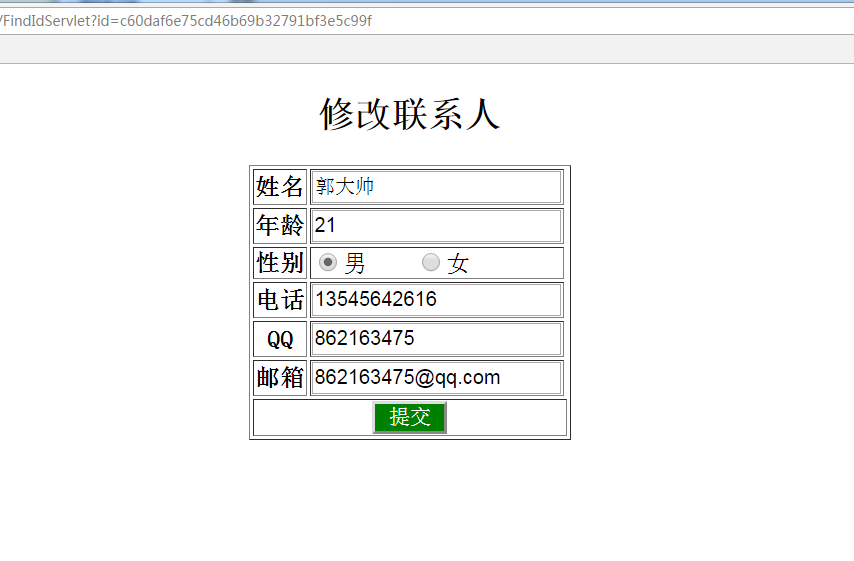
首先是要去查找这个联系人的信息,即FindIdServlet
package com.contactSystem.servlet;

import java.io.IOException;

import java.io.PrintWriter;

import javax.servlet.ServletException;

import javax.servlet.http.HttpServlet;

import javax.servlet.http.HttpServletRequest;

import javax.servlet.http.HttpServletResponse;

import com.contactSystem.dao.daoImpl.Operater;

import com.contactSystem.entiey.Contact;

public class FindIdServlet extends HttpServlet {

	/**

	 * 修改联系人逻辑

	 */

	private static final long serialVersionUID = 1L;

	public void doGet(HttpServletRequest request, HttpServletResponse response)

			throws ServletException, IOException {

		response.setContentType("text/html;charset=utf-8");

		PrintWriter writer=response.getWriter();

		Operater operater=new Operater();

		String id=request.getParameter("id");

		Contact contact=null;

		try {

			contact=operater.findContact(id);

		} catch (Exception e) {

			// TODO Auto-generated catch block

			e.printStackTrace();

		}

		String html="";

		html += "<!DOCTYPE html>";

		html += "<html>";

		html += "<head>";

		html += "    <meta charset='utf-8'>";

		html += "    <title>添加联系人</title>";

		html += "    <style media='screen'>";

		html += "      #btn{";

		html += "        width:40px;";

		html += "        width: 50px;";

		html += "        background: green;";

		html += "        color: white;";

		html += "        font-size:14px;";

		html += "      }";

		html += "    </style>";

		html += "</head>";

		html += "";

		html += "<body>";

		html += "    <center>";

		html += "        <h2>修改联系人</h2>";

		html += "    </center>";

		html += "    <form action='"+request.getContextPath()+"/UpdateServlet' method='post'>";

		html +="<input type='hidden' name='id' value='"+id+"' />";

		html += "        <table border='1' align='center'>";

		html += "            <tbody>";

		html += "                <tr>";

		html += "                    <th>姓名</th>";

		html += "                    <td><input type='text' name='userName' value='"+contact.getName()+"'/></td>";

		html += "                </tr>";

		html += "                <tr>";

		html += "                    <th>年龄</th>";

		html += "                    <td><input type='text' name='age' value='"+contact.getAge()+"' /></td>";

		html += "                </tr>";

		html += "                <tr>";

		html += "                  <th>性别</th>";

		html += "                  <td>";

		if (contact.getSex().equals("男")) {

			html += "                    <input type='radio' name='sex'  value='男'    checked='checked'/>男  ";

			html += "                    <input type='radio' name='sex' value='女' />女";

		}else {

			html += "                    <input type='radio' name='sex'  value='男'    />男  ";

			html += "                    <input type='radio' name='sex' value='女' checked='checked' />女";

		}

		html += "                  </td>";

		html += "                </tr>";

		html += "                <tr>";

		html += "                    <th>电话</th>";

		html += "                    <td><input type='text' name='phone' value='"+contact.getPhone()+"' /></td>";

		html += "                </tr>";

		html += "                <tr>";

		html += "                    <th>QQ</th>";

		html += "                    <td><input type='text' name='qq' value='"+contact.getQq()+"'  /></td>";

		html += "                </tr>";

		html += "                <tr>";

		html += "                    <th>邮箱</th>";

		html += "                    <td><input type='text' name='email' value='"+contact.getEmail()+"' /></td>";

		html += "                </tr>";

		html += "                <tr>";

		html += "                  <td colspan='3' align='center'>";

		html += "                    <input type='submit'  value='提交' id='btn'/>";

		html += "                  </td>";

		html += "                </tr>";

		html += "            </tbody>";

		html += "        </table>";

		html += "    </form>";

		html += "</body>";

		html += "";

		html += "</html>";

		writer.write(html);

	}

	public void doPost(HttpServletRequest request, HttpServletResponse response)

			throws ServletException, IOException {

		this.doGet(request, response);

	}

}
然后则是根据提交的内容去修改本地的联系人
package com.contactSystem.servlet;

import java.io.IOException;

import java.io.PrintWriter;

import javax.servlet.ServletException;

import javax.servlet.http.HttpServlet;

import javax.servlet.http.HttpServletRequest;

import javax.servlet.http.HttpServletResponse;

import com.contactSystem.dao.daoImpl.Operater;

import com.contactSystem.entiey.Contact;

public class UpdateServlet extends HttpServlet {

	/**

	 * 将修改后的数据提交

	 */

	private static final long serialVersionUID = 1L;

	public void doGet(HttpServletRequest request, HttpServletResponse response)

			throws ServletException, IOException {

		response.setContentType("text/html");

		request.setCharacterEncoding("utf-8");

		String userName=request.getParameter("userName");

		System.out.println(userName);

		String age=request.getParameter("age");

		String sex=request.getParameter("sex");

		String phone=request.getParameter("phone");

		String qq=request.getParameter("qq");

		String email=request.getParameter("email");

		String id=request.getParameter("id");

		Operater operater=new Operater();

		Contact contact=new Contact();

		contact.setId(id);

		contact.setName(userName);

		contact.setAge(age);

		contact.setSex(sex);

		contact.setPhone(phone);

		contact.setQq(qq);

		contact.setEmail(email);

		try {

			operater.updateContact(contact);

		} catch (Exception e) {

			// TODO Auto-generated catch block

			e.printStackTrace();

		}

		response.sendRedirect(request.getContextPath()+"/Index");

	}

	public void doPost(HttpServletRequest request, HttpServletResponse response)

			throws ServletException, IOException {

		this.doGet(request, response);

	}

}
最后则是删除联系人,不过要注意的是:火狐浏览器如果判断是get请求的话,会向服务器发送两次请求,可能会导致一些问题,其他的浏览器不会出出现该问题
package com.contactSystem.servlet;

import java.io.IOException;

import java.io.PrintWriter;

import javax.servlet.ServletException;

import javax.servlet.http.HttpServlet;

import javax.servlet.http.HttpServletRequest;

import javax.servlet.http.HttpServletResponse;

import com.contactSystem.dao.daoImpl.Operater;

public class DeleteServlet extends HttpServlet {

	public void doGet(HttpServletRequest request, HttpServletResponse response)

			throws ServletException, IOException {

		response.setContentType("text/html;charset=utf-8");

		String id=request.getParameter("id");

		Operater operater=new Operater();

		try {

			operater.removeContact(id);

		} catch (Exception e) {

			// TODO Auto-generated catch block

			e.printStackTrace();

		}

		response.sendRedirect(request.getContextPath()+"/Index");

	}

	public void doPost(HttpServletRequest request, HttpServletResponse response)

			throws ServletException, IOException {

		this.doGet(request, response);

	}

}
最后:不用jsp去写,就用servlet去写html真的好累,还是好好学jsp吧。
编码实战Web端联系人的增删改查的更多相关文章
- springboot+layui实现PC端用户的增删改查 & 整合mui实现app端的自动登录和用户的上拉加载 & HBuilder打包app并在手机端下载安装
springboot整合web开发的各个组件在前面已经有详细的介绍,下面是用springboot整合layui实现了基本的增删改查. 同时在学习mui开发app,也就用mui实现了一个简单的自动登录和 ...
- 前端使用AngularJS的$resource,后端ASP.NET Web API,实现增删改查
AngularJS中的$resource服务相比$http服务更适合与RESTful服务进行交互.本篇后端使用ASP.NET Web API, 前端使用$resource,实现增删改查. 本系列包括: ...
- 通过flask实现web页面简单的增删改查bootstrap美化版
通过flask实现web页面简单的增删改查bootstrap美化版 项目目录结构 [root@node1 python]# tree -L 2 . ├── animate.css ├── fileut ...
- 通过flask实现web页面简单的增删改查
通过flask实现web页面简单的增删改查 # 1.后台程序falsk_web01.py #coding:utf-8 from flask import Flask,render_template,r ...
- 使用HttpClient对ASP.NET Web API服务实现增删改查
本篇体验使用HttpClient对ASP.NET Web API服务实现增删改查. 创建ASP.NET Web API项目 新建项目,选择"ASP.NET MVC 4 Web应用程序&quo ...
- 基于gin的golang web开发:mysql增删改查
Go语言访问mysql数据库需要用到标准库database/sql和mysql的驱动.标准库的Api使用比较繁琐这里再引入另一个库github.com/jmoiron/sqlx. go get git ...
- Java Web(十) JDBC的增删改查,C3P0等连接池,dbutils框架的使用
前面做了一个非常垃圾的小demo,真的无法直面它,菜的抠脚啊,真的菜,好好努力把.菜鸡. --WH 一.JDBC是什么? Java Data Base Connectivity,java数据库连接,在 ...
- Node+Express+node-mysql 实战于演习 全套mysql(增删改查)
最近这段时间研究Node感觉不错,自己做了一个增删改查,虽然有些简陋,但是思想是想通的,其实所有项目都是增删改查,有助于初学者快速掌握Node 首先 本实例展示的是基于Node+Express+nod ...
- Web界面实现数据库增删改查过程
实现方法:JSP+Servlet+JavaBean 基本实现思想:jsp文件为显示界面,包括增删改查四个界面,然后使用form或者href超链接的方法将网页获得的值传到Servlet中的方法里:而se ...
随机推荐
- luarocks在macOS系统上的安装
luarocks是基于lua开发的一个包管理工具,所以在安装luarocks之前需要先安装lua(见博客同目录下“lua在MacOS系统上的安装”).具体的安装步骤如下: 1.源码安装部署luaroc ...
- shell编程的一些例子3
数值处理 1.let 命令 bash 的内部命令let可以用来计算算术表达式的值.如果表达式中有空格或者特殊字符,则应将表达式括在双引号中. let的语法命令:let express-list 如果最 ...
- Django中国|Django中文社区——python、django爱好者交流社区
Django中国致力于成为Python和Django框架等技术的中文开发者学习交流平台. 内容涵盖python教程.python基础.Django教程.python入门.web.py教程.linux教 ...
- C连接MySQL数据库开发之Linux环境完整示例演示(增、删、改、查)
一.开发环境 ReadHat6.3 32位.mysql5.6.15.gcc4.4.6 二.编译 gcc -I/usr/include/mysql -L/usr/lib -lmysqlclient ma ...
- websql
http://blog.darkcrimson.com/2010/05/local-databases/ http://www.oschina.net/question/12_26204 webkit ...
- PHP 判断从表单提交的值是否为空
@$time = $_GET['time'];if(empty($time)) { echo "empty";} else { echo "not empty" ...
- 打造属于自己的Altium Designer 3D封装库,不需要懂专门的三维设计软件
看到Andy_2020发的帖子“Altium Designer专题”之后,对Altium Designer的3D功能很感兴趣,着手自己做一个AD的3D封装库.刚开始按照Andy介绍的方法,学了两天So ...
- 公告: 新博客已经迁移到 www.root.run
root.run www.root.run www.root.run/sitemap.html www.root.run/sitemap.xml
- C++ Prime:函数
局部静态对象: 某些时候,有必要令局部变量的生命周期贯穿函数调用及之后的时间.可以将局部变量定义成static类型从而获得这样的对象.局部静态对象在程序执行路径第一次经过对象定义语句时初始化,并且直到 ...
- android Spinner的使用
首先是MainActivity package com.example.spinnertest; import java.util.ArrayList; import java.util.List; ...