
[D3] 11. Basic D3 chart interactivity on(), select(this), classed(class, trueorfalse)
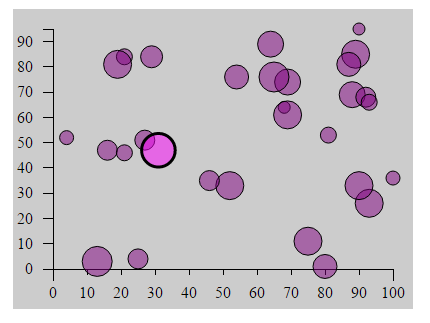
<!DOCTYPE html>

<html>

<head lang="en">

    <meta charset="UTF-8">

    <title></title>

    <script src="../bower_components/underscore/underscore-min.js"></script>

    <script src="../ventor/d3.min.js"></script>

    <style type="text/css">

        body {

            padding-top: 50px;

            padding-left: 100px;

        }

        #chartArea {

            width: 400px;

            height: 300px;

            background-color: #CCC;

        }

        .bar {

            display: inline-block;

            width: 20px;

            height: 75px; /* Gets overriden by D3-assigned height below */

            margin-right: 2px;

            /* fill: teal; *//* SVG doesn't have background prop, use fill instead*/

            z-index: 99;

        }

        .bubble {

            display: inline-block;

            fill: purple;

            fill-opacity: 0.5;

            stroke: black;

            stroke-weight: 1px;

        }

        .active {

            fill: magenta;

            fill-opacity: 0.5;

            stroke-width: 3px;

        }

        .axis path, .axis line {

            fill: none;

            stroke: #000;

            stroke-width: 1px;

            shape-rendering: crispEdges;

        }

    </style>

</head>

<body>

<section id="chartArea"></section>

<script>

    var dataset = _.map(_.range(30), function(num) {

                return {

                    x: Math.round(Math.random() * 100),

                    y: Math.round(Math.random() * 100),

                    r: Math.round(5 + Math.random() * 10)

                };

            }), //reandom generate 15 data from 1 to 50

            margin = {top: 20, right: 20, bottom: 40, left: 40},

            w = 400 - margin.left - margin.right,

            h = 300 - margin.top - margin.bottom;

    var svg = d3.select('#chartArea').append('svg')

            .attr('width', w + margin.left + margin.right)

            .attr('height', h + margin.top + margin.bottom)

            .append('g') //The last step is to add a G element which is a graphics container in SBG.

            .attr('transform', 'translate(' + margin.left + ', ' + margin.top + ')'); //Then offset that graphic element by our left and top margins.

    var yScale = d3.scale.linear()

            .domain([0, d3.max(dataset, function(d) {

                return d.y; //tell the max function just need to care about y prop

            })])

            .range([h, 0]);

    var yAxis = d3.svg.axis()

            .scale(yScale)

            .orient('left')

            .ticks(10)

            .innerTickSize(10)

            .outerTickSize(10)

            .tickPadding(10);

    svg.append('g')

            .attr('class', 'y axis')

            .attr('transform', 'translate(0,0)')

            .call(yAxis);

    var xScale = d3.scale.linear()

            .domain([0, 100])

            .range([0, w]);

    var xAxis = d3.svg.axis()

            .scale(xScale)

            .orient('bottom')

            .ticks(10)

            .innerTickSize(6)

            .outerTickSize(12)

            .tickPadding(12);

    svg.append('g')

            .attr('class', 'x axis')

            .attr('transform', 'translate(0, ' + h  + ')')

            .call(xAxis);

    svg.selectAll('circle')

            .data(dataset)

            .enter()

            .append('circle')// svg doesn't have div, use rect instead

            .attr('class', "bubble")

            .attr('cx', function(each_data, index) {

                return xScale(each_data.x);

            })

            .attr('cy', function(each_data) {

                return yScale(each_data.y);

            })

            .attr('r', function(each_data, i) {

                return each_data.r;

            })

            .on('mouseover', function() {

                d3.select(this).classed('active', true)

            })

            .on('mouseleave', function() {

                d3.select(this).classed('active', false)

            })

            .on('mousedown', function(d) {

                d3.select(this).attr('r', d.r * 1.2)

            })

            .on('mouseup', function(d) {

                d3.select(this).attr('r', d.r)

            });

</script>

</body>

</html>
[D3] 11. Basic D3 chart interactivity on(), select(this), classed(class, trueorfalse)的更多相关文章
- [D3] Build an Area Chart with D3 v4
Similar to line charts, area charts are great for displaying temporal data. Whether you’re displayin ...
- [D3] Build a Line Chart with D3 v4
Line charts are often used to plot temporal data, like a stock price over time. In this lesson we’ll ...
- [D3] 12. Basic Transitions with D3
<!DOCTYPE html> <html> <head lang="en"> <meta charset="UTF-8&quo ...
- A better way to learn D3 js - iLearning D3.js
iLearning D3.js Basic is an iPad app to learn and code with D3. In 1.1 version, new tutorial is prov ...
- [D3] 13. Cleaner D3 code with selection.call()
selection.call() method in D3 can aid in code organization and flexibility by eliminating the need t ...
- D3笔记01——D3简介与安装
1 D3简介 发布于2011年,全称Data-Driven Documents,直译为“数据驱动的文档”. 简单概括为一句话:D3是一个Javascript的函数库,是用来做数据可视化的.文档指DOM ...
- 使用 angular directive 和 json 数据 D3 随着标签 donut chart演示样本
使用angular resource载入中priorityData.json中间json数据,结合D3绘制甜甜圈图.执行index.html其结果见于图.: priorityData.json中jso ...
- [D3] Build a Column Chart with D3 v4
Column and bar charts are staples of every visualization library. They also make a great project for ...
- [D3] Creating a D3 Force Layout in React
Learn how to leverage d3's layout module to create a Force Layout inside of React. We'll take a look ...
随机推荐
- CoreGraphics --- CGContext
CGContext又叫图形上下文,相当于一块画布,以堆栈形式存放,只有在当前context上绘图才有效.iOS有分多种图形上下文,其中UIView自带提供的在drawRect:方法中通过UIGraph ...
- Linux发行版
Linux 发行版(英语:Linux distribution,也被叫做GNU/Linux 发行版),为一般用户预先集成好的Linux操作系统及各种应用软件.一般用户不需要重新编译,在直接安装之后,只 ...
- Android 自定义RadioButton实现
由于使用小米系统MIUI运行是RadioButton样式跟google Android API自定义的不一样,则我们可以定义任何想要的东东.没有做不到,只有想不到 Android 自定义RadioBu ...
- poj 1284 Primitive Roots
从来没有接触过完全剩余系,不会证明,知道看了别人的题解才知道要用欧拉函数: 下面是证明过程: p是奇素数,如果{xi%p | 1 <= i <= p - 1} = {1,2,...,p-1 ...
- Lea指令计算地址(用于四则混合运算),附上一个函数调用例子及其反汇编代码,很清楚
比如你用local在栈上定义了一个局部变量LocalVar,你知道实际的指令是什么么?一般都差不多像下面的样子: push ebp mov esp, ebp sub ...
- 【Xamarin开发 Android 系列 13】 应用打包部署
原文:[Xamarin开发 Android 系列 13] 应用打包部署 开始倒叙咯................ 先更新大宝部署吧,这个章节比较的Easy,童鞋们不用费脑筋.点解?从界面上填写几个参 ...
- JAVA 内存泄漏与内存溢出
一.Java内存回收机制 不论哪种语言的内存分配方式,都需要返回所分配内存的真实地址,也就是返回一个指针到内存块的首地址.Java中对象是采用new或者反射或者clone或者反序列化的方法创建的, 这 ...
- WordPress Complete Gallery Manager插件‘upload-images.php’任意文件上传漏洞
漏洞名称: WordPress Complete Gallery Manager插件‘upload-images.php’任意文件上传漏洞 CNNVD编号: CNNVD-201309-377 发布时间 ...
- ☀【CSS3】背景图片
CSS3全新的背景图片方案http://www.cnblogs.com/rubylouvre/p/3401125.html
- Power Strings
Power Strings TimeLimit: 1 Second MemoryLimit: 32 Megabyte Totalsubmit: 1791 Accepted: 528 Descr ...