
ADAMS与外部程序通信(Adams Command Server)
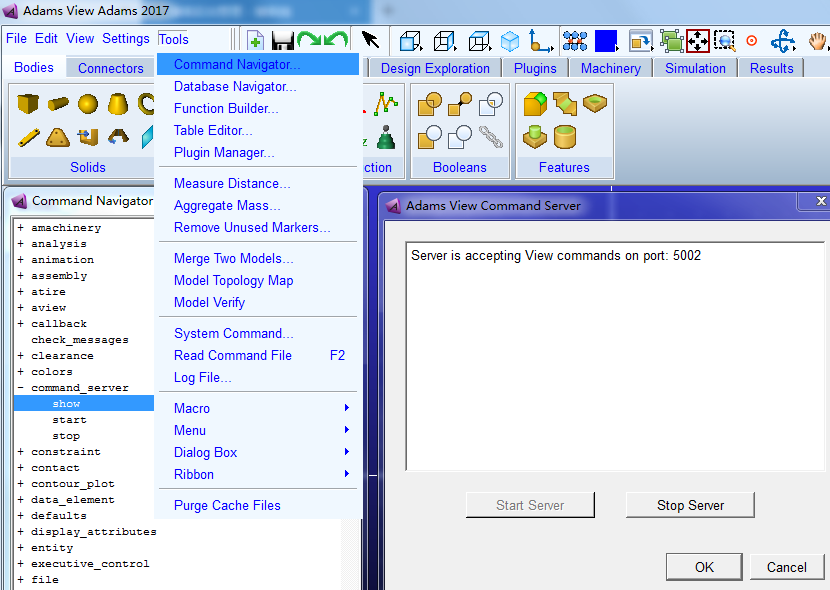
Issuing Commands
import socket

client_socket = socket.socket(socket.AF_INET, socket.SOCK_STREAM)

client_socket.connect(("localhost", 5002))

# formulate valid Adams View command language that starts with the string "cmd"

cmd = "cmd point create point_name = POINT__1 location = 10 , 15 , 10 relative_to = ground "

client_socket.send(cmd)

# receives feedback from the server. The server responds with the string "cmd: 0" for successful command processing

response = client_socket.recv(1024)

print response
# Returns:  cmd: 0 (on success) cmd: 1 (error detected in View command)
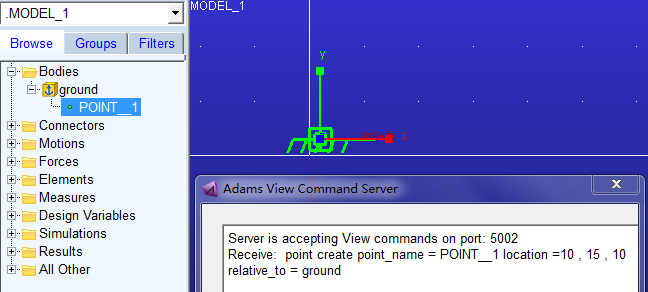
cmd指令在相对于ground的(10, 15, 10)位置处创建了一个点,命名为POINT_1:

import socket

import time

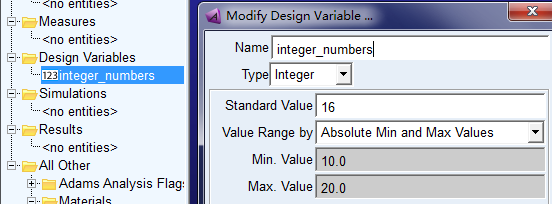
cmds = ["cmd variable create variable_name=integer_numbers integer_value=12 range=10,20",

        "cmd variable set variable_name=integer_numbers integer_value=16"]

# Each command must be sent to the server over a new socket

for cmd in cmds:

    client_socket = socket.socket(socket.AF_INET, socket.SOCK_STREAM)

    start_time = time.time()

    dt = time.time() - start_time

    while dt < 60:    # wait for a new server connection:

        dt = time.time() - start_time

        try:

            client_socket.connect(("localhost", 5002))

            break

        except socket.error:

             pass

    print "Connected to socket, sending cmd: %s" % cmd

    client_socket.send(cmd)

    data = client_socket.recv(1024)

    print "Response from cmd was: %s" % data
Issuing Queries
下面代码查询了零件PART_2的位置信息:
import socket

# create a socket & connect to the proper port/host

client_socket = socket.socket(socket.AF_INET, socket.SOCK_STREAM)

client_socket.connect(("localhost", 5002))

# queries must always start with the string "query" followed by an Adams View expression

the_query = "query part_2.location"

client_socket.send(the_query)

# server replies with a description of the data

query_description = client_socket.recv(1024)   # Description of result:  query: float : 3 : 12

# server waits for an "OK" command before sending the actual data

client_socket.send("OK")

query_data = client_socket.recv(1024)          # accepts the actual server data

# parse query data based on type:

description_list = query_description.split(':')

data_type = description_list[1]

data_length = int(description_list[2])

data_bytes = int(description_list[3])

print "Query returned %i values of data type %s" % (data_length, data_type)

print "Query data as a string is: %s" % query_data
输出如下:

ADAMS与外部程序通信(Adams Command Server)的更多相关文章
- Hadoop源码解析之 rpc通信 client到server通信
rpc是Hadoop分布式底层通信的基础,无论是client和namenode,namenode和datanode,以及yarn新框架之间的通信模式等等都是采用的rpc方式. 下面我们来概要分析一下H ...
- JAVA ANDROID SOCKET通信检测(SERVER)连接是否断开
Pre 解决思路 代码后记: 客户端app上的部分代码 调用: 服务器上: 客户端判断服务器是否还活着代码: PRE 在利用socket写通讯程序的时候,想检测服务器是否还活着. 从网上找了很多资料, ...
- C# 管道通信 (client —— server)Framework2.0版本也可用
//管道服务类public class PipServer { [DllImport("kernel32.dll", SetLastError = true)] public st ...
- iSight集成Adams/View:Adams组件
iSight本身支持特定版本的Adams/View,在Adams中添加isight的插件方法如下: 1.在iSight安装目录下搜索isight.bin文件,将其复制到Adams安装路径下的win32 ...
- adams/car 怎么进入template builder模块
打开C:\Documents and Settings\Administrator文件夹下的acar.cfg文件,将 Desired user mode (standard/expert)ENVIRO ...
- TCP/UDP通信中server和client是如何知道对方IP地址的
在TCP通信中 client是主动连接的一方,client对server的IP的地址提前已知的.如果是未知则是没办法通信的. server是在accpet返回的时候知道的,因为数据包中包含客户端的IP ...
- 用PHP的socket实现客户端到服务端的通信
服务端 <?php error_reporting(E_ALL); set_time_limit(0); ob_implicit_flush(); //本地IP $address = 'loca ...
- Socket编程之聊天程序 - 模拟Fins/ModBus协议通信过程
设备控制软件编程涉及到的基本通信方式主要有TCP/IP与串口,用到的数据通信协议有Fins与ModBus. 更高级别的通信如.net中的Remoting与WCF在进行C/S架构软件开发时会采用. 本篇 ...
- Erlang下与其他程序和语言的通信机制(1)
在Erlang运行时中,提供了几种机制来实现与其它程序或者语言的通信.一种为分布式Erlang,一种为端口,其中端口分为普通端口和链入式驱动端口,还有后面引入的NIFs. 分布式Erlang:一个Er ...
随机推荐
- CSS3 Flex布局整理(一)
一.说明 1.在以往的布局方案中,都是基于盒装模型,依赖display属性+position属性+float属性等. 他对于那些特殊布局非常不方便,比如,垂直居中等. 并且不同浏览器的盒模型还有些差异 ...
- 关于SqlBulkCopy SQL批量导入需要注意,列名是区分大小写的
最近在做数据从Excel批量导入MSSQL时,传统的是使用Insert Into Table方法,不过这个方便比较慢 通过使用 SqlBulkCopy 可以批量导入到数据库. 默认批量导入数据库,需要 ...
- Qt中printsupport的注意点和使用方法
问题:Qt中包含QPrintDialog.QPrinter.QPrintPreviewDialog失败:在引入printsupport后报cpp:651: error: undefined refer ...
- BZOJ3328: PYXFIB
题目:http://www.lydsy.com/JudgeOnline/problem.php?id=3328 题解:关键在于只处理i%k的项,那么我们就需要用一个式子来表达这个东西. p%k==1. ...
- 数学图形之贝塞尔(Bézier)曲面
前面章节中讲了贝塞尔(Bézier)曲线,而贝塞尔曲面是对其多一个维度的扩展.其公式依然是曲线的公式: . 而之所以由曲线变成曲面,是将顶点横向连了再纵向连. 很多计算机图形学的教程都会有贝塞尔曲面的 ...
- lazarus汉化
启动Lazarus IDE,点击菜单栏中的Environment,再点击Options选项 在弹出的IDE选项框内,点选左侧Environment下的Desktop子选项,将Language设为Chi ...
- 很不错的python 机器学习博客
http://www.cuijiahua.com/resource.html 曾看过的书,感觉一些很有用的学习资料,推荐给大家! Python基础: 网络教程推荐: 系统学习python3可以看廖雪峰 ...
- [leetcode]Best Time to Buy and Sell Stock II @ Python
原题地址:https://oj.leetcode.com/problems/best-time-to-buy-and-sell-stock-ii/ 题意: Say you have an array ...
- CentOS6 安装并破解Jira 7
CentOS6 安装并破解Jira 7 JIRA软件是为您的软件团队的每个成员构建的,用来规划,跟踪和发布优秀的软件. https://confluence.atlassian.... 最低硬件要求及 ...
- 基于PHP构建OAuth 2.0 服务端 认证平台
OAuth2.0 认证服务 安装 你可以在github上下载OAuth Server PHP,也可以用下列命令下载,不过内容都是一样的 mkdir my-oauth2-walkthrough cd m ...